AppDeploy
What is AppDeploy?
I still remember the moment it clicked. I described a simple habit tracker to Claude, and a minute later I had a working app with a live URL I could share with friends. No servers to configure, no deployment pipelines, no wrestling with hosting providers. It just worked. That feeling — going from idea to something real and shareable in minutes — is what makes this platform special. It removes the biggest friction point in building with AI: actually getting your app live and usable.
Introduction
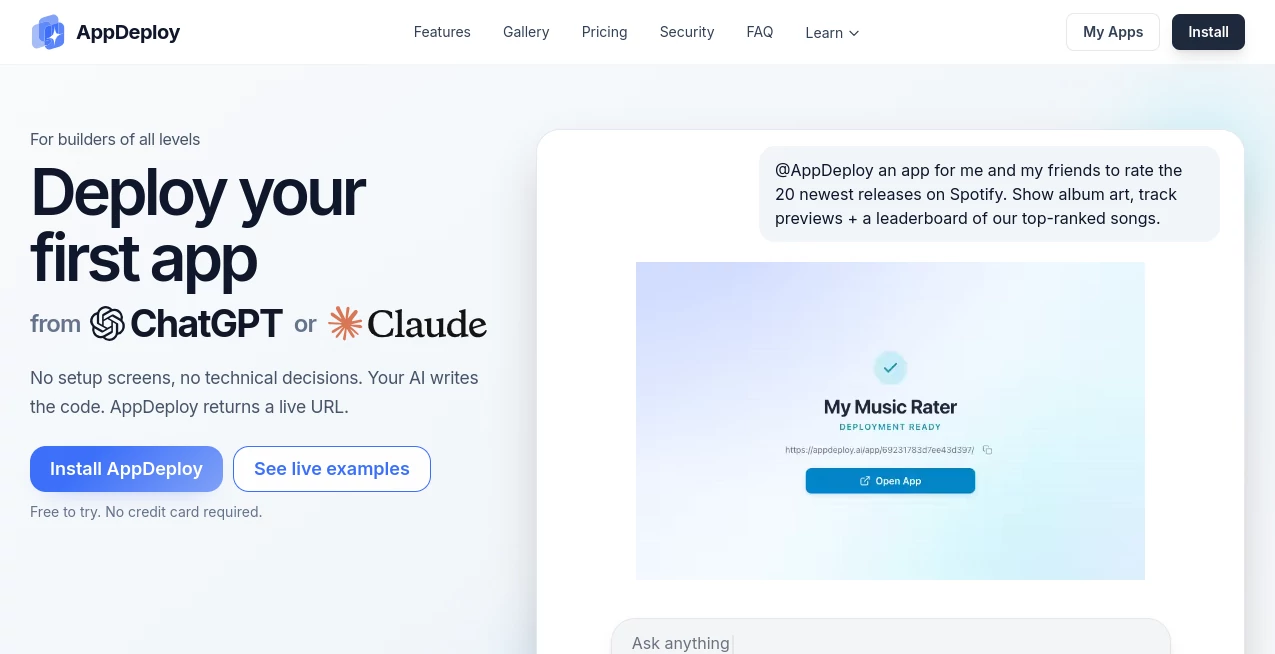
AI can write impressive code these days, but turning that code into a real, running application has always been the painful part. Most people get stuck at the deployment stage. This platform changes the game completely. You chat with your favorite AI (ChatGPT, Claude, Cursor, etc.), describe what you want, and when the code is ready, AppDeploy takes over — handling hosting, databases, authentication, background tasks, and even basic QA — then hands you a live URL. It’s designed for builders of all levels, from curious experimenters to serious indie makers who want to ship fast without the usual DevOps headaches.
Key Features
User Interface
The whole experience stays inside the chat you already use. After installing the connector once, you simply tell your AI what to build. When the code is ready, your AI calls AppDeploy and a live link appears in the conversation. No separate dashboards to learn, no complex configuration screens. It feels like magic the first few times — you stay in flow, focused on the idea instead of infrastructure.
Accuracy & Performance
It reliably turns AI-generated code into working applications. The platform handles full-stack needs automatically: frontend hosting, backend services, databases, file storage, and real-time features. Deployments are fast (often under a minute) and include autonomous testing so obvious bugs get caught early. In practice, it handles everything from simple tools to more complex apps with user accounts and data persistence surprisingly well.
Capabilities
Supports frontend-only and full-stack web apps. It automatically provisions databases, authentication, background jobs, notifications, and more when needed. You get version control with easy rollbacks, visual bug reports, and the ability to iterate quickly by chatting with your AI and redeploying. Works with ChatGPT, Claude, Cursor, and other MCP-compatible agents. The result is a true chat-native development experience where you describe, refine, and ship without leaving the conversation.
Security & Privacy
Security is taken seriously with proper secrets management, encrypted connections, and controlled access. Your code and data are handled responsibly during deployment. For teams and individual builders, the platform provides enough transparency and control to feel safe while keeping the process frictionless.
Use Cases
A solo founder describes a meal-planning tool during lunch and shares a working version with beta users by dinner. A teacher builds a simple classroom feedback system and deploys it in one evening. A product team prototypes new feature ideas in ChatGPT and tests them with real users the same day. Indie hackers use it to validate ideas quickly before investing in full custom development. It shines anywhere you want to go from concept to clickable reality as fast as possible.
Pros and Cons
Pros:
- Truly chat-native — stay inside your AI conversation the whole time.
- Removes almost all deployment friction and technical decisions.
- Fast iterations: describe changes and redeploy in minutes.
- Handles both simple tools and more complex full-stack apps.
- Free tier lets you try real deployments without a credit card.
Cons:
- Very complex or highly custom apps may still need manual refinement.
- Advanced enterprise features and high-scale usage require paid plans.
- You're somewhat dependent on the quality of the AI's initial code.
Pricing Plans
It starts completely free to try with no credit card required, giving you enough usage to build and deploy real apps. Paid plans unlock higher usage limits, priority deployments, advanced features, and better support for teams or heavier workloads. The pricing feels fair for the massive time savings it provides — many users say it pays for itself after shipping just one or two meaningful projects.
How to Use AppDeploy
First, install the AppDeploy connector in your preferred AI tool (ChatGPT, Claude, Cursor, etc.) — it takes about two minutes. Then simply describe the app you want in normal conversation. Once the AI has written the code, tell it to deploy using AppDeploy. Wait a short moment and you’ll receive a live URL. Share it, test it, and iterate by going back to the chat and describing changes. The whole loop stays inside the conversation you’re already comfortable with.
Comparison with Similar Tools
Traditional hosting platforms require you to handle code, servers, databases, and deployment pipelines yourself. Other AI app builders often stop at generating code or creating demos. This one closes the full loop — from chat to a real, hosted, testable application — with less friction than anything else currently available. It’s not trying to be everything; it’s laser-focused on making deployment from AI chats feel effortless.
Conclusion
The biggest barrier between a good idea and a working product has always been the gap between code and deployment. This platform shrinks that gap dramatically, letting you stay in creative flow instead of switching contexts between tools and servers. For indie hackers, product teams, teachers, and curious builders, it turns AI from a clever assistant into a true ship-fast partner. If you’ve ever wished building apps could feel as fluid as chatting about them, this is as close as it gets right now.
Frequently Asked Questions (FAQ)
Do I need coding knowledge?
No. If you can describe what you want, the AI handles the coding and AppDeploy handles the rest.
How long does deployment take?
Usually under a minute once the code is ready.
Is it really free to start?
Yes — you can try real deployments without a credit card.
What kind of apps can I build?
Frontend tools, full-stack apps with databases, simple games, internal tools, and more.
Can I use it for commercial projects?
Yes — paid plans support commercial usage and higher scale.
AI Workflow Management , AI App Builder , AI No-Code & Low-Code , AI Developer Tools .
These classifications represent its core capabilities and areas of application. For related tools, explore the linked categories above.

AppDeploy Alternatives Product

ChatFlowchart

Wplace Live

PatentFig AI

AI Workflow …

Agent Grid

Emergent

4ga Boards

Tate-A-Tate

DevUtilX