

















App Mockup Generator AI
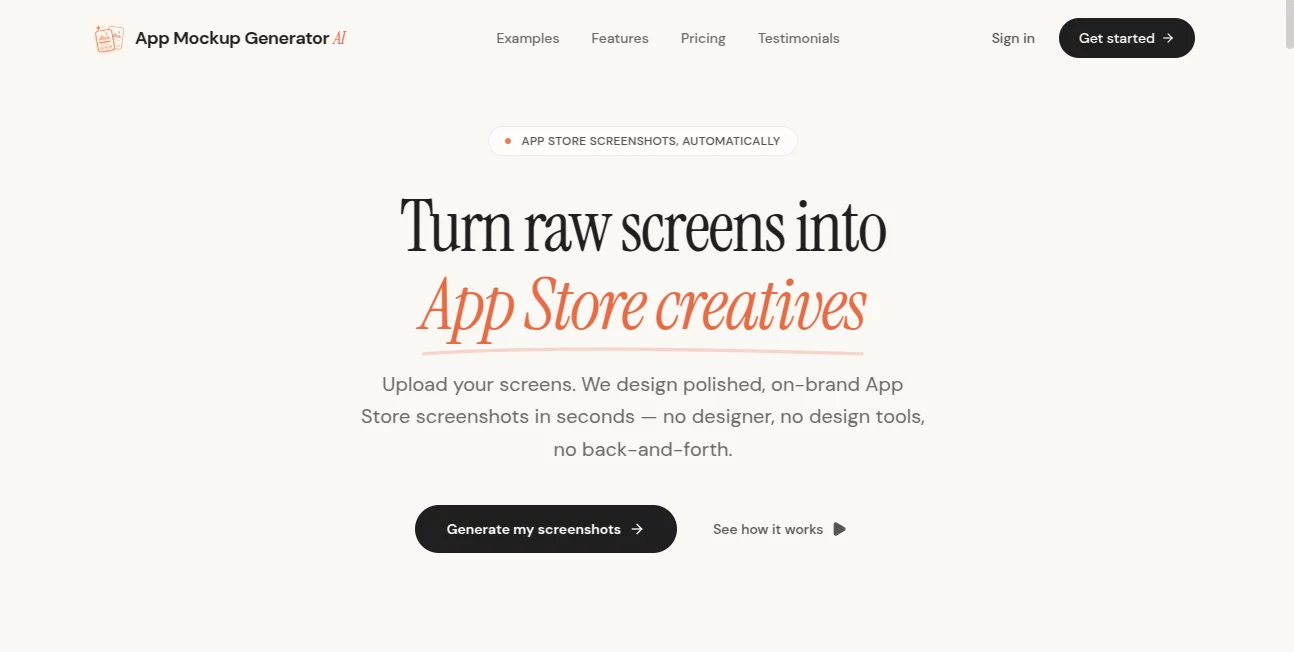
What is App Mockup Generator AI?
App Store screenshots have a surprisingly big job. They need to explain what an app does, look trustworthy, match the product's identity, and catch attention before someone even reads the description. App Mockup Generator AI takes the raw screens from a mobile product and turns them into polished store-ready visuals without requiring a designer or a complicated design workflow.
The process is built around a simple idea: upload the screenshots you already have, choose a visual direction, make a few adjustments, and export the finished assets. The platform is designed for developers, product teams, marketers, and solo founders who want professional-looking App Store and Google Play creatives without spending days arranging layouts manually.
It supports screenshots exported from tools such as Figma, Xcode, or mobile browsers. The layout engine can detect the uploaded content and apply device framing automatically, giving users a useful starting point instead of presenting them with a completely blank canvas.
Key Features
- AI-powered layouts: The system analyzes uploaded content and suggests composition, headline placement, and visual hierarchy.
- Brand color extraction: An app icon or brand kit can be used to extract a color palette and maintain visual consistency across screenshot sets.
- Multiple visual styles: Users can select curated design directions and customize headlines, backgrounds, fonts, and borders.
- Device frames: The platform supports realistic phone, tablet, and Android device presentations with shadows, reflections, and native-looking framing.
- Localization: Screenshot sets can be prepared for more than 10 locales, making international app launches easier to manage.
- Instant previews: Users can review the complete store presentation before exporting and change ordering, headlines, or framing as needed.
- High-resolution exports: Finished creatives can be downloaded as PNG files suitable for App Store and Google Play publishing.
User Interface
The interface follows a straightforward upload-customize-export workflow. Instead of requiring users to learn a full design application, the experience centers on the assets that matter most: screenshots, headlines, colors, fonts, and device presentation.
This approach should feel particularly comfortable for developers who already have finished product screens but do not want to spend hours turning them into marketing graphics. A typical workflow starts by dropping in screenshots, selecting a style, reviewing the generated composition, and making small adjustments before export.
Accuracy & Performance
The automated layout engine is intended to remove much of the repetitive work involved in screenshot production. It analyzes the supplied screen content and uses that information when suggesting placement and hierarchy, while automatic color extraction helps keep a set visually consistent.
Performance is also important when preparing several screenshots or localized versions. The workflow is designed around quick generation and real-time previews, so users can experiment with different arrangements without rebuilding each graphic from scratch.
Capabilities
The platform is more than a simple device-frame generator. It combines automated composition with customization options, allowing users to create a complete visual story for an app listing. Headlines can be adjusted, backgrounds can be changed, and typography and borders can be refined to match the product.
Its localization capabilities are especially useful for products distributed internationally. Rather than treating every market as a separate design project, teams can create localized screenshot sets while keeping the overall visual language consistent.
The tool also focuses on publishing requirements. Its exports are prepared in the dimensions and formats needed for modern app-store listings, reducing the amount of manual resizing and file preparation between design and publication.
Security & Privacy
When working with application screenshots, privacy and intellectual property are important considerations. The product page states that users retain full intellectual property ownership of both the screenshots they upload and the generated mockup scenes, with commercial rights for uses such as App Store graphics, landing pages, and marketing campaigns.
For teams working with confidential unreleased products, it is still sensible to review the provider's current privacy and data-handling documentation before uploading sensitive material, particularly when screenshots contain unreleased features or private customer information.
Use Cases
App Store launches: Developers can turn finished application screens into a cohesive set of store graphics instead of publishing plain screenshots.
Product updates: When an application receives a major redesign, new screenshots can be prepared quickly without starting a complete design project.
Solo founders: Independent developers can create professional promotional assets without hiring a dedicated designer for every release.
Product marketing: Marketing teams can use polished device presentations on landing pages, launch campaigns, and other promotional materials.
International launches: Teams targeting several markets can prepare localized screenshot sets while maintaining a consistent visual identity.
Fast experimentation: Teams can test different headline arrangements, visual styles, and screenshot ordering before committing to the final store listing.
Pros and Cons
Pros
- Quick workflow from raw screenshots to finished store creatives.
- AI-assisted composition reduces repetitive design work.
- Automatic brand color extraction helps maintain consistency.
- Supports iPhone, iPad, and Android-style device presentations.
- Useful localization workflow for international products.
- High-resolution PNG export is suitable for publishing and promotional use.
- Commercial rights are included for generated screenshot assets.
Cons
- It is primarily focused on app-store screenshot production rather than being a complete general-purpose design suite.
- Users who want extremely detailed manual design control may still prefer a traditional professional design application.
- Teams with highly unusual branding requirements may need additional editing outside the platform.
Pricing Plans
The pricing structure is based on monthly screenshot-generation credits. A free plan provides 3 credits, with one credit used for each screenshot generated. It includes headline layouts, device framing, and premium style presets, making it useful for testing the workflow before committing to a paid plan.
The Starter plan costs $10 per month and includes 50 credits. It is aimed at independent developers and provides additional device shells alongside the core generation features.
The Pro plan costs $25 per month and includes 150 credits. It adds access to all device shells and style presets as well as priority generation support, making it more suitable for active products that regularly update their store assets.
How to Use It
- Upload your raw mobile screenshots from Figma, Xcode, or a mobile browser.
- Let the layout engine analyze the screens and create an initial composition.
- Select a visual style that fits your application and brand.
- Customize headlines, fonts, backgrounds, borders, and other visual elements.
- Upload an app icon or brand material when you want the system to extract and apply your brand colors.
- Review the complete screenshot sequence using the instant preview.
- Prepare localized versions when targeting additional markets.
- Export the finished screenshots as high-resolution PNG files and prepare them for your app-store listing.
Comparison with Similar Tools
Traditional design software gives experienced designers considerably more freedom, but that flexibility also means manually handling frames, spacing, typography, colors, and export dimensions. This approach is excellent when a project needs detailed art direction, but it can be unnecessarily time-consuming for a developer who simply needs polished store screenshots.
Dedicated mockup generators usually focus on placing existing designs inside device frames. This platform takes a broader approach by combining device presentation with AI-assisted layout suggestions, headline placement, brand color extraction, localization, and store-oriented exports.
The biggest advantage is therefore workflow rather than simply visual effects. Someone who already has the application screens can move from raw assets to a cohesive store presentation without switching between several separate design tasks.
Conclusion
Creating app-store screenshots can easily become one of those small marketing jobs that consumes far more time than expected. The product solves that problem by putting the repetitive parts of the process into an automated workflow while still leaving room for customization.
Its strongest use case is clear: developers and product teams that already have their application screens but want those screens presented in a polished, consistent, and publication-ready way. Automatic layouts, brand color extraction, realistic device framing, localization, and high-resolution exports make the workflow considerably easier than building every screenshot manually.
For a solo developer preparing a first launch or a product team regularly shipping updates, it offers a practical way to turn existing product screens into marketing assets without turning every release into a separate design project.
Frequently Asked Questions (FAQ)
What does this tool do?
It turns raw mobile application screenshots into polished App Store and Google Play promotional creatives using AI-assisted layouts, device framing, customizable typography, backgrounds, and visual styles.
Do I need design skills?
No. The workflow is designed around uploading existing screenshots and choosing a visual direction. Automated composition handles much of the initial layout work, while users can make adjustments when needed.
Which screenshot files can I upload?
The platform accepts screenshots exported from sources such as Figma and Xcode, as well as PNG and JPG files from mobile browsers.
Can I create screenshots for Android?
Yes. The platform provides device shells for both iOS and Android presentations, allowing teams to prepare graphics for different mobile ecosystems.
Does it support multiple languages?
Yes. The platform supports more than 10 locales, allowing teams to create localized screenshot sets for different App Store territories.
How does the credit system work?
One credit is used to generate one screenshot mockup. The free plan includes 3 credits, while the Starter and Pro plans provide 50 and 150 monthly credits respectively.
Can I use the generated screenshots commercially?
Yes. The product states that users retain full intellectual property ownership of uploaded screenshots and generated mockup scenes, including commercial rights for app-store graphics, landing pages, and marketing campaigns.
Can I export the finished designs?
Yes. Completed screenshot creatives can be exported as high-resolution PNG files suitable for app-store publishing and other promotional uses.
Is there a free plan?
Yes. The free plan costs $0 per month and includes 3 credits, allowing users to test the generation workflow before moving to a paid subscription.
Who is it best suited for?
It is particularly useful for independent developers, startup teams, product marketers, and companies that need polished app-store screenshots without maintaining a dedicated design workflow for every release.
AI Design Assistant , AI Graphic Design .
These classifications represent its core capabilities and areas of application. For related tools, explore the linked categories above.
App Mockup Generator AI details
Website unavailable — View Alternatives
Pricing
- Freemium
Apps
- Web App
Categories

App Mockup Generator AI Alternatives Product

IMAGE 2

Freepik
Luma AI
onstyle

ModelsLab
YoFont

Logo Teddy

SparkIconAI

Sketchready
