
AR GenAI
What is AR GenAI?
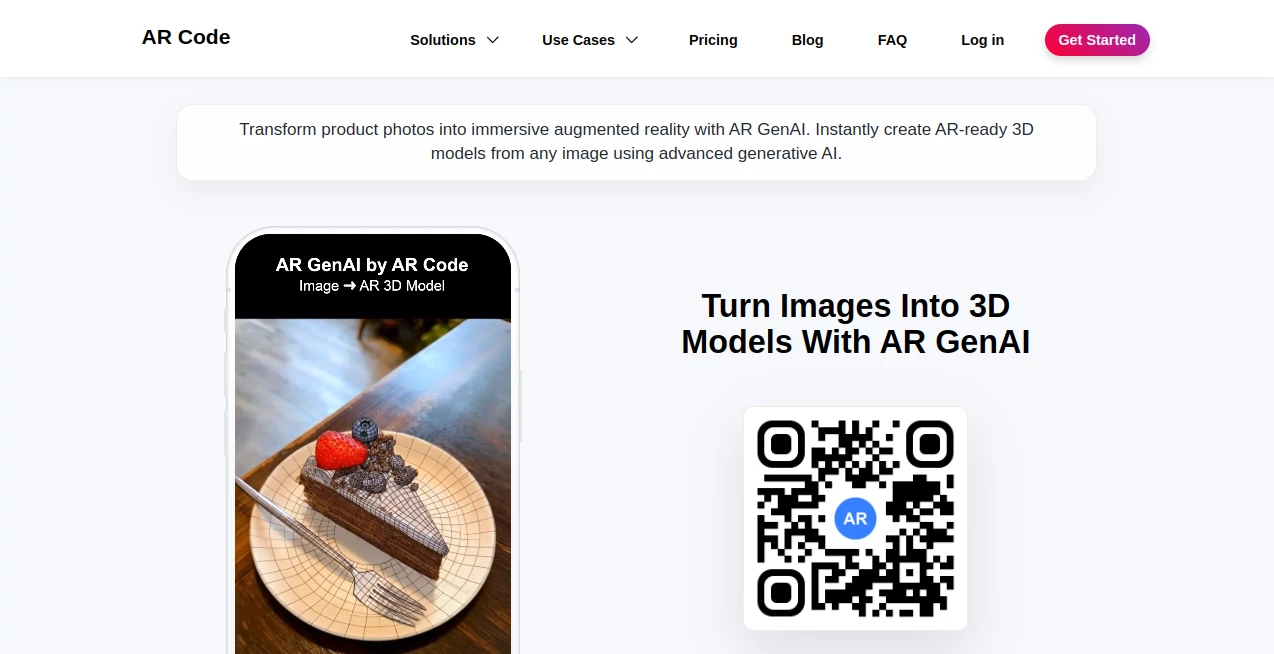
AR GenAI is designed for a simple but increasingly useful idea: take an ordinary image and turn it into an interactive 3D experience that people can explore in augmented reality. Instead of starting with complicated 3D software, modeling skills, or dedicated scanning equipment, users can upload a single image and let generative AI handle the creation of an AR-ready model.
The result is particularly interesting for businesses that already have product photography but want to make those products more engaging. A furniture store, restaurant, museum, online retailer, or educational organization can take existing visual material and turn it into something customers or visitors can interact with directly from a browser.
Another practical advantage is the browser-based approach. Viewers can access the resulting AR experience through an AR QR Code without installing a separate application, making the technology much easier to introduce into websites, printed materials, packaging, menus, exhibitions, and marketing campaigns.
Key Features
- Converts a single image into a photorealistic 3D model.
- Creates AR-ready textures and materials automatically.
- Generates an AR QR Code for sharing and instant access.
- Optimizes models for browser-based AR performance.
- Supports products, food, artwork, characters, and both simple and complex shapes.
- Works across Android, iOS, iPadOS, Meta Horizon OS, and Apple visionOS.
- Can be used for product visualization, education, marketing, museums, hospitality, and training.
User Interface
The workflow is intentionally straightforward. There is no need to begin with a complex modeling workspace filled with technical controls. The central task is uploading an image and allowing the platform to process it into a 3D asset.
This approach makes the experience approachable for marketers, educators, retailers, and content creators who may never have opened professional 3D modeling software. Someone working on a product campaign, for example, can focus on choosing a useful source image rather than learning how to build geometry manually.
The AR QR Code workflow is another strong part of the experience. Once the content is ready, it can be distributed in a format that is familiar to most smartphone users.
Accuracy & Performance
The system uses deep learning and native 3D latent spaces to reconstruct geometry from an image. It also generates physically based textures and aims to keep the resulting models lightweight enough for smooth browser performance.
That balance matters because a beautiful 3D model is less useful if it takes too long to load on a mobile device. The platform is built around web-based AR, so model optimization is part of the workflow rather than something users have to manage entirely on their own.
As with any image-to-3D system, the quality of the original image still matters. A clear photograph with a recognizable subject will generally give the system more useful visual information than a dark, blurry, or heavily obstructed image.
Capabilities
The platform goes beyond simple 3D generation by connecting the generated assets with an augmented reality distribution system. Users can turn photographs of products into interactive demonstrations, create virtual furniture previews, build digital menu experiences, or transform museum objects into educational AR content.
For example, a restaurant could use photographs of menu items to create interactive 3D previews. A furniture retailer could let shoppers visualize a product in their surroundings. A museum could take photographs of artifacts and provide visitors with an interactive layer of information through an AR QR Code.
The service is also part of a broader AR ecosystem that includes tools for object capture, AR text, AR video, AR portals, AR logos, data-driven AR experiences, and 3D file uploads. This makes it more interesting for organizations that expect their AR requirements to grow over time.
Security & Privacy
For commercial projects, licensing should be considered before publishing content publicly. The available plans distinguish between personal use and commercial usage, with commercial licenses designed around organization size and intended use.
Businesses should also review the provider's current privacy policy and terms before uploading proprietary product photography, customer-related material, or confidential assets. This is especially important for organizations handling sensitive commercial content.
Use Cases
E-commerce and retail: Online stores can turn static product photographs into interactive 3D previews. This can give shoppers a better sense of shape and appearance than a conventional product gallery.
Furniture visualization: Furniture companies can create AR-ready models from product images and allow customers to preview pieces in real environments before making a purchasing decision.
Restaurants and hospitality: Digital or printed menus can be enhanced with interactive 3D food previews, giving customers a more visual way to explore dishes.
Education: Teachers and educational organizations can transform photographs of learning materials, objects, or historical resources into interactive 3D experiences that students can examine from different angles.
Museums and cultural institutions: Photographs of exhibits and artifacts can become accessible AR experiences, providing visitors with another way to explore collections without requiring specialized scanning equipment.
Marketing: Brands can use 3D assets in product campaigns, promotional materials, virtual showrooms, and interactive storytelling. The QR-based distribution model is particularly useful for connecting physical advertising with digital experiences.
Prototyping and 3D workflows: Generated models can also serve as an early visualization step for projects that eventually require more detailed 3D work or physical production.
Pros and Cons
Pros
- Turns a single image into an AR-ready 3D asset.
- Does not require prior 3D modeling experience.
- Browser-based AR reduces friction for viewers.
- AR QR Codes make sharing physical and digital experiences simple.
- Useful across retail, education, hospitality, museums, and marketing.
- Generated models are designed with browser performance in mind.
- Supports a broad range of subjects and object types.
Cons
- The final model depends heavily on the quality and information available in the source image.
- Complex professional 3D projects may still require traditional modeling tools and expert refinement.
- Commercial users need to pay attention to licensing requirements.
- Advanced usage can become relatively expensive for organizations with high-volume AR requirements.
Pricing Plans
A free trial is available for exploring the wider AR Code platform, while commercial use is handled through paid plans. The Standard plan is aimed at individuals, small and medium-sized businesses, and resellers. The current listed price is US$89 per month after an introductory first month, and it includes up to 100 AR GenAI creations per month.
For larger organizations, the Pro plan is listed at US$990 per month and includes up to 1,000 AR GenAI creations per month, alongside a much higher AR scan allowance, team members, analytics, and additional AR and AI capabilities.
Pricing and licensing can change, so businesses should check the current plan details before committing to a commercial project. The available plans also distinguish between personal, commercial, and reseller usage.
How to Use It
- Choose a clear image of the object you want to convert into 3D.
- Upload the image through the platform.
- Let the AI generate the 3D geometry, textures, and materials.
- Review the generated result and prepare it for an AR experience.
- Generate the associated AR QR Code.
- Share the QR Code through a website, product packaging, printed material, menu, exhibition, or marketing campaign.
- Open the experience on a compatible smartphone, tablet, or supported AR/VR device to view the object in augmented reality.
A useful approach is to begin with one product or object rather than converting an entire catalog immediately. This makes it easier to evaluate the visual quality, loading performance, and usefulness of the AR experience before expanding the project.
Comparison with Similar Tools
Many image-to-3D services concentrate primarily on generating a 3D asset. The more distinctive part of this platform is the connection between generation and distribution. The workflow is not limited to producing a model that sits on a computer; the model can be prepared for browser-based AR and connected to an AR QR Code for real-world access.
That difference can be valuable for businesses. A retailer does not necessarily need another isolated 3D file. It needs a practical way to put that file in front of customers. Likewise, a museum needs visitors to access digital content easily rather than requiring them to understand a technical 3D workflow.
For users who only need detailed assets for professional 3D production, a specialized modeling or image-to-3D application may offer a more suitable workflow. For organizations looking for a bridge between image generation, 3D content, QR distribution, and augmented reality, this approach is considerably more compelling.
Conclusion
Turning a regular photograph into an interactive AR experience used to require a surprisingly long production process. This platform reduces much of that complexity by combining AI-based image-to-3D generation with optimized web AR and QR-based sharing.
Its strongest appeal is not simply the ability to generate a 3D model. It is the complete path from image to something an ordinary customer, student, visitor, or prospect can actually experience. That makes the technology practical rather than purely experimental.
For e-commerce brands, museums, restaurants, educators, furniture retailers, marketers, and other organizations working with visual content, it offers a straightforward way to experiment with augmented reality without building a complete AR application from scratch.
Frequently Asked Questions (FAQ)
Can I create a 3D model from just one image?
Yes. The service is specifically designed to generate an AR-ready 3D model from a single uploaded image.
Do I need 3D modeling experience?
No. The workflow is designed for users without professional 3D modeling skills. The AI handles model creation and optimization after the image is uploaded.
What types of images can be converted?
The system supports a wide variety of subjects, including products, artwork, food, characters, and objects with both simple and complex forms.
Can people view the result without installing an app?
Yes. The generated AR experience can be accessed through a web browser using an AR QR Code, so viewers do not need to install a dedicated application.
Which devices are supported?
The AR experiences can be distributed across Android, iOS, iPadOS, Meta Horizon OS, and Apple visionOS, depending on device compatibility.
Can businesses use the generated content commercially?
Yes, but commercial projects require an appropriate commercial license. The available licensing options vary according to the type and size of the organization.
Is there a free option?
A free trial is available for exploring the platform, while commercial features and higher usage limits are provided through paid plans.
Is the generated 3D model suitable for professional production?
The generated assets are optimized for AR and browser performance, making them particularly useful for visualization and interactive experiences. Projects requiring highly specialized production-grade geometry may still benefit from additional professional 3D refinement.
AI 3D Model Generator , AI Image to 3D Model , AI Education Assistant , 3D .
These classifications represent its core capabilities and areas of application. For related tools, explore the linked categories above.

AR GenAI Alternatives Product

volume shader

Translate a …

Classroom Sc…

Ask Bishop
TryInks

AI page tran…

PNG to 3D

insMind

Normal Map G…