


















ArchyBase
What is ArchyBase?
I still remember the first time I uploaded a photo of my tired-looking living room and watched it transform into something magazine-worthy in seconds. The colors popped, the furniture felt right, and the whole space suddenly felt like somewhere I actually wanted to live. That moment sold me. This platform makes professional-level design feel accessible without requiring years of experience or expensive software. Whether you're a homeowner dreaming about renovations or a designer presenting options to clients, it turns vague ideas into clear, photorealistic visuals faster than you’d expect.
Introduction
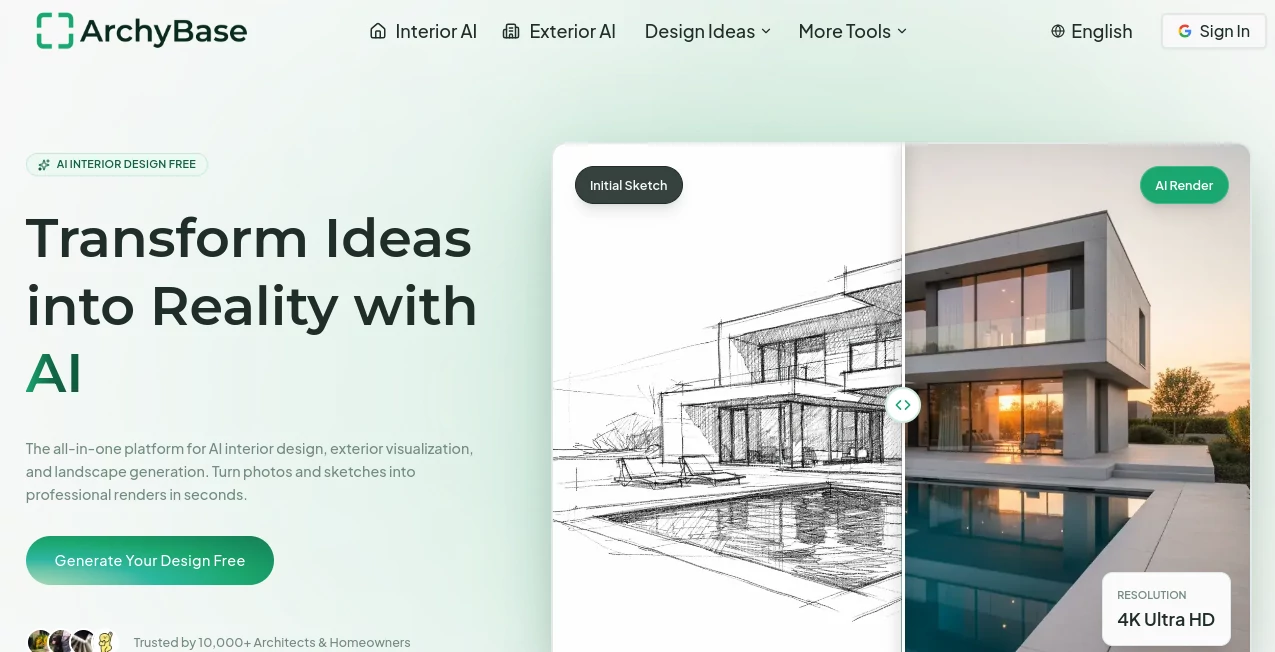
ArchyBase brings together several powerful AI tools under one roof: interior redesign, exterior makeovers, landscape planning, and sketch-to-render capabilities. You can start with a simple photo of your space, a rough hand-drawn sketch, or even just a text description, and the AI delivers high-quality 4K renders that respect real lighting, proportions, and materials. It’s built for both professionals who need speed in client presentations and everyday homeowners who want to visualize changes before committing to costly renovations. The results often feel so real that people ask if I hired a photographer.
Key Features
User Interface
The interface is clean and welcoming. You upload a photo or sketch, choose a style from dozens of options (Modern, Scandinavian, Industrial, etc.), and generate. Before-and-after comparisons appear side by side, and you can tweak prompts or regenerate specific elements easily. It never feels intimidating — even my non-designer friends have used it successfully on their first try. The workflow stays focused on creativity rather than fighting complicated menus.
Accuracy & Performance
The renders consistently respect the original structure of your space while intelligently suggesting improvements. Furniture scales properly, lighting feels natural, and architectural details stay true to the input. Generations are fast — often under 10-15 seconds — and the 4K quality holds up for both web sharing and professional presentations. It rarely produces the weird distortions you see in lesser tools, which builds real confidence when showing work to clients or family.
Capabilities
You get a full suite: AI interior design from photos, sketch-to-render for architects, exterior facade redesign, and landscape/garden visualization. It supports over 30 styles and works with both empty rooms and furnished spaces. Virtual staging, multi-angle views, and the ability to experiment with materials and colors make it incredibly versatile. Whether you’re planning a full home renovation or just refreshing one room, it covers the entire journey from idea to visualization.
Security & Privacy
Your uploaded photos and designs stay private. The platform is designed with care for personal home projects and professional client work, so you can explore ideas without worrying about images being used elsewhere. That peace of mind matters when you’re sharing sensitive property photos or client concepts.
Use Cases
A homeowner uploads photos of their outdated kitchen and quickly compares five different styles before meeting with contractors. An interior designer generates multiple concepts for a client presentation in minutes instead of days. An architect turns rough client sketches into photorealistic renders for early feedback. A real estate agent uses virtual staging to help buyers visualize empty properties. Landscape enthusiasts plan gardens and patios by uploading backyard photos and experimenting with different layouts. The common thread is saving time while making better decisions.
Pros and Cons
Pros:
- Impressive quality that looks professional enough for client work.
- Fast generation times that keep creative momentum going.
- Wide variety of styles and strong support for both interiors and exteriors.
- Works well with real photos and rough sketches alike.
- Generous free access to try before committing.
Cons:
- Very complex or highly custom architectural details may need some manual refinement.
- Heavy daily use benefits from a paid plan for unlimited generations.
Pricing Plans
It offers a solid free tier that lets you generate several designs and get a real feel for the quality. Paid plans remove limits, unlock higher resolution, faster processing during peak times, and additional features for professionals. The pricing feels reasonable given how much time and money it can save compared to traditional rendering or hiring designers for early concepts.
How to Use ArchyBase
Go to the interior or exterior tool, upload a clear photo of your space or a sketch. Describe any specific changes or style preferences in the prompt box. Choose from the style options and hit generate. Review the results, regenerate with small adjustments if needed, and download the high-res version. For best results, use well-lit photos and be reasonably specific in your instructions. The process is intuitive enough that you’ll be creating variations comfortably after just one or two tries.
Comparison with Similar Tools
Many AI design tools produce generic or cartoonish results. This one stands out with its attention to architectural accuracy, realistic lighting, and respect for the original structure of your space. It combines speed with quality in a way that feels more professional than pure consumer apps while remaining far more accessible than traditional 3D rendering software. For both quick visualizations and serious design work, it hits a sweet spot that’s hard to find elsewhere.
Conclusion
Visualizing changes to your home or client projects used to be slow and expensive. This platform makes it fast, affordable, and surprisingly fun. It empowers homeowners to explore ideas confidently and helps professionals present better options in less time. Whether you’re planning a small refresh or a full renovation, it gives you the clarity you need before making big decisions. In the end, it’s not just about prettier pictures — it’s about making better choices with confidence.
Frequently Asked Questions (FAQ)
How good are the results compared to hiring a designer?
Excellent for early visualization and exploration. Many professionals use it to speed up concept phases and client presentations.
Can I use my own photos?
Yes — uploading existing room or house photos works very well for realistic redesigns.
Is it suitable for professional architects?
Absolutely. Many architects use the sketch-to-render feature for fast client visualizations.
What styles are available?
Over 30 styles including Modern, Scandinavian, Industrial, Bohemian, Minimalist, and more.
Do I need design experience?
No. The tool is built to be useful for both complete beginners and seasoned professionals.
AI Landscape Generator , AI Design Generator , AI Interior & Room Design .
These classifications represent its core capabilities and areas of application. For related tools, explore the linked categories above.

ArchyBase Alternatives Product

Fiddl.art

grok imagine…

Pixal3D

Nano Banana …

RenderQuill

Uni-1

flux 3

Banana Promp…

Medical Illu…
