


















Arlopass
What is Arlopass?
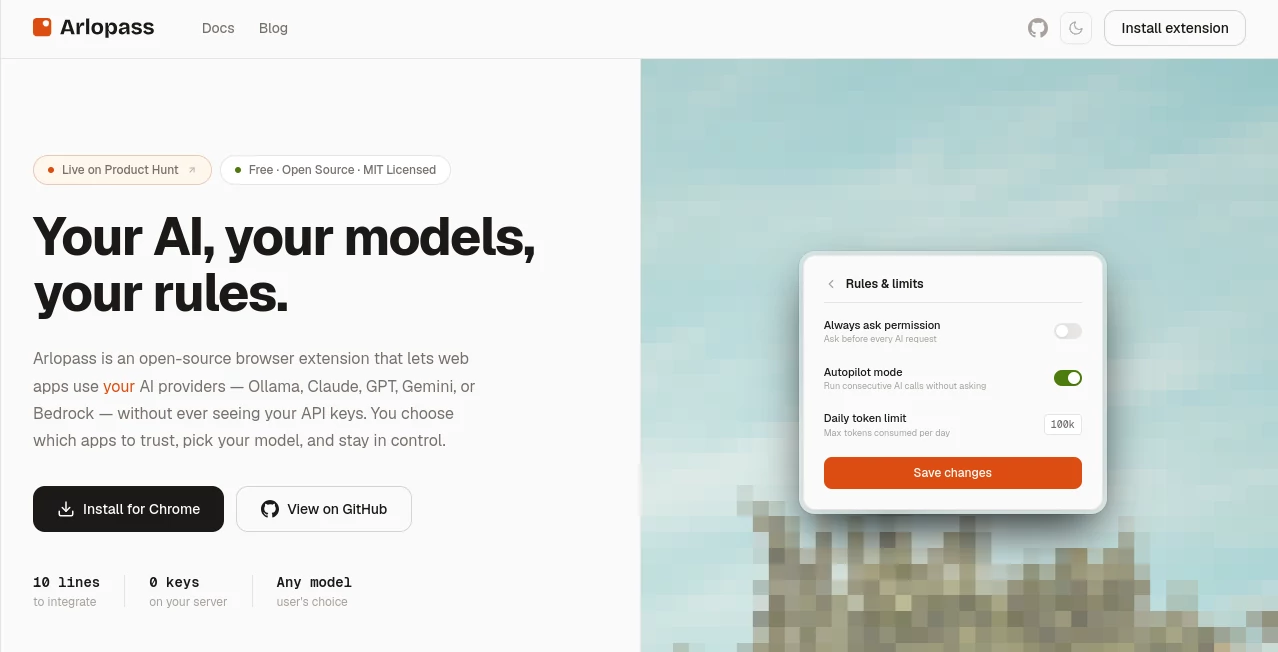
Arlopass is an open-source browser extension and developer SDK designed to give people more control over how web applications access artificial intelligence. Instead of asking users to hand API keys to every application that wants to use an AI model, it creates a secure layer between the application and the user's AI providers.
The idea is refreshingly practical: users choose which applications they trust, which providers they want to connect, and which models those applications can use. Developers, meanwhile, can add AI capabilities to web applications without maintaining their own API-key infrastructure or building a backend proxy.
The platform currently supports a growing collection of providers, including OpenAI, Anthropic Claude, Google Gemini, Ollama, Amazon Bedrock, Google Vertex AI, Perplexity, Microsoft Foundry, LM Studio, and others. It is also completely free and released under the MIT license, making it particularly interesting for developers who want an open foundation rather than another closed AI platform.
Key Features
- Local encrypted storage for AI credentials using AES-256-GCM.
- Support for multiple AI providers from a single interface.
- Per-application permissions and user consent.
- Model selection without requiring application code changes.
- Local AI support through providers such as Ollama and LM Studio.
- A TypeScript-first web SDK for developers.
- Streaming AI responses through an async iterator interface.
- Policy-based governance for approved providers, models, and data-handling rules.
- JSONL audit trails and signed policy bundles for more controlled environments.
- Open-source protocol, extension, SDK, and provider adapters.
User Interface
The interface is built around a straightforward permission model. When a website requests AI access, users can see which application is making the request, which providers it wants to use, and which models are involved. They can then approve or deny the connection instead of blindly giving the application access to their credentials.
Permissions can also be adjusted after a connection has been established. Users can enable or disable providers, select allowed models, configure permission behavior, and establish usage limits. The experience feels closer to approving a browser permission than configuring a complicated developer platform.
For someone managing several AI subscriptions, this approach can be especially convenient. Instead of repeatedly entering credentials into different services, the connections are handled in one place.
Accuracy & Performance
Performance depends largely on the AI provider and model selected rather than on the access layer itself. The system is designed to route requests between the web application and the selected provider while avoiding unnecessary server-side infrastructure.
Streaming support is another useful detail. Developers can receive generated content progressively rather than waiting for an entire response before displaying anything. This is particularly helpful for chat interfaces and applications where users expect immediate visual feedback.
Because the system can work with local providers such as Ollama and LM Studio, developers can also build experiences where AI processing remains on the user's own machine. That can be valuable for projects where privacy or offline operation matters more than access to the newest cloud models.
Capabilities
The main strength is its multi-provider architecture. A developer can create an application that allows users to choose between different AI providers without rewriting the application's core integration every time a model changes.
The developer SDK is intentionally compact. The official documentation demonstrates an integration based around connecting to the local extension, creating a chat session, and streaming responses. This makes it possible to add AI functionality without creating a traditional backend service solely for handling provider credentials.
Another notable capability is provider switching. A user might select Claude for one application, GPT for another, and a local Ollama model for sensitive tasks. The application can continue using the same integration while the underlying provider changes.
For more structured environments, policy bundles can be used to restrict providers, models, and data-handling behavior. Signed policies and audit trails add another layer for teams that need visibility into how AI access is being managed.
Security & Privacy
Security is clearly at the center of the product's design. API credentials are stored in an encrypted local vault rather than being placed on an application's server. The system uses AES-256-GCM for encryption at rest and can use the operating system's secure credential storage.
The web application does not receive the user's API keys. Instead, requests pass through the local access layer, allowing the user to review and authorize AI access before it reaches the selected provider.
The project also emphasizes a zero-cloud architecture. There is no requirement for a central account system or cloud backend, and the extension and native bridge operate locally. When paired with a local model provider, this can provide an especially private workflow because prompts and responses can remain on the user's computer.
Use Cases
- AI-powered web applications: Developers can add AI features without storing provider credentials on their own servers.
- Multi-model applications: Users can select between different AI providers and models from the same application.
- Privacy-focused AI: Local providers can be used when sensitive prompts should remain on the user's machine.
- Developer tools: Teams can integrate AI into browser-based development utilities without maintaining a separate credential proxy.
- Internal business applications: Organizations can control which providers and models are available to employees.
- AI experimentation: Developers can test different models without rebuilding the application around every provider.
- Enterprise governance: Policy controls and audit trails can help teams establish clearer rules around AI usage.
Pros and Cons
Pros
- Free and open source under the MIT license.
- API keys remain outside the web application's reach.
- Supports a broad selection of AI providers.
- Useful local-model support through Ollama and LM Studio.
- Simple developer integration with a TypeScript-focused SDK.
- Per-application permissions provide more granular control.
- No mandatory cloud infrastructure or user account.
- Provider switching does not require changing application logic.
Cons
- The ecosystem is still relatively new compared with established AI platforms.
- Developers need to understand the browser extension and local bridge architecture.
- Some advanced functionality is more relevant to developers and organizations than casual users.
- Provider availability and model capabilities can change independently of the access layer.
- Some planned features, including additional integrations and enterprise tooling, are still under development.
Pricing Plans
There are no paid pricing tiers. The software is completely free and open source under the MIT license, including the browser extension, SDK, protocol, and provider adapters.
There is also no separate subscription fee for the access layer. Users bring their own AI provider subscriptions or connect compatible local models. This makes the pricing model particularly attractive for developers who already pay for AI services and simply want a safer way to expose those services to web applications.
How to Use It
Getting started is designed to take only a few steps. First, install the browser extension and set up the required local components. No traditional account creation is required.
Next, connect the AI providers you want to use. Depending on your setup, this can include cloud providers such as OpenAI, Claude, Gemini, or Bedrock, as well as local platforms such as Ollama or LM Studio. Credentials are kept inside the local encrypted storage layer.
When a compatible website requests AI access, review the requested providers and models. You can approve or deny the request and decide exactly what the application is allowed to use.
Developers can integrate the functionality through the web SDK. The basic workflow involves connecting to the local extension, creating a chat session, and sending or streaming AI requests. The application does not need to maintain the provider credentials itself.
Comparison with Similar Tools
Traditional AI integrations usually require a web application to communicate directly with an AI provider. That means developers must manage API keys, server-side authentication, usage limits, provider selection, and sometimes the cost of every request. It works, but it also creates an additional security and infrastructure burden.
A different approach is to use a centralized AI gateway. These services can simplify provider management, but they generally place another server between the user and the AI provider. The access model described here takes a different route by moving credential ownership and permission decisions toward the user's device.
Compared with a conventional API proxy, the biggest distinction is control. The user can choose the provider and model, while the application can request AI capabilities without directly handling the underlying credentials. For developers building privacy-conscious or multi-provider applications, that is a meaningful architectural difference.
Conclusion
For developers who want to add AI to web applications without turning API-key management into another infrastructure project, this open-source approach is worth exploring. Its strongest selling point is not simply support for multiple models; it is the separation between the application and the user's AI credentials.
The combination of local credential storage, explicit permissions, provider switching, local-model support, and a lightweight developer SDK gives the project a distinctive position in the growing AI tooling ecosystem. It is particularly appealing for developers who value open source and want users to retain control over their own AI connections.
There is still plenty of room for the ecosystem to mature, but the underlying concept is compelling. Instead of every application asking users to trust it with an API key, AI access can become something the user explicitly grants, controls, and revokes.
Frequently Asked Questions (FAQ)
What is this tool used for?
It provides a secure access layer between web applications and AI providers. Users can connect their own AI services while keeping their credentials away from the applications they use.
Is it free?
Yes. The project is free and open source under the MIT license, with no paid subscription tiers for the access layer.
Which AI providers are supported?
Supported providers include OpenAI, Anthropic Claude, Google Gemini, Ollama, Amazon Bedrock, Google Vertex AI, Perplexity, Microsoft Foundry, LM Studio, and other compatible integrations.
Are API keys stored on a server?
No. The architecture is designed around local credential storage. API credentials are encrypted in a local vault and are not stored on the application's server.
Can it work with local AI models?
Yes. Ollama and LM Studio are supported, making it possible to connect locally hosted models and keep AI processing on the user's own hardware.
Can developers integrate it into their own applications?
Yes. Developers can use the web SDK to establish a session, create AI conversations, and stream responses without implementing their own API-key proxy.
Can users choose different AI models?
Yes. Users can select providers and models according to the permissions granted to each application. Provider switching can happen without requiring changes to the application's integration.
Does it require a cloud account?
No traditional account or cloud backend is required for the core experience. The extension and local components are designed to operate on the user's device.
Is it suitable for business environments?
It can be useful for teams that need more control over AI access. Policy-based governance, signed policies, provider restrictions, and audit trails provide tools for organizations that need clearer rules around AI usage.
Is the project open source?
Yes. The protocol, SDK, browser extension, and provider adapters are released under the MIT license, allowing developers to inspect, modify, fork, and extend the project.
AI API Design , AI Developer Tools .
These classifications represent its core capabilities and areas of application. For related tools, explore the linked categories above.
Arlopass details
Website unavailable — View Alternatives
Pricing
- Freemium
Apps
- Web App
- Chrome Extensions
Categories

Arlopass Alternatives Product

Nimbalyst

vivgrid

Emergent

AIQualityHQ

JSON-Tools

Workik

Somnio

Standard Com…

CtrlOps
