ASCII DOS CONVERTER
What is ASCII DOS CONVERTER?
There is something timeless about the look of classic computer terminals. The glowing green text, blocky characters, and nostalgic DOS-inspired visuals continue to inspire artists, developers, gamers, and retro computing enthusiasts. This tool brings that iconic experience back by transforming modern images into authentic ASCII art while preserving the unmistakable aesthetic of vintage MS-DOS systems.
Instead of simply converting pixels into random characters, the generator recreates the atmosphere of early personal computers with multiple display modes inspired by classic hardware. Whether someone wants a monochrome terminal appearance or colorful VGA-inspired output, every generated result feels like it belongs on a computer from the late 1980s or early 1990s.
The experience is intentionally simple. Users upload an image, choose a preferred display mode, adjust text size, select either a traditional rendering engine or an AI-enhanced conversion mode, and generate artwork within seconds. The final output can be copied directly, downloaded as a TXT file, or exported as HTML for websites, documentation, or creative projects.
For designers, programmers, content creators, educators, and retro gaming communities, this generator combines nostalgic design with modern image processing to create impressive ASCII artwork without requiring technical knowledge.
Key Features
User Interface
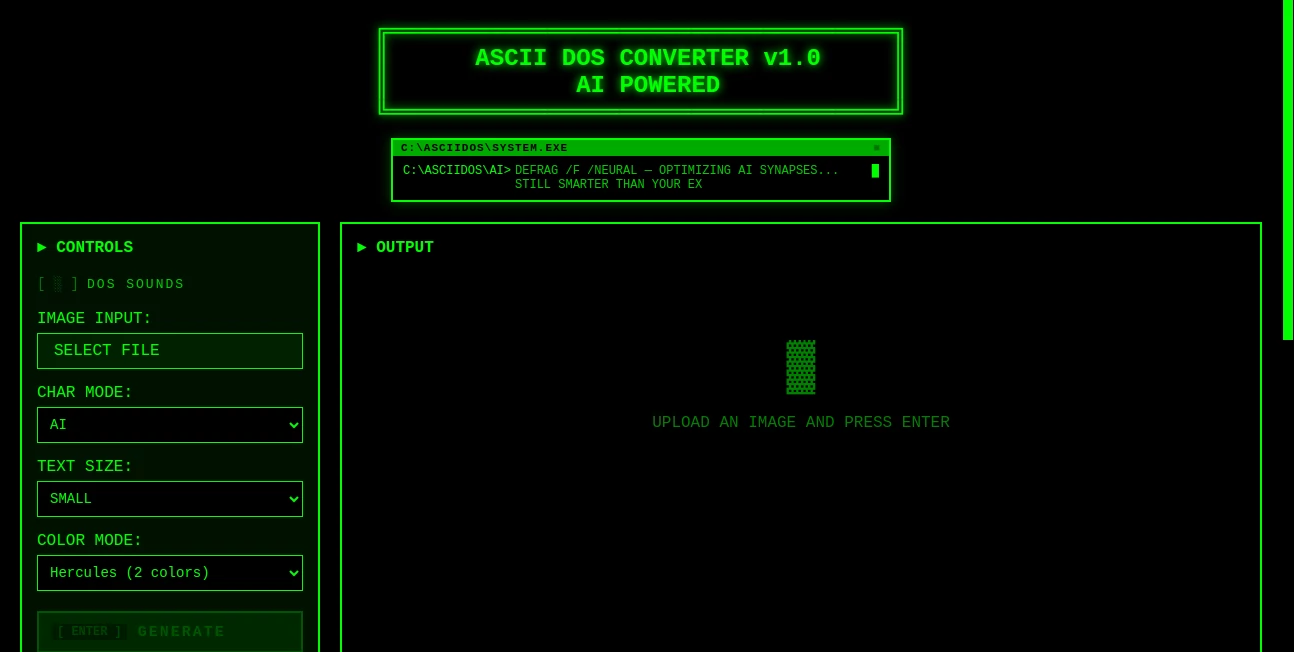
The interface is refreshingly straightforward. Every option is placed exactly where users expect it, allowing anyone to begin creating artwork immediately. Uploading an image only takes a moment, while customization options remain accessible without becoming overwhelming.
The nostalgic DOS-inspired presentation adds personality to the experience without sacrificing usability. Optional retro sound effects further recreate the feeling of working inside an old computer terminal, making the generation process enjoyable rather than purely functional.
- Simple drag-and-drop image upload.
- Fast image preview before conversion.
- Clean controls suitable for beginners.
- Retro DOS-inspired visual experience.
- Optional nostalgic sound effects.
Accuracy & Performance
Creating recognizable ASCII art requires more than replacing pixels with text characters. The rendering engine analyzes image brightness, contrast, and structure to produce readable artwork while maintaining important visual details.
The AI-enhanced mode improves edge detection and tonal balance, helping portraits, landscapes, logos, and illustrations retain their identity after conversion. Automatic image resizing also ensures stable performance while supporting images up to 1000 pixels in resolution.
Generation is completed quickly, making experimentation easy. Users can compare different rendering modes until they achieve the exact retro appearance they want.
Capabilities
The generator offers considerably more flexibility than traditional ASCII converters. Multiple display modes recreate the appearance of historic display adapters, allowing every project to have its own personality.
- Classic ASCII rendering.
- AI-enhanced ASCII generation.
- Monochrome terminal mode.
- CGA color mode.
- EGA display style.
- VGA-inspired rendering.
- SVGA 16-bit inspired appearance.
- Adjustable character sizes.
- Automatic image resizing.
- Copy generated ASCII instantly.
- Export as TXT.
- Export as HTML.
These options make the generator useful for both artistic experimentation and practical development workflows.
Security & Privacy
Image conversion focuses on simplicity and efficiency. Users upload an image, generate the artwork, and immediately export the results without unnecessary complexity. This streamlined workflow minimizes friction while allowing creators to maintain control over their generated ASCII art.
Since the tool focuses on quick conversion rather than long-term project management, users can create artwork rapidly without maintaining complicated accounts or extensive configuration settings.
Use Cases
The versatility of ASCII art continues to surprise people. What once existed because of hardware limitations has become a creative medium used across many industries.
- Create retro gaming artwork.
- Design vintage-inspired social media posts.
- Generate terminal graphics for programming tutorials.
- Decorate GitHub README files.
- Create hacker-themed presentations.
- Produce nostalgic marketing visuals.
- Generate creative posters.
- Create digital art projects.
- Build retro website headers.
- Produce educational examples for computer history.
- Create wallpapers with vintage aesthetics.
- Generate ASCII logos for software projects.
Imagine sharing an old vacation photograph converted into green phosphor text or transforming a gaming character into colorful VGA-style ASCII art. Small creative touches like these immediately capture attention because they feel both familiar and unique.
Pros and Cons
Pros
- Authentic DOS-inspired visual style.
- Multiple historical color modes.
- AI-assisted rendering improves output quality.
- Very easy to use.
- Fast image processing.
- TXT and HTML export options.
- Retro sound effects increase immersion.
- Automatic image resizing.
- Suitable for beginners and professionals.
Cons
- Focused specifically on ASCII artwork.
- Maximum supported resolution is 1000 pixels.
- Advanced artistic editing tools are intentionally limited.
Pricing Plans
The generator is designed to make creating retro ASCII artwork simple and accessible. Available plans and future feature updates may evolve over time as new capabilities are introduced. Users should check the official website for the latest pricing information and feature availability.
How to Use Asciidos
Creating ASCII artwork requires only a few simple steps.
- Upload an image from your computer.
- Select a preferred display mode such as Monochrome, CGA, EGA, VGA, or SVGA-inspired colors.
- Choose between the Classic rendering engine or the AI-enhanced mode.
- Adjust the desired text size.
- Generate the artwork.
- Preview the finished ASCII output.
- Copy the result or export it as TXT or HTML.
The entire process usually takes only a few seconds, making it easy to experiment with multiple images and visual styles.
Comparison with Similar Tools
Many ASCII generators focus solely on converting brightness values into characters. While functional, these converters often produce flat or generic-looking results.
This generator distinguishes itself by combining nostalgic design with modern AI-assisted rendering. Instead of providing only monochrome output, it recreates several historic display standards that defined the visual identity of DOS-era computing.
The combination of classic rendering, AI enhancement, multiple color palettes, adjustable text sizing, automatic resizing, HTML export, TXT export, and immersive DOS-inspired presentation makes it particularly appealing to users seeking authentic retro aesthetics rather than basic text conversion.
Conclusion
Retro computing continues to influence modern digital art, game development, programming culture, and online creativity. This generator successfully captures that spirit by recreating the appearance of classic DOS terminals while benefiting from contemporary AI image processing.
Its balance between simplicity and customization allows beginners to generate beautiful ASCII art in moments while giving experienced creators enough flexibility to experiment with different historical display modes. The nostalgic interface, multiple export options, and authentic visual styles make every generated piece feel like a tribute to the golden era of personal computing.
Whether the goal is creating eye-catching social media graphics, decorating developer documentation, designing gaming artwork, or simply enjoying the charm of vintage terminals, this generator delivers an experience that is both entertaining and surprisingly capable.
Frequently Asked Questions (FAQ)
What types of images work best?
Photos with clear contrast, recognizable subjects, and balanced lighting generally produce the most detailed ASCII artwork.
Can the generated artwork be downloaded?
Yes. Generated ASCII art can be copied directly or exported as TXT and HTML files.
Does it support different retro display modes?
Yes. Multiple visual modes inspired by Monochrome, CGA, EGA, VGA, and SVGA displays are available.
What is the difference between Classic and AI modes?
The Classic mode follows traditional ASCII conversion techniques, while the AI mode enhances image interpretation to preserve more recognizable details and improve overall visual quality.
Who is this generator designed for?
It is suitable for designers, developers, artists, retro gaming enthusiasts, educators, digital creators, and anyone who enjoys vintage computer aesthetics.
AI Photo & Image Generator , AI Art Generator , AI Image to Image .
These classifications represent its core capabilities and areas of application. For related tools, explore the linked categories above.
ASCII DOS CONVERTER details
Website unavailable — View Alternatives
Pricing
- Free
Apps
- Web App
Categories

ASCII DOS CONVERTER Alternatives Product

ChatGPT Imag…

RoomStaging

AI Age Progr…

Fiddl.art

NanoBanana2

GPT Image 2 …

NanoEditor

VeoNano

PixAI - AI A…