AutoNotes
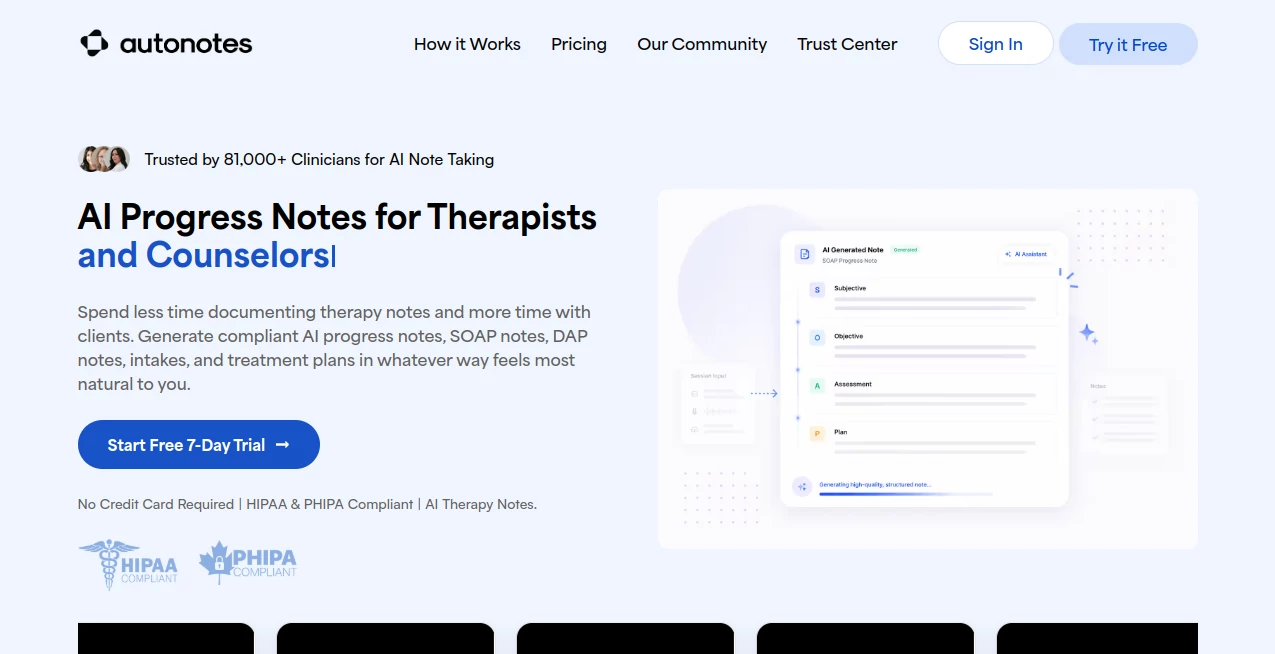
What is AutoNotes?
Clinical documentation is one of the most time-consuming responsibilities for therapists, counselors, psychologists, and behavioral health professionals. AutoNotes was created to simplify that process by transforming session details into structured clinical documentation within minutes. Instead of spending hours after appointments writing reports, professionals can focus their energy where it matters most—providing quality care to clients.
The platform supports a wide variety of documentation styles, including progress notes, SOAP, DAP, BIRP, treatment plans, intake assessments, and more. Users can type notes, dictate them, upload recordings, or even capture live sessions before reviewing and approving the generated documentation. Every note remains editable, allowing clinicians to maintain complete control over the final result.
Designed specifically for healthcare environments, the platform combines intelligent automation with privacy-focused workflows. Compliance features, customizable templates, and support for different therapy approaches make it suitable for both independent practitioners and larger behavioral health organizations.
Key Features
User Interface
The dashboard is clean, intuitive, and designed around the daily workflow of clinicians. Creating documentation requires only a few simple steps, making it easy even for users with little technical experience. Navigation is straightforward, while customizable templates help professionals match their preferred documentation style without unnecessary complexity.
Accuracy & Performance
The AI is trained for clinical documentation and generates well-structured notes based on session summaries, dictated conversations, uploaded audio, or recorded meetings. Users always review and edit the generated content before saving, ensuring documentation reflects their professional judgment while dramatically reducing writing time.
Capabilities
- Generate SOAP, DAP, BIRP, GIRP, PIE, and progress notes.
- Create individualized treatment plans.
- Support intake assessments and discharge summaries.
- Upload recorded sessions for automated documentation.
- Record live therapy sessions.
- Convert dictated summaries into professional notes.
- Maintain continuity between client sessions.
- Create customizable documentation templates.
- Support individual, family, couples, and group therapy.
- Work with behavioral health teams and private practices.
Security & Privacy
Security is a major strength of the platform. It supports HIPAA and PHIPA compliance, offers Business Associate Agreements for eligible organizations, and keeps clinicians in full control of every generated note. Documentation is never finalized automatically, allowing professionals to review, edit, and approve every record before it becomes part of the clinical workflow.
Use Cases
- Private therapy practices.
- Mental health clinics.
- Behavioral health organizations.
- Licensed counselors.
- Clinical psychologists.
- Social workers.
- Marriage and family therapists.
- Group therapy documentation.
- Treatment planning.
- Clinical supervision and documentation review.
Pros and Cons
Pros
- Significantly reduces documentation time.
- Supports multiple clinical note formats.
- Simple and beginner-friendly interface.
- Editable AI-generated notes.
- HIPAA and PHIPA compliance.
- Custom templates for different practice styles.
- Treatment planning and note continuity.
- Suitable for solo clinicians and enterprise teams.
Cons
- Primarily designed for mental health professionals.
- AI-generated notes still require clinician review.
- Advanced collaboration features are available in higher-tier plans.
Pricing Plans
A free 7-day trial is available without requiring a credit card. Paid subscriptions include Economy and First Class plans for individual clinicians and small practices, while Enterprise pricing is available for organizations requiring advanced administration, analytics, and workflow management.
How to Use AutoNotes
Start by selecting the appropriate session type and documentation format. Add session information by typing, dictating, recording live conversations, or uploading existing recordings. Once the information is processed, review the generated note, make any necessary edits, approve the final version, and save it as part of your clinical documentation workflow.
Comparison with Similar Tools
Compared with general-purpose AI writing assistants, this platform is built specifically for behavioral healthcare. Rather than producing generic text, it understands structured clinical documentation, treatment planning, therapy workflows, and professional note formats. Its compliance-focused design, customizable templates, and clinician-controlled approval process make it a practical choice for healthcare professionals who require accuracy, consistency, and secure documentation.
Conclusion
Managing clinical documentation no longer needs to consume valuable hours after every appointment. This platform combines intelligent automation with healthcare-specific workflows to produce organized, editable, and compliant documentation in a fraction of the usual time. Whether used by an independent therapist or a growing behavioral health organization, it provides an efficient solution that helps clinicians spend less time writing notes and more time supporting their clients.
Frequently Asked Questions (FAQ)
Who is this platform designed for?
It is built primarily for therapists, counselors, psychologists, social workers, and behavioral health teams.
What note formats are supported?
It supports progress notes, SOAP, DAP, BIRP, GIRP, PIE, treatment plans, intake assessments, discharge summaries, and several specialty documentation formats.
Can generated notes be edited?
Yes. Every generated document can be reviewed, modified, and approved before being finalized.
Does it support secure healthcare documentation?
Yes. The platform supports HIPAA and PHIPA compliance while giving clinicians full control over documentation approval.
Can session recordings be used?
Yes. Users can upload recordings or capture live sessions to generate structured clinical documentation.
AI Productivity Tools , AI Healthcare , AI Speech to Text , AI Notes Assistant .
These classifications represent its core capabilities and areas of application. For related tools, explore the linked categories above.

AutoNotes Alternatives Product

BulkPicTools

Sendmux

Rabbitholes …

Flitz AI
HTMLSlides

Coresite

Eleven AI
FluentDictat…

Skywork Supe…