
AutoSprite
What is AutoSprite?
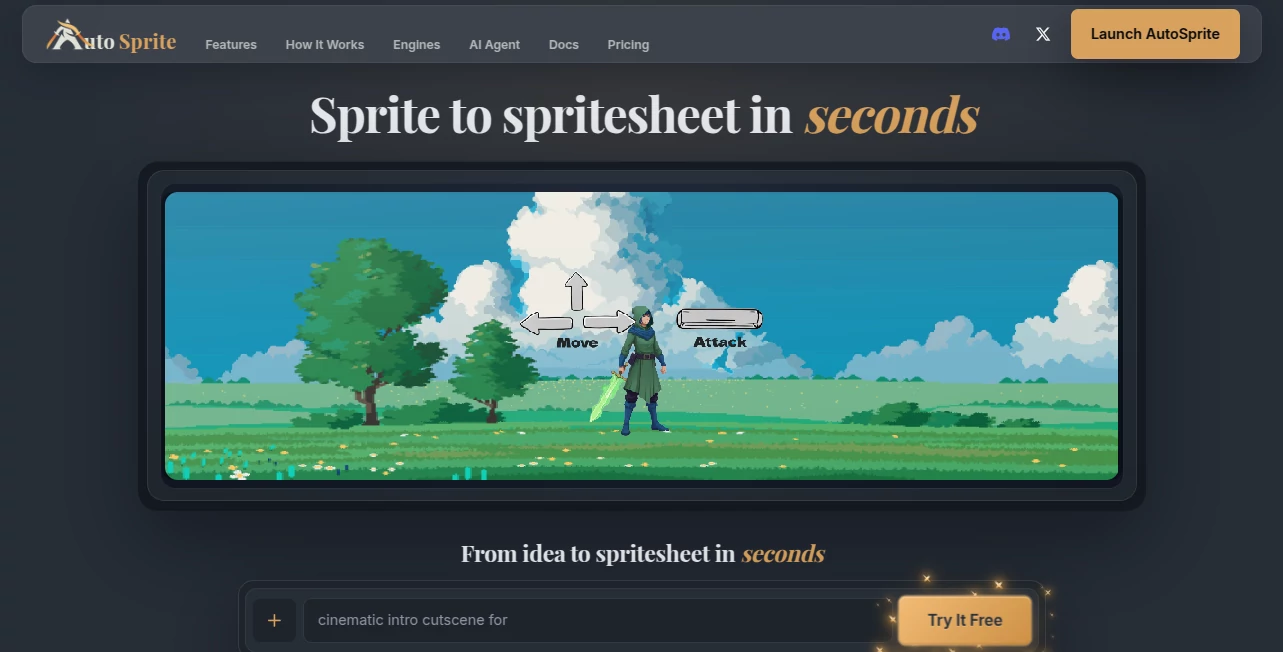
AutoSprite is an AI-powered game art tool designed to turn a single character image or a simple text prompt into ready-to-use animated spritesheets. Instead of drawing every frame by hand, game developers can create movements such as idle, walk, run, jump, and attack with a much shorter production workflow.
The idea is particularly useful for indie developers and small teams that need polished game characters but do not have the time or resources for traditional frame-by-frame animation. A character can be uploaded, a moveset selected, and the resulting animation previewed before exporting it for use inside a game project.
Key Features
- Generate character spritesheets from a single image or text prompt.
- Create common animations such as idle, walk, run, jump, and attack.
- Build custom animations using text prompts, reference images, and storyboard keyframes.
- Create directional animations for side-scrolling, top-down, and isometric games.
- Generate game props such as icons, weapons, items, and pickups.
- Create character outfit and skin variations while keeping the character visually consistent.
- Transfer existing or video-captured motion to different characters.
- Generate rigged 3D characters and animations from character images.
- Create cinematic cutscenes from text prompts.
- Export PNG spritesheets together with atlas data and individual animation frames.
User Interface
The workflow is built around a straightforward upload, animation, preview, and export process. Developers can start with an existing character image or generate a character from a prompt, select the movements they need, and preview the result directly in the browser.
The built-in preview is especially useful during iteration. You can check the pacing and looping of an animation before bringing it into the actual game. Controls for frame rates, loop start and end points, and reusable presets also make it easier to maintain a consistent animation style across a larger character library.
Accuracy & Performance
For game development, consistency matters just as much as visual quality. The platform is designed to preserve a character's proportions, colors, lighting, and visual identity across different animations. This makes it easier to create an animation set that actually feels like it belongs to the same character.
Generation time depends on the selected model, resolution, and animation length. The service states that many animations can be generated within roughly 30 to 60 seconds, while a typical character with several animations may take a few minutes. Higher-quality and longer generations naturally require more processing time.
Capabilities
Its capabilities extend beyond basic sprite animation. Custom animation prompts can be combined with reference images and keyframes to provide more control over important moments in a movement. This is helpful when a standard walk or attack animation is not quite what a game requires.
Directional animation is another useful feature. Developers working on top-down or isometric games can create movement sets covering multiple directions while keeping the same character identity. There is also an advanced batch workflow for generating animations across multiple characters using reusable movesets.
For developers building a more automated production pipeline, API and MCP access can connect the animation workflow with coding environments and compatible AI development agents. This can be particularly valuable when game assets need to be generated repeatedly rather than one at a time.
Security & Privacy
When working with game assets, developers should always review the service's current terms, privacy documentation, and asset licensing conditions before uploading confidential or unreleased material. The platform states that generated spritesheets can be used in commercial games, including prototypes, early-access projects, and full releases.
For teams working with proprietary characters or commercially sensitive assets, checking the latest account and data policies before production use is a sensible step.
Use Cases
Indie game development is one of the clearest applications. A developer with a finished character illustration can quickly turn that artwork into an animation set instead of spending hours preparing individual frames.
It can also be useful for prototypes. When testing a new gameplay idea, developers often need believable characters before the final art pipeline is ready. Generating temporary but functional animations can help a team concentrate on mechanics and level design first.
Pixel-art projects, RPGs, platformers, action games, and top-down or isometric titles can all benefit from the workflow. It can also help teams create supporting assets such as weapons, pickups, icons, and other game objects that need to follow a consistent visual direction.
Pros and Cons
- Pros: Fast character-to-spritesheet workflow, custom animation prompts, directional animation, browser-based preview, game-engine-friendly exports, batch generation, API and MCP support, and useful options for both 2D and 3D game development.
- Pros: Character consistency is a major advantage when several animations need to look like they belong to the same character.
- Pros: Developers can start for free without entering a credit card.
- Cons: Higher-quality animation models consume considerably more credits.
- Cons: AI-generated movement may still require regeneration or adjustment when a very specific artistic result is needed.
- Cons: Advanced automation and higher-volume workflows require a paid plan.
Pricing Plans
The platform offers a free plan with 15 monthly credits, two standard-resolution spritesheet unlocks per month, and daily login credits. This provides a practical way to test the workflow before committing to a subscription.
The Starter plan is listed at $12 per month and includes 500 monthly credits, unlimited spritesheet exports, higher queue priority, free redos, advanced animation options, and API and MCP access. The Pro plan is listed at $29 per month with 1,500 monthly credits, additional redos, higher queue priority, credit rollover, batch workflows, cutscene generation, audio generation, and developer-focused integrations.
There is also a custom Studio or Enterprise-style option for teams that need shared workspaces, custom credit allocations, dedicated queue priority, and higher API throughput. One-time credit packs are available as well, and purchased credits do not expire.
How to Use AutoSprite
Start by uploading a character image or creating a character from a text prompt. A clear character image generally provides the best starting point for consistent results.
Next, choose the animations you need. Presets such as idle, walk, run, jump, and attack are available, while custom prompts can be used when the character needs a more specific movement.
Preview the generated animation in the browser and adjust the timing or loop settings when necessary. For more controlled animations, reference images and keyframes can be added to guide important poses and movement stages.
Once the animation is ready, export the spritesheet. The output includes a PNG spritesheet with corresponding atlas information, and individual frames can also be obtained for workflows that require them.
Comparison with Similar Tools
Traditional sprite animation software gives artists detailed manual control, but creating a complete animation set can take considerable time. Generic AI image generators, on the other hand, can produce attractive characters but are not necessarily designed around game-ready animation pipelines.
This tool sits between those approaches. Its focus is not simply generating attractive game artwork; it is turning characters into usable animation assets with frame data, looping controls, directional movement, and compatibility with popular game engines.
That distinction makes it particularly appealing to developers who care about getting an asset from concept to playable project without adding several manual conversion steps along the way.
Conclusion
For developers who want to reduce the repetitive side of 2D game animation, this platform offers a compelling workflow. Turning one character image into multiple movements, previewing those animations in the browser, and exporting game-ready files can remove a substantial amount of routine production work.
The combination of custom animation, directional movement, asset generation, batch processing, and developer integrations makes it more than a simple sprite generator. It is designed around the practical needs of a game production pipeline, which is where its real value becomes apparent.
Frequently Asked Questions (FAQ)
What can I create with the platform?
You can create animated character spritesheets, custom movements, directional animations, game props, character variations, 3D models and animations, and cinematic cutscenes.
Which game engines are supported?
Exports are designed to work with popular engines and frameworks including Unity, Unreal Engine, Godot, GameMaker, Phaser, and RPG Maker.
Can I create a spritesheet from one character image?
Yes. A single character image can be used as the starting point for generating animation sets such as idle, walking, running, jumping, and attacking.
Can I create custom animations?
Yes. Custom animation prompts can be combined with reference images and storyboard keyframes to give the generated movement more specific direction.
Can the generated assets be used commercially?
The platform states that generated spritesheets can be used in commercial games, including prototypes, early-access projects, and full releases.
Is there a free plan?
Yes. New accounts receive 15 free credits, and users can also receive additional daily login credits. The free plan does not require a credit card.
Does it support batch generation?
Yes. Advanced workflows can process multiple animations across one or more characters and reuse saved movesets, which is useful for larger game projects.
Does it provide an API?
API access is available on qualifying paid plans, allowing developers to connect sprite and animation generation with their own production pipelines.
Can it work with AI coding agents?
Yes. MCP integration allows compatible development environments and coding agents to create characters, generate animations, and export game assets without leaving the development workflow.
How many credits does an animation use?
The credit cost depends on the selected generation tier and clip length. The default turbo option costs 5 credits for a 2-second animation, while higher tiers can use substantially more credits.
AI Game , AI 3D Model Generator , AI Anime & Cartoon Generator .
These classifications represent its core capabilities and areas of application. For related tools, explore the linked categories above.

AutoSprite Alternatives Product

Trilo 3D

Anime Fighti…
AI 3D World

Speedy Games

HY Motion

volume shade…
Play Queens …

WonderShare …

SAM 3D