


















baseten
What is baseten?
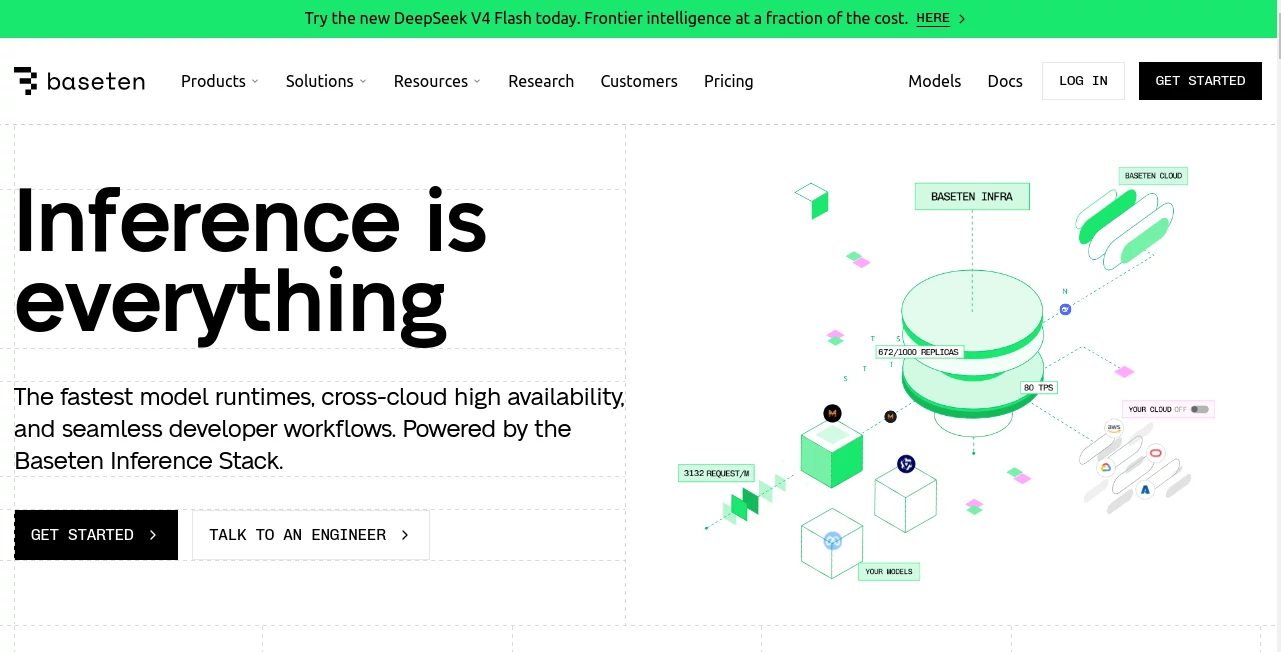
Baseten is a production-focused AI inference platform built for teams that need to move machine learning models from experimentation into reliable, high-scale applications. Instead of spending engineering time managing GPU infrastructure, model servers, scaling rules, and deployment environments, developers can use a dedicated inference stack designed around the demands of modern generative AI.
The platform supports open-source, custom, and fine-tuned models, making it suitable for companies that want more control than a traditional hosted AI API can provide. It also offers pre-optimized Model APIs for teams that want to test or integrate popular language models without handling the deployment process themselves.
What makes the approach particularly interesting is the focus on production performance. The infrastructure is designed around low latency, high throughput, fast cold starts, autoscaling, and availability across multiple clouds. For an AI product where every second of response time affects the user experience, those details can make a meaningful difference.
Key Features
- Deploy open-source, custom, and fine-tuned AI models.
- Pre-optimized Model APIs for popular open-source language models.
- Inference infrastructure designed for low latency and high throughput.
- Automatic scaling for workloads with changing demand.
- Multi-cloud deployment capabilities.
- Dedicated deployments with selectable GPU infrastructure.
- Support for custom model serving through Truss.
- Training and production deployment on the same infrastructure.
- Self-hosted and hybrid deployment options for enterprise workloads.
- Support for LLMs, image generation, transcription, text-to-speech, embeddings, and compound AI applications.
- Dedicated engineering support for teams working on demanding production workloads.
User Interface
The experience is primarily designed for developers, machine learning engineers, and technical teams rather than casual users. That is an important distinction. The interface focuses on deploying models, configuring infrastructure, monitoring workloads, selecting compute resources, and managing production inference.
For someone already comfortable with APIs, model repositories, GPUs, and deployment workflows, the platform aims to remove much of the infrastructure friction without hiding the controls that matter. Developers can work with pre-optimized models when speed of integration is the priority, while custom deployments provide considerably more flexibility.
The documentation and deployment workflow are also geared toward iterative development. A team can start with a model prototype, evaluate its behavior, tune its serving configuration, and then move toward a production deployment without rebuilding the entire infrastructure layer from scratch.
Accuracy & Performance
For an inference platform, performance is about much more than raw model quality. Response latency, throughput, cold-start behavior, GPU utilization, and scaling can all affect the final product.
The platform places substantial emphasis on these areas. Its inference stack incorporates performance optimizations such as custom kernels, advanced caching, and optimized model runtimes. The infrastructure is designed to provide fast cold starts and to scale workloads across cloud providers and regions.
Performance also varies by model, workload, hardware configuration, and application architecture, so developers should benchmark their own workloads rather than assuming that one published figure will apply everywhere. Still, the platform's focus on inference optimization makes it particularly compelling for applications where latency and operating costs are important engineering considerations.
Capabilities
The platform covers a broad range of AI workloads. Developers can deploy large language models, custom neural networks, image generation systems, transcription models, text-to-speech applications, embeddings, and more specialized inference pipelines.
Its Model APIs provide another entry point for teams that do not want to manage model deployment. These APIs expose managed models through an OpenAI-compatible interface, allowing developers familiar with chat-completion APIs to integrate supported models with relatively little modification.
Custom deployments are more flexible. Models that are not part of the managed catalog can be packaged and served using Truss, including models with custom serving logic, fine-tuned weights, or multi-step inference workflows.
There is also support for compound AI applications. This is useful when a product depends on several inference operations rather than a single model call. Instead of treating each model as an isolated service, developers can build more coordinated pipelines while retaining control over hardware and scaling behavior.
Security & Privacy
Security is an important part of the platform, particularly for businesses handling sensitive workloads. The service maintains SOC 2 Type II certification and is HIPAA compliant, providing a foundation for organizations operating under demanding security or regulatory requirements.
According to its documentation, model inputs, outputs, and model weights are not stored by default. Inputs for asynchronous inference may be temporarily retained while they are being processed, while outputs are not stored. Model weights can be loaded dynamically from sources such as Hugging Face, Google Cloud Storage, or Amazon S3 directly into GPU memory.
Enterprise customers can also choose deployment approaches designed for additional control, including single-tenant infrastructure, self-hosted deployments, and options for controlling data residency. These choices can be especially valuable for organizations that cannot send sensitive workloads through a conventional shared AI service.
Use Cases
Production LLM applications: Teams building AI assistants, agents, search systems, coding products, and other language-based applications can deploy optimized language models and scale them according to demand.
Custom AI models: Companies with proprietary or fine-tuned models can deploy their own weights instead of relying exclusively on third-party model APIs.
Image generation: Developers can serve custom image models and ComfyUI workflows for applications that require image generation as part of their product.
Speech and transcription: Real-time voice applications, transcription systems, speaker diarization, translation workflows, and AI phone agents can benefit from infrastructure designed around low-latency audio inference.
Embeddings and search: Embedding workloads can be integrated into retrieval, recommendation, and semantic search systems where throughput and response time are important.
High-traffic AI products: Products experiencing unpredictable demand can take advantage of autoscaling and multi-cloud capacity rather than maintaining a fixed amount of GPU infrastructure.
Enterprise AI: Organizations with strict infrastructure requirements can use self-hosted, single-tenant, or hybrid deployment models for greater control over their environments.
Pros and Cons
- Pros: Strong focus on production inference, support for custom and open-source models, fast scaling, multiple deployment options, pre-optimized Model APIs, enterprise security features, and access to GPU infrastructure without building the entire serving stack internally.
- Pros: The OpenAI-compatible Model API can make it easier for existing applications to experiment with supported models.
- Pros: Teams can choose between managed cloud infrastructure, self-hosted environments, and hybrid approaches depending on their requirements.
- Cons: The platform is primarily aimed at technical teams, so it may feel unnecessarily complex for users who simply want to consume an AI application.
- Cons: Costs depend heavily on GPU selection, usage, model architecture, and traffic patterns, making budgeting less straightforward than a simple fixed subscription.
- Cons: Getting the most from the platform may require knowledge of model serving, inference optimization, and cloud infrastructure.
Pricing Plans
The Basic plan has no monthly platform fee and uses a pay-as-you-go model. It includes dedicated deployments, Model APIs, fast cold starts, and support for deploying custom, fine-tuned, and open-source models.
The Pro plan is designed for organizations with larger or more demanding workloads. It adds unlimited autoscaling, priority access to high-demand GPUs, dedicated compute, higher Model API rate limits, and hands-on engineering support. Volume discounts are available.
The Enterprise plan provides additional infrastructure and governance options, including custom SLAs, self-hosted deployments, on-demand flexible compute, data residency controls, advanced security and compliance features, custom global regions, and advanced role-based access controls.
Dedicated compute is billed according to the infrastructure used, with GPU and CPU instances priced by the minute. Model APIs are priced according to token usage, while new accounts may receive credits for experimentation.
How to Use the Platform
- Choose your model: Start with a supported pre-optimized model or prepare your own open-source, fine-tuned, or proprietary model.
- Select the deployment approach: Decide whether a managed deployment, self-hosted environment, or hybrid setup fits your application.
- Configure the serving environment: Select suitable compute resources and configure the model's serving requirements.
- Deploy the model: Package custom models with Truss when required and deploy them as inference endpoints.
- Connect through the API: Integrate the deployed model into your application through HTTPS-based inference APIs.
- Test the workload: Measure latency, throughput, GPU utilization, and response quality under realistic traffic.
- Scale for production: Configure autoscaling and infrastructure according to expected demand and performance requirements.
Comparison with Similar Tools
Compared with general-purpose cloud GPU services, this platform is more focused on the complete model inference workflow. A conventional cloud provider gives developers access to computing resources, but the team may still need to build and maintain model serving, autoscaling, deployment processes, and performance optimizations.
Compared with hosted model API providers, the advantage is greater control. Developers can use managed models when convenience matters, but they can also deploy their own models and control hardware, scaling, and serving behavior.
Compared with traditional machine learning infrastructure, the main appeal is the shorter path between a working model and a production inference service. Teams that have already experienced the operational overhead of maintaining GPU servers may find this particularly attractive.
The right choice ultimately depends on the application. A small project using a single commercial API may not need this level of infrastructure. A company serving millions of AI requests, running proprietary models, or optimizing every millisecond of latency is much more likely to benefit from it.
Conclusion
For teams building serious AI products, the infrastructure underneath the model can be just as important as the model itself. Slow cold starts, poorly utilized GPUs, difficult scaling, and complicated deployment pipelines can quickly become expensive engineering problems.
This platform takes a more specialized approach by putting inference performance at the center of the development workflow. Its combination of managed Model APIs, custom model deployment, autoscaling, multi-cloud infrastructure, self-hosted options, and production-oriented optimization gives technical teams considerable room to build and grow.
It is not aimed at someone looking for a simple consumer chatbot or a basic AI utility. Its strengths become much more apparent when the goal is to turn sophisticated models into dependable production services. For startups, AI engineering teams, and enterprises where inference speed, scalability, and infrastructure control matter, it is a compelling option worth evaluating.
Frequently Asked Questions (FAQ)
What types of AI models can be deployed?
Developers can deploy open-source, custom, and fine-tuned models. The platform also provides managed Model APIs for selected high-performance language models.
Does the platform support custom models?
Yes. Custom models can be packaged and served through Truss, including models with custom serving logic, fine-tuned weights, and multi-step inference pipelines.
Can it handle high-traffic AI applications?
Yes. Autoscaling, multi-cloud capacity, dedicated infrastructure, and performance-focused model runtimes are designed for production workloads that can experience significant changes in demand.
Is it suitable for enterprise applications?
Yes. Enterprise options include self-hosted deployments, data residency controls, advanced security and compliance features, custom SLAs, single-tenant infrastructure, and advanced access controls.
Is there a free plan?
The Basic plan has a $0 monthly platform fee and follows a pay-as-you-go pricing model. New accounts may also receive credits for experimenting with deployments.
How are dedicated deployments charged?
Dedicated deployments are charged according to the compute resources used, with available GPU and CPU instances billed by the minute. The final cost depends on the selected hardware and actual usage.
Can models be self-hosted?
Yes. Self-hosted deployments are available for organizations that want to run the infrastructure within their own cloud environment and maintain greater control over security, networking, and data residency.
Code & IT , AI API Design , Large Language Models (LLMs) , AI Developer Tools .
These classifications represent its core capabilities and areas of application. For related tools, explore the linked categories above.

baseten Alternatives Product

Empiriolabs …

gemini omni …

Velokey

Gemini Omni

CtrlOps

JSON to TOON…

Defapi

JSON-Tools

Timestamp Ro…
