
BatchlyAI
What is BatchlyAI?
I remember the old way — writing one prompt, generating one image, then tweaking and regenerating over and over again just to test different backgrounds, outfits, or styles. It was slow and exhausting. Then I started using this tool and everything changed. You define variables once — like product type, background, lighting, audience — and it generates every meaningful combination automatically. Suddenly I could produce dozens of high-quality variations in the time it used to take for just one. The leap in efficiency is massive, especially when you're creating ads, social content, or product visuals at scale.
Introduction
Most AI image and video tools are built for single generations. This platform takes a different approach: it’s designed specifically for batch production. You write one smart prompt with variables, and it systematically creates all the combinations you need. It’s perfect for marketers testing ad creatives, e-commerce teams building product visuals, or creators who need multiple versions fast. The results stay consistent in style and quality while varying exactly where you want them to. It turns prompt engineering from a repetitive chore into a strategic, one-time setup that keeps delivering.
Key Features
User Interface
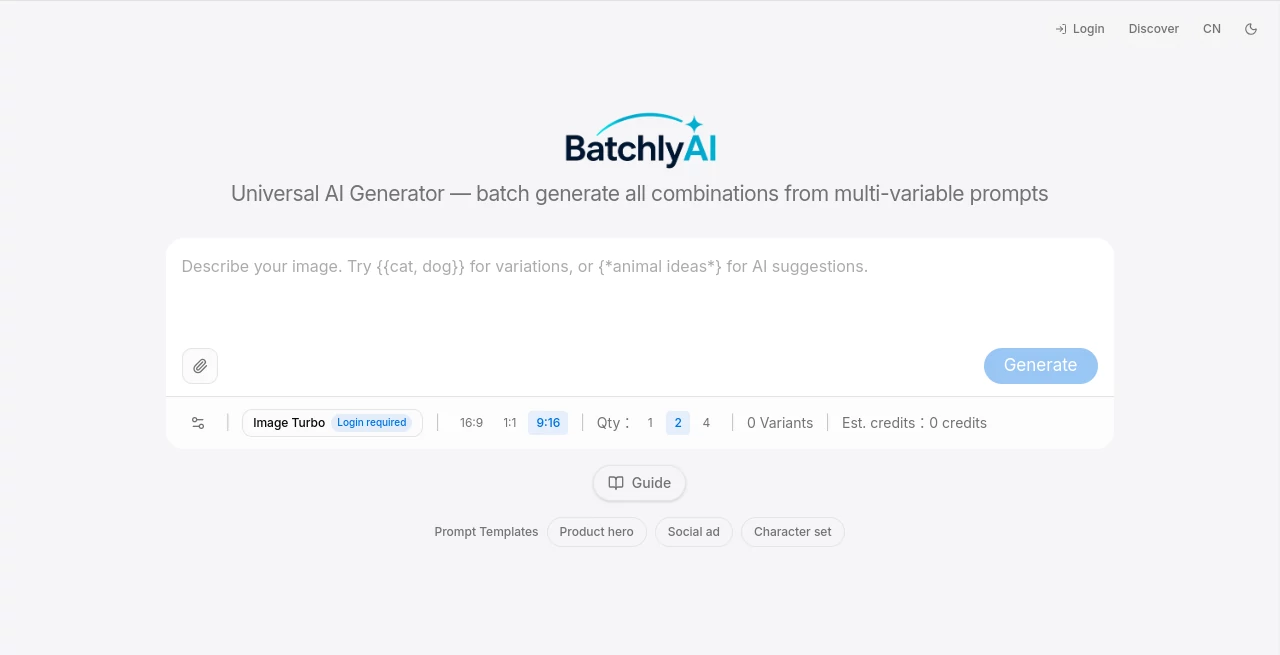
The interface is clean and focused on speed. You define your base prompt, add variables (like {style}, {background}, {angle}), set quantity, and hit generate. Everything lives in one workspace with clear previews as results come in. You can save prompt templates for future use, which becomes a huge time-saver once you build a few go-to setups. It feels designed for people who actually produce content at volume, not just experiment casually.
Accuracy & Performance
What impresses most is how well it maintains consistency across variations. Characters, lighting mood, and overall aesthetic stay coherent even when you swap backgrounds or styles. Generation is reasonably fast for batch work, and the quality holds up across both images and short videos. In practice, it reduces the usual trial-and-error loop dramatically — many users report getting usable assets on the first or second run instead of the tenth.
Capabilities
You can generate dozens (or hundreds) of images and videos from one prompt by mixing variables like product, model, environment, camera angle, and format. It supports both image and video workflows, prompt templates for common needs (product hero shots, social ads, character sets), and intelligent combination logic that avoids nonsensical results. The batch nature makes it especially powerful for A/B testing creatives or building large asset libraries quickly.
Security & Privacy
Your prompts and generated assets stay private to your account. The platform focuses on delivering value without unnecessary data sharing or training on user content. For teams handling brand assets or client work, that controlled environment provides important peace of mind.
Use Cases
An e-commerce brand generates hundreds of product variations with different models, backgrounds, and angles in one go, then picks the best performers for their store and ads. A social media manager creates multiple versions of the same campaign concept to test what resonates with different audiences. A game studio prototypes character outfits and scenes rapidly. A digital marketer builds entire batches of social ads from one master prompt, dramatically cutting production time. Wherever you need volume with consistency, this tool shines.
Pros and Cons
Pros:
- Truly batch-oriented workflow that saves enormous time compared to single generations.
- Smart variable system produces meaningful combinations instead of random noise.
- Strong consistency across style, characters, and lighting in batch outputs.
- Works for both images and video from the same prompt structure.
- Reusable templates make repeated campaigns much faster.
Cons:
- Best results still require well-crafted base prompts and smart variable choices.
- Heavy batch runs consume more credits, which suits higher-volume users.
- Video generation is powerful but naturally slower than images.
Pricing Plans
It offers a free tier to get started and understand the workflow. Paid plans scale with your generation volume, giving better value for heavier users who run frequent batches. The credit system is straightforward — you pay for what you generate, making it flexible for both occasional and professional use. Many teams find the time saved on creative production more than justifies the investment.
How to Use BatchlyAI
Start with a strong base prompt that includes variables (e.g., “{product} on a {background} with {lighting} style, {angle} shot”). Define the values each variable can take. Choose image or video mode, set the number of combinations, and generate. Review the batch results, save the winners, and refine variables as needed. Save successful prompt structures as templates for even faster future campaigns. The process becomes smoother with every use as you build your own library of effective setups.
Comparison with Similar Tools
Most AI generators focus on one prompt at a time, forcing you to run the same idea repeatedly with manual tweaks. This platform is purpose-built for batch production, turning one well-structured prompt into many targeted variations automatically. It saves significant time and mental energy compared to traditional single-shot tools, especially when you need volume with consistency. For marketers, creators, and e-commerce teams who generate lots of visuals, that difference is substantial.
Conclusion
Creating visual content at scale used to mean either massive time investment or massive compromise. This tool removes much of that trade-off. It lets you explore many directions intelligently from one thoughtful setup, delivering consistent, high-quality results across images and video. For anyone who needs to produce a lot of visuals without losing quality or personality, it’s become an incredibly practical advantage. The future of creative work isn’t just faster generation — it’s smarter, more systematic generation. This platform delivers exactly that.
Frequently Asked Questions (FAQ)
How many images or videos can I generate at once?
You can create dozens or even hundreds of combinations in a single batch run.
Does it work for video as well as images?
Yes — the same variable system supports both image and video generation workflows.
Can I save prompts for later use?
Yes, successful prompts can be saved as reusable templates.
Is it suitable for professional brand work?
Absolutely — many e-commerce and marketing teams use it daily for consistent, on-brand assets.
What makes it different from regular AI generators?
It systematically creates every meaningful combination from your variables instead of one-off generations.
AI Photo & Image Generator , AI Image to Video , AI Video Generator , AI Design Generator .
These classifications represent its core capabilities and areas of application. For related tools, explore the linked categories above.

BatchlyAI Alternatives Product

Seedance 3.0

Vidmix
Change-BG

Transform An…

Just Christm…

BananaPro

chibi art

Seedance 2.0…

Fiddl.art