
Booova
What is Booova?
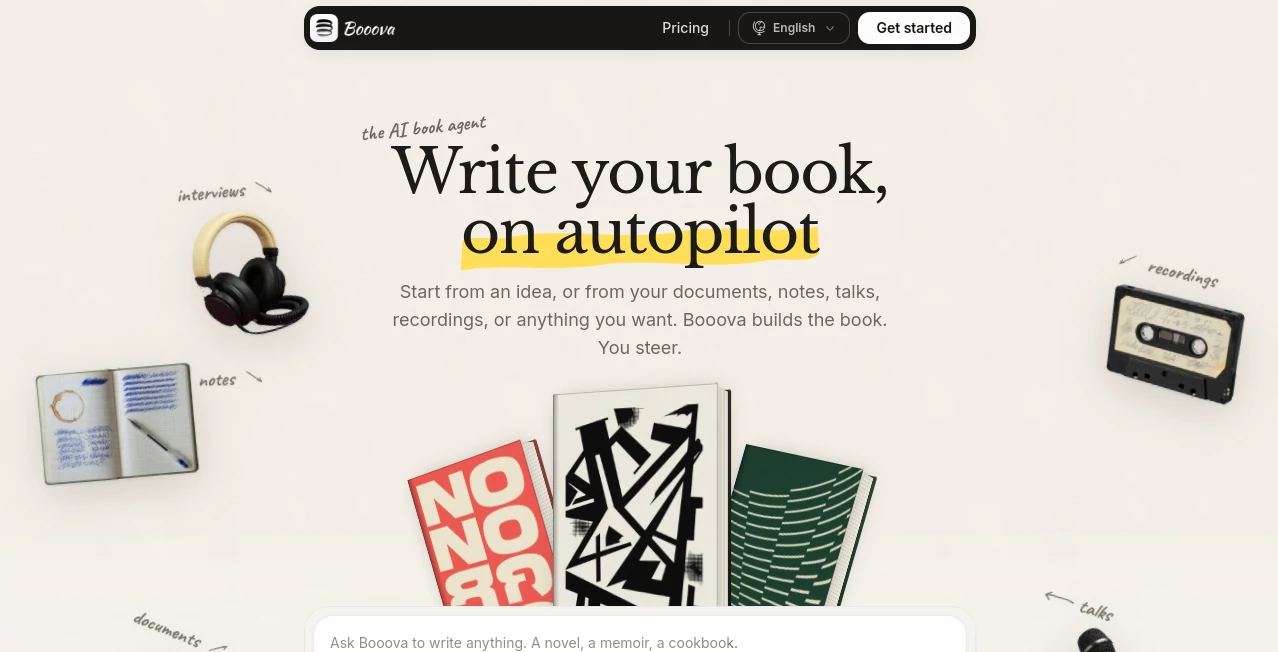
Booova is an AI book agent designed for people who have a book inside their head but do not necessarily have the time, structure, or patience to write it chapter by chapter. It can start with something as simple as an idea, or work from material you already have, including documents, notes, recordings, videos, and web content.
The approach is refreshingly practical. Instead of asking users to produce a perfect outline before getting started, the platform lets them provide whatever material they have and then turns that starting point into a complete book. It can be used for novels, memoirs, biographies, tutorials, cookbooks, and other types of long-form books.
One particularly useful aspect is the ability to continue writing across chapters rather than stopping after producing a short piece of text. For someone working on a family biography, for example, interview recordings and old documents can become the raw material for a much more organized manuscript.
Key Features
- Book creation from an initial idea, notes, documents, recordings, or other source material.
- Support for PDF, Word, PowerPoint, Excel, OpenDocument, EPUB, RTF, CSV, Markdown, and plain text files.
- Support for a wide range of audio and video formats.
- Book creation in more than 100 languages.
- Automatic chapter generation from a single starting instruction.
- Editing directly inside the book workspace.
- Web research capabilities for developing and expanding book content.
- Specialized writing skills for formats such as novels, biographies, and memoirs.
- Export options including DOCX, EPUB, PDF, HTML, and KDP packages on paid plans.
- Cover and illustration generation on paid plans.
- Commercial licensing for books created with paid plans.
User Interface
The workspace is built around the book rather than a conventional chat window. Chapters appear as part of the manuscript, making it possible to move between sections, read the developing book, and make changes without losing the overall structure.
Users can edit content directly on the page or communicate what they want changed. This makes the experience feel closer to working with an editorial workspace than simply asking an AI chatbot to produce paragraphs.
The structure is also straightforward: the manuscript can contain front matter, a title page, chapters, and additional sections. For anyone who has struggled with keeping a long AI-generated project organized, that distinction matters.
Accuracy & Performance
The quality of a generated book naturally depends on the material provided, the instructions given, and the type of book being created. The platform is particularly useful when there is meaningful source material to work from because documents, recordings, notes, and other inputs can provide context for the manuscript.
It also supports research as part of the writing process. Web search can be used while developing a book, which can be helpful for nonfiction projects that need additional background information.
Still, generated content should be reviewed before publication. Names, dates, quotations, historical claims, and other factual details deserve human verification, especially in biographies, educational books, and research-heavy manuscripts.
Capabilities
The platform covers a surprisingly broad range of book projects. A user can begin with a single sentence, upload existing material, or provide a collection of notes and recordings. From there, the system can develop chapters and continue until the manuscript reaches the intended shape.
Its support for different book types is another strength. Novelists can work on fiction, while authors creating memoirs, biographies, tutorials, cookbooks, or essays can start from a structure appropriate to their project.
The skills system adds another layer of control. Predefined skills can guide the writing process for formats such as memoirs, novels, and biographies, while users can also create their own skills for more specific requirements.
Another practical advantage is the export system. A finished manuscript can be prepared in several formats, including DOCX, EPUB, PDF, and HTML, while paid plans also provide a KDP pack for authors preparing a book for publishing workflows.
Security & Privacy
Privacy is an important consideration when uploading personal manuscripts, interviews, family records, or unpublished work. The service states that uploaded content is not used to train its models. It also says that content is encrypted both in transit and at rest and that user data is not sold.
The platform states that users retain ownership of their books and materials. It also allows a book or account to be deleted. Users are responsible for having the necessary rights to any material they upload, so copyrighted or third-party material should only be supplied when appropriate permission exists.
Use Cases
Writing a novel: Authors can begin with a concept and develop it into chapters rather than manually building the entire manuscript from a blank document.
Creating a memoir: Personal notes, recordings, and memories can provide source material for a structured life story.
Family biographies: Old letters, interviews, photographs, notes, and recordings can be assembled into a biography. This is one of the more interesting practical applications because the raw material often already exists but is scattered across different formats.
Cookbooks: Recipes and personal notes can become a more organized cookbook with chapters and supporting content.
Tutorials and educational books: Existing documents and research material can be turned into a structured long-form resource.
Authors preparing for self-publishing: Export formats and the KDP package can make the final stage of preparing a manuscript more convenient.
Pros and Cons
- Pros: Designed specifically around long-form book creation rather than short AI responses.
- Pros: Can work from documents, notes, audio, video, URLs, and other existing material.
- Pros: Supports more than 100 languages.
- Pros: Includes specialized skills for different types of books.
- Pros: Provides multiple manuscript export formats.
- Pros: Paid plans include commercial licensing.
- Pros: Users retain ownership of their books.
- Cons: The free plan is limited to 100 credits and does not provide full book file exports.
- Cons: AI-generated manuscripts still require human editing and factual review before publication.
- Cons: Credit usage applies to writing, revisions, research, and image generation, so heavy projects can consume credits quickly.
Pricing Plans
The service offers a free starting option with 100 credits and no credit card requirement. Users can read their book in the workspace, while full book file exports are reserved for paid plans.
Plus – $29/month: Includes 1,000 credits per month, document and media imports, URL imports, DOCX, EPUB, PDF, and HTML downloads, a KDP pack, cover and illustration generation, unlimited web search, unlimited book storage, and a commercial license.
Pro – $59/month: Provides 4,000 credits per month and the same core writing features as Plus, making it better suited to authors who expect more revisions and additional illustrations.
Max – $99/month: Includes 10,000 credits per month and is aimed at users working on several books or performing heavy regeneration and revision work.
Annual billing is also available. The annual option is charged as one payment for the equivalent of 10 months of the monthly price, while the monthly credit allowance remains the same.
How to Use the Tool
Start by deciding what kind of book you want to create. You can provide a simple description of the idea or bring existing source material. Documents, recordings, videos, notes, web pages, and supported cloud links can all be used as starting points.
Once the material is available, describe the book you want. The writing agent can then develop the manuscript chapter by chapter. You can review the result as it grows, edit text directly on the page, or instruct the agent to revise specific sections.
For a more specialized project, choose an appropriate writing skill such as a novel, memoir, or biography. You can also create a custom skill when your project requires a particular structure, tone, or writing approach.
When the manuscript is ready, review the entire book carefully. Check factual information, names, quotations, citations, consistency, and the overall voice before exporting it for publication or distribution.
Comparison with Similar Tools
Many AI writing applications are designed around individual tasks such as generating blog posts, rewriting paragraphs, or producing short-form copy. This platform takes a different route by treating the book itself as the main workspace.
That difference becomes important when a project contains dozens of chapters and a large amount of source material. Instead of repeatedly opening a chatbot and copying responses into a separate editor, authors can work within a dedicated manuscript environment.
Traditional word processors still offer greater manual control, while general-purpose AI assistants can be more flexible for unrelated tasks. However, for someone specifically looking to move from an idea or a collection of source materials toward a complete book, a book-focused workflow can be considerably more convenient.
Conclusion
Writing a book is rarely difficult because someone cannot produce a paragraph. The harder part is maintaining momentum, structure, continuity, and organization across an entire manuscript. This is where the platform makes its strongest case.
Its ability to begin with almost any kind of source material, develop chapters, support different book formats, and export a finished manuscript gives authors a practical path from scattered ideas to a readable book.
It is not a replacement for an author's judgment or editing. The best results will come from treating the AI as a capable writing partner while keeping a human firmly in charge of the story, facts, voice, and final decisions. For authors who want to spend less time staring at a blank page and more time shaping a finished manuscript, it is a compelling option.
Frequently Asked Questions (FAQ)
What types of books can I create?
You can create several types of books, including novels, memoirs, biographies, tutorials, cookbooks, and other long-form projects.
Can I start with only an idea?
Yes. You can start with a simple description of what you want to write. You can also provide documents, notes, recordings, videos, or other source material.
Can I upload documents and recordings?
Yes. Supported document formats include PDF, Word, PowerPoint, Excel, EPUB, RTF, CSV, Markdown, and plain text. A wide range of audio and video formats are also supported.
How many languages are supported?
The service states that books can be written in more than 100 languages.
Do I own the book I create?
Yes. The service states that users own their books and materials and receive full commercial rights on paid plans.
Is my content used to train AI models?
The service states that user content is not used to train its models. It also states that data is encrypted in transit and at rest and is not sold.
Can I export my finished book?
Paid plans support DOCX, EPUB, PDF, and HTML exports, as well as a KDP package. The free plan allows users to read the complete book in the workspace but does not include full book file exports.
Is there a free plan?
Yes. New users receive 100 welcome credits without requiring a card. AI features consume credits, while the book remains readable in the workspace after the credits are used.
Do unused credits carry over?
No. Unused monthly credits do not carry over to the following month. Failed AI runs are not charged.
AI Book Writing , AI Creative Writing , AI Novel , AI Story Writing .
These classifications represent its core capabilities and areas of application. For related tools, explore the linked categories above.

Booova Alternatives Product

PrompTessor

Dewy Chat

Klyra AI

The StoryGra…
PromptFix

Greetings Is…

ISEKAI ZERO

Sudowrite Mu…

Automateed