


















BSmeter
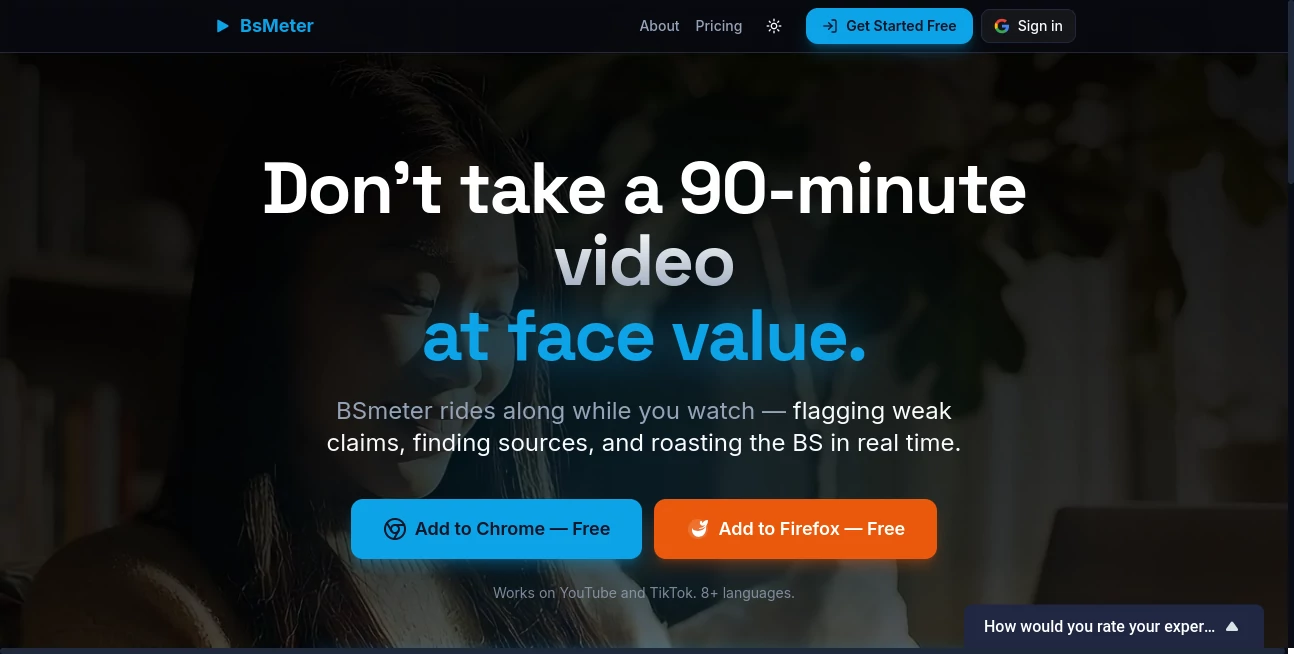
What is BSmeter?
I got tired of listening to podcasts and watching videos where hosts or guests made bold claims, and I had no quick way to know what was solid and what was spin. Then I found this tool. It rides along with you, quietly analyzing every claim in real time, giving clear credibility scores, pointing out logical fallacies, and even pulling sources when needed. The first time I used it on a popular interview, it flagged a few questionable statements I would have completely missed. Suddenly the conversation felt more honest, and I felt more informed. It doesn’t ruin the experience — it actually makes it better.
Introduction
In today’s media landscape, it’s harder than ever to separate fact from performance. BSmeter changes that by bringing intelligent fact-checking directly into your viewing experience. Whether you’re watching YouTube, TikTok, or listening to a podcast, it analyzes the transcript on the fly, scores each claim, highlights potential misinformation, and provides context without interrupting your flow. It’s built for curious minds who want truth without doing all the detective work themselves. The result is a smarter, more trustworthy way to consume long-form content — perfect for researchers, journalists, students, and anyone who’s tired of being misled.
Key Features
User Interface
The experience is delightfully seamless. Install the browser extension, play any video or podcast, and a clean sidebar appears when you want it. Claims are highlighted as they happen, with simple color-coded scores (green for solid, yellow for questionable, red for problematic). You can click any claim for a quick breakdown with sources and explanations. It never feels intrusive — you decide when to dive deeper, and the rest stays out of your way.
Accuracy & Performance
It’s impressively sharp at catching both obvious exaggerations and subtle misleading statements. The AI cross-references claims against reliable sources quickly, and the logical fallacy detection is especially useful for spotting common manipulation tactics. In my experience, it rarely flags solid information and catches enough questionable stuff to make you pay closer attention. Processing happens smoothly in real time without lag on most videos.
Capabilities
It works on YouTube, TikTok, podcasts, and other video platforms. You get claim-by-claim analysis, credibility scoring, source linking, logical fallacy identification, and even AI narration summaries when you want the big picture fast. The tool can handle long-form content effectively, making it great for deep dives into interviews, documentaries, or educational videos. Everything is timestamped so you can jump back to any moment easily.
Security & Privacy
Your viewing habits and analysis stay private. The extension processes content locally where possible and doesn’t store personal data unnecessarily. It’s transparent about what it does, giving users confidence while they explore potentially sensitive or controversial topics.
Use Cases
A researcher watches long interviews and quickly verifies key claims for their work. A student fact-checks lecture recordings and news videos for assignments. A concerned citizen analyzes political content to cut through spin before forming opinions. Content creators use it to review their own material or competitor videos for accuracy. It’s especially powerful during election seasons or when big stories break and everyone is rushing to comment.
Pros and Cons
Pros:
- Real-time analysis while you watch — no need to pause and search separately.
- Clear, easy-to-understand credibility scores and explanations.
- Helps spot logical fallacies most people miss.
- Works on major platforms without complicated setup.
- Great for both casual viewers and serious researchers.
Cons:
- Very new or obscure topics may have fewer external sources available.
- Some advanced features require a paid plan.
- Relies on good internet for the best real-time performance.
Pricing Plans
It offers a solid free tier that lets you experience the core fact-checking power on many videos. Paid plans unlock unlimited analysis, higher accuracy modes, advanced reporting, and priority support. The pricing feels reasonable for how much mental effort and time it saves, especially for heavy consumers of news, podcasts, and long-form video.
How to Use BSmeter
Install the browser extension, play any supported video or podcast, and click the BSmeter icon when you want analysis. The sidebar opens with live claim tracking. Click any highlighted claim for deeper breakdown and sources. Use the summary feature for quick overviews of long content. It’s simple enough to use casually but powerful enough for serious verification work. The more you use it, the more tuned in you become to spotting issues yourself.
Comparison with Similar Tools
Many fact-checking sites require you to manually search after watching. Others are slow or overly simplistic. This one stands out by integrating directly into your viewing experience with real-time, claim-level analysis and clear scoring. It’s less about post-game commentary and more about being a smart companion while you consume content — a meaningful difference in practice.
Conclusion
In an era of sophisticated spin and overwhelming information, having a reliable second opinion while you watch feels empowering. This tool doesn’t tell you what to think — it helps you see more clearly so you can decide for yourself. Whether you’re consuming news, educational content, or entertainment, it adds a valuable layer of awareness without killing the enjoyment. For anyone who values truth but doesn’t have time to fact-check everything manually, it’s one of the most practical AI tools available right now.
Frequently Asked Questions (FAQ)
Does it work on all videos?
It works best on YouTube, TikTok, and major podcast platforms, with new sites added regularly.
Is the analysis 100% accurate?
No AI is perfect, but it provides transparent scoring and sources so you can verify further if needed.
Can I use it for free?
Yes — the free tier offers meaningful usage to experience the value firsthand.
Does it store my viewing history?
Analysis is private by default, with options for more control on paid plans.
Is it useful for students or researchers?
Extremely — many use it to verify sources and understand arguments more deeply.
AI Research Tool , AI Analytics Assistant .
These classifications represent its core capabilities and areas of application. For related tools, explore the linked categories above.

BSmeter Alternatives Product

AI Job Risk …

Diploria AI

Zorin

Crawlly AI
JSON to TOON…

Arobis AI Vi…

Pinpoint Ans…

Startup Read…

Debate Tello…
