


















Cactal AI
What is Cactal AI?
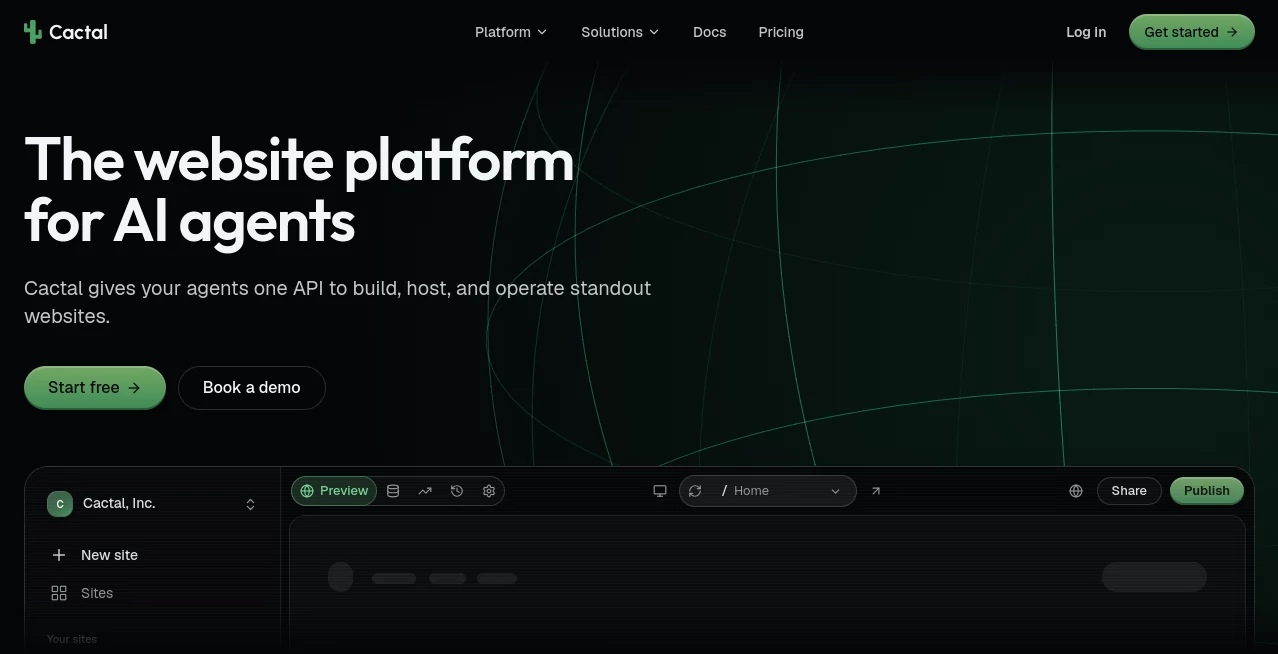
Cactal is an agent-native website platform built for creating, publishing, and operating professional websites with the help of AI agents. Instead of relying on traditional drag-and-drop page builders, it lets users connect an AI agent and describe what they want in plain language. The platform can then help design, build, edit, and publish real websites without requiring a dedicated development team.
What makes the approach particularly interesting is that the platform is not limited to generating a page and leaving the user to figure out the rest. Hosting, content management, publishing, version control, analytics, SEO features, and access management are part of the same environment. It can be used for a single business website, a collection of client projects, or large portfolios containing many websites.
For agencies and studios, this can remove a considerable amount of repetitive work. A team can manage client websites from one dashboard, control who has access to each project, and give clients content-only permissions when needed. Businesses can also use it to keep their websites updated without depending on a developer for every small change.
Key Features
- AI-agent-driven website creation and editing
- Support for MCP, API, and SDK integrations
- Headless CMS with structured content management
- Built-in SEO features including metadata, redirects, clean URLs, sitemaps, and canonicals
- Versioned publishing with preview and one-click rollback
- Managed hosting and CDN-served websites
- First-party website analytics
- Website-scoped and organization-scoped API keys
- Role-based team and client access
- Content-only permissions for collaborators
- Multi-tenant architecture for platforms and SaaS products
- Support for managing large numbers of websites from one dashboard
User Interface
The interface is designed around the idea of managing websites from a central control plane rather than jumping between a page builder, hosting provider, CMS, analytics dashboard, and deployment system. This makes the workflow easier to understand, particularly for agencies handling several client projects at the same time.
Users can preview changes before publishing them, manage website content, review analytics, and control access from the same environment. The experience is also deliberately agent-friendly, so users who prefer working with tools such as Claude Code, Codex, ChatGPT, or other MCP-compatible agents can drive the platform through those connections instead of manually editing every part of a site.
Accuracy & Performance
The platform focuses on producing real, production-ready websites rather than disposable mockups. Generated interfaces use server-rendered React and go through quality checks before being served. This approach is useful for teams that want AI-assisted development while still expecting the resulting website to behave like a proper web product.
Performance is also handled as part of the hosting layer. Websites are delivered through a global edge network, with managed infrastructure designed to keep pages responsive for visitors in different locations. Because hosting and publishing are integrated into the platform, there is less infrastructure work between creating a website and putting it online.
Capabilities
One of the strongest parts of the platform is its breadth. An AI agent can be connected through MCP, while developers can also work with the API and SDK. This opens the door to workflows where website creation becomes part of another application or SaaS product rather than a completely separate process.
The built-in CMS supports structured content, custom collections, drafts, and relationships. Versioned publishing means changes are saved as versions, allowing teams to restore an earlier state if an update causes a problem. First-party analytics provide information such as pageviews, referrers, devices, countries, and UTM campaigns, with CSV exports available for reporting.
For agencies, the combination of centralized management, per-site roles, analytics, version history, and managed hosting is especially practical. For SaaS companies and AI agent platforms, the API, SDK, and MCP support makes it possible to offer website creation as part of a larger product.
Security & Privacy
Access control is handled at several levels. Organizations can have owners, administrators, and members, while collaborators can be restricted to individual websites. A client, for example, can be given access to one project without being exposed to another client's website.
API keys can also be scoped to an organization or individual website and configured for read or full-edit access. Keys can be rotated or revoked when necessary, and they cannot hold the owner role or modify billing. Publishing activity, rollbacks, access changes, and key activity are recorded in an audit history, while tenant isolation is enforced across the platform.
Use Cases
Agencies and studios: Teams can build and operate multiple client websites from one dashboard, assign project-specific permissions, provide client reporting, and roll back changes when necessary.
Small businesses: A business owner can describe a website requirement to an AI agent and continue maintaining content without needing a developer for routine updates.
SaaS platforms: Developers can integrate website creation into their own products using the API, SDK, or MCP connection. This can be useful when customers need their own hosted websites as part of a larger service.
AI agent platforms: Agents can be given controlled access to website-building capabilities, allowing them to turn information, research, reports, or dashboards into real browser-based pages.
Enterprise teams: Organizations managing many business-unit or campaign websites can benefit from centralized governance, granular permissions, version history, and audit trails.
Pros and Cons
- Pros: Agent-first workflow, real React source code, built-in CMS, integrated hosting, automatic SEO infrastructure, version control, analytics, API/SDK/MCP access, granular permissions, and support for large website portfolios.
- Pros: The free plan is genuinely usable rather than being a short trial. Users can build and publish unlimited websites on the platform's own domains without a credit card.
- Pros: Paid plans include unlimited members, making collaboration more practical for agencies and teams.
- Cons: Users who prefer a traditional visual drag-and-drop builder may need some adjustment to the agent-first workflow.
- Cons: Custom domains require a paid plan, so businesses intending to use their own domain will need to move beyond the free tier.
- Cons: Users are expected to bring their own AI agent, which means the overall workflow can depend on the agent and model they choose.
Pricing Plans
The platform offers a Free plan at $0 per month with no time limit and no credit card requirement. Users can build unlimited websites, publish them on platform domains, and access the API, SDK, MCP, and their own AI agent.
The Pro plan starts at $20 per month when billed annually and is designed for businesses and agencies that want to use their own domains. It includes managed hosting, storage and bandwidth, a headless CMS, built-in SEO, versioned publishing, analytics, and unlimited members. The first website on a custom domain is included in the plan, with additional websites available at $20 per month each.
Enterprise pricing is custom and is intended for organizations with higher-volume, security-sensitive, or procurement-heavy requirements. Enterprise options can include custom limits, SSO, security review, SLA, priority support, onboarding, and migration assistance.
How to Use It
- Create an account and start with the free plan.
- Connect an AI agent that supports the available integration options, such as MCP.
- Describe the website you want to create, including its purpose, structure, content, and visual direction.
- Let the agent create and refine the website while reviewing the generated result.
- Use the built-in CMS to manage structured content, pages, posts, and other site information.
- Preview changes before publishing them.
- Publish the website and use the managed hosting environment to serve it.
- Connect a custom domain when you are ready to move the website to your own domain.
- Use analytics, version history, roles, and access controls to operate the website over time.
Comparison with Similar Tools
Traditional website builders generally focus on visual editing, templates, and manual page construction. AI website generators, meanwhile, often concentrate on producing an initial website quickly but may leave hosting, CMS management, deployment, versioning, and long-term maintenance to other services.
This platform takes a different route. Its central idea is to make an AI agent part of the website development workflow while keeping the resulting websites as real, manageable web projects. The combination of agent connectivity, a headless CMS, managed hosting, built-in SEO, analytics, versioned publishing, and access controls makes it particularly attractive for people who want AI-assisted development without treating the website as a one-time generated mockup.
It is therefore a stronger fit for agencies, developers, SaaS platforms, and businesses looking for an ongoing website operating environment than for someone who simply wants a basic template and a conventional visual editor.
Conclusion
Cactal offers a compelling take on AI-powered website creation by focusing on what happens after the first prompt. Users are not simply handed a generated page; they get an environment for building, publishing, editing, hosting, measuring, and maintaining websites over time.
The agent-first approach is the standout feature. By connecting AI agents through MCP, API, or SDK integrations, the platform can turn website development into a more conversational and programmable process. At the same time, features such as versioned publishing, a headless CMS, built-in SEO, analytics, managed hosting, and granular access controls give the workflow the structure expected from a serious website platform.
For an individual building a small project, the free plan provides an easy way to explore the system. For agencies and organizations managing multiple websites, the centralized dashboard and scalable architecture make the proposition considerably more interesting.
Frequently Asked Questions (FAQ)
Can I build websites for free?
Yes. The Free plan has no time limit and does not require a credit card. It allows unlimited websites on the platform's domains and includes API, SDK, and MCP access.
Do I need coding experience?
No. The platform is designed around an agent-first workflow where users can describe what they want in natural language. Full source-code access is available for users who want deeper control.
Can I connect my own AI agent?
Yes. Users can bring their own AI agent and connect it through supported MCP, API, and SDK interfaces. The service does not meter the number of prompts used by the connected agent.
Can I use my own domain?
Yes. Custom domains are available on the Pro plan. The first website on an owned domain is included, while additional websites can be added for an additional monthly fee.
Can agencies manage multiple client websites?
Yes. Agencies can manage client websites from one dashboard, assign website-specific permissions, provide clients with limited access, and use analytics and reporting features for individual projects.
Can I roll back website changes?
Yes. Changes are versioned, allowing users to preview, publish, and restore previous versions when necessary.
Does it include SEO features?
Yes. SEO functionality is built into the platform and includes features such as sitemaps, redirects, metadata, clean URLs, and canonical URLs.
AI Website Builder , AI No-Code & Low-Code , AI Website Designer , AI Developer Tools .
These classifications represent its core capabilities and areas of application. For related tools, explore the linked categories above.

Cactal AI Alternatives Product

ace.me
RepoClip

Ito AI

Sendmux

Website Audi…

Xvibe

Jujutsu Zero…

freellm

Bolt AI
