
Capturable
What is Capturable?
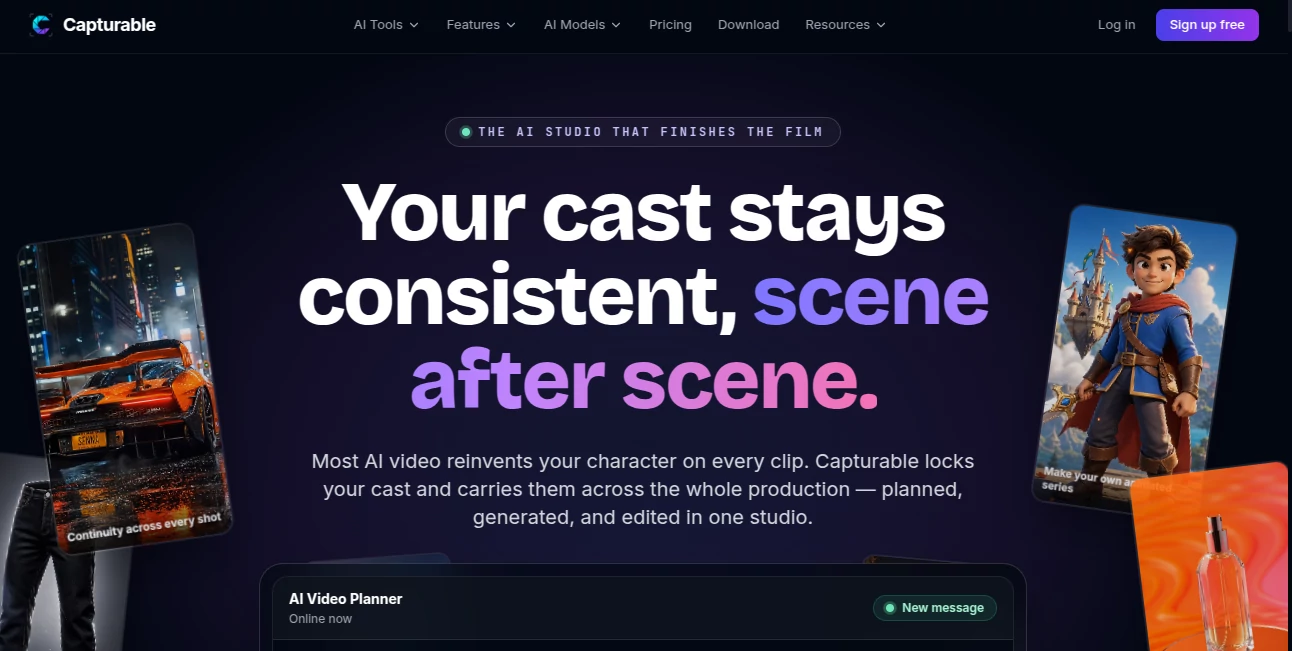
Creating cinematic videos with AI has become easier than ever, but maintaining visual consistency across multiple scenes is still one of the biggest challenges for creators. This platform solves that problem by combining story planning, AI video generation, editing, and timeline management into a single production workflow. Instead of jumping between different applications for scripting, image generation, animation, voiceovers, and editing, everything can be managed in one organized workspace.
Whether you're producing YouTube content, marketing campaigns, animated explainers, social media videos, or short films, the platform keeps characters, environments, and storytelling aligned from the first frame to the final export. For creators who value speed without sacrificing quality, it offers a refreshingly practical approach to AI-powered filmmaking.
Key Features
User Interface
The workspace feels familiar to anyone who has used modern video editing software while remaining approachable for beginners. Storyboards, scene management, character libraries, and editing timelines are organized logically, making even complex productions easier to manage. The multi-track editor allows users to arrange visuals, narration, captions, music, and transitions without unnecessary complexity.
Accuracy & Performance
One of the strongest aspects of the platform is its ability to preserve character consistency throughout an entire project. Approved character references remain stable between scenes, reducing the need for repeated prompt engineering. Different AI generation engines can also be used for individual scenes, allowing creators to choose the most suitable model for each visual style.
Capabilities
- Storyboard planning before production begins.
- Script-to-video scene generation.
- Reusable characters and environments.
- Multi-scene AI film production.
- Frame consistency across shots.
- Voiceover integration.
- Background music management.
- Caption generation and editing.
- Multi-track video timeline.
- Export-ready video production.
- Support for multiple AI generation models.
- Organized project management for long-form videos.
Security & Privacy
The platform is designed for professional production workflows where project organization matters. User-created assets, reusable characters, scripts, and timelines remain separated by project, making it easier to manage creative work without unnecessary duplication. As with any cloud-based creative solution, users should review current privacy policies before uploading confidential content.
Use Cases
- AI short film production.
- YouTube storytelling videos.
- Marketing video campaigns.
- Educational explainers.
- Animated presentations.
- Social media content creation.
- Brand storytelling.
- Creative agencies managing multiple projects.
- Independent filmmakers exploring AI production.
- Content creators building serialized characters.
Pros and Cons
Pros
- Excellent character consistency across scenes.
- Combines planning, generation, and editing in one workflow.
- Supports reusable characters and worlds.
- Integrated storyboard creation.
- Multi-track editing saves time.
- Flexible AI model selection for different scenes.
- Suitable for both short and long-form productions.
Cons
- Currently evolving as a relatively new platform.
- Advanced productions still require creative direction.
- Rendering time depends on project complexity.
Pricing Plans
The platform is currently available through early access and beta availability. Pricing details may evolve as new features are introduced. Users interested in commercial production should check the latest subscription information before starting larger projects.
How to Use Capturable
Begin by creating a new project and outlining your story using the storyboard planner. Import or write your script, then break it into individual scenes. Create reusable characters and environments that remain visually consistent throughout the production. Generate each shot using the preferred AI model, then arrange every scene inside the multi-track editor. Finally, enhance the project with narration, music, captions, and transitions before exporting the completed video.
Comparison with Similar Tools
Unlike many AI video generators that focus on producing isolated clips, this solution is built around complete storytelling. Its strongest advantage is maintaining consistent characters while combining planning, generation, and editing inside one production environment. Traditional AI video tools often require several external applications to achieve the same result, whereas this workflow keeps the entire creative process centralized and significantly more efficient.
Conclusion
For creators who want more than simple text-to-video generation, this platform delivers a complete AI filmmaking experience. Its combination of storyboard planning, consistent characters, flexible scene generation, and integrated editing makes it particularly valuable for professional creators and ambitious storytellers. Instead of treating every scene as an independent generation task, it approaches video production like a real studio pipeline, helping projects feel coherent from beginning to end.
Frequently Asked Questions (FAQ)
Can beginners use this platform?
Yes. The interface is designed to simplify AI filmmaking while still providing advanced production features.
Does it support multi-scene video creation?
Yes. Projects can include multiple connected scenes with consistent visual elements throughout the story.
Can characters remain consistent across different shots?
Yes. One of its primary strengths is maintaining approved character references during production.
Is video editing included?
Yes. Users can edit scenes on a multi-track timeline, including voiceovers, captions, music, and transitions.
Who is this platform best suited for?
It is ideal for content creators, filmmakers, marketing teams, educators, agencies, and anyone producing AI-powered narrative videos.
AI Animated Video , AI Video Generator , AI Video Editor , AI Text to Video .
These classifications represent its core capabilities and areas of application. For related tools, explore the linked categories above.

Capturable Alternatives Product

Spark Robin …

Seedance 2.0…

WonderShare …

Seedance 2.0

pvz fusion
animearc

ImgVid

Gemini AI vi…
Render of Dr…