


















Carbon Badge
What is Carbon Badge?
Let's be honest for a second. When someone visits your website, you probably think about design, speed, conversions, or maybe how many people bounce off the homepage. But here's something most site owners never even consider: every single page load leaves a mark on the planet. Yeah, seriously. Those data centers humming in the background, the networks shuffling your pixels around, even the device someone's holding—they all guzzle energy.
I remember the first time I ran a carbon test on my own site. I was pretty proud of my sleek little blog until the results came back showing a grade that made me wince. That's exactly why this tool exists. It doesn't just tell you your website is dirty and leave you hanging. It gives you a clear grade, shows you exactly where the emissions come from, and hands you a badge you can actually show off to prove you're doing something about it.
The best part? It takes about thirty seconds to figure out where your site stands. No complicated setups, no technical degrees required. Just pop in your domain and watch the magic happen.
Key Features
User Interface
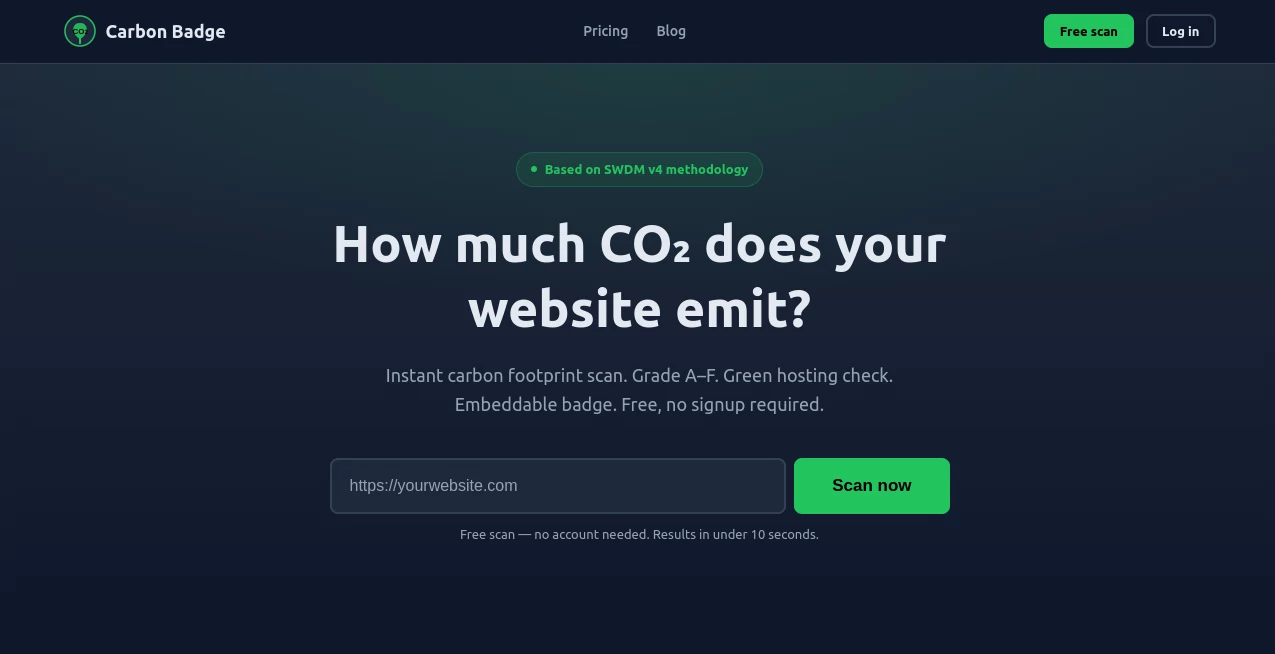
Nobody wants to wrestle with a clunky dashboard when they're trying to save the planet. The interface here is refreshingly straightforward. You land on the homepage, type in your website address, and hit enter. That's it. Within seconds, you get a beautiful breakdown of your site's carbon footprint without any jargon vomit. The grading system uses simple A through F letters, just like school, so you instantly know if you're acing sustainability or flunking hard. And the badge itself? Clean, professional, and comes in both light and dark themes so it won't ruin your site's aesthetic .
Accuracy & Performance
This isn't some random guess or marketing gimmick. The tool runs on the Sustainable Web Design Model version 4, which is pretty much the gold standard for measuring digital emissions right now. Here's what it actually looks at: how many bytes your page transfers (that's all your images, scripts, fonts, the whole package), where those bytes travel from, what kind of device someone uses to view your site, and even how clean the electricity grid is in your region. The calculations update every twenty-four hours, so if you clean up your act, your badge reflects it almost immediately. A friend of mine optimized some massive hero images on his portfolio and watched his grade jump from a D to a B literally overnight.
Capabilities
Free users get three scans per day, which is plenty if you're just checking your own site or a handful of client projects. But here's where things get interesting. The paid plans unlock monitoring features that track your emissions over time, API access if you want to integrate carbon data into your own tools, and the ability to scan up to five hundred pages in one go . For agencies managing multiple client sites, that's a lifesaver. You can white-label reports, set up alerts when a site's footprint spikes, and show clients exactly how your optimizations saved real carbon. And yes, the embeddable badge works everywhere—WordPress, custom HTML, even static sites.
Security & Privacy
Nobody wants their data floating around somewhere sketchy. The service uses proper security headers including HSTS preload and CSP, plus Cloudflare handles the DNS and CDN layer . They're not collecting your visitors' personal info or tracking people across the web. The badge itself just pulls data for your domain and displays it. Simple, clean, no hidden trackers. The cookie consent system only loads Google Analytics if someone actually agrees, which is more than most sites bother doing.
Use Cases
Eco-conscious brands and agencies slap this badge on their footer to show clients they walk the walk. I've seen design studios land contracts specifically because they displayed their A-grade carbon badge next to their portfolio.
Digital marketing teams use the scanner to audit landing pages before launching campaigns. A heavy page doesn't just cost the planet—it costs conversions because slow load times kill sales. The carbon grade correlates surprisingly well with page speed, so optimizing for one helps the other.
WordPress site owners can add the badge as a Gutenberg block or through plugins, making it dead simple to integrate without touching code .
Enterprise sustainability leads need to report on digital emissions for CSRD compliance or ESG goals. The API lets them pull data across hundreds of subdomains and generate audit-ready reports.
Pros and Cons
Pros:
- Free tier covers basic needs for most small site owners
- Grade system is intuitive—everyone understands A through F
- Badge design looks professional and doesn't scream "greenwashing"
- Updates every 24 hours so improvements show quickly
- API access for automation and custom integrations
Cons:
- New scans aren't instant; you have to wait for the next update cycle
- The calculation is an estimate, not a perfect scientific measurement
- Some very large enterprise sites might need the highest tier for full coverage
- Dark mode badge styling could use a few more customization options
Pricing Plans
Free: 3 scans per day, 1 page per scan. Perfect for personal blogs or testing the waters.
Pro – €9 per month: 50 scans daily, embeddable badge, ongoing monitoring. Great for freelancers and small business owners.
Business – €29 per month: 500 pages per scan, full API access, manage up to 5 different sites. Ideal for agencies and marketing teams.
Enterprise – €79 per month: Unlimited scans and pages, priority support, custom reporting. For large organizations with serious sustainability commitments.
All paid plans include the same core technology and accuracy—you're paying for volume, not better results.
How to Use This Tool
First, head to the website and find the big search bar on the homepage. Type in your domain name exactly as it appears (including the https:// part) and hit enter. Give it a few seconds to run the numbers. You'll see your carbon grade right away along with a detailed breakdown showing grams of CO2 per page view.
If you like what you see, grab the embed code from the dashboard. It's just a simple HTML snippet you can paste anywhere on your site—footer, about page, blog sidebar, wherever makes sense. For WordPress users, you can install one of the available plugins or just drop the code into a custom HTML block .
Want to improve your grade? The tool gives you hints about what's making your page heavy. Usually it's oversized images, bloated JavaScript frameworks, or too many third-party scripts. Clean those up, rescan in a day or two, and watch that grade climb.
Comparison with Similar Tools
There are a few other website carbon calculators floating around. Website Carbon (the original one from Wholegrain Digital) started this whole space and still works well, but it doesn't offer the same tiered monitoring or API access. Some newer tools focus only on green hosting verification without measuring actual page weight. Others, mostly hackathon projects, never made it past the prototype stage and lack reliable maintenance .
Where this one stands out is the balance between accessibility and depth. Free users get real value. Paid users get enterprise-grade features. The badge itself is also more visually polished than competitors, which matters when you're putting it on your live site for customers to see. Some alternatives look like they were designed in 2005 and never updated.
The SWDM v4 methodology is standard across most serious tools, so the underlying math is similar. The difference comes down to interface quality, update frequency, and the embed experience. On all three fronts, this one leads the pack .
Conclusion
Sustainability isn't a trend or a marketing checkbox anymore. It's becoming a real requirement. Clients ask about it. Regulators are writing rules about it. And honestly, most of us want to do the right thing but don't know where to start. This tool removes the guesswork. It shows you exactly where your website stands, gives you a badge to prove your commitment, and helps you track improvements over time.
The internet produces nearly four percent of global carbon emissions—that's more than the entire airline industry. Every small optimization adds up. Switching to a leaner theme, compressing those PNGs, ditching that heavy tracking script you forgot about years ago. Each fix moves your grade up a notch and shrinks your digital footprint. Give it a shot on your own domain. You might be pleasantly surprised. Or you might find some room for improvement. Either way, you'll finally know.
Frequently Asked Questions (FAQ)
How accurate is the carbon calculation?
It's based on peer-reviewed SWDM v4 methodology and real-world data about energy grids, data center efficiency, and network transfer emissions. Like any model, it's an estimate, not a laboratory measurement, but it's consistent and transparent about what factors it includes.
Will adding the badge slow down my site?
Nope. The badge is just a lightweight image or JavaScript snippet that pulls a small file. It won't affect your page speed scores in any meaningful way. Some implementations are even cached for twenty-four hours to reduce repeated requests .
Can I use the badge on multiple sites with a free account?
The free account lets you scan sites and retrieve badges, but each domain you monitor counts toward your daily scan limit. For three sites doing one scan each per day, you'd use all three of your free scans. Heavy usage requires a paid plan.
Why did my grade change even though I didn't change my site?
The calculation factors in regional grid carbon intensity, which fluctuates based on how much renewable energy is available at different times. It also checks green hosting status periodically through the Green Web Foundation API. If your host changed their energy mix or if the grid got cleaner or dirtier, your grade adjusts accordingly .
What's considered a "good" grade?
A or B means your site is genuinely low-emission. C is average but with room to improve. D, E, or F means your page is heavy, slow, and likely costing you both carbon and conversions. Most well-optimized modern sites land somewhere in the B to C range on first scan.
AI SEO Assistant , AI Analytics Assistant , AI Developer Tools .
These classifications represent its core capabilities and areas of application. For related tools, explore the linked categories above.

Carbon Badge Alternatives Product

Analyse

Latency Atlas

JSON to TOON…

Sound Level …

Vurge

DeepSeek V4

KarmaGuy

AI Agent Ski…

AyeWatch AI
