Ceyla
What is Ceyla?
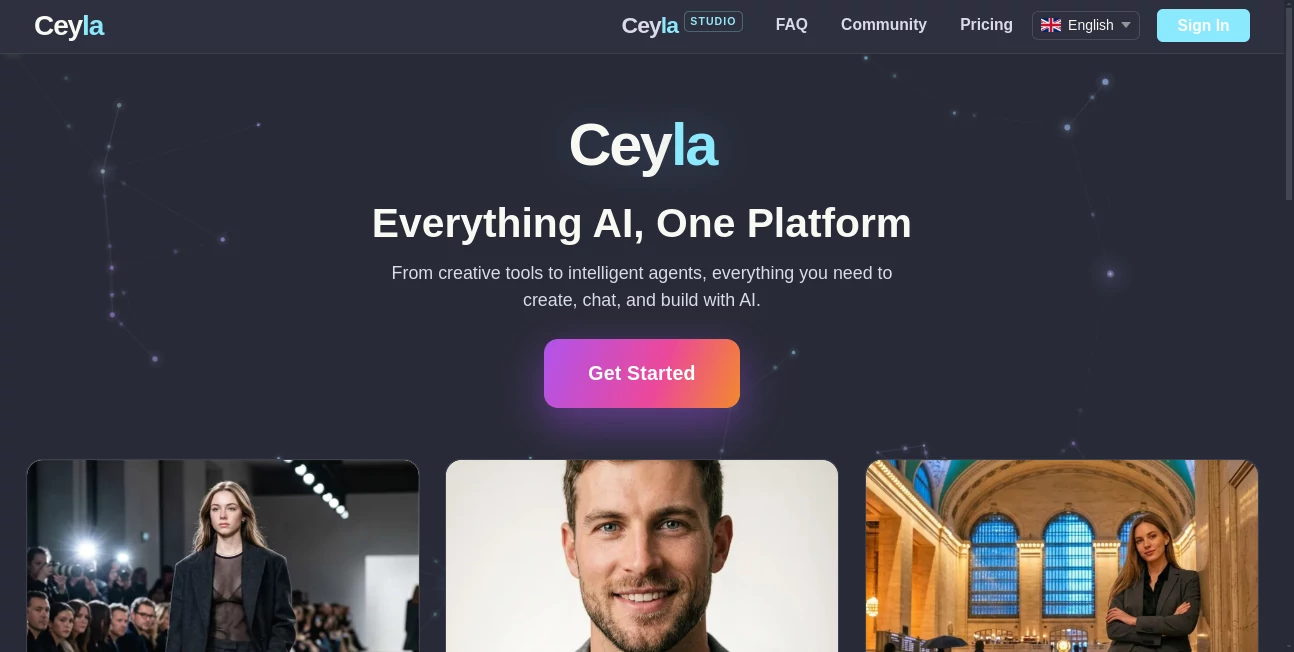
Creating digital content often means switching between multiple applications for writing, image generation, video production, voice creation, and AI conversations. That fragmented workflow slows down creativity and makes projects harder to manage. This platform brings those capabilities together into one modern workspace, allowing creators, marketers, designers, entrepreneurs, and businesses to complete entire projects without constantly changing tools.
Whether the goal is producing eye-catching visuals, generating professional headshots, creating short-form videos, designing interiors, chatting with advanced language models, or working alongside intelligent AI agents, everything is organized inside a single ecosystem. The result feels less like using separate AI services and more like working inside a complete creative studio where every feature complements the next.
Key Features
User Interface
The interface is thoughtfully organized with a clean layout that makes navigation simple for both beginners and experienced users. Different creative tools are grouped logically, making it easy to move from image creation to AI chat, video generation, or voice production without confusion. Projects remain organized, helping users stay focused instead of searching through complicated menus.
Accuracy & Performance
Powered by modern AI models, the platform delivers high-quality outputs across multiple creative tasks. Images maintain impressive detail, AI conversations provide helpful responses, and video generation produces content suitable for social media publishing. Character consistency across multiple scenes is particularly useful for storytelling, branding, and marketing campaigns where visual continuity matters.
Capabilities
- Create AI-generated images from text prompts.
- Generate consistent characters across multiple scenes.
- Produce professional AI headshots from reference photos.
- Create vertical AI videos with native audio.
- Transform room photos into interior design concepts.
- Access multiple leading AI language models in one place.
- Switch between AI models during conversations.
- Interact with intelligent AI agents for different purposes.
- Generate voiceovers using text-to-speech technology.
- Create personalized travel-style portraits and creative photography.
Security & Privacy
User privacy is treated as an important part of the overall experience. Personal projects remain associated with the user's account while AI processing is designed to provide fast results without making collaboration unnecessarily complicated. Account management and workspace organization make it practical for both individuals and professional teams.
Use Cases
- Design marketing graphics for advertising campaigns.
- Create professional profile photos for business websites.
- Generate engaging social media content.
- Produce AI videos for TikTok, Instagram Reels, and YouTube Shorts.
- Build consistent visual characters for books, games, and comics.
- Create interior design previews before renovation projects.
- Generate creative artwork for blogs and presentations.
- Use AI chat for research, brainstorming, and daily productivity.
- Create voiceovers for educational or promotional videos.
- Develop visual concepts for creative agencies and design teams.
Pros and Cons
- Pros
- Combines numerous AI tools inside one platform.
- Supports advanced image, video, voice, and chat generation.
- Excellent character consistency for creative projects.
- Access to multiple AI language models.
- Simple interface suitable for all experience levels.
- Useful for both personal and commercial work.
- Cons
- Some advanced features may require paid credits.
- Rendering complex creative projects can take additional processing time.
- Users looking for only one specialized feature may not need the complete toolkit.
Pricing Plans
The platform offers free access for users who want to explore its capabilities, while premium plans unlock additional credits, higher usage limits, and access to more advanced creative features. This flexible approach allows individuals and businesses to choose a plan that matches their workload and production needs.
How to Use Ceyla
Create an account, choose the creative tool that fits your project, upload reference images if needed, or enter a detailed prompt describing the desired result. Generate the content, review the output, refine it with additional instructions, and export the finished project for publishing or further editing. Users can also switch between AI models during conversations or explore specialized AI agents depending on the task.
Comparison with Similar Tools
Many AI platforms specialize in only one area such as image generation, chatbot conversations, or video creation. This solution takes a broader approach by combining visual creation, AI assistants, video production, voice generation, interior design, and intelligent agents into one unified workspace. Instead of maintaining subscriptions across several different services, creators can complete a wide variety of tasks from a single dashboard, making workflows more efficient and easier to manage.
Conclusion
For creators who regularly work across images, videos, AI conversations, voice generation, and creative design, having every essential tool available in one workspace offers a significant advantage. The combination of modern AI models, consistent character technology, professional-quality media generation, and intelligent assistants creates a flexible environment that supports everything from quick social media posts to larger creative productions. It is an impressive choice for professionals and hobbyists who value convenience without sacrificing creative possibilities.
Frequently Asked Questions (FAQ)
Is there a free version available?
Yes. New users can explore many of the platform's capabilities before upgrading to a paid plan.
Can it generate AI videos?
Yes. Users can create short vertical videos from prompts or reference images, making them suitable for popular social media platforms.
Does it support AI chat?
Yes. Multiple advanced AI language models are available, allowing users to compare responses and switch models during conversations.
Can it create professional headshots?
Yes. Users can upload reference photos to generate studio-quality professional headshots in various styles.
Who is this platform best suited for?
It is ideal for content creators, designers, marketers, agencies, entrepreneurs, educators, and anyone looking for a complete AI-powered creative workspace.
AI Photo & Image Generator , AI Image to Video , AI Chatbot , AI Voice Assistants .
These classifications represent its core capabilities and areas of application. For related tools, explore the linked categories above.

Ceyla Alternatives Product

ChatGPT Imag…

AI Polaroid …

Nano Banana …

ImagineToVid…

MDZ.AI

GPT Image 1.5

Romantic AI

Leonardo.ai
Flux 2 Klein