


















ChatbotX Omnichannel
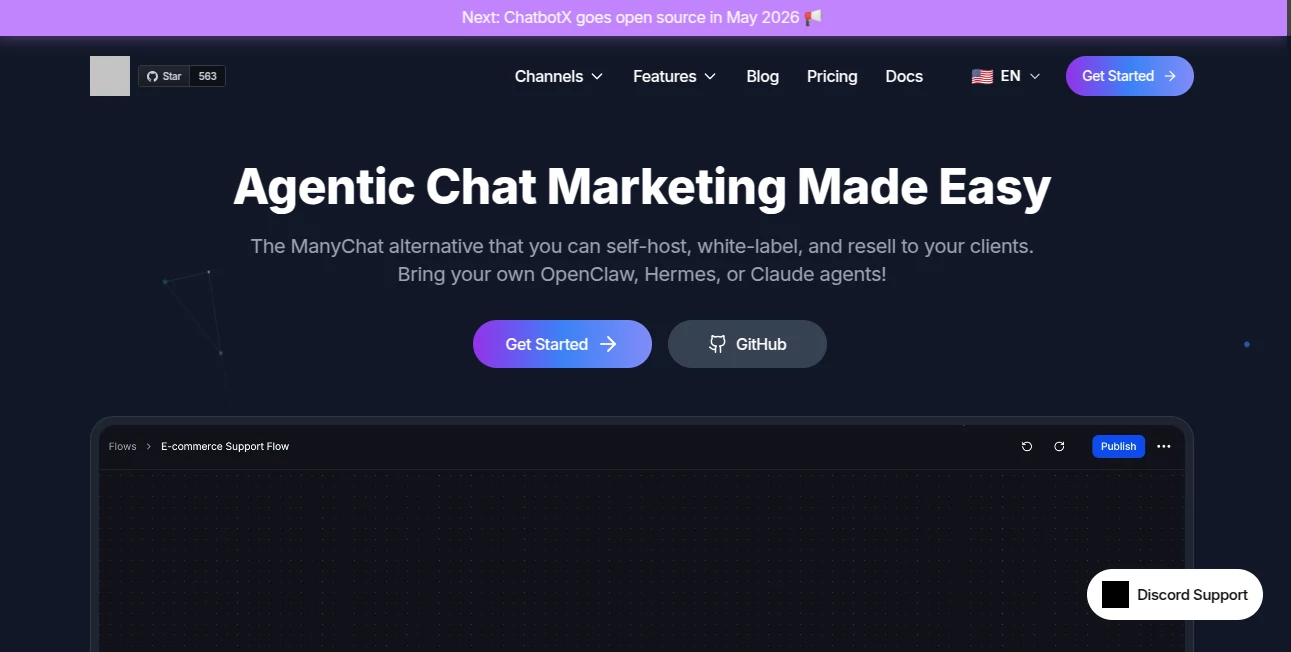
What is ChatbotX Omnichannel?
I still remember the first time a friend showed me how their WhatsApp chatbot was handling customer inquiries at 2 a.m. while they slept. No more missed messages, no more exhausted team members replying to the same questions. That’s the kind of relief this platform delivers. It lets you build smart, conversational AI that works across WhatsApp, Messenger, Instagram, Telegram, and more—all from one clean place. What makes it special is how it feels both powerful and approachable: you can start simple and grow into complex automated workflows without needing to be a developer.
Introduction
Running customer conversations across multiple platforms used to mean juggling different tools, inconsistent replies, and lost opportunities. ChatbotX changes that by giving you one unified system where your AI understands context, routes complex queries to humans when needed, and keeps everything in a single inbox. It’s built for real businesses—from small shops recovering abandoned carts to larger teams managing high-volume support. The visual builder means you can map out conversations like drawing a flowchart, while the AI agents add intelligence that actually feels helpful rather than robotic. Many users say it’s the closest thing to having an always-on team member who never gets tired.
Key Features
User Interface
The dashboard is refreshingly straightforward. The drag-and-drop flow builder lets you connect triggers, conditions, and actions visually—no code required. Everything lives in one clean workspace: design flows, manage contacts, monitor the unified inbox, and track performance without switching tabs constantly. It feels modern yet familiar, so even non-technical team members can jump in and make changes confidently.
Accuracy & Performance
The AI agents are trained to detect intent accurately and respond in natural language while staying on-brand. Conversations flow smoothly across channels, and the system routes tricky questions to human agents seamlessly. Response times are fast, even during peak hours, and the platform handles thousands of conversations without slowing down. Users often notice a big drop in missed inquiries and faster resolution times after switching over.
Capabilities
You get omnichannel deployment (WhatsApp, Messenger, Instagram, Telegram, Zalo, Webchat, and more), visual flow building, AI-powered agents, live chat inbox with team collaboration, contact CRM with segmentation, broadcast campaigns, automated sequences, and strong analytics. It supports e-commerce flows like cart recovery, lead qualification, appointment booking, and customer support automation. The combination of no-code simplicity and advanced AI makes it flexible enough for both simple FAQs and sophisticated sales funnels.
Security & Privacy
Conversations and customer data are handled with care. The platform offers self-hosting options for those who want full control, and cloud users benefit from standard enterprise-grade security practices. Team roles and permissions keep sensitive access limited, and data stays where it belongs—under your oversight.
Use Cases
A fashion store uses it on WhatsApp to recover abandoned carts and send personalized recommendations, boosting sales without extra staff. A service business qualifies leads 24/7, booking appointments automatically and only handing warm prospects to sales reps. An education company runs drip campaigns for course promotions while answering common student questions instantly. Teams love having one inbox for all channels instead of checking multiple apps all day.
Pros and Cons
Pros:
- True omnichannel experience—build once, deploy everywhere.
- Visual builder that non-technical users can actually master.
- Strong AI agents that reduce repetitive work significantly.
- Unified inbox saves hours of context-switching for teams.
- Self-hosting option for companies that need maximum control.
Cons:
- Some advanced AI customizations still require learning the platform’s logic.
- Free tier is limited—most growing businesses quickly move to paid plans.
Pricing Plans
It starts with a free plan that’s genuinely useful for testing and small-scale use. Paid tiers scale with your contact volume and features needed, offering more channels, higher message limits, team seats, and priority support. Pricing is transparent and competitive, especially when you consider the time and staff hours it saves. Many users say the ROI becomes clear within the first month through increased conversions and reduced support workload.
How to Use ChatbotX
Sign up and connect your messaging channels (WhatsApp, Messenger, etc.). Use the visual builder to map out conversation flows—start with welcome messages, add conditions based on user replies, and include actions like sending products or routing to humans. Test everything in the simulator, then publish live. Monitor conversations in the unified inbox and refine flows based on real interactions. The whole setup can go from zero to functional chatbot in a single focused afternoon.
Comparison with Similar Tools
Many platforms lock you into one or two channels or force heavy coding for anything advanced. This one stands out with its true omnichannel approach and balance of no-code ease plus serious AI capabilities. Where some tools feel limited or overly salesy, ChatbotX feels built for practical, everyday business use with room to grow into more complex automations.
Conclusion
Great customer experiences don’t have to mean hiring more people or staying glued to your phone. This platform gives businesses a smart, always-available layer that handles the routine while highlighting the moments that need a human touch. It’s practical, scalable, and genuinely helpful—exactly what more companies need as messaging becomes the preferred way customers reach out. If you’re tired of scattered conversations and missed opportunities, this could be the calm, capable system you’ve been looking for.
Frequently Asked Questions (FAQ)
Which messaging platforms does it support?
WhatsApp, Messenger, Instagram, Telegram, Zalo, Webchat, and more coming soon.
Do I need coding skills to build flows?
No—the visual drag-and-drop builder is designed for non-technical users while still offering depth for advanced needs.
Can my team collaborate on conversations?
Yes—the unified inbox supports team assignment, notes, and real-time collaboration.
Is there a free plan?
Yes, with generous limits for testing and small operations.
Can I self-host it?
Yes—open-source options are available for teams that prefer full control.
AI Marketing Plan Generator , AI Chatbot , AI Customer Service Assistant , AI Productivity Tools .
These classifications represent its core capabilities and areas of application. For related tools, explore the linked categories above.
ChatbotX Omnichannel details
Website unavailable — View Alternatives
Pricing
- Free
Apps
- Web App
Categories

ChatbotX Omnichannel Alternatives Product

MeetAssist

TruthSpine

Linkedora

AltHunt

BulkPicTools

Reachara
HTMLSlides

Romantic AI

Rank++
