CHROMANGA
What is CHROMANGA?
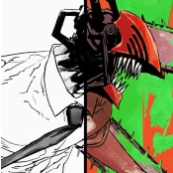
Reading manga in black and white has always been part of the medium’s identity, but there are moments when readers wish they could experience their favorite stories with richer visual depth. This browser-based solution brings a fresh perspective to manga reading by transforming monochrome pages into vibrant colorized artwork with remarkable ease.
Built specifically for manga enthusiasts, the platform integrates directly into supported reading websites, allowing users to enjoy a cinematic reading experience without downloading images or switching between applications. Instead of disrupting the reading flow, it works seamlessly in the background, preserving the original artwork while enhancing the emotional impact of each scene.
Whether revisiting a legendary series or discovering a new release, readers can experience familiar panels in a completely different way. The result feels less like a simple filter and more like watching an anime adaptation unfold page by page.
Key Features
User Interface
The extension focuses on simplicity. Installation takes only a few moments, and once activated, readers can colorize manga chapters directly from their preferred websites. The workflow is intuitive, requiring minimal setup and no complicated configuration.
Because the colorized pages appear within the original reading environment, users never have to leave the site they are already using. This creates a smooth and uninterrupted reading experience.
Accuracy & Performance
Advanced deep learning models trained on large collections of colored manga panels help deliver convincing colorization results. The technology analyzes artwork structure, shading, and visual context to generate colors that feel natural rather than artificial.
The first session includes a brief optimization process that adapts the engine to the user's device. After calibration, subsequent colorizations become significantly faster, making chapter-by-chapter reading efficient and enjoyable.
Capabilities
- One-click manga colorization.
- Support for major manga reading websites.
- Automatic colorization while reading.
- GPU acceleration on supported browsers.
- Noise reduction for cleaner image processing.
- Customizable color intensity and smoothing controls.
- Real-time previews for visual adjustments.
- Local processing without disrupting reading sessions.
Security & Privacy
One of the most impressive aspects of the platform is its privacy-focused architecture. Processing occurs directly on the user's device rather than relying on external servers. This approach reduces privacy concerns and allows readers to enjoy enhanced visuals while maintaining control over their data.
For users who prioritize security and transparency, local processing provides an additional layer of confidence compared to many cloud-dependent alternatives.
Use Cases
- Enhancing the visual experience of classic black-and-white manga.
- Revisiting completed series with a fresh perspective.
- Exploring action-heavy scenes with greater visual impact.
- Creating a more immersive reading experience for newcomers.
- Improving engagement during long reading sessions.
- Enjoying manga in a style closer to animated adaptations.
Pros and Cons
Pros
- Simple one-click workflow.
- Works directly inside supported manga websites.
- Strong privacy through local processing.
- Fast performance after initial setup.
- GPU acceleration improves speed on compatible hardware.
- Customization options for color quality and appearance.
- No need to download manga pages manually.
Cons
- Initial calibration may take several minutes.
- Results can vary depending on artwork complexity.
- Requires a compatible browser environment.
- Performance may differ on lower-end hardware.
Pricing Plans
The platform offers browser-based access through its extension ecosystem. Pricing details may evolve over time, so users should review the official product page for the latest information regarding free access, premium options, and future subscription plans.
How to Use CHROMANGA
- Install the browser extension.
- Open a supported manga reading website.
- Navigate to your preferred chapter.
- Activate the colorization feature.
- Allow the initial setup process to complete.
- Enjoy fully colorized manga pages directly within the website.
- Adjust visual settings if desired for personalized results.
Comparison with Similar Tools
Many manga enhancement tools focus on translation, OCR, or image editing. This solution stands out by concentrating specifically on high-quality manga colorization while remaining integrated into the reading experience.
Unlike traditional image editors that require manual uploads and processing, it operates directly within supported websites. Compared with general-purpose AI image tools, its workflow is purpose-built for manga readers, reducing complexity and improving convenience.
The emphasis on local processing also distinguishes it from cloud-based alternatives, offering both speed and privacy advantages for regular readers.
Conclusion
For manga fans seeking a more immersive reading experience, this platform delivers a compelling blend of convenience, visual enhancement, and privacy. The ability to transform black-and-white pages into colorful scenes with minimal effort creates a unique way to revisit favorite stories and discover new ones.
Its seamless browser integration, intelligent colorization technology, and reader-focused design make it an exciting addition to the modern manga ecosystem. Readers who have ever wondered how their favorite chapters might look in full color will likely find this tool both entertaining and surprisingly effective.
Frequently Asked Questions (FAQ)
What does this tool do?
It automatically colorizes black-and-white manga pages using AI-powered image processing technology.
Do I need editing skills to use it?
No. The colorization process is designed to work with a single click, making it accessible to all readers.
Does it work on multiple manga websites?
Yes. Support is available for major manga reading platforms, and additional sites can be added.
Is my data uploaded to external servers?
The processing is designed to run locally on the user's device, providing a privacy-focused experience.
Why is the first colorization slower?
The initial session performs device calibration and optimization. After setup, future colorizations become significantly faster.
Can I customize the output?
Yes. Users can adjust settings such as color saturation, smoothing, and processing quality to match their preferences.
AI Photo & Image Generator , AI Image to Image , AI Anime & Cartoon Generator , AI Art Generator .
These classifications represent its core capabilities and areas of application. For related tools, explore the linked categories above.
CHROMANGA details
Website unavailable — View Alternatives
Pricing
- Free
Apps
- Web App
- Chrome Extensions
Categories

CHROMANGA Alternatives Product

Leonardo.ai

Image2GPT

MeltFlex AI

Deep Nostalg…

grok images

Nano Banana …
GPT Image 2

LPM AI:

Nanosora