
Clear Cortex
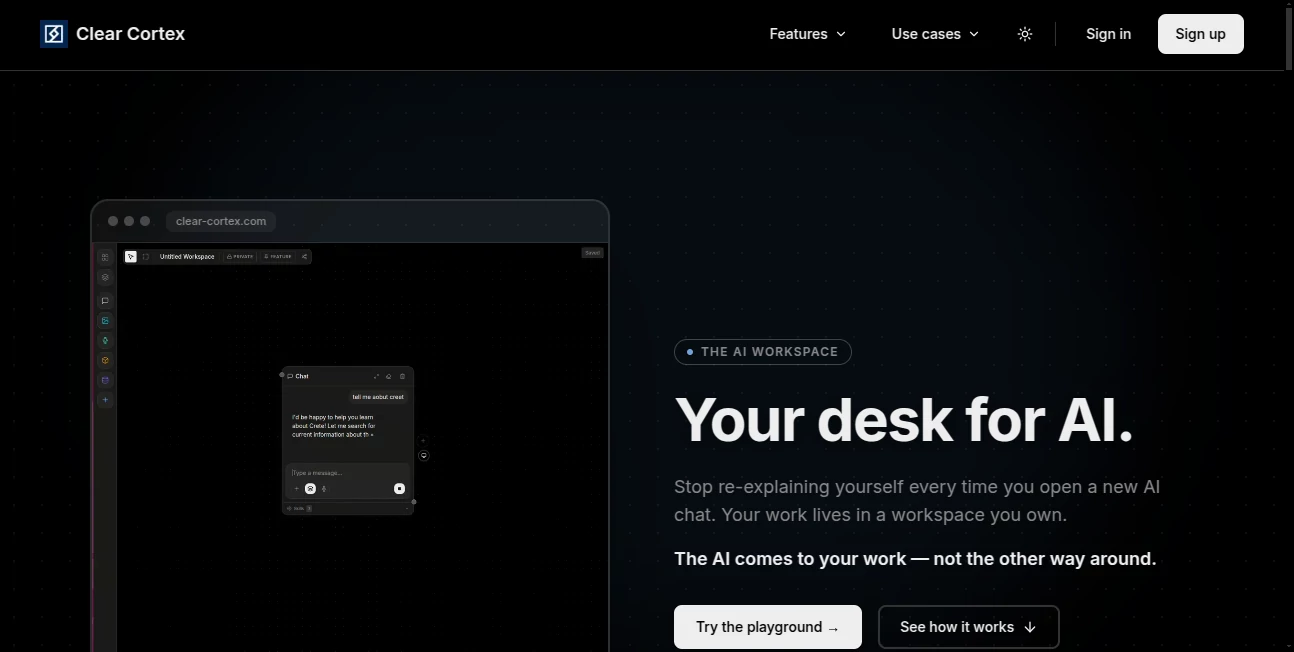
What is Clear Cortex?
Managing AI conversations across different platforms often means repeating the same context again and again. This workspace takes a different approach by keeping files, notes, data, and conversations together on a visual canvas. Instead of moving information between AI tools, the workspace becomes the center of every project, making collaboration smoother and research far easier.
Key Features
User Interface
The clean canvas layout feels more like working at a real desk than chatting with a chatbot. Files, images, notes, and conversations stay connected, making navigation simple even as projects grow.
Accuracy & Performance
Responses are generated using only the connected resources, with references pointing back to their original sources. This makes it easier to verify information and reduces the chance of losing important context.
Capabilities
- Visual AI workspace for organizing projects.
- Connect documents, notes, images, audio, and datasets.
- Support for multiple AI models from a single workspace.
- Persistent project context across sessions.
- Easy sharing with teammates while preserving project knowledge.
Security & Privacy
Your project materials remain inside your workspace rather than becoming part of isolated chat sessions. Connected resources stay organized and accessible while maintaining clear ownership of your work.
Use Cases
- Managing research projects with multiple documents.
- Collaborating on business planning and product development.
- Organizing marketing assets and creative ideas.
- Keeping long-term AI projects consistent without repeating context.
Pros and Cons
- Pros
- Persistent workspace instead of temporary chat history.
- Supports collaboration with shared context.
- Works with multiple AI models.
- Source-backed responses improve confidence.
- Cons
- Currently expanding through early access.
- Large workspaces may require some initial organization.
Pricing Plans
Access is currently offered through a waiting list while the platform continues to roll out new features. Updated pricing is expected after broader public availability.
How to Use Clear Cortex
Create a workspace, upload your files and notes, connect the resources that matter, then start asking questions. The AI uses only the connected information, allowing you to continue projects over time without rebuilding context.
Comparison with Similar Tools
Unlike traditional AI chat applications that rely on isolated conversations, this platform keeps knowledge organized inside a persistent workspace. It also supports multiple AI models from a single environment, making it easier to switch providers without rebuilding every project.
Conclusion
For anyone juggling research, documents, and AI conversations, this workspace offers a refreshing way to stay organized. The visual approach, persistent memory, and collaborative design create an experience that feels closer to working at a real desk than managing disconnected chat windows.
Frequently Asked Questions (FAQ)
What makes this workspace different from a regular AI chatbot?
It stores your project context in a visual workspace instead of limiting it to individual conversations.
Can multiple AI models be used?
Yes. Different AI models can access the same connected workspace without rebuilding context.
Can teams collaborate?
Yes. Shared workspaces allow teammates to access the same files, connections, and project knowledge.
Does it support different file types?
Yes. Documents, notes, images, audio, and other project resources can be connected inside the workspace.
Is it publicly available?
The platform is currently expanding through an early-access waiting list.
AI Workflow Management , AI Productivity Tools , AI Team Collaboration , AI Files Assistant .
These classifications represent its core capabilities and areas of application. For related tools, explore the linked categories above.

Clear Cortex Alternatives Product

Notion

Sourcetable

XreplyAI

LorePanic

fasturl

Embedful

FLINT AI

AiZolo

KronoPrompt