
ClipMatch
What is ClipMatch?
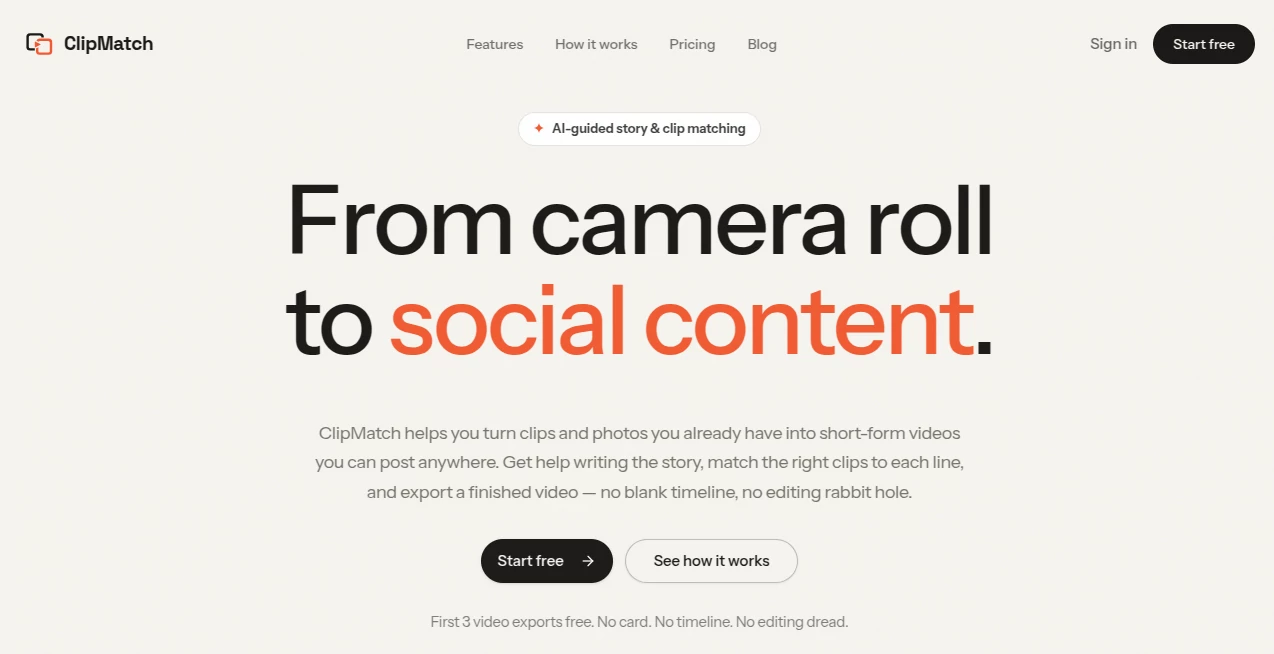
Creating engaging short-form videos often takes far longer than recording the original moments. Hours of footage sit unused in a camera roll simply because editing feels overwhelming. ClipMatch changes that experience by helping creators transform existing photos and video clips into polished social content without spending hours on a traditional editing timeline.
Instead of starting with an empty project, users begin with a story. The platform assists in writing a script, intelligently analyzes uploaded media, and automatically pairs each sentence with the most relevant video clip or image. This story-first workflow makes video creation faster, more enjoyable, and far less intimidating for creators, marketers, small businesses, and anyone who wants to publish consistently.
Whether you're producing travel recaps, restaurant reviews, product demonstrations, event highlights, or behind-the-scenes business updates, the platform streamlines every stage of production. Rather than searching manually through dozens of clips, the AI identifies matching scenes and builds a ready-to-review vertical video that can be shared across today's most popular social media platforms.
Key Features
User Interface
The interface is refreshingly simple and avoids the complexity found in traditional video editors. Users upload media, describe their story, review automatically matched clips, make optional adjustments, and export the final video. This guided workflow makes professional-looking editing accessible even for beginners.
Accuracy & Performance
One of the strongest aspects of the platform is its intelligent clip matching engine. Every uploaded photo and video is analyzed before being paired with the most appropriate section of the script. Suggested matches are highly relevant while remaining fully editable, allowing creators to swap clips whenever they want without rebuilding the entire project.
Capabilities
The platform offers much more than simple video editing. It assists with script writing, automatically organizes uploaded media, matches scenes to narration, generates captions and voiceovers, and exports ready-to-publish vertical videos for social media. This integrated workflow dramatically reduces editing time while helping users tell more compelling visual stories.
Security & Privacy
Users retain ownership of the photos and videos they upload. Uploaded content is processed only to provide editing services, and according to the service documentation, customer content is not used to train AI models. This gives creators greater confidence when working with personal or commercial media.
Use Cases
Content creators can quickly publish consistent Instagram Reels, TikTok videos, YouTube Shorts, and LinkedIn posts without spending hours editing.
Small businesses can convert product photos, customer events, and behind-the-scenes footage into attractive promotional videos.
Travel enthusiasts can transform vacation memories into cinematic highlight reels.
Restaurants can showcase dining experiences using photos and videos already captured during service.
UGC creators can build professional portfolios by turning raw product footage into polished demonstrations suitable for brand collaborations.
Event organizers can create recap videos from conferences, weddings, launches, or community gatherings within minutes.
Pros and Cons
Pros
Simple story-first editing workflow.
No traditional editing timeline required.
AI-assisted script writing.
Smart clip matching saves significant editing time.
Captions and voiceover support are included.
Designed specifically for vertical social media videos.
Free exports available for new users.
Cons
Focused primarily on short-form vertical content.
Advanced cinematic editing tools are intentionally limited.
Pricing is currently based on exported videos during the beta period.
Pricing Plans
New users can export their first three videos for free without providing a credit card. After the free allowance, completed video exports are charged individually, making the platform attractive for occasional creators who don't need an expensive monthly subscription.
How to Use ClipMatch
Step 1: Upload photos and video clips from your camera roll.
Step 2: Describe your story or write a rough script.
Step 3: Let the AI organize your footage and match clips to each section.
Step 4: Review the suggested sequence and replace any clips if desired.
Step 5: Export the finished vertical video and publish it on your preferred social media platform.
Comparison with Similar Tools
Unlike many AI video editors that begin with a complicated timeline, this platform focuses on storytelling first. While tools like OpusClip primarily repurpose existing long-form videos and CapCut emphasizes manual editing, this solution specializes in transforming everyday camera roll footage into structured social content with minimal effort. The combination of script assistance and intelligent clip matching creates a workflow that feels both efficient and approachable.
Conclusion
For creators who constantly collect photos and videos but rarely find time to edit them, this platform offers a refreshing alternative to traditional video production. Its story-driven approach removes much of the technical complexity while still giving users creative control over the final result. From personal memories to professional marketing campaigns, it helps transform scattered footage into engaging short-form videos that are genuinely ready to share. Anyone looking to create social content more consistently without becoming a professional editor will likely find tremendous value in this workflow.
Frequently Asked Questions (FAQ)
Can beginners use this platform?
Yes. The guided workflow eliminates many of the technical challenges associated with traditional video editing software.
Does it support social media video formats?
Yes. Videos are optimized for popular vertical platforms including Instagram Reels, TikTok, YouTube Shorts, and LinkedIn.
Can I change the AI's clip selections?
Absolutely. Users can review every suggested match and manually replace clips before exporting the final video.
Is there a free version available?
Yes. The first three video exports are available free of charge, allowing new users to test the platform before paying for additional exports.
Who benefits most from this tool?
Content creators, UGC producers, marketers, freelancers, small businesses, restaurants, travel creators, and anyone who wants to turn existing camera roll footage into engaging short-form videos.
AI Video Generator , AI Video Editor , AI Short Clips Generator , AI UGC Video Generator .
These classifications represent its core capabilities and areas of application. For related tools, explore the linked categories above.

ClipMatch Alternatives Product

Lyria 3

v04 ai
Katto

Remove Water…

Seedance 2.0

LTX 2.3

ViraFlow
MikeSullyToo…

Mimo AI