
AI Contract Generator
What is AI Contract Generator?
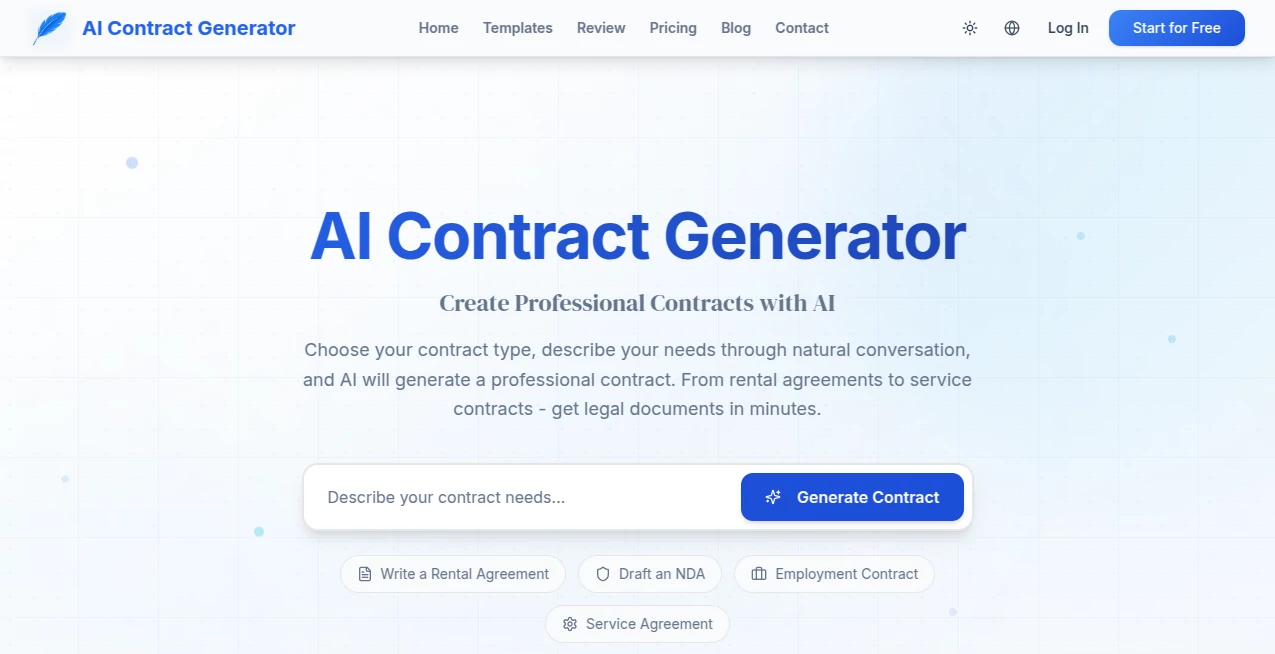
Writing contracts the old way always felt intimidating—worrying about missing clauses, getting the language right, or paying a lawyer for something straightforward. This tool changes that completely. You choose the type of agreement you need, describe your situation in plain English, and it generates a polished, professional contract in moments. I’ve seen small business owners use it to create service agreements that look like they came from a law firm, and freelancers draft NDAs that actually protect them without the stress. It takes the fear out of legal paperwork while still delivering documents that feel solid and trustworthy.
Introduction
Most people avoid drafting contracts until they absolutely have to, and even then it’s usually a scramble with templates that don’t quite fit. This platform makes the process feel natural and surprisingly fast. Instead of filling endless blanks or copying old documents, you simply tell the AI what you need in conversation-style prompts. It understands context and produces clear, well-structured agreements covering the important points. From rental contracts to freelance service deals and employment offers, it covers the common situations most people and small businesses encounter. The real value is how it removes the barrier—giving you professional-looking results without the professional price tag or the headache.
Key Features
User Interface
The design is refreshingly straightforward. You pick a contract type from a sensible list, then chat with the AI about your specific needs. It asks clarifying questions when necessary and shows a preview of the document as it builds. You can edit directly in the browser or continue the conversation to request changes in plain language. No complex legal jargon in the interface itself—just a clean flow that guides you from idea to finished PDF.
Accuracy & Performance
The AI consistently produces contracts that cover the essential clauses for each type while adapting to the details you provide. It avoids overly generic language and focuses on making the document readable yet professional. Generation is quick—most contracts appear in under a minute—and the output is ready to use or tweak. Users often note how the results feel thoughtful rather than robotic, striking a good balance between legal soundness and everyday clarity.
Capabilities
It supports a wide range of common agreements including rental/lease contracts, NDAs, service agreements, employment offers, freelance contracts, and more. You can generate from scratch or start with a template and customize through chat. Built-in PDF editing lets you make final tweaks directly, and you can download ready-to-sign documents. The conversational modification feature is particularly handy—simply say what you want changed and watch the document update intelligently.
Security & Privacy
Your generated contracts and conversation history are handled with care. The platform focuses on delivering the document to you without unnecessary data retention. For sensitive agreements, this straightforward privacy approach gives confidence that your business or personal details stay protected during the creation process.
Use Cases
A freelancer uses it to quickly generate client service agreements with clear payment terms and scope protection. A landlord creates customized rental contracts that include specific house rules without starting from scratch each time. Small business owners draft employment offer letters or NDAs when bringing on new team members. Startups use it for partnership agreements and vendor contracts during early growth phases. In each case, it saves significant time while helping users feel more confident about the documents they’re using.
Pros and Cons
Pros:
- Turns natural language descriptions into professional-looking contracts quickly.
- Conversational editing makes customization feel natural and easy.
- Covers the most common contract types people actually need.
- No legal background required to get usable results.
- Fast generation and PDF export streamline the entire process.
Cons:
- Complex or highly specialized agreements may still benefit from legal review.
- Free usage has reasonable limits for heavy daily needs.
- Some very niche clauses might require manual addition after generation.
Pricing Plans
The platform offers a generous free tier that lets you generate and download multiple contracts to experience the quality firsthand. Paid plans remove usage limits, unlock priority generation, and provide additional features for users who create documents regularly. The pricing is practical—many small businesses and freelancers find the paid option pays for itself after just a few saved lawyer consultations or hours of manual drafting.
How to Use Contract Generator
Choose the contract type that best matches your need (rental agreement, service contract, NDA, etc.). Describe what you want in plain English—be as specific as possible about parties, terms, duration, and any special conditions. Review the generated draft, then chat with the AI to request changes (“add a termination clause” or “make the payment terms net 15”). Once satisfied, download the PDF. The whole process usually takes just a few minutes from start to finished document.
Comparison with Similar Tools
Many contract tools rely on rigid templates that require lots of manual filling. Others generate text but leave you to format and polish everything yourself. This one stands out by combining smart generation with easy conversational editing and clean PDF output. It’s less intimidating than full legal platforms and more capable than basic template fillers, striking a sweet spot for everyday business and personal use.
Conclusion
Contracts don’t have to be scary or time-consuming. This tool makes creating solid agreements feel approachable and efficient, giving individuals and small businesses access to professional-quality documents without the traditional barriers. It handles the heavy lifting while keeping you in control, so you can focus on the actual agreement rather than the formatting stress. For anyone who regularly needs contracts but doesn’t want to pay lawyer rates for standard situations, it’s a genuinely useful addition to the toolkit.
Frequently Asked Questions (FAQ)
Are the generated contracts legally binding?
They provide a strong starting point based on standard practices, but complex situations should still be reviewed by a qualified lawyer.
How specific can I be with my requirements?
The more details you provide in your description, the more tailored the contract becomes.
Can I edit the contract after generation?
Yes—both through chat with the AI and direct PDF editing in the browser.
Is there a limit on free usage?
Free tier allows multiple generations per day; paid plans offer unlimited access.
What file format do I get?
Downloadable PDF that’s ready for signatures and sharing.
AI PDF , AI Documents Assistant , AI Forms & Surveys , AI Contract Management .
These classifications represent its core capabilities and areas of application. For related tools, explore the linked categories above.
AI Contract Generator details
Website unavailable — View Alternatives
Pricing
- Free
Apps
- Web App
Categories

AI Contract Generator Alternatives Product
Fill PDF fro…
Lynote

Ryne AI

GLM-OCR Onli…
heicpdf.to

LocalRAG!

Create Filla…

AIDeckly

PDF Inspector