


















Create3D.io
What is Create3D.io?
Creating high-quality 3D assets has traditionally required advanced modeling skills, expensive software, and countless hours of manual work. This platform changes that workflow by allowing users to generate production-ready 3D models from simple text prompts, reference images, or multiple image angles within minutes. Whether you are building game assets, preparing product visualizations, designing prototypes, or creating models for 3D printing, the entire process becomes significantly faster without sacrificing flexibility.
What makes this solution especially attractive is that it does not stop after generation. Instead, it provides an end-to-end workflow where creators can preview models, repair geometry, improve textures, remesh assets, convert between popular file formats, and export them for real-world production. The result feels less like a simple AI generator and more like a complete online 3D creation studio.
Both beginners and experienced designers can quickly turn ideas into usable digital assets. A product designer might start with a simple description, while a game developer can upload concept art and receive a model ready for further refinement. The workflow removes much of the repetitive technical work, allowing creators to focus on creativity instead of complex modeling.
Key Features
User Interface
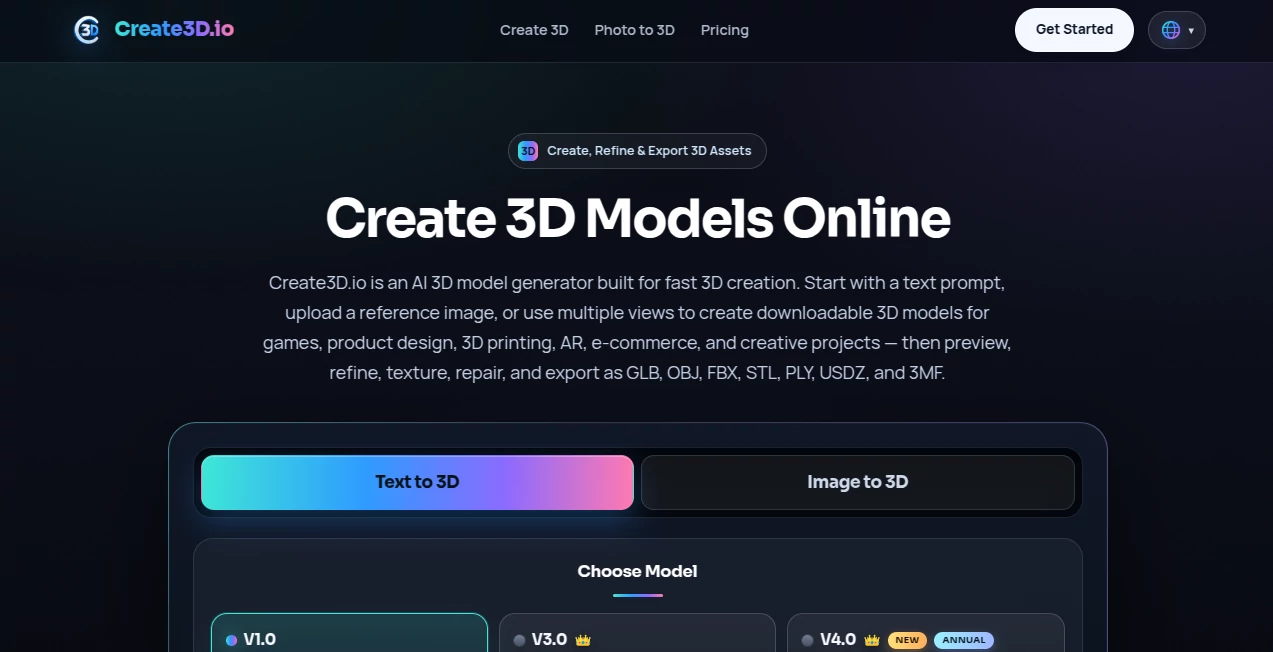
The interface is clean, modern, and designed around a simple creative workflow. Users can choose between text-to-3D, image-to-3D, or multi-view generation before reviewing the results inside an integrated 3D viewer. Navigation remains intuitive even for first-time visitors, making the platform approachable for users without professional 3D experience.
Accuracy & Performance
The platform generates detailed geometry and realistic textures while supporting multiple quality levels. Advanced models produce cleaner meshes, improved surface details, and more consistent proportions. Failed generations automatically restore consumed credits, helping users experiment freely without unnecessary frustration.
Capabilities
- Generate 3D models from text descriptions.
- Create models from a single reference image.
- Support multi-view image generation for higher accuracy.
- Repair damaged or incomplete geometry.
- Generate AI textures and improve material quality.
- Remesh models for cleaner topology.
- Convert between major 3D file formats.
- Preview assets directly in the browser.
- Export GLB, OBJ, FBX, STL, PLY, USDZ, and 3MF files.
- Prepare assets for game engines, AR, e-commerce, and 3D printing.
Security & Privacy
Paid subscriptions include private asset generation together with commercial usage rights for created models. The service also provides secure cloud-based project management, allowing users to keep their creative work organized while maintaining control over downloadable assets.
Use Cases
- Creating game-ready props, environments, and characters.
- Rapid product prototyping and industrial design.
- Generating printable models for 3D printing projects.
- Building AR and VR experiences.
- Creating interactive e-commerce product previews.
- Producing educational and STEM learning materials.
- Designing marketing visuals and promotional assets.
- Developing concept art into complete 3D objects.
Pros and Cons
Pros
- Multiple AI generation methods in one platform.
- Supports professional export formats.
- Integrated editing and refinement tools.
- Suitable for beginners and professionals alike.
- Commercial licensing available for paid users.
- Fast cloud-based processing.
- Useful for a wide range of industries.
Cons
- Premium quality models require a paid subscription.
- Credit-based usage may limit heavy daily production.
- Very complex models may still benefit from manual editing after export.
Pricing Plans
A free plan allows new users to explore the platform using complimentary daily credits. Premium subscriptions unlock higher-quality AI models, increased monthly credits, unlimited downloads, commercial usage rights, faster processing queues, advanced geometry options, and additional refinement features. Pricing scales according to creative workload, making it suitable for individuals as well as professional teams.
How to Use Create3D.io
Start by selecting your preferred generation method. You can describe an object with a text prompt, upload a reference image, or provide multiple viewing angles for improved accuracy. Once the model has been generated, inspect it inside the online viewer before refining textures, repairing geometry, or optimizing topology. Finally, export the finished asset in the file format that best matches your workflow, whether for game development, animation, web applications, augmented reality, or 3D printing.
Comparison with Similar Tools
Unlike many AI 3D generators that focus solely on model creation, this platform provides a complete production pipeline. Users can generate, preview, repair, texture, convert, and export assets without switching between multiple applications. Its broad support for professional file formats and post-processing utilities makes it especially valuable for creators who need production-ready models instead of simple concept outputs.
Conclusion
Modern content creation increasingly demands speed without compromising quality, and this platform successfully delivers both. By combining AI-powered generation with practical editing tools and professional export options, it simplifies a process that once required significant technical expertise. Whether you are designing products, building virtual worlds, creating educational content, or preparing assets for commercial projects, it offers a reliable workflow that transforms ideas into polished 3D models with remarkable efficiency.
Frequently Asked Questions (FAQ)
Can beginners create professional-looking 3D models?
Yes. The platform is designed for users with little or no modeling experience while still providing advanced tools for professionals.
Does it support 3D printing?
Yes. Models can be exported in STL and 3MF formats, making them suitable for most modern 3D printing workflows.
Which export formats are available?
Supported formats include GLB, OBJ, FBX, STL, PLY, USDZ, and 3MF.
Can generated assets be used commercially?
Commercial usage rights are included with paid subscription plans.
Can I generate models from both text and images?
Yes. The platform supports text prompts, single-image generation, and multi-view image inputs for improved model accuracy.
Design & Art , AI 3D Model Generator , AI Text to 3D , AI Image to 3D Model .
These classifications represent its core capabilities and areas of application. For related tools, explore the linked categories above.

Create3D.io Alternatives Product

AI House Plan

Image to STL
AI 3D World

Luma AI

ImageToSTL

Modelfy 3D

SAM 3D

insMind

Image to Thr…
