


















CreateMusicVideo.ai
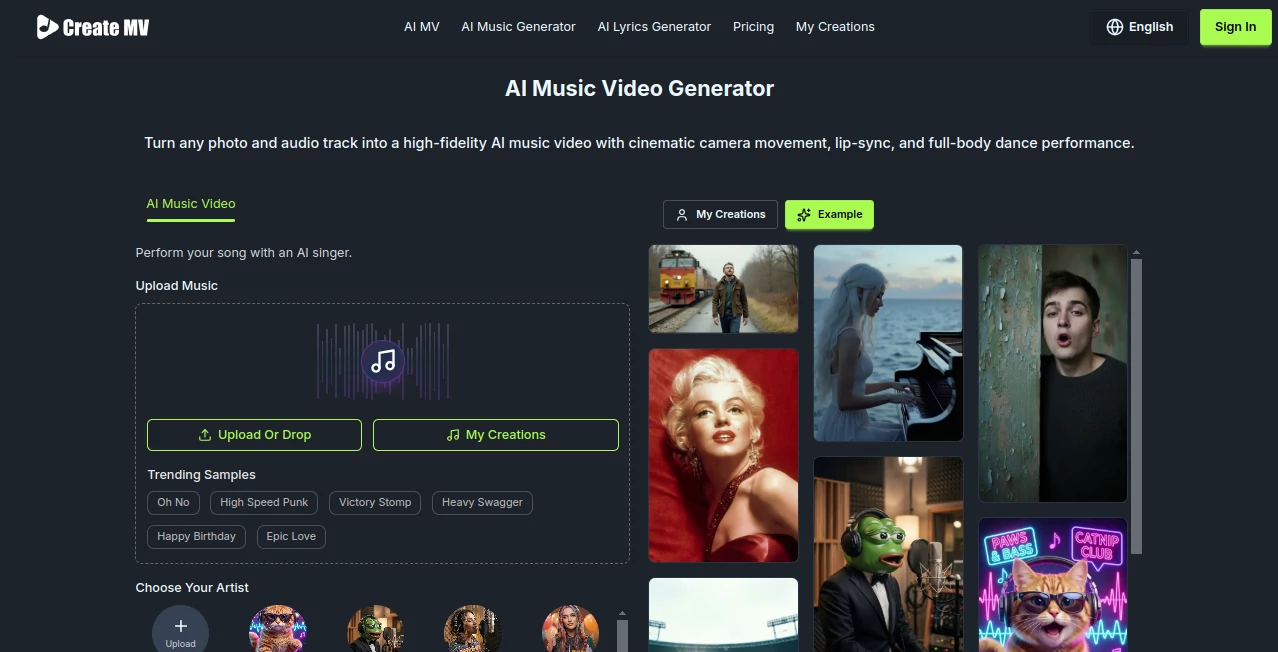
What is CreateMusicVideo.ai?
In a world where short-form content dominates attention spans, turning music into visually engaging videos has become more than just a creative luxury—it’s a necessity. This platform is designed for musicians, content creators, and marketers who want to transform audio tracks into compelling music videos without the need for complex editing skills or expensive production teams.
Instead of spending hours on video editing software, users can simply upload their music and let the system generate visually synchronized scenes that match the mood, rhythm, and energy of the track. The result is a polished, share-ready video that feels professionally produced.
Key Features
User Interface
The interface is clean, intuitive, and built with non-technical users in mind. Everything is arranged in a simple workflow: upload, customize, generate, and export. Even first-time users can navigate the platform without confusion or a learning curve.
Accuracy & Performance
One of the standout qualities is how well the system interprets audio. Beats, tempo changes, and emotional tones are analyzed to align visuals precisely with the music. This creates a natural flow between sound and imagery, avoiding the robotic feel seen in many automated tools.
Capabilities
- Automatic music-to-video synchronization
- AI-generated visual scenes based on audio mood
- Multiple video styles and themes
- High-resolution video export
- Customizable visual effects and transitions
Security & Privacy
User uploads are handled securely, with a focus on protecting creative content. Files are processed in a controlled environment, ensuring that private projects remain confidential and are not publicly accessible.
Use Cases
This tool fits naturally into several creative and professional workflows. Independent musicians can use it to promote new releases on social media. DJs and producers can create visual loops for live sets. Marketing teams can transform audio branding elements into engaging promotional videos. Even educators and storytellers can use it to bring audio-based lessons to life.
- Music promotion on platforms like YouTube, TikTok, and Instagram
- Visual content for live performances and DJ sets
- Brand storytelling through audio-visual campaigns
- Creative experimentation for artists and designers
Pros and Cons
Pros
- Fast and automated video generation
- No editing skills required
- High-quality visual output
- Great for social media content creation
- Time-saving for creators and marketers
Cons
- Limited deep manual editing control compared to professional software
- Style output may vary depending on audio complexity
- Requires stable internet connection for processing
Pricing Plans
The platform typically follows a flexible pricing model that accommodates different user needs. A free tier is often available for basic exploration and testing, while premium plans unlock higher-quality exports, faster processing, and advanced customization options. For professional creators, subscription-based tiers provide consistent access to all features.
How to Use This Tool
Getting started is straightforward. First, upload your audio file or music track. Next, select a visual style or theme that matches your artistic vision. The system will automatically analyze the sound and generate a synchronized video. After previewing the result, you can make minor adjustments if needed and export the final video in your preferred resolution.
Comparison with Similar Tools
Compared to traditional video editing software, this platform removes the need for manual scene editing and timeline synchronization. While other AI video generators may focus on generic video creation, this one specializes in music-driven visuals, making it more suitable for musicians and audio-focused creators.
Unlike basic slideshow-style tools, it creates dynamic motion graphics that respond to beats and rhythm, giving the final output a more professional and immersive feel.
Conclusion
For anyone looking to turn sound into visual storytelling, this platform offers a fast, creative, and surprisingly powerful solution. It bridges the gap between music production and video creation, making it easier than ever to produce content that stands out in a crowded digital space. Whether you’re an independent artist or a marketing professional, it opens up new possibilities for creative expression.
Frequently Asked Questions (FAQ)
Can I use it without video editing experience?
Yes, the platform is designed for beginners and requires no prior editing skills.
What type of music files are supported?
Most common audio formats are supported, including MP3 and WAV files.
Can I customize the visuals?
Yes, users can select themes, styles, and adjust visual intensity depending on their preference.
Is the output suitable for social media?
Absolutely. The videos are optimized for platforms like YouTube, Instagram, and TikTok.
Does it work for long music tracks?
Yes, but processing time may vary depending on length and complexity of the audio.
AI Animated Video , AI Music Video Generator , AI Video Generator , AI Music Generator .
These classifications represent its core capabilities and areas of application. For related tools, explore the linked categories above.
CreateMusicVideo.ai details
Website unavailable — View Alternatives
Pricing
- Free
Apps
- Web App
Categories

CreateMusicVideo.ai Alternatives Product

gemini video

Veo 3.2

LPM 1.0

Wan 2.7
animearc

lyric video …

kling 4.0

Video Upscal…

Kling 3.0
