
cronloop
What is cronloop?
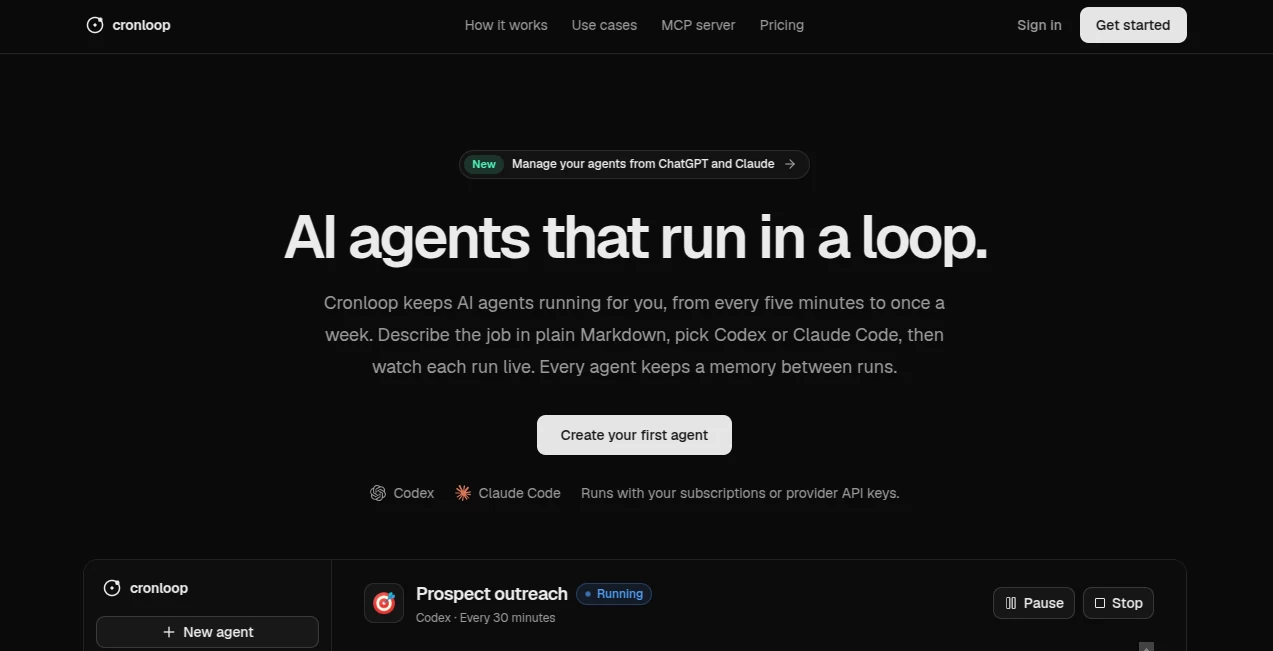
Cronloop is an AI automation platform built for people who want specialized AI agents to keep working without being manually restarted every time. Instead of treating an AI agent as a one-off assistant, it lets users describe a recurring job in plain Markdown, choose an AI coding engine such as Codex or Claude Code, and schedule the agent to run automatically.
The idea is refreshingly practical: tell an agent what needs to happen, decide how often it should run, connect the tools it needs, and let it handle the routine work. Schedules can range from every five minutes to once a week, while each agent can retain memory between runs. That makes the platform particularly interesting for recurring business, development, research, sales, support, and growth workflows.
For example, a marketing team could create an agent that checks competitors twice a day, while a development team could have another agent review assigned issues and prepare pull requests every hour. The same approach can be applied to customer support, SEO, prospect research, content operations, and many other repetitive jobs.
Key Features
- Scheduled AI agents that can run from every five minutes to once a week.
- Support for Codex and Claude Code using existing subscriptions or provider API keys.
- Persistent agent memory that carries useful information from one run to another.
- Fresh isolated sandboxes for individual runs.
- Connections to APIs, MCP servers, CLIs, and commonly used business applications.
- Live execution monitoring and detailed run history.
- Flexible instructions written in plain Markdown.
- Ability to pause, resume, update, delete, or manually start agents.
- Secure handling of credentials and environment settings.
- Integration with ChatGPT and Claude through a remote MCP server.
User Interface
The interface is designed around the concept of individual agents rather than a complicated automation diagram. Users can create an agent, provide its instructions, connect the required tools, configure its schedule, and monitor what happens during each run.
The live run view is particularly useful for anyone who wants visibility into autonomous work. Instead of simply waiting for an automation to finish, users can inspect what the agent is doing and review previous runs. This makes the system easier to supervise, especially when agents are performing business or development tasks that need occasional human oversight.
Accuracy & Performance
Performance depends heavily on the selected model, instructions, connected tools, and the complexity of the assigned task. The platform itself focuses on keeping recurring jobs organized and continuously available rather than replacing the underlying AI models.
One practical advantage is persistent memory. An agent does not necessarily have to start from zero on every scheduled run. It can carry durable information forward, which is useful for jobs that evolve over time, such as monitoring competitors, maintaining websites, researching prospects, or handling recurring support workflows.
The isolated execution environment also gives each run a fresh workspace, allowing agents to install or use the resources required for their particular job without turning every automation into a manually maintained setup.
Capabilities
The platform is broad enough to support much more than simple text generation. Agents can interact with business applications, development services, databases, analytics platforms, communication tools, and other systems when the required connection is available.
For sales teams, an agent can research prospects, work with CRM data, send personalized outreach, and record activity. For support teams, it can read documentation, respond to routine tickets, and escalate sensitive cases. Developers can use agents to inspect issues, work with repositories, run tests, and prepare code changes.
There is also room for growth and marketing workflows. An agent can monitor Search Console data, research competitors, work with content systems, and perform recurring SEO-related tasks. The important distinction is that these workflows can continue on a schedule rather than requiring someone to start them manually each morning.
Security & Privacy
Security is especially important when autonomous agents are connected to company accounts and internal services. Credentials can be stored as secrets, and the platform states that secret values are encrypted during transmission and cannot be read back through the interface.
Each run also starts in a fresh sandbox, providing an isolated environment for the agent's work. Users should still follow normal security practices when granting access to third-party services and should give an agent only the permissions it actually needs.
Use Cases
Sales and Prospecting: Build an agent that researches potential customers, identifies prospects matching an ideal customer profile, prepares personalized outreach, and records activity in a CRM.
Customer Support: Create a recurring support agent that reads help documentation, handles straightforward tickets, and escalates issues that require human attention.
SEO and Content: An agent can regularly inspect search performance, research opportunities, update website content, and work with connected CMS or analytics platforms.
Software Development: Development teams can assign agents recurring engineering jobs, such as reviewing issues, investigating errors, running tests, or preparing pull requests.
Competitor Monitoring: An agent can repeatedly check competitor websites, pricing pages, product updates, social channels, or other public sources and deliver a structured summary.
Social Media: Content workflows can be scheduled so an agent turns an existing content calendar into posts for selected channels while maintaining the desired brand style.
Pros and Cons
Pros:
- Supports genuinely recurring AI workflows rather than one-time prompts.
- Flexible schedules ranging from minutes to weekly intervals.
- Persistent memory between agent runs.
- Works with Codex and Claude Code.
- Can connect to a wide range of business and developer tools.
- Supports MCP, APIs, and CLI-based workflows.
- Live run monitoring makes autonomous activity easier to supervise.
- Useful for both technical and non-technical recurring workflows.
Cons:
- Setting up advanced agents may require a good understanding of the tools being connected.
- Results still depend on the underlying AI model and the quality of the instructions.
- Autonomous workflows should be monitored carefully when they have access to production systems or customer-facing accounts.
- The most advanced scheduling and execution limits are reserved for the paid plan.
Pricing Plans
The platform offers a Free plan for users who want to start experimenting with scheduled AI agents. It includes up to three agents, schedules as frequent as once per hour, 200 run minutes per month, runs of up to 10 minutes, and one active run at a time.
The Pro plan costs $25 per month, or $20 per month when billed annually. It removes the fixed agent limit, supports schedules as frequent as every five minutes, provides no fixed monthly run-minute limit, allows runs of up to 60 minutes, and supports three active runs simultaneously. Provider subscriptions or API keys can be used with both plans.
How to Use It
Start by creating a new agent and describe the job you want it to perform. The instructions can be written in plain Markdown, so you do not need to build a traditional visual automation workflow.
Next, choose the AI engine you want to use and connect the applications, APIs, MCP servers, or other tools required for the task. Give the agent clear instructions about its objective, limits, preferred workflow, and what should happen when it encounters an unusual situation.
Set the desired schedule and start the agent. From there, you can watch its runs live, inspect previous activity, adjust its instructions, and maintain its persistent memory. A good starting point is a small recurring task that has a clear success condition. Once the workflow proves reliable, it can be expanded with additional tools and responsibilities.
Comparison with Similar Tools
Traditional cron jobs are excellent for triggering scripts at specific times, but they generally require the developer to build and maintain the underlying logic. AI agent platforms add another layer: instead of hard-coding every decision, the agent can interpret instructions, use connected tools, and adapt its actions to the situation.
General-purpose AI assistants are useful for conversations and individual tasks, but they are not always designed to operate continuously in the background. The approach here is different. Each agent is created around a specific recurring responsibility, given access to the tools it needs, and scheduled to keep performing that responsibility.
Compared with building a custom agent infrastructure from scratch, the main attraction is convenience. Scheduling, execution environments, memory, connections, secrets, monitoring, and agent management are brought together instead of being assembled as separate pieces.
Conclusion
AI becomes considerably more useful when it stops waiting for the next prompt. That is the central idea behind this platform: create specialized agents, give them a clear job, connect the systems they need, and let them return to that job on a schedule.
It is particularly compelling for teams with repetitive work that requires judgment rather than simple automation. Sales research, support triage, SEO maintenance, competitor monitoring, development tasks, and content operations are all areas where a scheduled agent can potentially remove hours of repetitive work.
The best way to approach it is not to hand an agent everything at once. Start with one well-defined recurring task, observe its runs, improve the instructions, and gradually expand its responsibilities. For teams looking to move from occasional AI assistance toward continuous AI-powered workflows, that approach can be a meaningful step forward.
Frequently Asked Questions (FAQ)
What is an AI agent loop?
An AI agent loop is a recurring workflow in which an AI agent performs a defined job on a schedule, rather than waiting for a person to manually start every task. The agent can retain memory between runs and continue working on the same responsibility over time.
How often can agents run?
Scheduling depends on the plan. The platform supports recurring execution ranging from every five minutes to once a week, while the Free plan supports schedules as frequent as once per hour.
Can I use my existing AI subscription?
Yes. The platform supports provider subscriptions as well as API keys, including connections for Codex and Claude Code. This allows users to work with the AI provider they already use.
Can an agent remember previous runs?
Yes. Agents have durable memory that can be read, written, and maintained between runs. This is useful for long-running workflows where context accumulated during earlier executions matters.
Can agents connect to external applications?
Yes. Agents can work with connected applications and services through available integrations, APIs, MCP servers, or command-line tools. The platform lists connections across areas such as CRM, analytics, communication, project management, development, databases, and content systems.
Is there a free plan?
Yes. The Free plan allows users to create up to three agents and provides 200 run minutes per month, making it suitable for testing recurring workflows before moving to a larger setup.
Is this useful for developers?
Definitely. Developers can create agents for recurring engineering work such as issue handling, code changes, testing, monitoring, repository maintenance, and other tasks involving development tools and APIs.
Can it be used for marketing automation?
Yes. Marketing teams can use scheduled agents for prospect research, competitor monitoring, SEO workflows, content operations, and social media tasks, provided the necessary services are connected and the agent is given appropriate instructions.
AI Workflow Management , Marketing , AI Developer Tools , AI DevOps Assistant .
These classifications represent its core capabilities and areas of application. For related tools, explore the linked categories above.

cronloop Alternatives Product

OhNoCode

git-lrc

Verne

onuml

UpMocker

Lime Social

ClearWork

DevUtilX

Jujutsu Zero…