


















Delulu Stream
What is Delulu Stream?
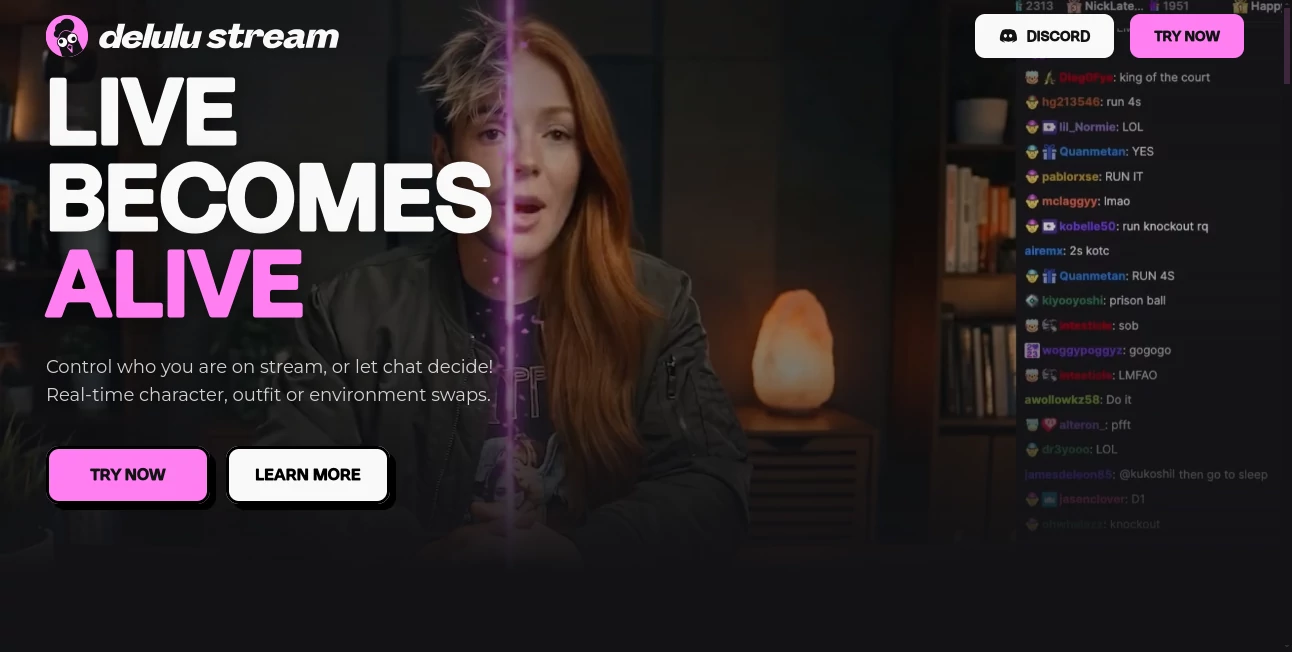
Live streaming is no longer limited to showing a camera feed and talking to an audience. Delulu Stream turns the stream itself into something viewers can actively influence, making real-time character, outfit, and environment changes part of the entertainment. Instead of waiting until a video is edited and published, creators can transform what happens on screen while they are live.
The platform is designed for creators who want their audience to do more than watch. Viewers can trigger transformations through chat interactions, while streamers can connect these actions to events such as Bits, tips, gifts, Super Chats, or Kicks. This creates a playful feedback loop where the audience becomes part of the show.
The setup is also aimed at everyday streamers rather than technical specialists. It works with OBS and other broadcasting software and supports connections with platforms including Twitch, Kick, YouTube, and TikTok.
Key Features
- Real-time character transformations during live streams.
- Outfit and environment swaps without waiting for traditional video rendering.
- Chat-controlled transformations that let viewers influence what happens on screen.
- Support for community skins as well as the ability to upload custom skins.
- Integration with Twitch through chat commands and the Twitch Extension.
- Monetization options connected to Bits, tips, gifts, Super Chats, and Kicks.
- Compatibility with OBS and other broadcasting software.
- Support for streaming workflows across Twitch, Kick, YouTube, and TikTok.
User Interface
The interface is built around a straightforward streaming workflow rather than a complicated production environment. The drag-and-drop approach makes it easier for creators to connect their streaming account, choose a transformation, and get it into a live broadcast.
That simplicity matters when you are already managing a camera, microphone, chat, alerts, and broadcast software. A streamer should not have to stop the show just to operate another complicated production tool. The platform's approach keeps the transformation process close to the existing streaming workflow.
Accuracy & Performance
The most interesting part of the experience is its real-time nature. Transformations are designed to happen while the creator is already live, allowing visual changes to become part of the broadcast instead of something prepared afterward.
Performance will naturally depend on the streamer's computer, connection, broadcasting setup, and the complexity of the transformation. Still, the live-first design makes it particularly interesting for interactive streams where timing matters. A viewer triggering a transformation during a funny moment can create a completely different reaction from an effect added during post-production.
Capabilities
The platform goes beyond a basic webcam filter. Creators can change their apparent character, switch outfits, alter environments, and work with different community or custom skins. The audience can also become an active control layer by triggering transformations from chat.
For example, a streamer could let viewers decide whether the next transformation changes their character or surroundings. A gaming creator could connect transformations to donations, while an entertainment streamer could make every major chat event capable of changing the visual direction of the broadcast.
This combination of live video transformation and audience interaction gives creators considerably more room to experiment with formats that would be difficult to reproduce with conventional editing software.
Security & Privacy
Creators should pay close attention to the platform's terms when working with personal data, uploaded material, or AI-generated and manipulated content. The service states that users are responsible for having the necessary rights and permissions for their inputs and for complying with applicable privacy and disclosure requirements.
The terms also explain that submitted content may be used to develop, improve, provide, and maintain the platform, including for AI model development and training. Users should therefore review the current privacy policy and terms before uploading sensitive material or content involving other people.
AI-generated or manipulated media may also require disclosure in certain situations. The service specifically notes that users remain responsible for complying with legal requirements concerning deepfakes and other AI-generated content.
Use Cases
- Livestream Entertainment: Turn ordinary broadcasts into interactive shows where viewers can directly influence what appears on screen.
- Gaming Streams: Connect audience actions with visual transformations during gameplay to create unexpected moments.
- Virtual Characters: Experiment with different characters, appearances, and community-created skins without relying entirely on traditional avatar production.
- Interactive Communities: Give viewers a more meaningful role than simply sending messages or emotes.
- Monetized Streams: Link transformations to Bits, tips, gifts, Super Chats, or Kicks and turn audience participation into another revenue mechanism.
- Creative Experiments: Test live character, outfit, environment, and visual-effect concepts without editing every piece of footage afterward.
- Social Content: Capture unexpected live moments that can later become clips for short-form platforms.
Pros and Cons
Pros
- Real-time transformations make streams more dynamic and unpredictable.
- Audience members can actively influence the broadcast.
- Custom and community skins provide creative flexibility.
- Supports several major streaming platforms.
- Works with OBS and other broadcasting software.
- Chat interactions are available without a mandatory paid plan for short transformations.
- Transformations can be connected to monetization events.
Cons
- Free chat-triggered transformations are limited to 60 seconds per transformation.
- Longer transformation sessions require a paid option.
- Live AI transformations can depend heavily on network and system conditions.
- Creators using AI-generated or manipulated media need to consider disclosure and legal requirements.
- Users should carefully review content and privacy terms before uploading material involving other people.
Pricing Plans
The service offers free chat interactions, with transformations available for up to 60 seconds per transformation. This makes it possible for creators to experiment with the core interactive concept without immediately committing to a subscription.
Paid access removes the transformation time cap, allowing creators to use IRL skins and transformations for longer periods. Paid subscribers also have the service watermark automatically removed. The AI-generated watermark can be removed after successful verification, while creators remain responsible for legally required AI or deepfake disclosures.
There is also a one-time minute top-up option priced at $10 for 60 additional minutes. These minutes are added instantly and do not expire, carrying over between billing cycles.
How to Use It
- Connect your streaming account from a supported platform such as Twitch, Kick, YouTube, or TikTok.
- Set up the service alongside OBS or your preferred broadcasting software.
- Choose a community skin or upload a suitable custom skin.
- Select the type of transformation you want to use during your stream.
- Configure chat interactions so viewers can trigger transformations.
- If desired, connect transformations to Bits, tips, gifts, Super Chats, or Kicks.
- Start streaming and let your audience interact with the visual experience in real time.
Comparison with Similar Tools
Traditional video editors and conventional streaming filters generally focus on either post-production or predefined visual effects. This platform takes a different approach by making transformation an interactive part of the live broadcast.
Compared with ordinary webcam filters, its audience-control features are a major distinction. The viewer is not simply watching an effect; their interaction can become the trigger for what happens next. Compared with standard video editing software, there is also no need to wait until the stream has ended before introducing a transformation.
For creators who mainly need conventional editing, recording, or color correction, a dedicated video editor may still be the better choice. But for streamers looking for audience-driven visual changes, this type of live transformation workflow offers a more specialized experience.
Conclusion
Live streaming becomes considerably more engaging when the audience has a genuine influence over what happens on screen. That is where this platform stands out. Its combination of real-time character and environment transformations, custom skins, chat interaction, and monetization options creates a format that feels closer to an interactive show than a conventional livestream.
The free entry point is useful for testing the idea, while paid access makes more sense for creators who want longer transformation sessions. The biggest appeal is not simply changing how a streamer looks; it is giving viewers a reason to participate and making their participation visible immediately.
For creators building communities around entertainment, gaming, virtual characters, or experimental live content, it is an interesting addition to the modern streaming toolkit.
Frequently Asked Questions (FAQ)
Is it free to use?
Yes. Chat interactions are available for free, with transformations lasting up to 60 seconds each. Longer transformation sessions are available through paid access.
Can viewers control transformations?
Yes. Viewers can trigger transformations through chat interactions, including supported Twitch interactions and extensions.
Which streaming platforms are supported?
The service states that creators can connect streaming accounts on Twitch, Kick, YouTube, and TikTok.
Can I upload my own skins?
Yes. Creators can choose from community skins or upload their own skins for use in transformations.
Can transformations be monetized?
Yes. Creators can connect transformations to events such as Bits, tips, gifts, Super Chats, and Kicks, allowing audience interaction to become part of a monetization strategy.
Does it work with OBS?
Yes. The platform is designed to work with OBS and other broadcasting software, making it possible to incorporate transformations into an existing streaming setup.
Do I need advanced technical skills?
No. The service describes its setup as drag-and-drop, so creators who already know how to stream from a computer should be able to get started without specialized technical knowledge.
Is there a limit on free transformations?
Free chat interactions support transformations of up to 60 seconds each. Paid access removes the transformation duration cap.
Can I use the generated content commercially?
The terms state that, subject to compliance with the applicable terms, users receive rights to their generated output and may use their content for purposes including commercial use. Users are still responsible for rights, permissions, laws, and disclosure requirements related to their content.
What should I know about AI-generated content?
Creators should follow applicable laws and platform requirements regarding AI-generated or manipulated media. In particular, the service places responsibility on users for required disclosures and for ensuring that uploaded material does not violate third-party rights.
AI Animated Video , AI Video to Video , AI Video Generator , AI UGC Video Generator .
These classifications represent its core capabilities and areas of application. For related tools, explore the linked categories above.
Delulu Stream details
Website unavailable — View Alternatives
Pricing
- Freemium
Apps
- Web App
Categories

Delulu Stream Alternatives Product

Motion Contr…

Ltx 2.3

Sora AI Vide…
Seedance 2.5…

seedance 2
hailuo03

Veo 3.1

Seedance 2.0

Shoorts AI
