
Deployables
What is Deployables?
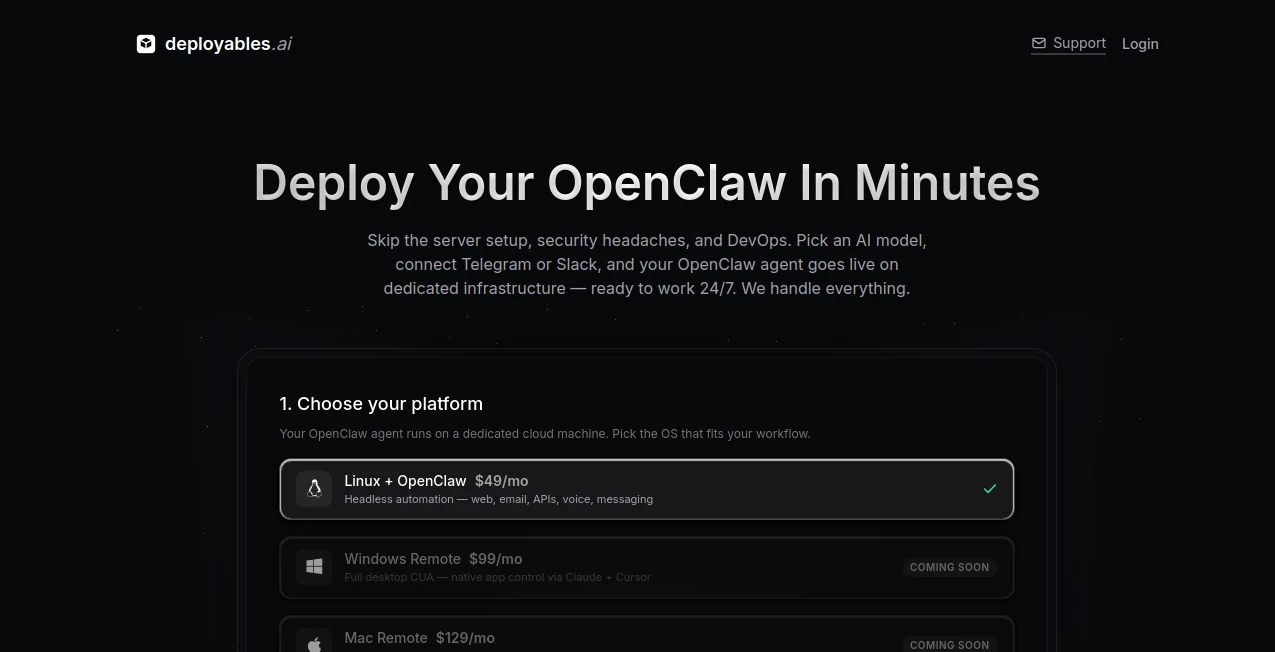
I’ve always found it funny how we spend weeks interviewing humans, only to realize months later they weren’t quite the right fit. What if you could deploy a tireless digital teammate in literally two minutes — one that works 24/7, never calls in sick, and you can literally watch it work in real time? That’s exactly what this platform lets you do. You pick an AI model, connect it to Telegram or Slack, and suddenly you have an autonomous agent running on its own dedicated machine, handling tasks, browsing the web, sending emails, and even making phone calls. It feels like hiring without the HR headaches.
Introduction
Deployables takes the open-source OpenClaw agent framework and makes it ridiculously easy to run in production. No more fiddling with servers, Docker, security configs, or worrying about uptime. You choose Linux (available now), Windows, or Mac (coming soon), pick your AI brain, connect your messaging channels, and your agent is live and working in under two minutes. The best part? You get a live screen view so you can watch everything it does — like sitting next to a remote employee without the awkward small talk. It’s perfect for anyone tired of doing repetitive work themselves or managing flaky automation scripts.
Key Features
User Interface
The whole experience is surprisingly smooth and human. Sign in, choose your platform, pick an AI model, connect Telegram/Slack/Discord, and hit deploy. The dashboard gives you a beautiful live view of your agent’s desktop, real-time task logs, call transcripts, and spending controls. It never feels technical or intimidating — even if you’re not a DevOps person, you’ll feel in control from minute one.
Accuracy & Performance
Because each agent runs on dedicated infrastructure (not shared containers), performance is consistent and reliable. Agents stay up 24/7 with persistent memory, so they remember context across tasks. Live screen streaming means you catch mistakes early instead of discovering them hours later in logs. Users report their agents handle complex workflows — browsing, emailing, filling forms — with impressive reliability.
Capabilities
Your agent can browse the web, send emails, make and receive phone calls, manage files, run scripts, use APIs, and coordinate with other agents. Linux agents are great for automation and ops. Upcoming Windows and Mac tiers will add full desktop control for enterprise apps, design tools, and development workflows. You can give it natural language instructions and watch it execute like a real teammate.
Security & Privacy
Security is taken seriously — dedicated machines, proper TLS, egress filtering, and audit logging come standard. You set daily spending limits and approved contacts for calls. Everything runs on isolated infrastructure, so one agent can’t affect another. For businesses handling sensitive tasks, this level of control and visibility is a huge relief.
Use Cases
A solopreneur deploys an agent to handle customer support inquiries on Telegram while they focus on building the product. A small agency sets up agents to research leads, draft proposals, and schedule calls. An operations team uses agents for data entry and report generation that used to eat up hours. Creative professionals run Mac agents for batch processing or file management. The possibilities grow as you add more agents to your fleet and let them coordinate.
Pros and Cons
Pros:
- Deploy a working AI teammate in literally two minutes — no DevOps required.
- Live screen view gives you full visibility and control.
- Dedicated machines mean consistent, reliable performance.
- Built-in voice calling and messaging channel support.
- Clear spending controls so you never get surprise bills.
Cons:
- Windows and Mac agents are still rolling out (Linux is available now).
- Very complex, long-running tasks may need occasional human guidance.
Pricing Plans
The base plan starts at $49/month for a Linux agent, including the server, dashboard, integrations, and $10 monthly AI credits. Windows and Mac tiers will be higher to account for the more powerful desktop control. You only pay for what you use on top of the platform fee, and agents automatically pause when credits run out. It’s transparent, predictable, and far cheaper than hiring a human for similar repetitive work.
How to Use Deployables
Sign in, choose your platform (Linux is ready now), select an AI model, connect your messaging channels (Telegram, Slack, etc.), and deploy. Your agent will be online within minutes. Give it tasks via chat, watch it work in the live dashboard, and set spending limits for peace of mind. Add more agents as your needs grow. It’s that straightforward — from idea to working digital employee faster than most meetings.
Comparison with Similar Tools
Most AI agent platforms either run in fragile sandboxes or require complex self-hosting. Deployables stands out by giving every agent its own dedicated machine with live visibility and easy channel integration. It’s less “black box automation” and more “transparent digital teammate” — a big difference when you actually need to trust and monitor the work being done.
Conclusion
Hiring is slow and expensive. Deploying capable AI teammates shouldn’t be. This platform makes it feel effortless while giving you the visibility and control that real work requires. Whether you’re a solo founder looking to reclaim your time or a team ready to scale operations, it offers a smarter, faster way to get things done. The future of work isn’t just AI — it’s AI that’s easy to deploy and even easier to trust.
Frequently Asked Questions (FAQ)
How long does deployment take?
Usually under 2 minutes for Linux agents — you can grab a coffee and come back to a live agent.
Can I watch my agent work?
Yes — full live screen streaming is included so you see exactly what it’s doing in real time.
Do agents have phone numbers?
Yes — every agent can make and receive real phone calls with natural voice.
What happens if credits run out?
The agent automatically pauses — no surprise bills. Just top up when you’re ready.
Is it suitable for businesses?
Absolutely — dedicated machines, audit logs, spending controls, and team features make it enterprise-ready.
AI Workflow Management , AI App Builder , AI Developer Tools , AI Voice Assistants .
These classifications represent its core capabilities and areas of application. For related tools, explore the linked categories above.

Deployables Alternatives Product

DeepSeek

Discord Time…

Bolt AI

Screenshot t…

DevUtilX
AI Wire

LocaFlow

LorePanic

HY Motion