
Devin AI
What is Devin AI?
In the rapidly evolving world of software development, automation is no longer a luxury—it is becoming the foundation of modern engineering workflows. This platform introduces a new way of building software, where an AI system doesn’t just assist developers but actively participates in real engineering tasks.
Unlike traditional coding assistants that simply suggest snippets, this system behaves more like a junior developer capable of planning, writing, debugging, and iterating on full projects. It brings together reasoning, coding ability, and task execution in a unified environment that feels surprisingly close to working with a real engineering teammate.
Key Features
User Interface
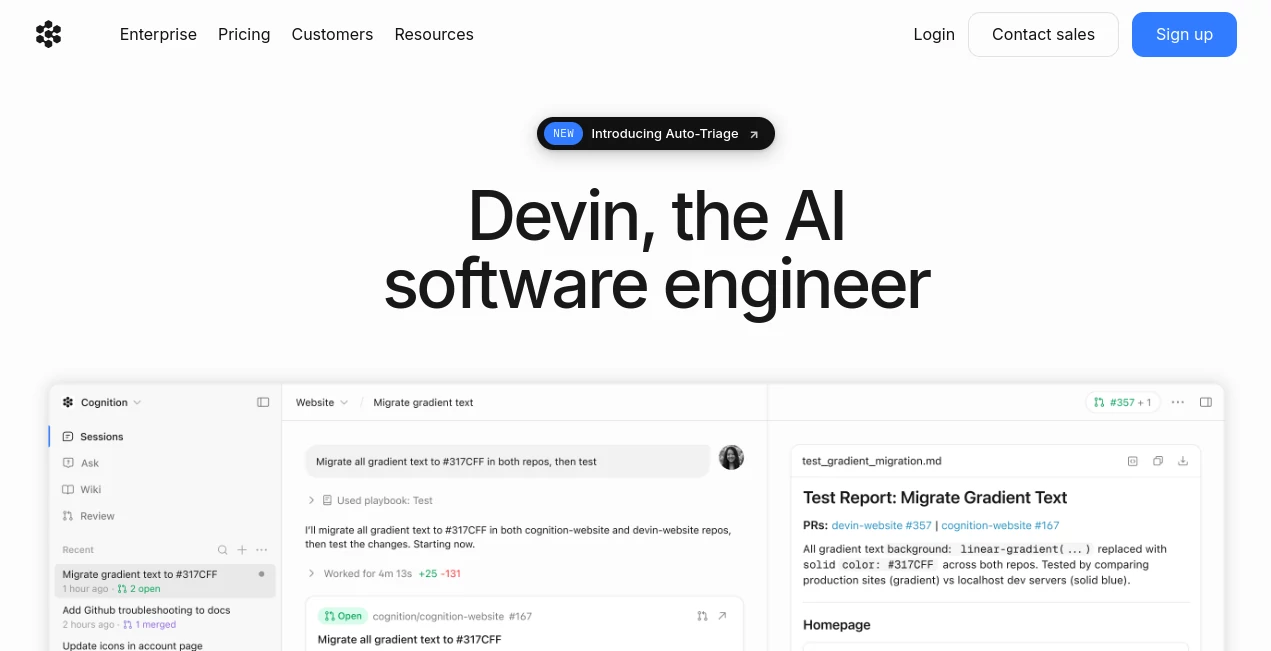
The interface is designed to feel minimal yet powerful. Users can assign tasks in natural language, track progress, and review outputs as if they are managing a remote developer. Everything is organized in a clean workspace that prioritizes clarity over complexity.
Accuracy & Performance
One of the most impressive aspects is how it breaks down complex engineering tasks into manageable steps. Instead of generating incomplete solutions, it plans ahead, tests assumptions, and refines outputs, which leads to more reliable results in real-world coding scenarios.
Capabilities
- Full-stack software development assistance
- Debugging and issue resolution across codebases
- Autonomous task planning and execution
- Repository-level understanding and modifications
- Iterative improvement of generated solutions
Security & Privacy
Security is treated as a core principle, especially since the system may interact with sensitive codebases. Access control, isolated environments, and controlled execution help ensure that workflows remain safe and predictable for development teams.
Use Cases
- Rapid prototyping of web and software applications
- Automating repetitive engineering tasks
- Assisting developers with debugging large codebases
- Accelerating startup MVP development cycles
- Supporting engineering teams with backlog reduction
Pros and Cons
Pros
- Can handle end-to-end development tasks
- Reduces time spent on repetitive coding work
- Acts like a virtual engineering assistant
- Improves productivity for small and large teams
Cons
- May require supervision for complex production systems
- Still evolving in terms of reliability for edge cases
- Learning curve for teams new to autonomous AI tools
Pricing Plans
The platform typically follows a subscription-based model with access tiers depending on usage and team size. Plans are designed to support both individual developers and enterprise-level engineering teams, offering scalability as needs grow.
How to Use This Tool
Getting started is straightforward. Users begin by describing a development task in natural language, such as building a feature or fixing a bug. The system then analyzes the request, breaks it into steps, and begins execution in a controlled environment. Users can monitor progress, provide feedback, and request revisions as needed.
Over time, it adapts to the style and preferences of the development workflow, making collaboration smoother and more intuitive.
Comparison with Similar Tools
Compared to traditional code completion tools, this system operates at a much higher level of autonomy. While most assistants focus on line-by-line suggestions, this platform focuses on full task execution and project-level understanding.
In contrast to basic AI coding plugins, it behaves less like a helper and more like an active contributor, bridging the gap between human developers and automated engineering systems.
Conclusion
This platform represents a shift in how software development can be approached. Instead of simply speeding up coding, it redefines the role of AI in engineering by allowing it to participate in real development cycles. For teams looking to scale output without increasing complexity, it offers a compelling glimpse into the future of autonomous software creation.
Frequently Asked Questions (FAQ)
Is this tool suitable for beginners?
Yes, but it is especially powerful for users who already understand software development basics, as it works best when guided by clear task definitions.
Can it replace human developers?
No, it is designed to support developers rather than fully replace them. Human oversight is still important for critical decisions.
What kind of projects can it handle?
It can work on a wide range of software projects, from simple applications to more complex full-stack systems.
Does it require technical setup?
Setup is minimal, and most interactions happen through natural language instructions rather than manual configuration.
AI Code Assistant , Code & IT , AI Developer Tools , AI DevOps Assistant .
These classifications represent its core capabilities and areas of application. For related tools, explore the linked categories above.

Devin AI Alternatives Product

Workik

Ito AI
GTM API

Reverse Imag…

DeepSeek

Geekflare AI

Vibe Coding …

Toonifyit

Jujutsu Zero…