


















Diagrid Catalyst
What is Diagrid Catalyst?
Building an AI agent is one thing. Keeping that agent reliable when a server crashes, a deployment restarts, a workflow runs for hours, or several services need to communicate is a much harder problem. Diagrid Catalyst is designed for teams that want to move agentic applications beyond prototypes and into dependable production environments.
The platform focuses on durable execution, secure communication, workflow orchestration, and operational visibility. Instead of treating an AI agent as a simple process that starts again after a failure, it allows workflows to preserve their state and continue from where they stopped. This approach is particularly useful for applications where losing progress is expensive or where an agent needs to coordinate several steps before a task is complete.
It also works with a broad selection of agent frameworks, including LangGraph, CrewAI, Google ADK, Strands, OpenAI Agents, Deep Agents, Microsoft Agent Framework, and Dapr Agents. That framework flexibility makes it a practical option for development teams that do not want their infrastructure decisions tied to a single AI framework.
Key Features
- Durable execution for long-running AI agent workflows
- Automatic retries, checkpoints, and recovery after failures
- Session lifecycle and state management
- Event-driven Pub/Sub communication between agents and services
- Cryptographic agent identity and mutual TLS authentication
- Verifiable execution records and cryptographic attestation
- Service discovery and inter-agent communication
- Support for multiple agent frameworks
- Multi-region and multi-cloud traffic routing
- Integration with infrastructure services through a unified API
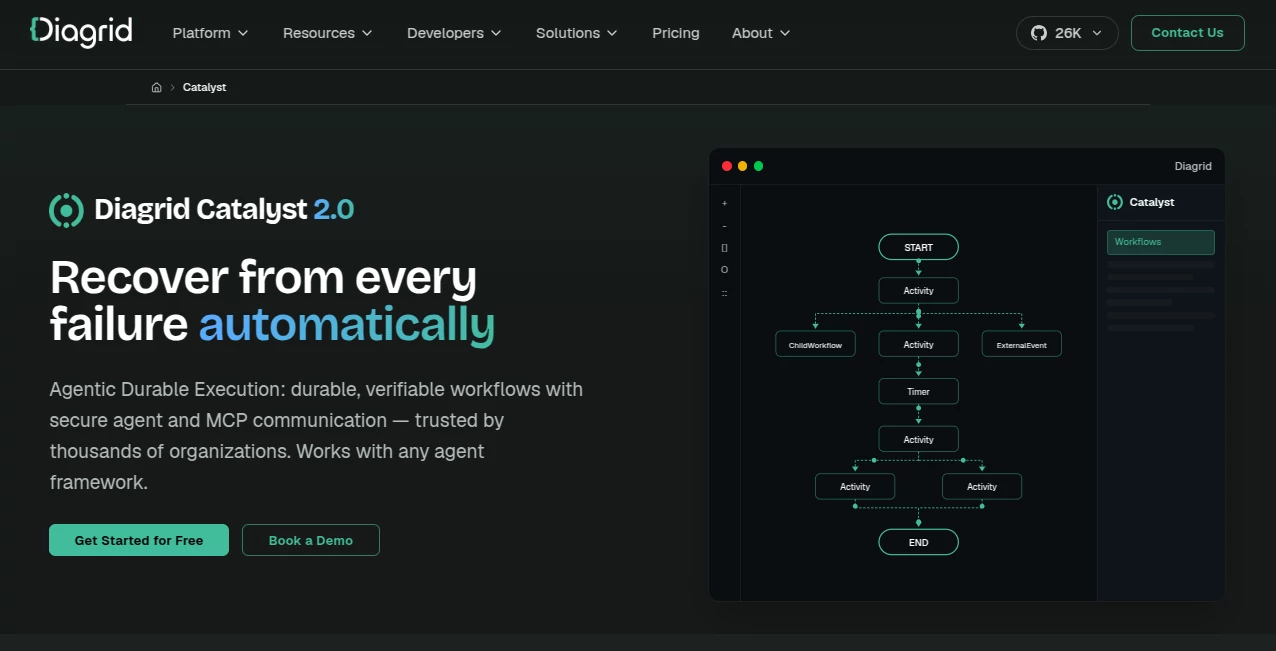
- Workflow visualization and observability
- Deployment options ranging from managed cloud hosting to self-hosted environments
User Interface
The web console is built around the practical needs of teams operating distributed applications rather than simply experimenting with prompts. Projects, applications, components, workflows, and infrastructure connections can be managed from a central environment.
For developers, the experience is complemented by a CLI and quickstart applications. This creates a useful balance: developers can work with code and familiar development tools while platform teams get a centralized place to manage the underlying environment.
The workflow visualization capabilities are especially useful when an application contains many dependent steps. Instead of trying to reconstruct what happened from scattered application logs, teams can inspect workflow activity and understand how an execution progressed.
Accuracy & Performance
For an infrastructure platform like this, performance is less about generating an answer and more about making sure an application behaves consistently under real operating conditions. The platform is designed to preserve workflow progress through crashes, deployments, restarts, and other interruptions.
Long-running and asynchronous executions are supported, while automatic retries and checkpoints help reduce the chance that a temporary failure forces an entire operation to start again. Multi-region capabilities can also help organizations design applications that remain available when individual infrastructure locations experience problems.
The platform states that it can help teams achieve significant developer-velocity improvements, although actual results will naturally depend on the architecture, team, and workload involved. Its strongest performance benefit is likely to appear in systems where reliability and distributed coordination would otherwise require substantial custom engineering.
Capabilities
The central capability is durable execution for AI agents and workflows. An application can maintain progress across interruptions instead of relying on fragile checkpoints implemented independently by developers.
Another important capability is agent-to-agent communication. Pub/Sub messaging allows agents and services to communicate through events, supporting patterns such as fan-out, fan-in, and asynchronous coordination. This can be valuable when a single task involves multiple specialized agents or services.
Session management adds another layer by giving applications a structured way to handle conversations, tasks, context, and state. Teams can define ownership and isolation rather than leaving session behavior entirely to application code.
The platform also provides a security-oriented identity model. Agents and MCP servers can use cryptographic identities and mutual TLS, reducing reliance on shared credentials and making service-to-service communication easier to control.
Infrastructure portability is another strong point. Applications can work with different message brokers, databases, storage systems, secret stores, configuration systems, middleware, and LLM providers. This abstraction can make it easier to change infrastructure components without rebuilding the entire application around one provider.
Security & Privacy
Security is treated as part of the architecture rather than an optional layer added after development. Mutual TLS, identity-based communication, access policies, and audit-friendly tracing are among the security mechanisms available for agent and service interactions.
Verifiable execution is another notable feature. Workflow steps can be recorded in tamper-evident records, while cryptographic attestation can help organizations establish who performed an operation and what happened during execution. This can be particularly relevant for applications operating in regulated or audit-sensitive environments.
For managed infrastructure, the provider states that data stored in its managed services is encrypted at rest and that secrets passed to the platform are encrypted and stored in a cloud secret manager. The service also states that its organization holds SOC 2 Type II certification.
Use Cases
Autonomous AI agents: Teams can build agents that perform multi-step tasks while maintaining state and recovering from interruptions. This is useful when an agent needs to reason, call tools, interact with services, and continue working over an extended period.
Complex business workflows: Organizations can coordinate APIs, services, approvals, and automated actions in a durable workflow. If a downstream service temporarily becomes unavailable, the workflow does not necessarily need to be rebuilt from the beginning.
Human-in-the-loop automation: Workflows can combine automated processing with human approvals, escalations, or additional information. This is useful for business processes where complete automation is undesirable.
Multi-agent systems: Several specialized agents can communicate through event-driven messaging instead of relying on tightly coupled callbacks. This can make larger agent architectures easier to organize and scale.
Event-driven microservices: Development teams can use the platform for applications where services communicate through events and need reliable coordination across distributed infrastructure.
Enterprise AI infrastructure: Platform and security teams can provide common infrastructure for multiple AI applications while maintaining access controls, observability, identity, and governance.
Architecture modernization: Organizations modernizing older systems can use service discovery, messaging, state management, observability, resiliency, and workflow orchestration as part of a gradual migration toward cloud-native architectures.
Pros and Cons
- Pros: Durable execution helps protect long-running workflows from failures and interruptions.
- Pros: Supports multiple popular AI agent frameworks instead of forcing teams into one development approach.
- Pros: Strong identity and mTLS capabilities are valuable for enterprise agent communication.
- Pros: Pub/Sub and session management simplify common multi-agent architecture patterns.
- Pros: Multiple deployment models provide flexibility for different infrastructure requirements.
- Pros: The free cloud tier provides an accessible way to evaluate the platform before committing to a production setup.
- Cons: The platform is primarily aimed at developers, platform engineers, and enterprise AI teams rather than casual users.
- Cons: Production deployments may require additional planning around infrastructure, quotas, networking, and security configuration.
- Cons: Teams building very small AI applications may find its infrastructure capabilities unnecessary for their needs.
Pricing Plans
The cloud version is available at no cost for teams that want to explore the platform and build development workloads. The free environment includes core capabilities such as durable workflows, AI agent functionality, Dapr APIs, managed infrastructure components, access policies, observability, and the web console.
The free cloud environment has usage limits and is intended for evaluation and development rather than production workloads. Current documented limits include three projects, ten total applications, ten components, and defined storage, request, and retention quotas.
For production environments, dedicated and enterprise deployment options are available. These can provide features such as private networking, dedicated infrastructure, enterprise support, service-level agreements, and self-hosted deployment options. Enterprise pricing is customized according to the organization's requirements.
How to Use It
Getting started is relatively straightforward for developers who are already comfortable with AI agent frameworks or distributed applications.
- Create a free cloud account and create a project.
- Install the command-line interface used to manage the environment.
- Choose an existing quickstart application or connect an existing application.
- Define the workflow or agent using your preferred supported framework.
- Connect the required services, infrastructure components, or LLM providers.
- Run the application and inspect its workflows, communication, and operational activity.
- Configure security, access policies, networking, and deployment requirements as the application moves toward production.
For example, a development team could take an existing LangGraph agent and add durable workflow execution without redesigning the agent from scratch. The same general approach can be applied to other supported frameworks.
Comparison with Similar Tools
Traditional workflow systems can be excellent at orchestrating predefined processes, while custom-built agent infrastructure can provide maximum flexibility. The challenge appears when an application needs both reliable workflows and modern AI-agent behavior.
This platform takes a broader approach by combining durable workflows with agent identity, session management, Pub/Sub communication, verifiable execution, and infrastructure connectivity. That makes it particularly interesting for teams building systems where several agents, APIs, databases, and services need to work together reliably.
Compared with building these capabilities internally, the main advantage is reducing the amount of distributed-systems infrastructure that developers need to design and maintain themselves. For a small experimental chatbot, that may not matter much. For a production agent coordinating payments, approvals, data retrieval, or multiple business services, it can make a substantial difference.
Conclusion
AI agents become considerably more complicated once they leave the demo stage. A prototype can often survive a restart or a failed request. A production system handling real customers, business processes, sensitive data, or long-running tasks cannot rely on luck.
This platform addresses that gap with durable execution, recovery, agent communication, identity, observability, and infrastructure abstraction. Its support for several agent frameworks is another practical advantage for teams that want freedom over their application layer.
The free cloud option makes experimentation accessible, while dedicated and self-hosted deployment paths give larger organizations room to build around stricter networking, security, and operational requirements. For developers and enterprise AI teams looking to turn agentic applications into dependable production systems, it is a compelling infrastructure layer worth exploring.
Frequently Asked Questions (FAQ)
What is this platform used for?
It is used to build and operate durable AI agents, workflows, event-driven applications, and distributed services. It is particularly suited to applications that need reliable execution, state management, secure communication, and recovery from failures.
Can it work with different AI agent frameworks?
Yes. The platform supports several agent frameworks, including LangGraph, CrewAI, Google ADK, Strands, OpenAI Agents, Deep Agents, Microsoft Agent Framework, and Dapr Agents.
Is there a free plan?
Yes. The managed cloud offering has a free tier intended for evaluation and development. It includes core workflow, agent, infrastructure, security, and observability capabilities, subject to usage quotas.
Is it suitable for production applications?
Yes. The platform is specifically designed to help teams move agentic applications from prototypes into production. Dedicated and enterprise deployment options are available for organizations requiring higher limits, private networking, dedicated infrastructure, support, or other enterprise requirements.
Does it support secure communication between agents?
Yes. Agent and MCP server communication can use cryptographic identity and mutual TLS. This provides an identity-based security model for communication between agents and services.
Can workflows recover after an application failure?
Durable workflows are designed to preserve execution state and recover from failures. Automatic retries, checkpoints, and recovery mechanisms help long-running workflows continue rather than simply restarting from the beginning.
AI Workflow Management , AI API Design , AI Developer Tools .
These classifications represent its core capabilities and areas of application. For related tools, explore the linked categories above.
Diagrid Catalyst details
Website unavailable — View Alternatives
Pricing
- Free
Apps
- Web App
Categories

Diagrid Catalyst Alternatives Product

Motion

Geekflare AI

Solovio

Standard Com…

Blackbox AI

Online White…
Timestamp Ro…

Neurohelper
TutuoAI
