Directus
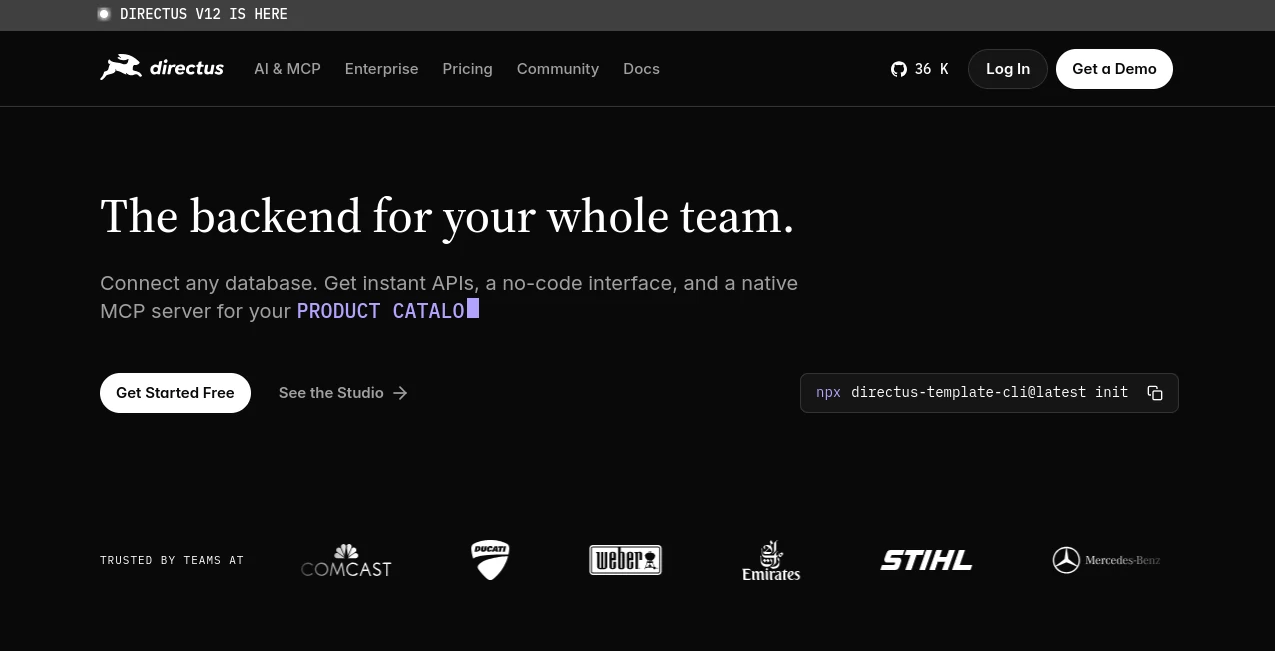
What is Directus?
Modern digital projects need more than a traditional content management system. Teams require a flexible backend, instant APIs, collaboration tools, automation, and a workspace that connects developers, content managers, and business users. This platform delivers exactly that by transforming existing SQL databases into a powerful data management environment without forcing organizations to rebuild their infrastructure from scratch.
What makes this solution especially appealing is its database-first approach. Instead of locking users into a proprietary system, it works with existing data structures while providing a polished interface for managing content, assets, workflows, and permissions. Whether you're building a website, mobile application, customer portal, or internal business platform, it offers the flexibility needed for modern development.
Many teams appreciate how quickly they can launch production-ready backends. A project that might normally require weeks of API development and admin panel creation can often be operational within hours, allowing teams to focus on delivering customer value rather than repetitive infrastructure work.
Key Features
User Interface
The visual studio is one of the strongest aspects of the platform. Non-technical users can manage content, files, and structured data through intuitive forms and dashboards, while developers maintain full control over the underlying database architecture.
- Clean and modern administration workspace.
- Visual content editing and data management.
- Custom dashboards with real-time insights.
- Drag-and-drop workflow creation.
- Easy navigation for both technical and non-technical teams.
Accuracy & Performance
Because the platform works directly with SQL databases rather than creating unnecessary abstraction layers, data remains consistent and reliable. APIs are generated automatically from existing schemas, reducing the risk of development errors and synchronization issues.
- Instant REST and GraphQL APIs.
- Fast database access with minimal overhead.
- Support for large-scale content operations.
- Real-time data availability.
- Optimized content delivery across multiple channels.
Capabilities
The platform goes far beyond traditional content management. It can function as a headless CMS, backend platform, internal tool foundation, automation hub, and data management system simultaneously.
- Headless content management.
- Workflow automation and approvals.
- Asset and media management.
- Role-based collaboration.
- AI-assisted content operations.
- Database visualization and administration.
- Integration with modern frontend frameworks.
Security & Privacy
Security is built into every layer. Organizations can define detailed permissions and control access at collection, field, and user levels. This approach helps teams maintain governance while allowing collaboration across departments.
- Role-based access control.
- Granular field-level permissions.
- Secure authentication mechanisms.
- Self-hosting options for maximum control.
- Consistent governance across users and automated processes.
Use Cases
The flexibility of the platform makes it suitable for a wide range of business and development scenarios.
- Building headless websites and enterprise portals.
- Managing content across multiple channels and applications.
- Creating internal dashboards and business tools.
- Supporting e-commerce product information management.
- Developing mobile app backends.
- Centralizing company data across departments.
- Automating approval and publishing workflows.
- Managing multilingual content operations.
Pros and Cons
Pros
- Works with existing SQL databases.
- Automatic REST and GraphQL API generation.
- Excellent balance between developer control and user-friendly management.
- Powerful workflow automation capabilities.
- Flexible deployment options including self-hosting.
- Strong permission and security controls.
- Suitable for both small projects and enterprise environments.
Cons
- Requires understanding of database structures for advanced implementations.
- Headless architecture may require a separate frontend application.
- Some advanced enterprise features may involve additional licensing considerations.
- Initial configuration can feel overwhelming for complete beginners.
Pricing Plans
Several deployment options are available depending on organizational needs.
- Free self-hosted option for developers and teams getting started.
- Cloud-hosted plans for simplified deployment and maintenance.
- Business-oriented plans with additional support and collaboration features.
- Enterprise solutions for large organizations with advanced requirements.
Pricing structures may evolve over time, so users should review the latest plan details before deployment decisions.
How to Use Directus
Getting started is surprisingly straightforward, even for teams transitioning from traditional content management systems.
- Connect an existing SQL database or create a new one.
- Allow the platform to generate APIs automatically.
- Configure collections, fields, and relationships.
- Set user roles and permission rules.
- Build content workflows and automations.
- Connect frontend applications through REST or GraphQL APIs.
- Manage content, assets, and operational data from a single workspace.
Many organizations report that the visual setup process significantly reduces backend development time while improving collaboration between technical and business teams.
Comparison with Similar Tools
Compared with many headless CMS platforms, this solution stands out because it prioritizes existing databases rather than forcing users into a proprietary content model. While some competitors focus exclusively on content management, this platform functions as a complete backend ecosystem.
For developers, the database-first architecture provides exceptional flexibility. For content teams, the visual workspace offers an accessible environment without requiring technical expertise. Organizations that need both developer freedom and operational efficiency often find this combination particularly valuable.
Its ability to serve as a content platform, API layer, automation engine, and administrative workspace gives it a broader scope than many traditional headless CMS alternatives.
Conclusion
This platform has earned a strong reputation among developers, digital agencies, and enterprise teams for good reason. It bridges the gap between technical infrastructure and everyday content operations, creating a shared environment where everyone can work with the same live data.
The combination of automatic API generation, intuitive administration tools, workflow automation, and flexible deployment options makes it a compelling choice for modern digital projects. Whether you're launching a content-driven website, building internal business systems, or creating a scalable application backend, it provides the foundation needed to move quickly without sacrificing control.
Frequently Asked Questions (FAQ)
What is this platform primarily used for?
It is commonly used as a headless CMS, backend platform, API layer, and data management solution for websites, applications, and business systems.
Does it support REST and GraphQL APIs?
Yes. APIs are generated automatically from connected database schemas, allowing developers to start building immediately.
Can non-technical users manage content?
Absolutely. The visual administration interface is designed for content editors, marketers, and business teams without requiring coding knowledge.
Can it be self-hosted?
Yes. Organizations can deploy it on their own infrastructure for maximum control and flexibility.
Is it suitable for enterprise projects?
Yes. Its scalability, permission controls, workflow automation, and database flexibility make it suitable for large-scale implementations.
AI Workflow Management , AI Website Builder , AI API Design , AI Developer Tools .
These classifications represent its core capabilities and areas of application. For related tools, explore the linked categories above.

Directus Alternatives Product

Luma AI
Ito AI
MyToolster W…

Carmatec

UpMocker

TruthSpine

CodeProt

freellm.net
Skillselion