DocBatch AI
What is DocBatch AI?
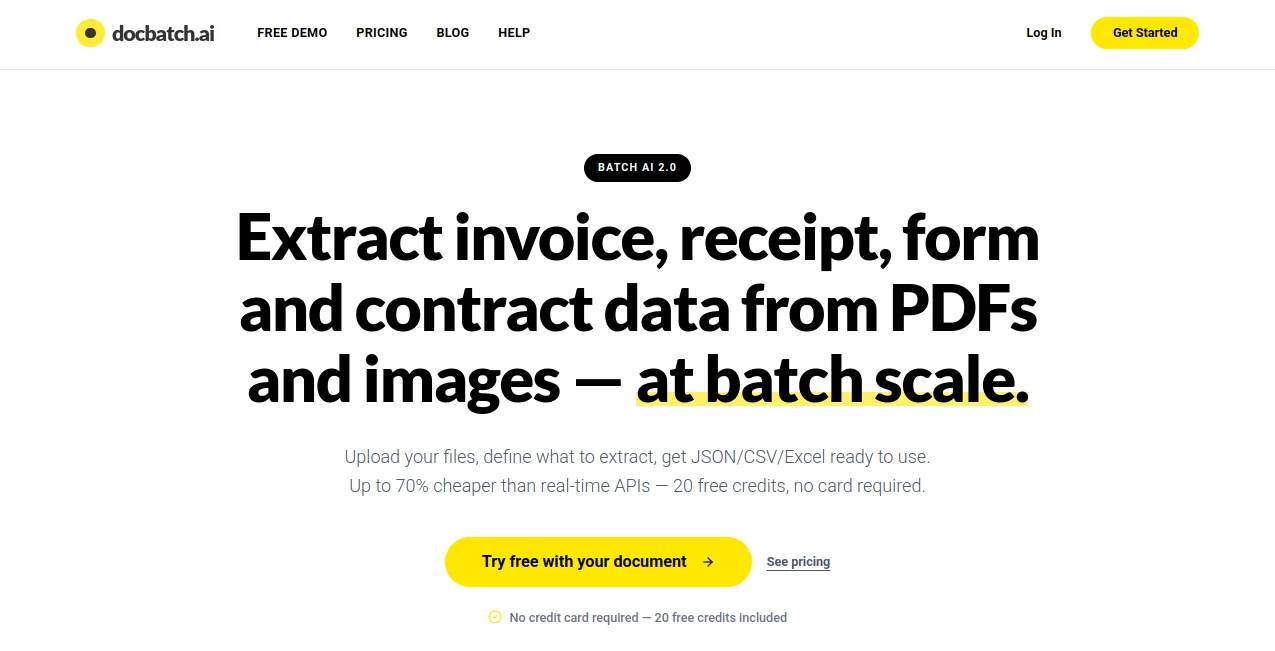
Managing thousands of invoices, contracts, receipts, forms, and other business documents can quickly become a time-consuming task. Instead of relying on repetitive manual data entry or expensive real-time AI APIs, this platform introduces a smarter way to process large document collections through batch AI extraction. It allows organizations to upload PDFs or images, define exactly what information should be extracted, and receive structured results in JSON, CSV, or Excel formats.
Designed for finance departments, legal teams, HR professionals, logistics companies, and operations managers, the platform focuses on high-volume document automation without unnecessary complexity. One practical advantage is its deferred batch processing approach, making it significantly more affordable for workloads that don't require immediate results while maintaining impressive extraction accuracy. The experience feels streamlined from beginning to end, making advanced AI document processing accessible even for non-technical users. :contentReference[oaicite:0]{index=0}
Key Features
User Interface
The interface is refreshingly simple. Users upload a sample document, allow the AI to identify potential fields, then customize the extraction schema using natural language or visual selection. No programming knowledge is required, making it suitable for business users who simply want results without building complex automation pipelines.
Accuracy & Performance
The extraction engine performs exceptionally well on structured business documents such as invoices, contracts, receipts, resumes, and forms. Clear documents typically achieve very high extraction accuracy, while every completed batch includes an accuracy score for additional confidence. The platform can process anywhere from a handful of files to tens of thousands in one batch, making it equally valuable for small businesses and enterprise operations. :contentReference[oaicite:1]{index=1}
Capabilities
- Batch extraction from PDF and image files.
- Automatic field detection using AI.
- Natural language schema creation.
- Visual field selection.
- Exports in JSON, CSV, and Excel formats.
- Supports invoices, receipts, contracts, resumes, medical records, and custom forms.
- Processes thousands of documents within a single workflow.
- No-code experience suitable for business teams.
- Cost-efficient batch processing for non-urgent workloads.
- Compatible with structured business automation pipelines.
Security & Privacy
Security is treated as a core feature rather than an afterthought. Uploaded documents are encrypted during transfer, processed inside isolated environments, and automatically deleted after successful processing. Equally important, customer files are never used to train AI models, making the platform an attractive option for organizations handling confidential financial, legal, or medical documents. :contentReference[oaicite:2]{index=2}
Use Cases
- Invoice processing for accounting teams.
- Contract analysis for legal departments.
- Receipt extraction for expense management.
- Resume parsing for recruitment workflows.
- Insurance claim document processing.
- Healthcare record digitization.
- Bulk form processing.
- Logistics and shipping documentation.
- Enterprise document digitization projects.
- Business intelligence data preparation.
Pros and Cons
Pros
- Simple no-code workflow.
- Supports very large document batches.
- Lower processing costs than many real-time AI alternatives.
- High extraction accuracy for structured documents.
- Multiple export formats.
- Strong privacy protections.
- Free credits available for new users.
Cons
- Not intended for instant real-time processing.
- Batch jobs may require waiting before completion.
- Performance depends on document quality and consistency.
Pricing Plans
New users receive 20 free credits without providing a credit card. Every processed document consumes one credit. Paid credit packages begin with 1,000 credits, followed by larger plans for growing businesses and enterprise-scale organizations. Credits never expire, allowing companies to process documents whenever needed instead of maintaining monthly subscriptions. Custom enterprise pricing is also available for organizations with higher processing volumes. :contentReference[oaicite:3]{index=3}
How to Use DocBatch
Start by uploading a sample PDF or image that represents the document type you want to process. Review the fields automatically detected by the AI and define any additional information you need using plain language or visual selection. Once your extraction schema is ready, upload the complete batch of documents. After processing finishes, download the extracted data in your preferred structured format, including JSON, CSV, or Excel, ready for reporting, automation, or database import. :contentReference[oaicite:4]{index=4}
Comparison with Similar Tools
Many document extraction platforms emphasize real-time API processing, which can become expensive for organizations handling thousands of files every month. This solution approaches the problem differently by scheduling AI processing in batches, allowing businesses to reduce operational costs without sacrificing extraction quality. Teams that can comfortably wait for scheduled processing often find this approach more economical than continuously calling real-time AI services. Combined with its no-code workflow and flexible export options, it offers an excellent balance between affordability and capability. :contentReference[oaicite:5]{index=5}
Conclusion
For organizations overwhelmed by repetitive document processing, this platform delivers a practical and highly efficient alternative to manual entry and costly real-time AI APIs. Its combination of batch automation, excellent extraction accuracy, strong privacy standards, and transparent pricing makes it an attractive solution for businesses seeking to modernize document workflows. Whether processing hundreds or thousands of documents, it provides a reliable way to transform unstructured files into structured business data while keeping operational costs under control.
Frequently Asked Questions (FAQ)
What document types are supported?
The platform supports PDFs and popular image formats, including invoices, contracts, receipts, forms, resumes, and many other structured business documents.
Can non-technical users operate the platform?
Yes. Its visual interface and natural language schema builder eliminate the need for coding.
What export formats are available?
Processed data can be exported as JSON, CSV, or Excel files.
Is uploaded data used to train AI models?
No. Uploaded files remain private, are processed securely, and are automatically deleted after successful processing.
Who benefits the most from this platform?
Finance teams, HR departments, legal professionals, operations managers, logistics companies, healthcare organizations, and any business processing large document volumes can significantly reduce manual work using this solution.
AI Documents Assistant , AI Document Extraction , AI PDF , AI Productivity Tools .
These classifications represent its core capabilities and areas of application. For related tools, explore the linked categories above.

DocBatch AI Alternatives Product

Period Calcu…

PDF to MD
Photo to Text

Flowmata AI

Syncity AI

photo to URL

Enji

Wild and Fre…

UPDF AI