
Drama Pilot
What is Drama Pilot?
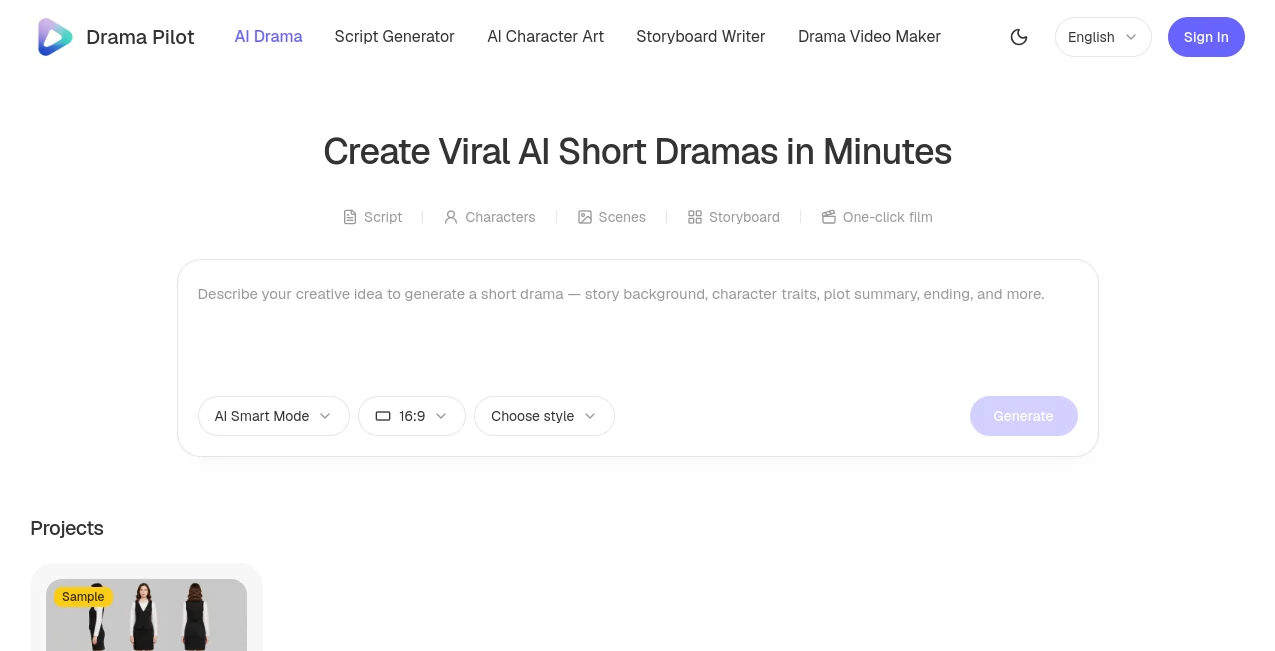
DramaPilot is an AI-powered creative production platform built for turning story ideas into short dramas, visual stories, and episodic video content. Instead of jumping straight from a prompt to a finished clip, it connects several parts of the production process, including script development, character creation, scene design, storyboarding, shot planning, video generation, and episode assembly.
The idea is simple: start with a story and gradually turn it into something viewers can actually watch. A creator can begin with a single-line premise, develop an episodic script, establish recurring characters and locations, plan individual shots, and then bring those shots together into complete episodes.
This makes the platform particularly interesting for independent creators who want to experiment with serialized storytelling without organizing a large traditional production team. It can also be useful for writers, content studios, filmmakers, and teams producing short-form drama for social platforms.
Key Features
- AI-assisted short-drama script generation from a simple story idea.
- Novel-to-script conversion for turning longer written stories into screenplay-style content.
- Character reference generation with multiple viewing angles for improved visual continuity.
- Panoramic scene creation for recurring environments and multi-angle coverage.
- Automatic script breakdown into episodes, scenes, and storyboard shots.
- Director-style controls for shot size, camera movement, lighting, and keyframes.
- Batch video rendering and episode assembly.
- Local export for completed video projects.
User Interface
The workflow is organized around the production process rather than presenting creators with an overwhelming collection of disconnected AI tools. A project can move from script development to characters and scenes, then into storyboards and generated clips.
For someone creating a short drama for the first time, this structure is useful because each stage answers a different production question. The script establishes what happens, the character and scene references establish what the world looks like, and the storyboard determines how the audience sees it.
The interface also gives creators room to review and edit generated material rather than treating the first AI output as the final version. That distinction matters when building a story with several episodes.
Accuracy & Performance
For AI video production, performance is not only about how attractive an individual clip looks. Consistency between shots is often much more important. A character who looks different every time the camera changes angle can quickly break the illusion of a continuing story.
The platform addresses this challenge by creating reusable character references and scene assets before the video generation stage. Character sheets can include front, side, and 45-degree views, while panoramic scenes are designed to support more consistent environments across shots.
Storyboard generation also provides an additional planning layer. Instead of asking an AI model to invent an entire episode in one oversized prompt, creators can work with individual shots and define framing, movement, lighting, and other visual decisions.
Capabilities
The strongest part of the platform is its connected production workflow. A creator can enter a basic story idea and receive a structured starting point containing elements such as the story background, character information, episode outline, dialogue, and narration.
Writers working from existing material have another useful option. A DOCX novel of up to 100,000 characters can be uploaded for novel-to-script conversion. The system analyzes the source material and turns its plot, characters, scenes, and dramatic beats into a screenplay-oriented draft that can then be reviewed and edited.
Once the story is ready, the production can move toward visual development. Characters and locations can be prepared as reusable references, while the storyboard system breaks episodes into individual shots. Camera choices such as wide, medium, close-up, and shot-reverse-shot can be combined with movements such as push, pull, pan, track, and orbit.
The final stage brings generated clips together into episodes. Storyboards can be batch-queued for rendering, while completed clips can be sequenced and stitched into a finished episode for local export.
Security & Privacy
Privacy is an important consideration whenever creators upload original stories, scripts, or other creative material to an online AI service. The platform provides dedicated Privacy Policy and Terms of Service pages, but creators should still review the current policies before uploading commercially sensitive manuscripts or unreleased production material.
For professional projects, it is also sensible to keep copies of original scripts and source files independently of the platform. This provides an additional layer of control over important creative assets throughout the production process.
Use Cases
The platform is particularly well suited to short-form serialized storytelling. A creator could start with a dramatic premise such as a betrayed heiress returning under a new identity, then develop that premise into multiple episodes with recurring characters, locations, and visual references.
It can also be useful for novel adaptation. Rather than manually converting every chapter into a production script, writers can use the novel-to-script workflow to create an initial adaptation and then refine the important character motivations, scenes, dialogue, and dramatic turns themselves.
Content creators can use the workflow for social-media dramas, short cinematic stories, concept episodes, proof-of-concept pilots, and experimental film projects. Small studios may also find the connected approach useful when they need to produce multiple short episodes without rebuilding their production structure from scratch each time.
For example, a creator planning a three-episode pilot could first establish the main characters and locations, create the episode scripts, turn those scripts into storyboards, generate the required shots, and review the complete sequence before committing to a larger season.
Pros and Cons
- Pros: Covers multiple stages of AI short-drama production in one workflow.
- Pros: Supports both original story ideas and novel-to-script conversion.
- Pros: Character and scene references are designed to improve continuity across episodes.
- Pros: Provides shot-level controls instead of relying entirely on one large generation prompt.
- Pros: Supports episode assembly rather than stopping at individual AI-generated clips.
- Cons: AI-generated scripts and visual material still benefit from human review and editing.
- Cons: More complex productions can require substantial generation credits.
- Cons: Creators expecting a traditional full-feature film production environment may need additional editing and production tools.
Pricing Plans
The platform uses a credit-based model for AI production rather than relying exclusively on a conventional fixed subscription. Credits can be used across different stages of the workflow, including script generation, storyboard creation, image generation, and video generation.
Published credit options range from a 70-credit Starter pack through larger production packages of 350, 750, 1,500, 3,900, 8,400, 13,000, and 18,000 credits. Smaller packages can be useful for testing a concept, while larger packages are intended for creators producing more scenes, shots, and episodes.
One useful detail for creators is that purchased credits do not expire. This makes the model more practical for projects that develop gradually rather than requiring continuous production every month.
How to Use DramaPilot
Start by creating a new project and entering a story idea. You can choose a visual style and aspect ratio before generating the initial story structure.
Next, review the generated synopsis, story background, episode outline, characters, dialogue, and narration. If you are adapting a novel, use the novel-to-script workflow and upload the supported DOCX manuscript before reviewing the resulting screenplay.
Once the story is ready, create the visual references for the important characters and locations. Establishing these assets early is especially helpful when the same person or environment needs to appear throughout several episodes.
After that, move into storyboard generation. Review the proposed shots and adjust important production decisions such as framing, camera movement, lighting, and keyframes. This is a good point to correct story or visual problems before spending additional credits on video generation.
Finally, generate the video clips, review the individual results, and assemble the strongest shots into the completed episode. Watch the finished sequence as a whole rather than judging every clip in isolation. A technically impressive shot can still weaken an episode if it interrupts the story or breaks continuity.
Comparison with Similar Tools
Many AI video platforms concentrate primarily on generating individual clips from text or images. That approach can be excellent when the goal is a single visual sequence, but serialized drama introduces additional challenges: recurring characters, episode structure, scene continuity, storyboards, dialogue, and shot planning.
This platform takes a more production-oriented approach. Its workflow connects story development with visual references, storyboard planning, controlled shots, and episode assembly. In practical terms, it is closer to an AI production pipeline than a simple text-to-video generator.
That difference is most noticeable when a creator wants to build several connected episodes rather than produce one standalone clip. Instead of repeatedly starting from an empty prompt, the project structure can carry important creative decisions from one production stage to the next.
Conclusion
Creating a convincing AI short drama requires more than generating attractive video. The story needs structure, characters need visual continuity, locations need to remain recognizable, and individual shots need to work together as part of an episode.
DramaPilot brings these pieces into a single workflow, making it easier to move from a rough idea or existing novel toward scripts, characters, scenes, storyboards, generated shots, and finished episodes. Its biggest advantage is therefore not simply AI video generation; it is the way the different stages are connected.
For independent filmmakers, writers, short-form creators, and small production teams interested in serialized AI storytelling, this can provide a practical starting point for turning an idea into something much closer to a complete production.
Frequently Asked Questions (FAQ)
What is DramaPilot?
It is an AI creative production platform designed for short dramas and serialized visual storytelling, combining script development, character and scene creation, storyboards, video generation, and episode assembly.
Can it create a short drama from one idea?
Yes. A creator can enter a one-line story idea and generate an initial structure containing elements such as a synopsis, story background, episode outline, characters, dialogue, and narration.
Can I turn a novel into a screenplay?
Yes. The script workflow supports uploading a DOCX novel of up to 100,000 characters and can transform the source material into a structured drama script for further review and editing.
Can characters remain consistent between scenes?
The platform provides reusable character references, including multi-angle character sheets, specifically to help maintain appearance and styling across scenes and episodes.
Does it generate storyboards?
Yes. Scripts can be broken into episodes and shots, with storyboard planning that includes production details such as shot size, camera movement, lighting, and keyframe controls.
Can generated clips be combined into complete episodes?
Yes. Generated clips can be batch-rendered, sequenced, stitched together, and exported locally as complete episodes.
Do purchased credits expire?
No. According to the published credit information, purchased credits do not expire.
Who is the platform best suited for?
It is particularly useful for short-drama creators, writers, independent filmmakers, content studios, and anyone interested in producing serialized AI video without managing every production stage separately.
Does it replace human creative decisions?
No. AI can accelerate script development, visual planning, and production, but creators still need to review story logic, character motivation, pacing, visual continuity, and the final edit.
AI Creative Writing , AI Video Generator , AI Text to Video , AI Script Writing .
These classifications represent its core capabilities and areas of application. For related tools, explore the linked categories above.
Drama Pilot details
Website unavailable — View Alternatives
Pricing
- Freemium
Apps
- Web App
Categories

Drama Pilot Alternatives Product
VideoFlux

gemini video

OmniGemini

MiniMax H3

Seedance AI

Sora 2

kling 3 AI

Banana Promp…

MixHub AI