


















Fableclip
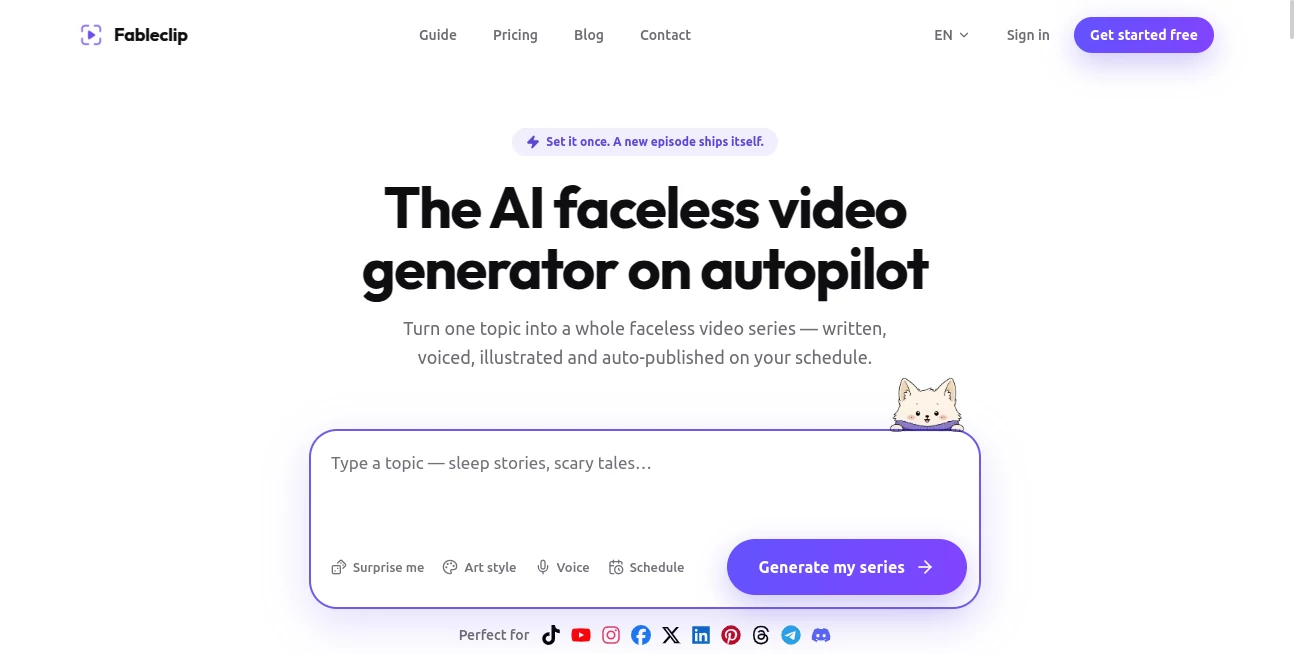
What is Fableclip?
Creating engaging short-form videos every day can quickly become overwhelming. From brainstorming ideas to writing scripts, recording voiceovers, designing visuals, editing captions, and publishing across multiple social platforms, the process often consumes hours of valuable time. This platform changes that workflow by transforming a single topic into an automated content series with minimal effort.
Designed for creators, marketers, educators, and businesses, it combines AI-powered scripting, realistic voice generation, artistic visuals, animated captions, background music, scheduling, and automatic publishing into one streamlined experience. Instead of managing several editing applications, users can build an entire faceless content strategy from a single dashboard.
Whether you're launching a YouTube Shorts channel, growing on TikTok, sharing educational content on Instagram, or publishing motivational videos across multiple networks, the platform helps maintain a consistent publishing schedule while dramatically reducing manual production work.
Key Features
User Interface
The dashboard is clean, beginner-friendly, and designed around a simple step-by-step workflow. Users choose a content niche, enter a topic, customize visual style, select narration, and configure publishing preferences without navigating complicated editing timelines. Even first-time creators can produce professional-looking videos within minutes.
Accuracy & Performance
The AI generates complete short-form videos that include well-structured scripts, synchronized narration, visually consistent illustrations, animated captions, and balanced background music. Content is optimized for vertical video platforms, making it suitable for modern social media audiences. Scheduled automation ensures videos continue publishing consistently without constant supervision.
Capabilities
- Generate complete faceless video series from a single idea.
- Create AI-written scripts for multiple content formats.
- Produce natural-sounding voiceovers.
- Generate unique AI illustrations in various artistic styles.
- Add animated word-by-word captions.
- Include background music automatically.
- Schedule videos for daily or weekly publishing.
- Automatically publish to YouTube, TikTok, Instagram, Facebook, LinkedIn, X, Pinterest, Threads, Telegram, and Discord.
- Edit captions, narration, and music before publishing.
- Export watermark-free videos on paid plans.
Security & Privacy
User accounts are protected through secure authentication, while uploaded content and generated assets remain associated with the owner's workspace. According to the platform's privacy policy, personal information is not sold to third parties, and connected social media accounts are only used for publishing and automation purposes. Cloud infrastructure and trusted service providers help maintain secure operations.
Use Cases
- Building automated YouTube Shorts channels.
- Growing TikTok accounts without appearing on camera.
- Publishing daily motivational videos.
- Creating horror and storytelling channels.
- Producing educational explainers.
- Sharing finance and business tips.
- Generating history and fun-fact videos.
- Running multiple niche content channels simultaneously.
- Repurposing ideas into consistent social media campaigns.
- Helping agencies manage multiple client accounts.
Pros and Cons
Pros
- End-to-end AI video production workflow.
- Supports automatic publishing across numerous platforms.
- Excellent variety of visual art styles.
- Natural AI narration with multiple voice options.
- Built-in caption generation improves viewer engagement.
- Ideal for creators who prefer faceless content.
- No advanced editing skills required.
- Suitable for both individuals and agencies.
Cons
- Mainly focused on short-form vertical videos.
- Advanced automation requires a paid subscription.
- Creative fine-tuning is more limited than professional desktop editors.
- Internet connection is required for generation and publishing.
Pricing Plans
A free plan allows new users to test the platform before upgrading. Paid subscriptions include Hobby, Daily, and Pro plans with increasing monthly video limits, more content series, additional connected social profiles, custom scheduling, watermark-free exports, advanced caption styles, and priority generation for larger publishing operations.
How to Use Fableclip
Begin by selecting a content niche and entering the topic you want to cover. Choose an artistic style that matches your brand, then customize the AI narrator, captions, background music, language, and video duration. Connect your preferred social media accounts and define an automatic publishing schedule. Before release, you may review each generated video, make adjustments if necessary, and publish immediately or allow the automation system to handle future episodes.
Comparison with Similar Tools
Unlike many AI video generators that only create individual videos, this platform focuses on building complete automated content series. Instead of requiring creators to manually write scripts, edit footage, generate captions, and publish each video separately, it manages nearly the entire production pipeline. The combination of AI-generated visuals, voiceovers, scheduling, and multi-platform publishing makes it particularly attractive for creators seeking long-term content automation rather than one-off video generation.
Conclusion
For anyone serious about growing faceless social media channels, this solution offers an impressive balance between automation and creative flexibility. It dramatically reduces production time while maintaining professional presentation through AI-generated scripts, voices, artwork, captions, and scheduled publishing. Whether you're an independent creator experimenting with new niches or an agency managing multiple brands, it provides a practical way to scale short-form content production without building a large editing team.
Frequently Asked Questions (FAQ)
Can beginners use this platform?
Yes. The guided workflow makes video creation straightforward even for users with no editing experience.
Does it automatically publish videos?
Yes. Users can schedule automatic publishing across several major social media platforms or manually review videos before posting.
Can I create videos in different niches?
Absolutely. The platform supports storytelling, history, motivation, finance, horror, educational content, fun facts, bedtime stories, and many other formats.
Does it generate voiceovers and captions?
Yes. AI narration, synchronized captions, background music, and illustrations are generated as part of the production process.
Is there a free version?
Yes. New users can start with a free plan before upgrading to premium subscriptions for additional video generation capacity and advanced automation features.
AI Social Media Assistant , AI Video Generator , AI Short Clips Generator , AI Text to Video .
These classifications represent its core capabilities and areas of application. For related tools, explore the linked categories above.

Fableclip Alternatives Product

Image2

RunwayAI

Video Breakd…

Seedance Art

Groniz

See dance 2.…

KlingVideo

ModelsLab

CinemaDrop
