

















Video Breakdown
What is Video Breakdown?
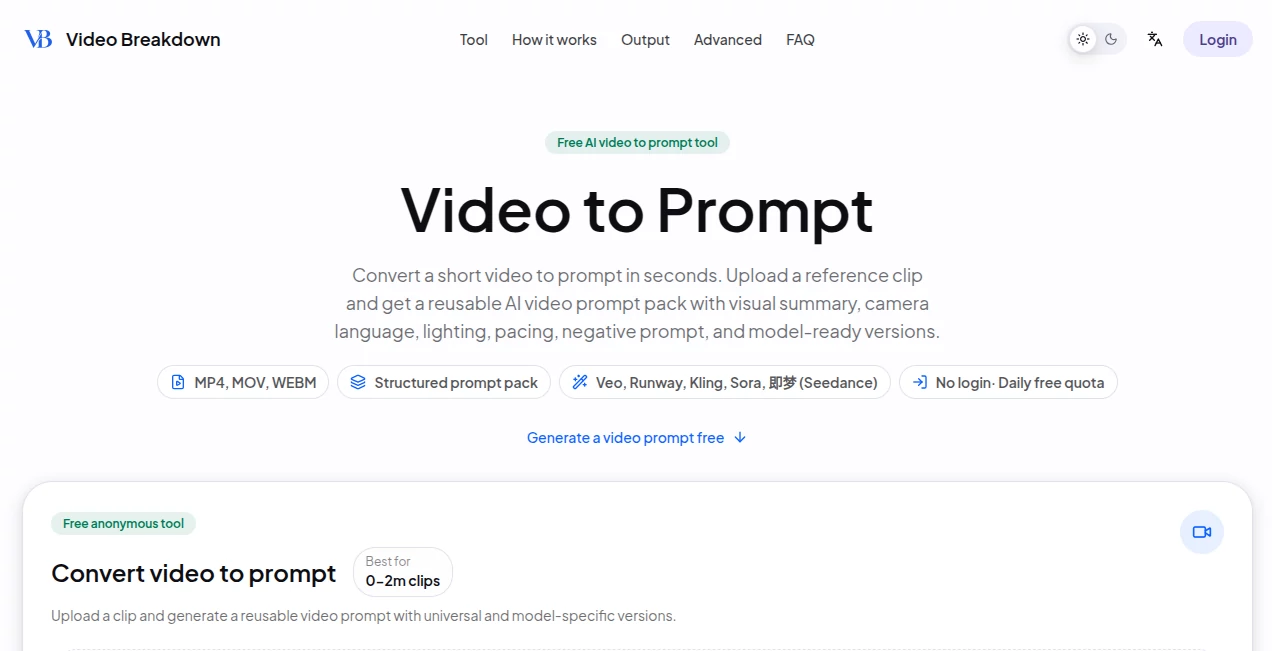
Video Breakdown is a free AI video-to-prompt tool designed for creators who want to turn a short reference clip into a structured prompt they can reuse with AI video generators. Instead of repeatedly pausing a video, taking screenshots, and trying to describe camera movement or lighting from memory, users can upload a short clip and receive a prompt pack covering the visual summary, camera language, lighting, pacing, negative prompt, and recommended settings.
The workflow is particularly useful when a creator has found a video with a visual style worth recreating or adapting. The service supports MP4, MOV, and WEBM files, and the free workflow accepts clips of up to two minutes. It also provides prompt versions tailored for platforms such as Veo, Runway, Kling, Sora, and Seedance.
Key Features
- Convert short reference videos into reusable AI video prompts.
- Generate universal prompts alongside model-specific versions.
- Extract visual details such as subject, action, setting, camera, lighting, style, mood, and pacing.
- Create structured storyboard prompts with shot duration, shot type, visual details, sound, and transitions.
- Generate negative prompts and recommended generation settings.
- Support for MP4, MOV, and WEBM uploads.
- No login is required for the free workflow.
- Support for multiple AI video generation platforms, including Veo, Runway, Kling, Sora, and Seedance.
User Interface
The interface keeps the process straightforward. Users can drag and drop a reference clip or choose a video file, select their target prompt version, and generate the result. There is little unnecessary setup, which makes the tool approachable even for someone who does not regularly work with prompt engineering.
The generated result is organized into sections rather than appearing as one large block of text. A user can review the video description, summary, universal prompt, platform-specific prompts, storyboard information, and recommended settings before copying the part they need.
Accuracy & Performance
The main advantage of the workflow is that it works from the actual video rather than relying on a written description supplied by the user. The analysis is designed to identify elements such as the subject, movement, camera language, lighting, visual style, and pacing, giving creators a more useful starting point for recreating a visual concept.
For short clips, the process is designed to be quick. The website presents the workflow as roughly a 30-second process for uploading a clip, generating the prompt pack, and copying the desired version. Results should still be treated as a creative starting point rather than a guarantee that another AI video model will reproduce every detail of the reference exactly.
Capabilities
The strongest capability is turning visual information into language that can be reused in an AI video workflow. For example, a cinematic reference can be broken down into camera movement, lighting mood, subject action, pacing, and visual treatment instead of simply receiving a generic description.
The storyboard output goes further by organizing a sequence into individual shots. It can describe shot type, duration, scene, camera movement, color tone, visual action, sound, transition, and an accompanying prompt. This makes the output useful for creators who want more control than a single paragraph can provide.
The platform-specific versions are another practical touch. A creator can start with the universal prompt and then use a version formatted for a particular generation platform, reducing the amount of manual rewriting required before testing an idea.
Security & Privacy
The free workflow does not require users to create an account. According to the site's workflow description, the browser uploads a selected video directly to storage through a signed URL before the AI analysis takes place. Users should still review the service's current privacy policy before uploading confidential, copyrighted, or commercially sensitive material.
Use Cases
Short-form video creators can use the tool to study the structure and visual language of clips they want to use as references for TikTok, Reels, Shorts, and other social content. Rather than manually documenting every camera move or visual transition, they can turn the reference into editable prompt material.
Marketing teams can also benefit from the workflow. Product demonstrations, advertisements, and branded videos often contain specific combinations of camera movement, lighting, product positioning, and pacing. Converting those characteristics into prompts can make it easier to explore new creative directions.
For e-commerce creators, the tool can help analyze product showcases and extract details about the subject, materials, camera movement, lighting, and rhythm. Those observations can then become a starting point for creating new product-focused video concepts.
It can also be useful for filmmakers, editors, educators, and researchers who need to document the visual structure of a short reference clip. A course segment, interview excerpt, cinematic scene, or archived asset can be converted into a more searchable and editable textual structure.
Pros and Cons
- Pros: Free workflow, no account required, supports common video formats, structured prompt output, multiple model-specific versions, storyboard-style breakdowns, and recommended settings.
- Pros: Saves time compared with manually pausing, screenshotting, and describing reference footage.
- Pros: Useful for both creative experimentation and practical production workflows.
- Cons: The free workflow is limited to short clips of up to two minutes.
- Cons: AI-generated prompts may still need creative adjustment to achieve a precise visual match.
- Cons: Advanced long-video analysis and export features are presented as an upcoming paid workflow rather than part of the current free experience.
Pricing Plans
The basic video-to-prompt workflow is available for free, with no login required and a daily free quota. Free users can analyze short clips up to two minutes and receive universal and platform-specific prompt versions.
The site also describes an Advanced workflow that is intended for longer videos. This upcoming option is planned to include ordered shot records, per-shot prompts, saved jobs, higher processing priority, and exports in formats such as JSON, Markdown, or CSV. The pricing for the Advanced workflow is not currently presented as an active paid plan, so users should check the service for the latest availability and pricing.
How to Use Video Breakdown
- Prepare a short reference video in MP4, MOV, or WEBM format.
- Open the video-to-prompt workflow and upload the clip.
- Choose the target prompt version, such as Veo, Runway, Kling, Sora, or Seedance.
- Start the analysis and wait for the structured prompt pack to be generated.
- Review the video summary, universal prompt, platform-specific prompt, and prompt anatomy.
- Use the storyboard and recommended settings when you need more detailed control over the generated result.
- Copy the most suitable prompt into your preferred AI video generation platform and refine it according to your creative goal.
Comparison with Similar Tools
Many AI tools can summarize a video, but that is not necessarily the same task as converting a reference video into a production-oriented prompt. The main focus here is reverse-engineering visual characteristics into reusable prompt language.
Compared with a manual breakdown, the process is considerably more convenient because users do not have to repeatedly pause the footage, capture frames, record camera details, and reorganize their notes. Compared with asking a general AI assistant to work from a written description, the workflow starts from the reference clip itself, allowing the resulting prompt to include more concrete visual information.
Its model-specific prompt options also make the output more practical for creators who move between different AI video generators. Instead of treating the result as a generic description, users can select a version intended for the platform they plan to use.
Conclusion
For creators who regularly work with AI-generated video, turning a good reference clip into usable prompt language can be surprisingly time-consuming. This tool addresses that specific problem with a focused workflow: upload a short video, analyze its visual characteristics, and receive a structured collection of prompts that can be copied and refined.
The combination of universal prompts, platform-specific versions, storyboard information, and recommended settings makes it more useful than a basic video summarizer. The free two-minute workflow is particularly appealing for quick experiments, social-media references, product concepts, and cinematic studies. While the output will often benefit from human refinement, it provides a solid creative starting point without requiring users to manually document every detail of a reference clip.
Frequently Asked Questions (FAQ)
What is a video-to-prompt tool?
A video-to-prompt tool analyzes a reference video and converts its visual characteristics into written prompts that can be reused with AI video generation systems.
What video formats are supported?
The free workflow supports MP4, MOV, and WEBM video files.
How long can a free video be?
The free workflow supports videos up to two minutes long.
Do I need to create an account?
No. The free workflow is designed to work without requiring a login.
Which AI video models are supported?
The prompt workflow provides versions for Veo, Runway, Kling, Sora, and Seedance, alongside a universal prompt option.
Does it generate the final video?
No. Its purpose is to analyze a reference clip and create reusable prompts. The generated prompts can then be used with an AI video generation platform.
Can it create a shot-by-shot breakdown?
Yes. The generated storyboard prompt can organize a reference into shots with information such as duration, shot type, scene, camera movement, visual details, sound, transitions, and prompts.
Is the tool useful for marketing videos?
Yes. Product demonstrations, advertisements, social-media videos, and other marketing references can be converted into structured visual prompts that can serve as a starting point for new creative concepts.
Can long videos be analyzed?
The current free workflow is intended for short clips. The site describes an upcoming Advanced workflow for full long-video breakdowns with ordered shot records, per-shot prompts, and export options.
Can the generated prompts be edited?
Yes. The prompts are intended to be copied and refined, allowing creators to adjust subjects, visual style, camera movement, pacing, settings, or other creative details before generating a new video.