
FacelessGenie
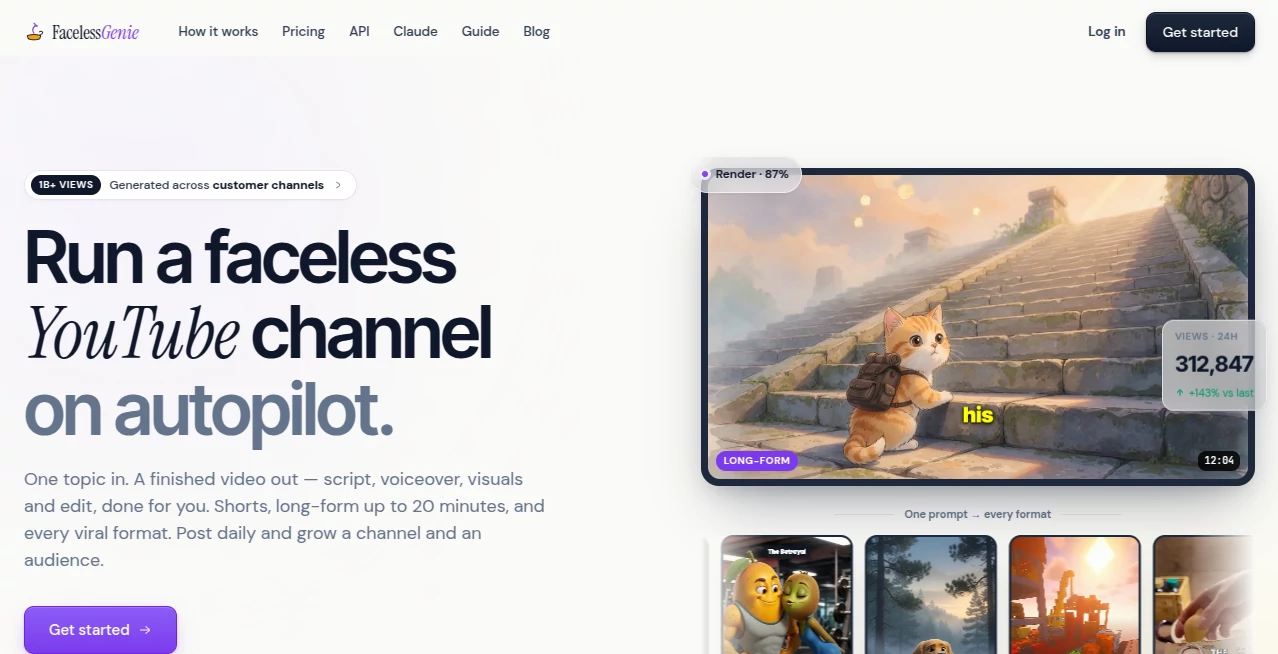
What is FacelessGenie?
Creating engaging videos consistently is one of the biggest challenges for content creators. Producing scripts, recording voiceovers, finding visuals, editing clips, and publishing on multiple platforms often requires hours of work for every single upload. This platform changes that workflow by turning a simple idea into a complete video in just a few minutes.
Designed for creators, marketers, agencies, and entrepreneurs, the platform automates nearly every step of video production. A single prompt becomes a polished video with AI-generated scripts, natural voiceovers, visuals, captions, background music, and final editing. Whether the goal is growing a YouTube channel, publishing TikTok videos, or creating Instagram Reels, users can produce content without appearing on camera or hiring an editing team.
Another standout advantage is its ability to generate both short-form content and documentary-style videos up to 20 minutes long. Instead of juggling multiple AI tools, everything happens inside one workspace, making daily publishing much more realistic for solo creators and growing businesses.
Key Features
User Interface
The interface focuses on simplicity. Users choose a video format, enter a topic, and let the system build the project automatically. Every generated scene remains editable, allowing creators to rewrite scripts, regenerate visuals, replace voices, customize captions, or adjust branding before exporting the final video.
Accuracy & Performance
The platform combines AI writing, image generation, voice synthesis, captions, and video editing into one streamlined workflow. Rendering is fast, while the structured content generation helps maintain logical storytelling from introduction to conclusion. Support for HD exports and multiple publishing formats further improves production efficiency.
Capabilities
- Generate complete AI videos from a single topic.
- Create YouTube Shorts, TikTok videos, Instagram Reels, and long-form YouTube content.
- Automatically write scripts and generate realistic AI voiceovers.
- Create visuals, animations, captions, and background music.
- Produce videos up to 20 minutes long.
- Convert articles, blogs, PDFs, Reddit posts, tweets, and YouTube links into videos.
- Create reaction videos, gameplay videos, explainers, narrated stories, AI podcasts, music videos, kids' rhymes, and more.
- Generate recurring AI characters with consistent visual styles.
- Schedule automated daily video creation through Auto Mode.
- Support API integrations and workflow automation.
Security & Privacy
The service operates through secure cloud infrastructure and allows users to manage projects within their own account. API connectivity and workflow integrations are available for businesses looking to automate large-scale video production while maintaining centralized project management.
Use Cases
- Growing faceless YouTube channels.
- Publishing daily YouTube Shorts.
- Creating TikTok and Instagram Reels.
- Automating educational video production.
- Repurposing blog articles into engaging videos.
- Turning PDFs into narrated visual content.
- Creating documentary-style YouTube videos.
- Producing AI podcast clips.
- Generating children's educational videos.
- Supporting marketing agencies with scalable video creation.
Pros and Cons
Pros
- Complete end-to-end AI video generation.
- Supports both short-form and long-form content.
- No camera or editing experience required.
- Large variety of viral video templates.
- Powerful editing tools after generation.
- Automatic captions and voiceovers included.
- Content repurposing from multiple source formats.
- Automation mode for recurring video production.
- API support for developers and businesses.
Cons
- No permanently free production plan for high-volume creators.
- Advanced automation features require premium subscriptions.
- Heavy AI video rendering may consume monthly credits quickly.
Pricing Plans
The platform offers subscription-based pricing with monthly credits.
- Starter: Includes 20,000 monthly credits, AI video generation, premium voices, one automation worker, and HD exports.
- Growth: Adds 35,000 monthly credits, premium AI models, multiple automation workers, API access, and faster rendering.
- Pro: Designed for studios and professional creators with 70,000+ credits, advanced AI models, priority rendering, extensive automation, and premium support.
How to Use FacelessGenie
Begin by selecting a preferred video format such as Shorts, documentary videos, gameplay clips, reaction videos, or AI podcasts. Enter a topic or upload existing content like an article, PDF, or YouTube link. The AI automatically generates a complete script, narration, visuals, captions, music, and editing timeline.
Before exporting, users can customize scenes, regenerate visuals, modify captions, swap AI voices, and fine-tune branding elements. Once satisfied, export the finished HD video and publish it across YouTube, TikTok, Instagram, or other supported platforms. Users who want hands-free publishing can enable automated daily video generation through Auto Mode.
Comparison with Similar Tools
Unlike many AI video generators that only convert text into short clips, this platform provides a complete production pipeline. It combines scriptwriting, narration, scene creation, editing, branding, captions, automation, and publishing preparation inside one workspace.
Its support for long-form YouTube videos, automated content repurposing, recurring AI characters, workflow automation, and daily scheduled generation makes it particularly attractive for creators building sustainable faceless channels rather than producing occasional marketing videos.
Conclusion
Building a successful video channel normally demands creativity, editing expertise, and significant time investment. This platform dramatically reduces that workload by automating every major production stage while still giving creators full control over the final result.
For anyone planning to publish consistently across YouTube, TikTok, or Instagram, it offers an impressive combination of AI writing, voice generation, visual creation, editing, automation, and content repurposing. The ability to create professional-quality videos from a single prompt makes it a practical solution for creators looking to scale their content output without expanding their production team.
Frequently Asked Questions (FAQ)
Can beginners create videos without editing experience?
Yes. The platform is designed to automate scripting, voiceovers, visuals, captions, and editing, making it accessible even for first-time creators.
Does it support long-form YouTube videos?
Yes. Users can generate documentary-style videos up to 20 minutes in addition to short-form vertical content.
Can existing articles or PDFs be converted into videos?
Yes. Articles, PDFs, blogs, YouTube links, Reddit posts, and social media threads can all be transformed into complete AI-generated videos.
Is automatic daily video generation available?
Yes. Auto Mode can generate and prepare videos on a recurring schedule without manual intervention.
Does the platform provide API access?
Yes. Higher-tier plans include API connectivity and workflow integrations for developers and businesses.
AI YouTube Assistant , AI Video Generator , AI Short Clips Generator , AI Text to Video .
These classifications represent its core capabilities and areas of application. For related tools, explore the linked categories above.

FacelessGenie Alternatives Product

Seedance 2.0

Seedance 2.5…

Getforge.stu…

Sora-2.co

HappyHorse A…

JoyFlix AI

seedance 2

Faceless vid…

wan2-6.org