


















fal Agent
What is fal Agent?
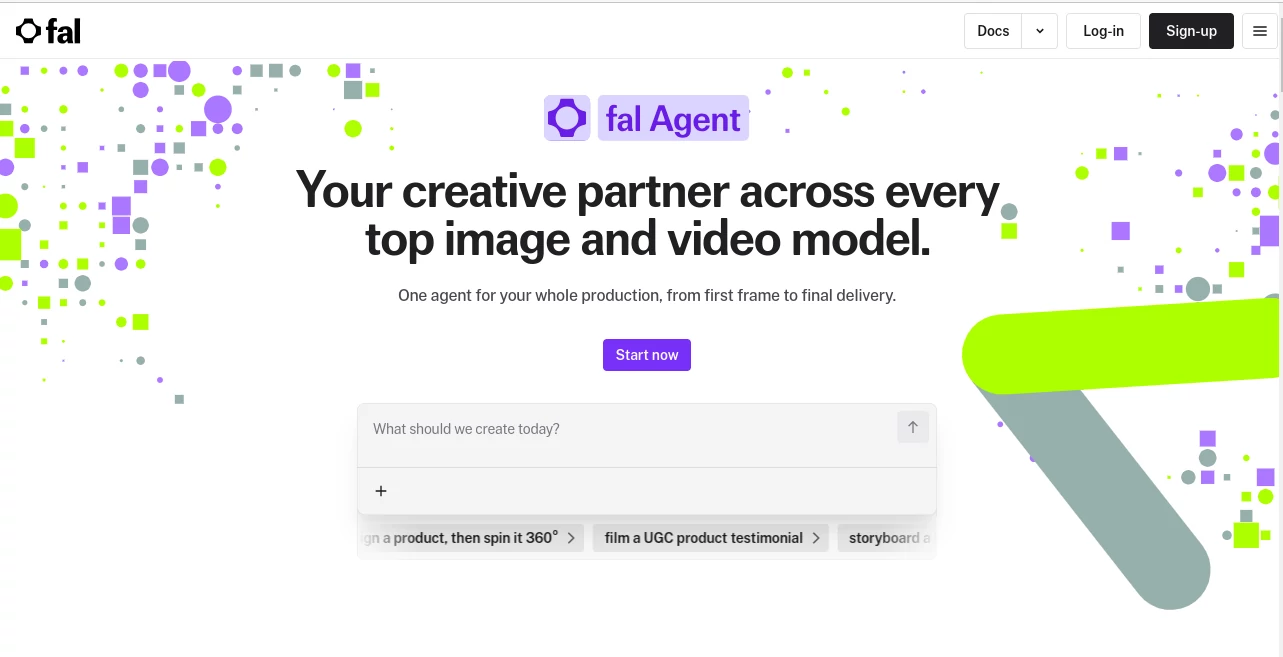
fal Agent brings a different approach to generative media creation. Instead of jumping between separate image, video, and 3D tools, creators can describe what they want and let a single creative agent coordinate the production process. It is designed around complete projects rather than isolated prompts, making it particularly useful when a campaign requires multiple assets that need to look like they belong together.
The platform can work with image, video, and 3D generation in the same session. More importantly, it keeps references, decisions, and previous iterations connected to the project. That makes a noticeable difference for creative work where consistency matters. A product campaign, for example, can begin with a reference image and continue through multiple scenes without rebuilding the visual direction from scratch every time.
For creators, marketers, designers, and production teams who regularly experiment with several generative models, this approach can save a considerable amount of back-and-forth. The experience feels closer to working with a creative production partner than simply entering prompts into individual generators.
Key Features
- Work with image, video, and 3D generation in one session.
- Persistent project memory keeps references, decisions, and rejected versions connected.
- Consistent characters, objects, and visual styles can be maintained across iterations.
- Built-in creative skills provide structured workflows for common production tasks.
- Custom skills can be added to follow specific creative or brand requirements.
- The system can select suitable models based on the requested output.
- Projects can be shared across workspaces for collaborative production.
- Queue and batch workflows can help when production volume increases.
- Multiple creative workflows can be managed at the same time.
- Enterprise users can apply model access and budget controls.
User Interface
The interface is centered around a conversational project workflow. Rather than forcing users to configure every generation manually, the creative brief can be described in natural language. Examples include creating a paid-social campaign, developing a product from different angles, building a UGC concept, or producing a sequence of cinematic scenes.
The project-based structure is especially useful for longer assignments. References and previous decisions remain attached to the project, so returning to an earlier campaign does not mean starting from an empty workspace. For someone working on several visual concepts at once, that organization can make the creative process much easier to manage.
Accuracy & Performance
Performance depends on the underlying models selected for each generation, but the platform is built around access to a large collection of production-ready generative media models. Its wider infrastructure supports image, video, audio, and 3D workloads, allowing creators to work across different media without maintaining separate technical setups.
Consistency is one of the stronger parts of the experience. Characters and objects can be locked and reused across scenes, while references remain connected to the project instead of being buried inside individual prompts. This is useful when a campaign requires the same product, character, wardrobe, or visual treatment to appear repeatedly.
Capabilities
The creative workflow goes beyond simple text-to-image generation. A still image can be transformed into motion, an image can be developed into a 3D asset, and multiple creative steps can be combined into a larger production task. The system can also work through multi-step assignments where several models are involved.
This makes it suitable for projects such as advertising campaigns, product visualization, character development, storyboards, social media content, cinematic concepts, and branded visual collections. A particularly useful scenario is when the desired result requires several different generations but all of them need to share the same visual identity.
Security & Privacy
Project-based separation helps keep creative work organized, while enterprise features provide additional control over model access and spending. Enterprise teams can manage which models their users are allowed to access and establish spending limits through their agreements.
Organizations evaluating the platform for professional production should still review the current terms, privacy documentation, and enterprise agreements to understand how their specific content and account data are handled.
Use Cases
- Advertising: Create coordinated image and video assets for paid social campaigns.
- Product Marketing: Develop product shots, alternate angles, lifestyle scenes, and promotional visuals.
- UGC Production: Plan and generate concepts for product testimonials and social-first content.
- Character Development: Maintain a recognizable character across poses, scenes, and animations.
- Fashion Campaigns: Build consistent visual directions across multiple campaign assets.
- YouTube Content: Develop attention-grabbing thumbnails and supporting visual material.
- Creative Prototyping: Quickly test visual ideas before investing in traditional production.
- Brand Campaigns: Keep products, colors, references, and creative direction consistent across a collection of assets.
Pros and Cons
Pros
- Combines multiple creative modalities in one workflow.
- Persistent project memory is useful for long-running campaigns.
- Strong focus on character, object, and style consistency.
- Access to a broad selection of generative models.
- Useful for both individual creators and production teams.
- Supports complex multi-step creative workflows.
Cons
- The subscription price may be high for casual users.
- Generation costs can vary depending on the models and outputs used.
- Users looking for a single-purpose image generator may find the workflow more extensive than necessary.
- Some programmatic capabilities are still listed as coming soon.
Pricing Plans
The available paid plans are built around monthly credits that can also be used across the broader platform. The Pro plan costs $200 per month and includes $200 in monthly credits, along with a 5% discount on eligible UI, Sandbox, Playground, and CLI usage.
The Max plan costs $1,000 per month and includes $1,000 in monthly credits plus a 10% discount on eligible UI, Sandbox, Playground, and CLI usage. Credits roll over each month and are used before pay-as-you-go rates.
Enterprise customers receive access with custom monthly credit volumes and custom discount rates. The underlying platform also uses usage-based pricing for many model APIs, so the final cost of a production workflow can depend on the models and amount of media generated.
How to Use fal Agent
- Create or access your account and add the required credits or subscription.
- Start a new creative project and describe the result you want to produce.
- Upload relevant references when consistency with an existing product, person, character, or visual style is important.
- Explain the creative direction, output format, number of assets, and other requirements.
- Review the generated results and continue refining the project through the same session.
- Reuse locked characters, objects, and references when creating additional scenes.
- For larger campaigns, organize multiple workflows and collaborate through a shared workspace.
Comparison with Similar Tools
Many generative media platforms specialize in one area, such as image generation, video creation, or animation. This solution takes a broader approach by connecting several modalities within a project-oriented workflow. That distinction becomes important when a task moves from a single image into a sequence of related assets.
It is particularly appealing to users who already work with multiple generative models and want a more unified production experience. Instead of manually deciding which model to use for every stage, the creative agent can select an appropriate model for the requested output while keeping the wider project context available.
For a simple one-off image, a dedicated image generator may be faster to understand. For a campaign involving product images, animation, 3D assets, multiple iterations, and consistent characters, the broader workflow can be considerably more practical.
Conclusion
For anyone treating generative AI as part of a real creative workflow rather than a collection of isolated experiments, this platform offers an impressive way to connect the pieces. Its biggest advantage is not simply the number of models available, but the way projects, references, creative instructions, and multiple media types can work together.
The persistent context and consistency features are especially valuable for commercial work. A creator can move from an initial idea to a collection of related images, video scenes, or 3D assets without repeatedly explaining the entire creative direction. That makes it a compelling option for marketers, designers, agencies, and production teams looking to make generative media more organized and scalable.
Frequently Asked Questions (FAQ)
What can I create with fal Agent?
You can use it for image, video, and 3D creative projects, including advertising campaigns, product visuals, character development, UGC concepts, storyboards, thumbnails, and other multi-step media workflows.
Does it support multiple AI models?
Yes. The platform is built around access to a large catalog of generative models and can select suitable models for different creative outputs.
Can it keep a character consistent?
Yes. Characters and objects can be locked and reused across scenes, helping maintain their appearance through different generations and iterations.
How much does it cost?
The Pro plan is $200 per month with $200 in monthly credits, while the Max plan is $1,000 per month with $1,000 in credits. Enterprise pricing is customized.
Is it useful for marketing teams?
Yes. Its project memory, shared workspaces, consistent asset generation, and multi-step creative workflows make it well suited to campaign production and recurring marketing content.
AI Photo & Image Generator , AI Image to Video , AI Video Generator , AI Text to Image .
These classifications represent its core capabilities and areas of application. For related tools, explore the linked categories above.

fal Agent Alternatives Product

hd image con…

Generador De…

Seedance2 Vi…

meta ai image

SellerPic

Happy Horse

Nano Banana 2

Nano banana …
Kynelio
