
















hd image converter
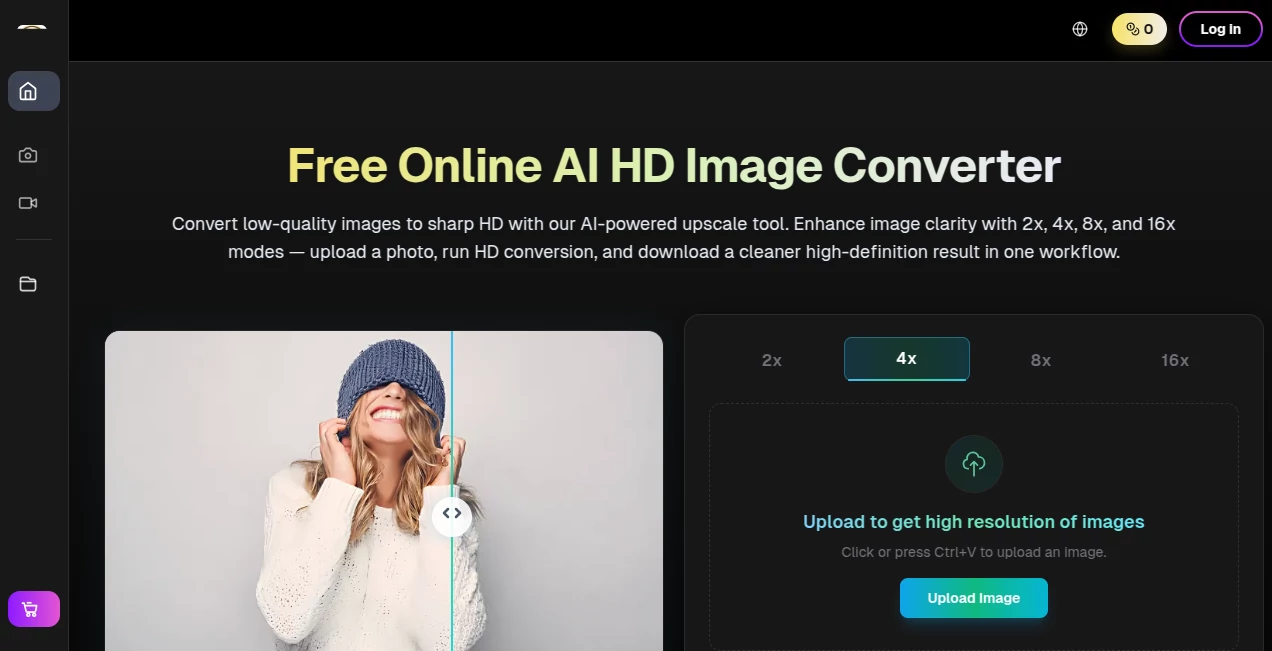
What is hd image converter?
Let’s be real for a second. You’ve got this one image – maybe it’s a product shot for your online store, an old travel memory, or a banner for a social campaign. But it looks… soft. Blurry around the edges. The kind of blurry that makes people scroll past without a second look. Frustrating, right?
Now, imagine feeding that same image into a smart system that actually rebuilds the details. Not just stretching the pixels like a cheap zoom, but genuinely putting back the sharpness where it belongs. That’s exactly what this online tool does. It takes your low-quality visuals and hands you back a crisper, cleaner version – often at 2x, 4x, or even 16x the original resolution. No complicated software to install. No steep learning curve. Just upload, let the AI do its thing, and download your upgraded file.
I’ve tested quite a few so-called “enhancers” that promised magic but delivered plastic-looking garbage. This one surprised me. The textures actually look natural, and the colors don’t end up weirdly oversaturated. If you run a small business, create content for social media, or just want your personal photos to look presentable on a big screen, you’re going to like what this brings to the table.
Key Features
Where does this tool really shine? Let’s break it down into the bits that actually matter when you’re racing against a deadline or trying to keep your brand visuals consistent.
User Interface
You know those tools where you have to watch three YouTube tutorials before you even figure out where to upload a file? This isn’t one of them. The dashboard is refreshingly minimal. You land on the page, see a big area where you can click or just paste an image straight from your clipboard (Ctrl+V works like a charm), and that’s it. No pop-ups begging you to create an account first. No endless settings panels to confuse you. For anyone who’s ever felt lost inside Photoshop or GIMP, this feels like a breath of fresh air.
Accuracy & Performance
Here’s where most free converters fall apart. They either add weird halos around objects or turn faces into waxy masks. This tool takes a different approach. It actually analyses edges, textures, color shifts, and the usual damage caused by JPEG compression. Then it rebuilds the missing information carefully. I threw a grainy, low-res portrait at it – the kind taken on an old phone in bad lighting – and the result kept the skin looking like skin, not plastic. The hair strands were still visible. That level of accuracy is rare for a web-based tool that doesn't cost a fortune.
Capabilities
You’re not locked into just one type of upscaling. You can push the conversion to 2x for a gentle touch, or go all the way to 16x if you need a massive billboard-ready asset. The batch processing feature (available on paid plans) is a game-changer for anyone handling dozens of product photos at once. On top of plain upscaling, there are extra controls to balance sharpness, clean up noise, and refine the overall style. Do you need a soft portrait look or a punchy, high-contrast output for ads? You get to decide. And if you ever need more than just upscaling, the same platform offers text-to-image, image-to-image editing, and even image-to-video generation – all in one ecosystem.
Security & Privacy
Nobody wants their private photos or unreleased product shots floating around on some random server. The platform uses encrypted channels for uploads and downloads. While no online tool is 100% risk-free if you’re handling highly sensitive material, the team here has set up proper access controls and secure transport. You can use the free tier for basic testing without worrying that your grandma’s birthday photo will end up somewhere weird. For business users, the paid plans add an extra layer of priority handling and support.
Use Cases
So who actually needs this on a regular Tuesday? Pretty much anyone who touches digital visuals. A freelance fashion photographer I know uses it to rescue client proofs that were shot with less-than-ideal lighting. An Etsy seller running a sticker shop throws all her hand-drawn designs through the converter before printing, because the 4x upscale keeps the lines razor-sharp. Social media managers love it for turning old meme-worthy screenshots into clean posts. Even real estate agents have jumped on board – those dark, blurry phone pics of a cozy living room suddenly look bright and inviting after a quick AI pass. And because batch mode exists, you’re not stuck doing one image at a time when the boss drops 50 files on your desk at 4 PM on a Friday.
Pros and Cons
Pros:
- Genuinely improves clarity without turning images into a waxy mess.
- Supports up to 16x upscaling, which is almost unheard of for a free-tier tool.
- The interface is so simple that your non-techy coworker could use it.
- Batch processing saves hours when you have multiple files.
- A solid free plan (6 images per day) lets you test the quality before committing.
- Extra creative tools like text-to-image and image-to-video are available under the same roof.
Cons:
- The free tier is limited to 6 conversions daily – casual users are fine, but heavy creators will need a subscription.
- No tool can fully resurrect details that never existed in the source file; garbage in, decent-but-not-magical out.
- You’ll need a paid plan for the fastest processing speeds, especially during peak hours.
Pricing Plans
The tool keeps things straightforward. There’s a Free option that gives you 6 image chances per day. Perfect for trying it out or handling light, occasional work. If you need more, the Pro plan (billed annually at $4.99/month) includes 2,000 conversions per month, batch processing, and priority speed. The Pro Unlimited tier at $35/month removes all caps – unlimited conversions every month, plus 60,000 yearly credits for other AI features. For large teams or agencies, the Max Unlimited plan offers enterprise access, API integration, and shared credits. There are also one-time credit packs (starting at $29.90) if you don’t want a recurring subscription. Fair warning: the annual discounts are significant (up to 60% off), so if you know you’ll use it often, that’s the smarter route.
How to Use HD Image Converter
You’ll be done before your coffee gets cold. First, head to the website and look for the main upload area. Click or simply press Ctrl+V to paste an image from your clipboard. Second, pick your target resolution – 2x, 4x, 8x, or 16x – and choose the general use case (product photo, social graphic, print mockup, etc.). This helps the AI understand what to focus on. Third, hit the convert button and wait a few seconds (the free tier uses standard speed, paid plans get priority processing). Fourth, review the output. You can tweak sharpness and noise reduction if needed. Finally, download your HD image. That’s it. No account required for the first test runs, but creating one lets you track your history and manage batch jobs.
Comparison with Similar Tools
Compared to giants like Topaz Gigapixel, this tool is web-based and infinitely easier to start with – no hefty software download, no $100 upfront fee. It also beats most free online converters (like many generic “image upscaler” sites) because it actually recovers realistic texture instead of just guessing blurry pixels. Where it might fall slightly behind desktop software is in fine-grained manual controls. But for 95% of everyday tasks – product listings, social posts, quick enhancements – it’s more than enough. The extra features (text-to-image, image-to-video) give it an edge over single-purpose upscalers. If you’re a casual creator or a busy small business owner, the trade-off is well worth it.
Conclusion
You don’t need a degree in graphic design or a $600 software subscription to make your images look sharp again. This tool proves that by combining genuine AI smarts with a dead-simple workflow. The free tier is generous enough to earn your trust. If you find yourself using it daily (and many people do once they see the results), the paid plans are fairly priced, especially with the yearly discount. Stop wrestling with blurry photos or trying to explain to your boss why “there’s nothing we can do about the quality.” Go ahead, upload that old image, and see the difference for yourself. It works, and it works fast.
Frequently Asked Questions (FAQ)
What exactly does an HD image converter do?
It takes a low-resolution or compressed image and rebuilds missing details to make it sharper and clearer, suitable for modern screens and print.
Is there a free version?
Yes. The free plan gives you 6 conversions per day. Great for testing and light personal use.
Which image formats are supported?
JPG, PNG, and WebP are the baseline. HEIC and other common formats are also accepted on most workflows.
Can I use this for commercial projects (like product photos for my store)?
Absolutely. The output files are yours to use wherever you want – no hidden licensing tricks.
How is this different from just increasing the size in MS Paint?
Paint just stretches pixels, which causes blur. This tool actually reconstructs edges and textures for a natural, sharp result.
Does it work with faces? Will people look weird?
It’s surprisingly good with portraits. Skin stays natural, and there’s no plastic “filter face” effect if you don’t overdo the sharpness slider.
Can I process more than one image at a time?
Yes, batch processing is available on the Pro plan and above. A massive time-saver.
What’s the maximum upscale level?
Up to 16x the original resolution, but for most web uses, 2x or 4x is plenty.
Is my data safe?
Uploads and downloads are encrypted. For highly sensitive images, always be cautious with any online tool, but the security here follows standard industry practices.