

















What is Find Image Prompt?
Turning a visual idea into the right AI prompt is often harder than it looks. You may know exactly what you like about an image—the lighting, composition, colors, atmosphere, or camera angle—but describing all of those details clearly can take time. FindImagePrompt makes that process much easier by turning visual references and rough ideas into practical prompts for image generation.
The platform is built as a creative toolkit rather than a single-purpose generator. You can start with an existing image, a simple text idea, or a visual question, then move toward a polished prompt and even generate an image from it. That makes the workflow useful for designers, marketers, photographers, artists, and anyone experimenting with AI-generated visuals.
Key Features
- Convert reference images into detailed AI image prompts.
- Generate prompts from simple text ideas.
- Describe images and identify visual elements, atmosphere, objects, and style.
- Choose between general, detailed, structured, graphic-design, and JSON prompt formats.
- Select a target image model and language before generating a prompt.
- Generate images directly from finished prompts.
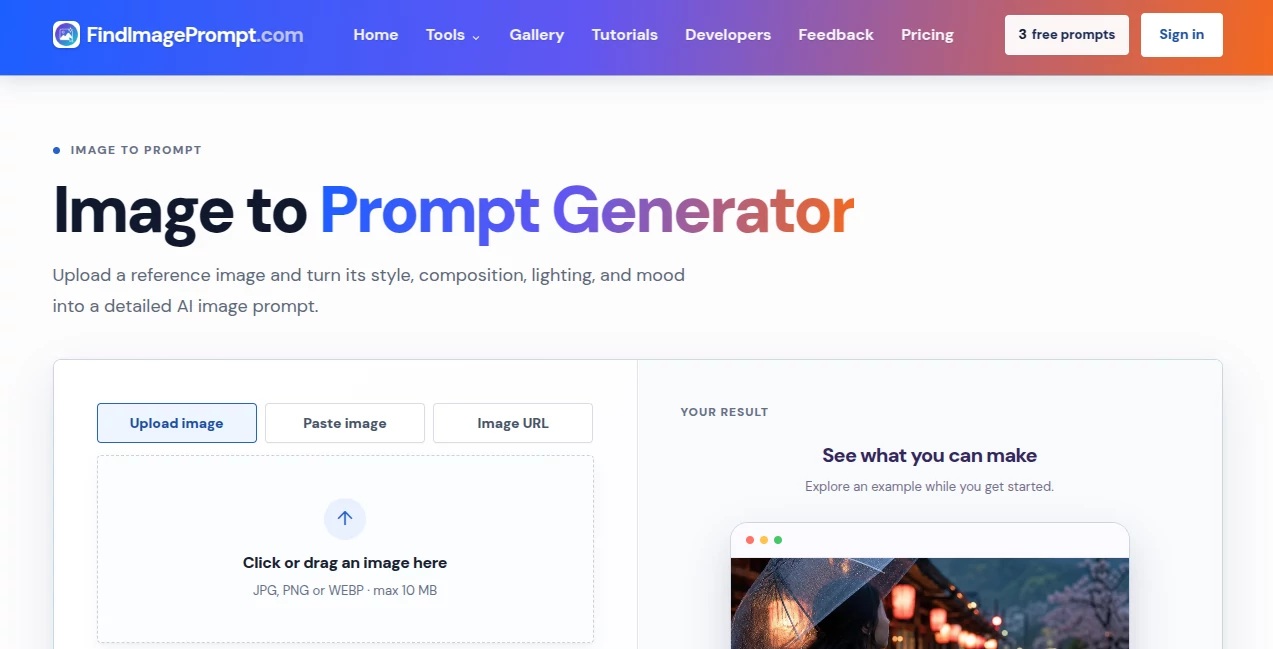
- Support JPG, PNG, and WEBP reference images up to 10 MB.
- Use image URLs or paste images directly instead of uploading a local file.
- Explore a gallery of creative visual references and prompt ideas.
User Interface
The interface is deliberately straightforward. The main image-to-prompt workflow gives you several ways to add a reference, including uploading an image, pasting one from the clipboard, or entering an image URL. After that, you can choose the type of prompt you want and select the target model and language.
This makes the experience feel more like a creative workspace than a complicated AI dashboard. Someone trying image prompting for the first time can understand the basic workflow quickly, while experienced users have enough control to produce structured or model-aware results.
Accuracy & Performance
The strongest part of the experience is its attention to visual details. Instead of simply identifying the main subject, the image-to-prompt workflow can interpret elements such as framing, viewpoint, lighting, depth, textures, dominant colors, materials, atmosphere, and overall visual direction.
That distinction matters. A prompt such as “a red chair in a room” leaves an image model with plenty of room to guess. A more useful description can specify the position of the chair, the quality of light, the surrounding materials, the camera perspective, and the intended mood.
Prompt and image-description requests are designed to return within a few seconds, while image generation may take longer depending on the selected model and current demand. The result can then be edited rather than treated as a final, untouchable instruction.
Capabilities
The platform covers several stages of an AI image workflow. Image-to-prompt functionality is particularly useful when you have a reference but cannot easily explain why it works visually. The image describer can focus on subjects, objects, people, style, text, or broader visual characteristics.
There is also a text-to-prompt workflow for expanding a rough idea into more specific creative direction. Once the prompt is ready, the image generator can be used to test the concept and see whether the wording produces the desired result.
For more technical workflows, structured and JSON outputs can make individual elements easier to edit or pass into another system. The ability to select a target model is also helpful when the same creative concept needs to be adapted for different image-generation environments.
Security & Privacy
Privacy is an important consideration whenever users upload personal or commercially sensitive images. The platform states that an uploaded image is used to create the requested result and provides a low-friction workflow without requiring an account for an initial creative session.
Users working with confidential client material should still review the current privacy terms before uploading sensitive assets. For ordinary creative references, the simple upload-and-generate workflow keeps the process focused and avoids unnecessary account setup.
Use Cases
Designers can use the platform to study the visual decisions behind an image and turn them into an editable creative brief. Instead of merely saying that a reference “looks premium,” they can identify its composition, material treatment, color palette, lighting, and photographic style.
Photographers can use it when planning concepts or exploring alternative visual directions. A reference can be translated into useful language around framing, light, atmosphere, and lens-like characteristics before a shoot or AI experiment.
Marketing teams can also benefit from the workflow. For example, a campaign team might have a product photograph with a particular color palette and editorial feel. The generated prompt can become a starting point for creating new scenes while changing the product, environment, or message.
Artists and content creators can use the tool for mood boards, concept development, social media imagery, illustrations, and creative experiments. It is especially useful when the visual idea is clear but the wording is not.
Pros and Cons
Pros:
- Strong focus on image-to-prompt workflows.
- Multiple prompt output formats for different creative needs.
- Supports image uploads, pasted images, and image URLs.
- Useful image description and visual analysis options.
- Includes a built-in image generation workflow.
- Target-model selection helps adapt prompts to different workflows.
- No sign-up is required for the initial creative experience.
- Commercial licensing is included with paid credit plans.
Cons:
- Credit usage can become important for users who generate many images.
- Image generation costs substantially more credits than prompt generation.
- Results still depend on the quality and clarity of the reference image.
- Generated prompts may require manual editing for highly specific professional projects.
Pricing Plans
The pricing system uses a single pool of creative credits rather than separate balances for different features. A prompt costs 1 credit, while image generation costs 10 credits, allowing users to decide how they want to spend their monthly allowance.
The Starter Monthly plan costs $9.90 per month and includes 500 creative credits. The annual Starter option costs $79.90 per year and provides the same monthly credit allowance while offering an annual discount.
The Pro Monthly plan costs $19.90 per month and includes 1,500 creative credits. The annual Pro option costs $169.90 per year and also provides 1,500 credits per month with annual savings.
Paid plans include features such as no watermark and a commercial licence, while subscriptions can be cancelled at any time. The practical value of each plan depends on whether you primarily create prompts or regularly generate images.
How to Use the Tool
- Choose an image, idea, or visual reference that you want to develop.
- For image-to-prompt work, upload a JPG, PNG, or WEBP image, paste an image, or provide a direct image URL.
- Select the desired prompt format, such as general, detailed, structured, graphic design, or JSON.
- Choose the language and target image model when appropriate.
- Generate the prompt and review the visual details it identifies.
- Edit the parts that you want to change, such as the subject, setting, palette, lighting, composition, or style.
- Use the finished prompt in an image generator or test it with the built-in image-generation workflow.
Comparison with Similar Tools
Image-to-prompt tools generally fall into a few different categories. Basic image captioning focuses on quickly explaining what appears in a picture. Built-in “describe” features inside image-generation platforms may provide a useful starting point, but they are often tied to that specific ecosystem.
Manual prompt writing gives creators the most direct control, but it also requires more time and a good understanding of visual language. This platform sits between those approaches by turning a reference into an editable creative direction while also offering different output structures and model-aware options.
That makes it particularly appealing when the goal is not simply to describe an image, but to understand the visual decisions behind it and reuse those ideas in a new creative project.
Conclusion
A good image prompt does more than name the objects in a scene. It communicates what should attract attention, how the image should feel, where the light comes from, how the composition is organized, and which visual qualities are worth preserving.
This toolkit handles that translation surprisingly well. Its combination of image-to-prompt conversion, image description, text-to-prompt generation, structured outputs, and image generation gives creators a practical path from inspiration to execution.
It is not intended to replace creative judgment—and that is one of its strengths. The best results come when users treat the generated prompt as a starting point, keep the details that matter, remove what does not, and then make the concept their own.
Frequently Asked Questions (FAQ)
What does the tool do?
It helps turn images and ideas into clear AI image prompts. It can analyze a reference image, create a detailed description, develop a prompt, and generate an image from a finished direction.
Which image formats are supported?
JPG, PNG, and WEBP images are supported, with a maximum upload size of 10 MB. Users can also paste an image or provide a direct image URL.
Can I create a prompt from an existing image?
Yes. Upload or paste a reference image, select the desired output format, and generate an editable prompt based on the visual characteristics of the reference.
Can the generated prompt be edited?
Yes. The prompt is designed as editable creative direction. You can change the subject, setting, colors, lighting, composition, materials, or other details before using it with an image model.
Which image models can use the prompts?
The workflow supports selecting a target model, with options designed for modern image-generation systems such as Nano Banana, GPT Image, Flux, Midjourney, and Stable Diffusion.
Do I need an account to try it?
No. The initial creative experience is designed so users can try the workflow without signing up.
How much does image generation cost?
Image generation costs 10 creative credits per image, while generating a prompt costs 1 credit.
Is there a free plan?
The current pricing structure focuses on paid monthly and annual credit plans. The paid plans provide monthly creative credits, with Starter and Pro options available.
Can the prompts be used commercially?
Paid plans include a commercial licence and no watermark, making them suitable for users who want to incorporate the generated creative work into commercial projects.
Is it useful for professional designers?
Yes. Designers, art directors, photographers, marketers, product storytellers, and other creative professionals can use it to turn visual references into clearer briefs and reusable image-generation directions.