


















Firecrawl Monitor
What is Firecrawl Monitor?
Keeping track of websites sounds simple until the list grows. A pricing page changes, a competitor publishes a new product, documentation gets updated, or a company quietly adds a new job opening. Checking those pages manually is repetitive, while a basic polling script can waste resources by repeatedly processing pages that have not changed.
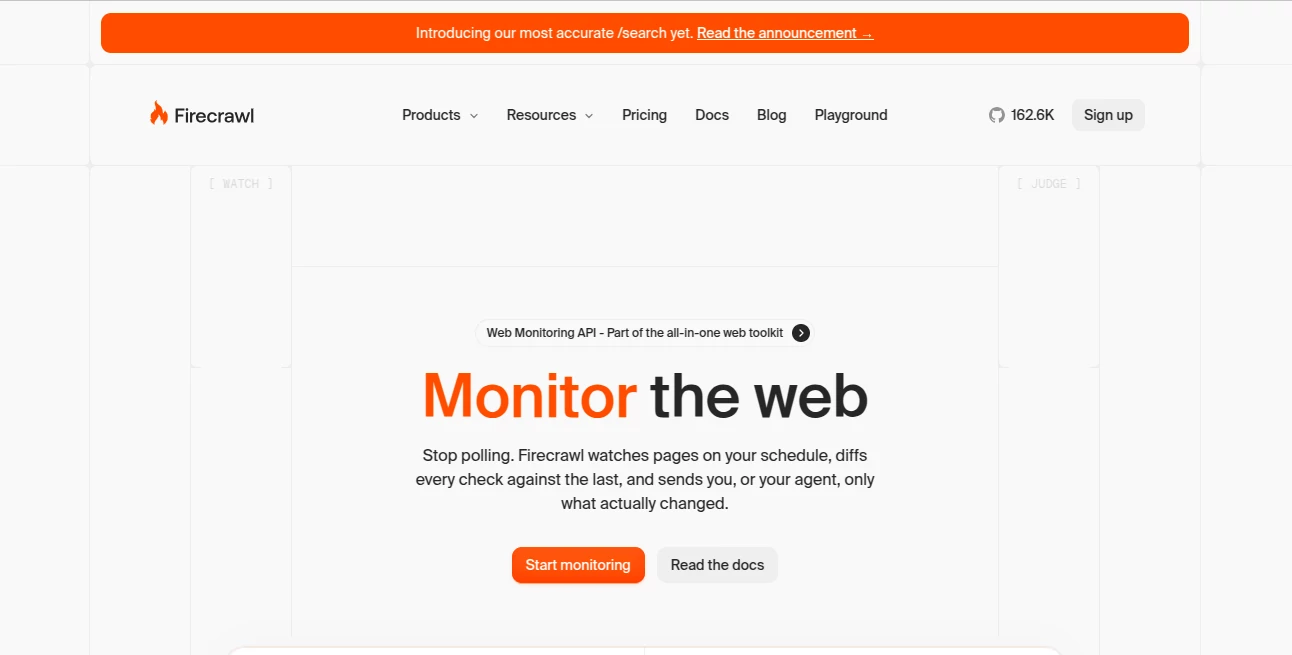
Firecrawl Monitor takes a more practical approach. It watches web pages, groups of URLs, entire sites, or even search results on a schedule and focuses on what is actually different. Instead of sending an entire page to an application every time, it can return a structured diff showing what was added, removed, or changed.
One of the most useful ideas here is the ability to describe a monitoring goal in plain English. For example, a team could ask to be alerted when a competitor changes its pricing rather than receiving notifications for every small alteration on the page. The system can then use its AI judgment layer to filter changes that are unlikely to matter.
This makes the service particularly interesting for developers building AI agents, data pipelines, research systems, competitive intelligence workflows, and applications that need fresh web information without constantly polling the same pages.
Key Features
- Scheduled monitoring for individual pages, URL batches, and entire websites.
- Web-wide monitoring based on search queries rather than predefined URLs.
- Automatic change detection with structured diffs.
- Plain-English monitoring goals for filtering relevant changes.
- AI-based judgment to reduce irrelevant alerts.
- Webhook delivery for connecting changes directly to applications and AI agents.
- Email notifications for teams that prefer a simpler alerting workflow.
- Support for monitoring specific structured fields instead of an entire page.
- Deterministic JSON extraction for consistent field-level comparisons.
- Include and exclude paths when monitoring larger websites.
- Support for Python, Node.js, cURL, and CLI workflows.
- Permalinks for individual changes, making results easier to share or process.
User Interface
The interface is designed around the monitoring workflow rather than unnecessary configuration. A user can define what should be watched, choose how frequently it should be checked, and specify the kind of change that matters.
For developers, the dashboard is only one part of the experience. Monitoring jobs can also be created through an API, SDKs, or the command-line interface. This is especially useful when monitoring is part of a larger application rather than a standalone task.
The overall setup feels closer to configuring an automated event source than setting up another traditional website tracker. That distinction becomes valuable once multiple pages or automated agents are involved.
Accuracy & Performance
The strongest part of the system is its focus on differences rather than repeatedly passing complete pages through a workflow. Each scheduled check can be compared with the previous state, allowing downstream applications to work with the actual change.
The AI judgment layer adds another useful filter. A small modification such as a copyright year or rotating testimonial does not necessarily deserve an alert. A meaningful pricing change, new documentation entry, or newly published job can be much more important. By defining a goal, users can tell the system what kind of change they actually care about.
The platform states that processing only changed information can reduce LLM token usage by up to 90% compared with repeatedly ingesting unchanged pages. Actual savings will depend on the monitored content and workflow, but the architecture makes the benefit particularly relevant for AI-powered applications.
Capabilities
The monitoring capabilities go beyond watching a single URL. A developer can monitor a collection of pages or crawl an entire website, with options for including or excluding specific paths. New and removed pages can also become part of the resulting events.
Another interesting option is web-wide monitoring. Instead of starting with a page that already exists, users can define a search query and a goal. This can be useful for discovering new pages, announcements, product launches, research developments, or other information that appears across the web.
For structured data, deterministic JSON provides another layer of control. Instead of comparing an entire document, a monitor can focus on fields such as a product name, price, plan, or call-to-action. This is a practical choice when the application cares about a specific value rather than general page changes.
Security & Privacy
The service is built for developer and business workflows where monitored information may eventually feed applications or AI agents. Webhook events can be delivered as signed requests, helping applications verify that incoming monitoring events are authentic.
Security requirements can vary significantly between projects, so teams should review the provider's current documentation and plan-specific security terms before using the service with sensitive information. Enterprise customers can also access additional security and support options depending on their agreement.
Use Cases
Competitor Pricing: Businesses can watch competitor pricing pages and receive an alert when a meaningful plan or price change occurs.
Documentation Monitoring: Developer teams can monitor API documentation, changelogs, and release pages so internal systems or AI agents stay aware of important updates.
RAG Freshness: Teams maintaining retrieval-augmented generation systems can use meaningful content changes as a signal that indexed information may need to be refreshed.
E-commerce Research: Product pages can be monitored for price reductions, newly available products, or other changes that matter to a purchasing or research workflow.
Job Market Tracking: Recruiting systems can watch career pages and identify newly published positions without repeatedly downloading and processing unchanged pages.
Compliance: Legal and compliance teams can track terms, policies, and other public documents where changes need to be reviewed.
AI Agents: Developers can turn web changes into events that an AI agent can consume through a webhook instead of forcing the agent to repeatedly poll websites.
Pros and Cons
Pros
- Designed specifically around meaningful web changes.
- Supports pages, websites, and web-wide search monitoring.
- Plain-English goals make filtering easier to configure.
- Structured diffs reduce unnecessary downstream processing.
- Webhook and email delivery fit different workflows.
- Useful SDK and CLI options for developers.
- Field-level structured monitoring is helpful for pricing and product data.
- Can integrate naturally with AI agents and automated pipelines.
Cons
- The monitoring endpoint requires an API key.
- Usage is credit-based, so large monitoring projects require careful planning.
- Frequent checks across many pages can consume credits quickly.
- Teams looking for a simple visual website-change tracker may find the developer-oriented approach more than they need.
- Advanced monitoring workflows may require API or webhook development.
Pricing Plans
The monitoring functionality uses the platform's credit system. Monitoring currently costs 1 credit per page per check. The broader platform offers a free tier with 1,000 credits per month, while paid plans increase the available credits and concurrency.
- Free: $0 per month with 1,000 credits.
- Hobby: $16 per month when billed yearly, with 5,000 credits.
- Standard: $83 per month when billed yearly, with 100,000 credits.
- Growth: $333 per month when billed yearly, with 500,000 credits.
- Scale: $599 per month when billed yearly, with 1,000,000 credits.
- Enterprise: Custom pricing and custom credit allocations.
Because monitoring consumes credits on each page check, the required budget depends heavily on the number of pages and monitoring frequency. A small set of important pages checked daily can be inexpensive, while hundreds of pages checked every few minutes can become a much larger workload.
How to Use the Monitoring Service
Getting started is straightforward for developers familiar with APIs or SDKs. First, create an account and obtain an API key. Monitoring can then be configured through the dashboard, Python or Node.js SDKs, the CLI, or direct API requests.
Choose the pages, site, or search queries you want to watch. Next, define a schedule such as every few minutes, hourly, daily, or another supported cadence. Add a plain-English goal when you want the system to distinguish meaningful changes from ordinary page noise.
For an automated application, configure a webhook endpoint so your system receives monitoring events. Each event can contain the relevant status, difference, and judgment information. From there, your application can store the change, send a notification, update a database, trigger an AI agent, or start another workflow.
A good starting experiment is a competitor pricing page. Monitor it once every few hours and set a goal such as detecting changes to subscription prices. This gives you a clear way to see the difference between ordinary page updates and changes that are actually useful to your business.
Comparison with Similar Tools
Traditional website monitoring services often focus on notifying users whenever a visual or textual difference is detected. That approach works well for straightforward page tracking, but it can become noisy when websites contain timestamps, rotating content, advertisements, or frequently changing interface elements.
This service takes a more developer-oriented route. Instead of treating every difference as equally important, it can combine scheduled checks, structured diffs, plain-English goals, and AI judgment. It also provides webhook-based delivery, which makes the result easier to plug into an existing application or autonomous agent.
Another distinction is the ability to monitor search results across the web. That changes the workflow from simply asking “Did this page change?” to asking “Did something new appear on the web that matches what I am looking for?” For research and discovery systems, that can be a meaningful advantage.
Conclusion
For anyone building software that depends on fresh web information, reliable change detection can save a surprising amount of engineering time. Instead of maintaining polling jobs, snapshot storage, comparison logic, filtering rules, and notification infrastructure separately, this service brings those pieces into one developer-focused workflow.
Its combination of scheduled monitoring, structured diffs, AI-powered relevance filtering, field-level extraction, and webhooks makes it particularly well suited to modern data pipelines and AI agents. It is not simply about knowing that a webpage changed; the more useful idea is knowing what changed and whether that change matters.
For developers, researchers, product teams, and businesses that need dependable signals from the constantly changing web, it offers a practical way to turn web updates into events that can immediately feed the next step of a workflow.
Frequently Asked Questions (FAQ)
What is this monitoring service?
It is a web monitoring system that checks pages, websites, or search queries on a schedule and sends information about meaningful changes through webhooks or email.
Can it monitor an entire website?
Yes. Monitoring can be configured for a single URL, multiple URLs, or an entire site through crawling, with options to include or exclude paths.
Can I monitor specific fields instead of a complete page?
Yes. Deterministic JSON allows developers to define structured fields such as prices, plan names, or other values they want to track.
Can it send changes to an AI agent?
Yes. Monitoring events can be delivered through webhooks, making it possible to connect changes directly to an AI agent or another automated application.
How often can websites be checked?
Monitoring supports scheduled checks ranging from frequent intervals to hourly and daily schedules, as well as custom cron-style scheduling for suitable workflows.
How much does monitoring cost?
Monitoring uses 1 credit per page per check. The platform has a free tier with 1,000 credits per month, followed by paid plans with larger credit allocations.
Does it only monitor existing URLs?
No. Web-wide monitoring can use search queries to discover new results that match a defined goal, making it useful for tracking information that does not yet have a known URL.
Is an API key required?
Yes. The monitoring endpoint requires an API key, and it can be used through the API, SDKs, CLI, or dashboard.
AI Web Scraping , AI Workflow Management , AI Developer Tools , AI Monitor & Report Builder .
These classifications represent its core capabilities and areas of application. For related tools, explore the linked categories above.
Firecrawl Monitor details
Website unavailable — View Alternatives
Pricing
- Free
Apps
- Web App
Categories

Firecrawl Monitor Alternatives Product

AI Agent Ski…
MyToolster W…

GLM 5

Lovable APP

Velokey

LocaFlow

Agent Grid

Motion

Sourcetable
