
















What is Flico.art?
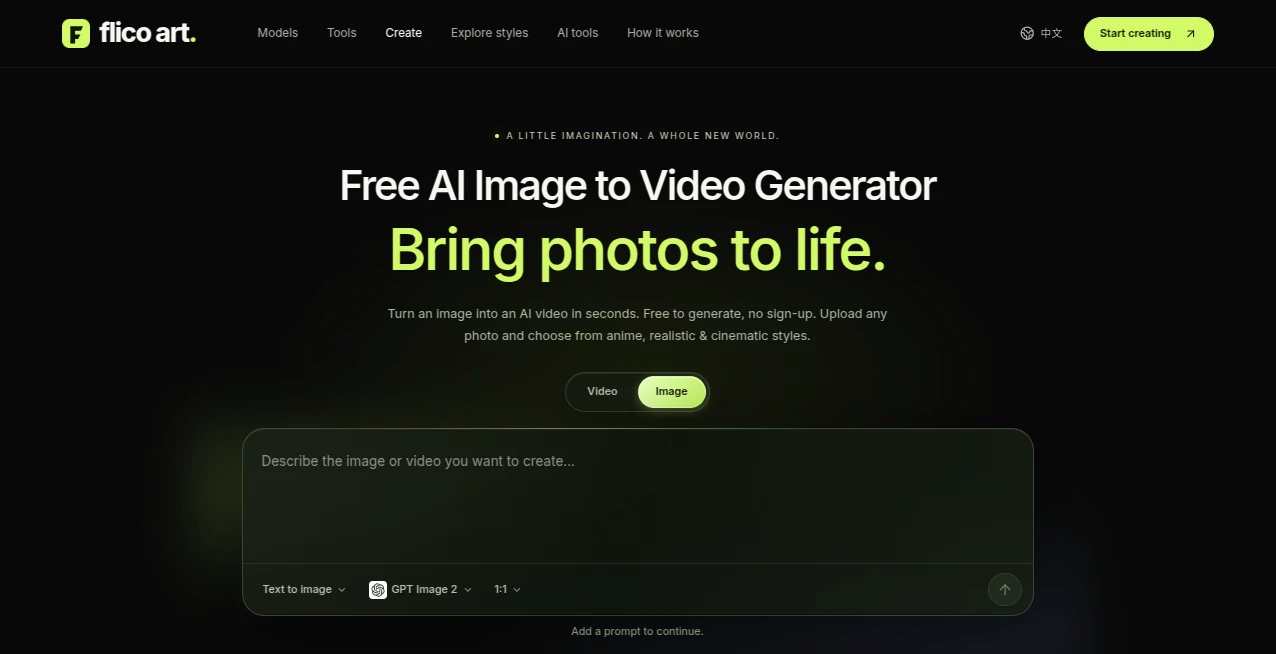
Flico.art is a creative AI platform built for turning simple ideas and existing images into engaging visual content. Its main experience focuses on bringing still images to life, while also offering text-to-video, text-to-image, and image-to-image workflows in the same creative environment.
What makes the platform particularly approachable is the straightforward way it handles image animation. Instead of dealing with timelines, keyframes, or complicated animation software, users can upload an image, describe the movement they want, choose a visual style, and let the generation process handle the rest.
For creators working with portraits, product photography, illustrations, social media content, or visual concepts, this provides a practical way to experiment with motion without having a traditional video-production workflow.
Key Features
User Interface
The interface is designed around a simple creative workflow. Users can start with an existing image or begin with a text prompt, then select the appropriate generation method. The image-to-video workflow keeps the main controls focused on the source image, visual style, and motion instructions.
The process is especially easy to understand for someone who has never worked with animation software. Instead of learning a complicated editor, the user mainly needs to describe what should move and how the camera should behave.
Accuracy & Performance
Results depend on the selected generation model, source image, prompt, and output settings. The platform recommends starting with a sharp image, an uncluttered background, and enough space around the main subject. These details can give the system a stronger visual starting point.
Motion prompts can also be kept simple. For example, a creator might ask for a character to turn toward the camera while the camera slowly moves backward. Keeping the action focused helps avoid competing movements within the same scene.
Generation time varies according to factors such as the selected model, video duration, resolution, and provider queue, so users should not expect every generation to finish at exactly the same speed.
Capabilities
- AI image-to-video generation from existing photos and illustrations
- Text-to-video generation for creating scenes from written descriptions
- Text-to-image generation for creating original visual starting points
- Image-to-image generation for changing or reinterpreting an existing image
- Anime, realistic, and cinematic visual styles
- Support for JPG, PNG, and WebP source images up to 10 MB for the image-to-video workflow
- Motion prompts for directing subject movement and camera behavior
- Creative workflows for portraits, products, illustrations, landscapes, and social media clips
- Ability to review generation settings and applicable credit costs before submitting a task
- Downloadable completed creations
Security & Privacy
Users should only upload images they have permission to process. This is particularly important when working with photographs of other people, copyrighted material, or commercial assets.
Commercial use is not automatically guaranteed for every generated result. The applicable rights can depend on the source material, the selected model, third-party terms, and other licensing conditions. Users planning to publish or monetize generated content should review the relevant terms and make sure they have the necessary permissions.
Use Cases
One of the strongest use cases is turning ordinary photographs into short visual clips. A portrait can be given subtle movement, a product image can become a gentle promotional shot, and an illustration can be transformed into a more dynamic scene.
Social media creators can use the workflow to experiment with short-form visual content without building an animation from scratch. A vertical composition can be prepared for a social clip, while wider compositions can be used when a more cinematic presentation is desired.
Product marketers can also benefit from small, controlled movements. A slow camera orbit or reveal can make a product image feel more dynamic while keeping the main object clearly visible.
Illustrators and character designers can use the image-to-image and image-to-video workflows together. For example, an original character can first be created or refined as an image and then used as the visual foundation for an animated scene.
Pros and Cons
- Pros: Simple workflow that does not require traditional animation skills
- Pros: Multiple creative generation modes in one platform
- Pros: Anime, realistic, and cinematic style options
- Pros: Supports common JPG, PNG, and WebP image formats
- Pros: Useful for portraits, products, illustrations, and social media content
- Pros: Motion prompts provide direct control over the intended movement
- Cons: Generation speed can vary depending on the model and provider queue
- Cons: Output quality can depend heavily on the source image and prompt
- Cons: Credit requirements vary according to the selected model and settings
- Cons: Commercial usage requires attention to source material, model terms, and third-party rights
Pricing Plans
The platform uses a credit-based generation system. The number of credits required is not identical for every creation because it depends on the selected model and output settings. Before submitting a generation, users can review the applicable credit cost.
The service also promotes free access for trying its image-to-video experience, although available trial allowances and free-generation eligibility can vary. Some generation workflows may require signing in, while browsing the creative tools does not necessarily require an account.
This approach can be useful for occasional creators because the cost is connected to actual generation activity rather than requiring every user to commit to a fixed production workflow.
How to Use
Start by choosing the type of creation you want to make. If you already have a photograph or illustration, the image-to-video workflow is a natural starting point. If you are beginning with an idea rather than an image, text-to-video or text-to-image can be more appropriate.
- Upload a JPG, PNG, or WebP image when working from an existing visual.
- Choose a visual direction such as Anime, Realistic, or Cinematic.
- Write a short motion prompt describing what should move and how the camera should behave.
- Review the selected model, prompt, and applicable credit cost.
- Submit the generation and wait for the task to complete.
- Review the result and refine the motion prompt if the movement needs adjustment.
- Download the completed creation when the result matches your intended direction.
A useful approach is to change only one instruction at a time when refining a result. This makes it easier to understand which prompt change improved the motion and which one caused an unwanted effect.
Comparison with Similar Tools
Many AI creative platforms concentrate on only one part of the generation process, such as text-to-image or video generation. This platform takes a broader creative approach by connecting several workflows around the same visual starting point.
For someone who already has an image, the image-to-video workflow can be more practical than starting a video entirely from text. The original visual appearance remains an important reference, while the motion prompt focuses on movement and camera behavior.
On the other hand, creators who need advanced timeline editing, detailed keyframe control, professional color correction, or a full post-production environment may still prefer conventional video-editing software after generating their initial material.
Conclusion
This platform offers a straightforward way to explore what can happen when a static image becomes a moving scene. Its strongest appeal is the low-friction workflow: upload an image, describe a simple movement, choose a style, and generate.
It is particularly interesting for creators who want animated portraits, product visuals, illustrated scenes, or short social media clips without spending time learning traditional animation tools. The combination of image generation, image editing, and video creation also makes it possible to develop an idea from an initial concept through to an animated result.
For anyone experimenting with AI-generated visual content, it provides a practical creative playground where even a small amount of movement can give an otherwise static image an entirely different feel.
Frequently Asked Questions (FAQ)
What can I create with this platform?
You can create AI-generated images and videos, animate existing photos or illustrations, generate scenes from text, and reinterpret images using image-to-image generation.
Can I turn a photo into a video?
Yes. The image-to-video workflow is designed specifically for turning an existing photo or illustration into a moving scene. You can select a visual style and describe the desired motion with a prompt.
Which image formats are supported?
The image-to-video workflow supports JPG, PNG, and WebP images up to 10 MB. A clear subject, good lighting, and an uncluttered composition can provide a better starting point.
Do I need animation experience?
No. The workflow is designed for users who do not have traditional animation skills. You can describe the movement with a short text instruction instead of manually creating keyframes or working with a timeline.
How should I write a motion prompt?
A good starting point is to describe the subject's action separately from the camera movement. For example, describe what the person or object should do and then explain whether the camera should move closer, pull back, pan, or remain steady.
Is video generation free?
The platform offers a free way to explore its image-to-video experience, while generation uses credits and applicable allowances can vary. The required credit amount is displayed according to the selected model and output settings.
Can I use generated content commercially?
Commercial use depends on the source material, selected model, applicable terms, and third-party rights. Anyone using generated content commercially should review the relevant terms and make sure they have permission to use all required source materials.
Can I create an image before turning it into a video?
Yes. You can use text-to-image to create a starting visual or image-to-image to modify an existing reference, then use the resulting image as the foundation for an image-to-video creation.