Folk
What is Folk?
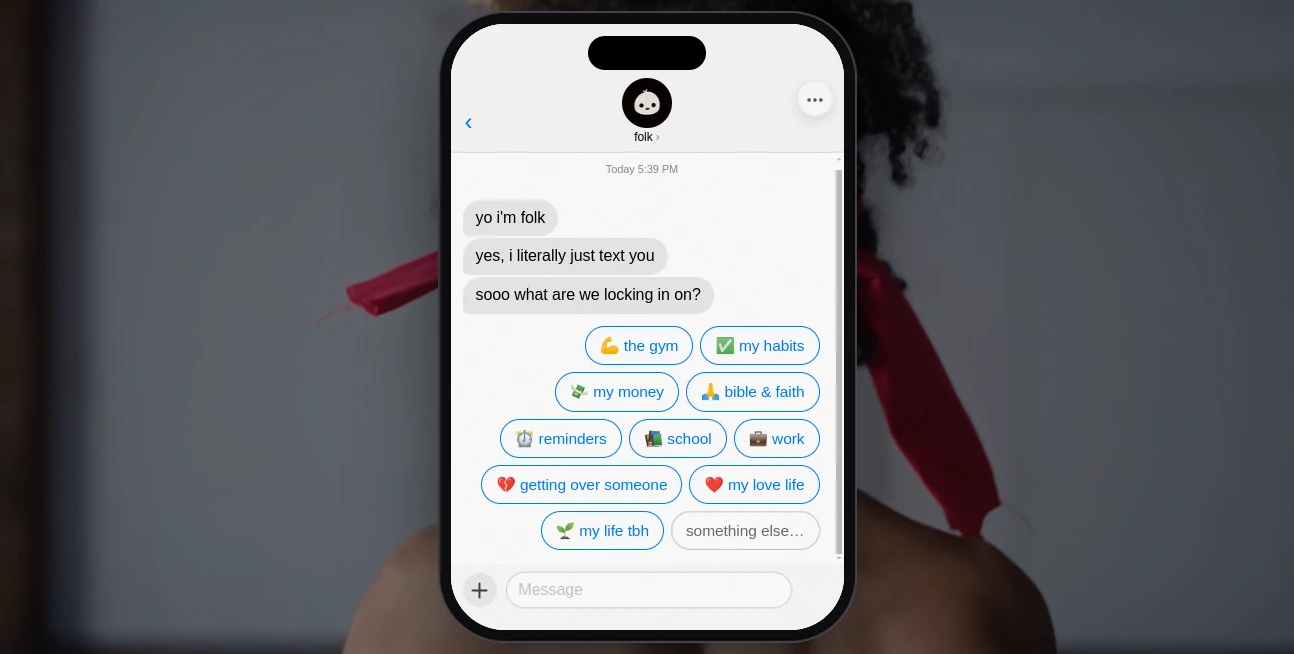
folk is a personal AI assistant designed to fit naturally into the messaging apps people already use. Instead of asking users to learn another complicated dashboard, it can be reached through iMessage, Telegram, and WhatsApp, making everyday assistance feel much closer to having a helpful contact on your phone.
The idea is refreshingly practical: tell the assistant what you need, give it access to the services you choose, and let it handle tasks that would otherwise occupy your attention. It can browse the web, work with connected services, remember useful context, manage reminders, research topics, monitor information, and even take actions on a user's behalf.
This approach makes it particularly interesting for founders, professionals, students, busy parents, travelers, and anyone who constantly moves between calendars, email, reminders, research, and personal errands. Rather than becoming another place to manage, it is designed to work in the background when needed.
Key Features
- Messaging-based AI assistant: Use the assistant directly through iMessage, Telegram, or WhatsApp without needing to learn another traditional productivity interface.
- Web research and actions: It can browse the web and perform practical actions instead of simply returning a block of text.
- Persistent memory: The assistant can remember information shared with it, making future conversations more useful and personalized.
- App connections: Users can connect external services and allow the assistant to work with information from the tools that matter to them.
- Background automation: Paid plans allow it to keep working when the user is not actively chatting, including reminders, briefings, monitoring, and recurring automations.
- Voice calls: Pro and Max plans add real phone calls, giving users another way to interact with their assistant.
- Personal apps: The built-in builder allows users to create their own lightweight applications around their needs.
User Interface
The interface is arguably one of the most appealing parts of the experience because there is very little interface to learn. Instead of opening a large workspace filled with menus and dashboards, users can simply send a message through a familiar messaging service.
This makes the experience feel conversational rather than technical. Someone might ask for help preparing for a trip, request a reminder, ask for research, or tell the assistant to watch a price. The interaction stays inside the same communication environment people already understand.
Accuracy & Performance
Performance is not limited to generating responses. The assistant is designed to use its own computer environment, browse online information, connect with authorized services, and carry out tasks requested by the user.
That distinction matters. For example, instead of merely explaining how to track a flight or monitor a price, it can be instructed to watch the relevant information and notify the user when something changes. Results should still be reviewed when a task involves important financial, legal, medical, or other high-stakes decisions.
The higher subscription tiers also provide access to more capable AI models and increased automation capacity, which is useful for people who want the assistant to handle heavier workloads.
Capabilities
The range of capabilities goes well beyond simple question answering. Users can ask for research reports, manage reminders, receive briefings, monitor websites and prices, work with email and calendars, organize personal information, and automate recurring tasks.
It can also be useful for practical situations that are difficult to fit into a conventional productivity application. A traveler could ask it to monitor a flight. A founder could use it to stay on top of an inbox and follow-ups. Someone planning an event could bring the assistant into a group conversation and ask it to help coordinate schedules or reservations.
The combination of memory, connected services, web access, and background activity is what makes the platform feel more like an ongoing assistant than a conventional chatbot.
Security & Privacy
Privacy is an important part of the product because the assistant can potentially work with personal messages and connected services. According to its published privacy information, user data is kept in a private environment isolated from other users and encrypted when stored.
The company also states that messages are not sold and are not used to train AI models. Users can review what the assistant remembers, remove individual memories, or wipe their account and associated information.
Access to external services is also based on authorization. The assistant does not automatically gain access to unrelated conversations simply because it has been added to a messaging platform.
Use Cases
- Personal productivity: Capture tasks, create reminders, organize information, and keep important details available for later.
- Founders and business owners: Stay on top of email, calendars, research, follow-ups, travel, and recurring administrative work.
- Travel planning: Research destinations, monitor flights or prices, organize plans, and receive updates when something changes.
- Students: Keep track of deadlines, schedules, research tasks, and reminders without constantly switching between applications.
- Busy professionals: Delegate repetitive research, reminders, monitoring, and preparation tasks to an assistant that remains available through messaging.
- Group planning: Add the assistant to supported group conversations and use it to coordinate schedules, plans, reservations, and shared activities.
- Personal organization: Keep useful preferences and recurring information in memory so future requests require less explanation.
Pros and Cons
Pros
- Works through familiar messaging platforms.
- Can perform actions rather than only generate answers.
- Persistent memory makes repeated interactions more useful.
- Supports web research and connected applications.
- Background automations can handle tasks while the user is away.
- Free plan is available without a subscription commitment.
- Paid plans add voice calls and more powerful models.
Cons
- Some advanced capabilities are restricted to paid plans.
- The number of connected applications and usage limits depends on the subscription.
- Users need to be comfortable granting access to selected services for deeper automation.
- Important outputs should still be checked before being used for high-stakes decisions.
Pricing Plans
The platform uses a straightforward free-to-paid model. The Free plan costs $0 and is available indefinitely without requiring a credit card. It provides access to messaging-based interaction, selected app connections, web browsing, memory, reminders, image generation, and the ability to build a personal app.
The Pro plan is listed at $20 per month, with annual billing available at a lower effective rate. It adds unlimited messaging subject to fair use, unlimited connected apps, background work, recurring automations, more advanced AI models, and 60 minutes of phone calls each month.
The Max plan is listed at $100 per month, with a discounted annual option. It includes the Pro capabilities along with the best available AI models, higher automation capacity, 150 minutes of phone calls per month, priority support, and early access to selected new features.
Annual subscriptions can provide substantial savings, while regional pricing may be available in some countries and for eligible students.
How to Use It
Getting started is intentionally simple. Create an account and choose one of the supported messaging channels. From there, send a normal message describing what you want to accomplish.
For example, instead of creating a reminder manually, you can ask the assistant to remind you about something at a specific time. For research, describe the topic and explain what kind of information you need. For ongoing monitoring, tell it what should be watched and when you want to be notified.
As you connect more services, the assistant can become more useful because it can work with information from those authorized accounts. Paid users can also take advantage of background automations, recurring reminders, briefings, monitoring, and phone calls.
Comparison with Similar Tools
Traditional productivity applications generally require users to open the right application, find the relevant section, and manually complete each step. Conventional chatbots are easier to talk to, but many are primarily focused on producing responses rather than continuously managing tasks.
This product takes a different route by combining conversational interaction with memory, web access, connected services, and the ability to perform actions. It therefore sits somewhere between a personal assistant, an automation platform, and an AI chatbot.
Its strongest advantage is the way these capabilities are brought together inside messaging applications. For someone who wants a single conversational point of contact for research, reminders, planning, monitoring, and everyday tasks, that can be considerably more convenient than maintaining several separate productivity tools.
Conclusion
A good personal assistant should reduce the amount of work you have to remember, not create another system that needs constant maintenance. That is where this approach stands out. It puts AI assistance inside familiar messaging channels and combines conversation with memory, research, connected services, automation, and real-world actions.
The free tier makes it easy to experiment without committing to a subscription, while Pro and Max provide a much more proactive experience for people who want an assistant working in the background. Whether the goal is organizing a busy schedule, keeping track of important information, handling research, or simply getting repetitive tasks out of the way, it offers a compelling alternative to traditional productivity software.
Frequently Asked Questions (FAQ)
Is there a free plan?
Yes. The Free plan is available indefinitely and does not require a credit card. It includes messaging access, selected app connections, web browsing, memory, reminders, and other basic capabilities.
Which messaging platforms are supported?
The assistant is available through iMessage, Telegram, and WhatsApp, allowing users to interact with it from devices where those messaging services are already available.
Can it work without being actively prompted?
Yes. Background capabilities on paid plans allow it to handle recurring reminders, briefings, monitoring, and automations while the user is away.
Can it make phone calls?
Yes. Phone calling is available on the paid plans, with Pro including 60 minutes per month and Max providing 150 minutes per month.
Does it remember previous conversations?
It can retain information through its memory system. Users can review and remove remembered information, and the account can be wiped when desired.
Is my information used to train AI models?
The company states that user messages are not sold and are not used to train AI models. It also describes isolated and encrypted storage for user information.
Who can benefit most from it?
It is particularly useful for people managing many small responsibilities, including founders, professionals, students, travelers, busy parents, and anyone who wants to delegate repetitive digital tasks to an AI assistant.
Can it be used in group conversations?
Yes. It can participate in supported group conversations when explicitly added, helping with activities such as planning, scheduling, and coordinating shared tasks.
Are the AI's answers always reliable?
No AI system should be treated as infallible. The assistant can browse and take actions, but important information and consequential actions should always be reviewed by the user before relying on them.
Can I cancel a paid subscription?
Yes. Paid subscriptions can be canceled from the account's billing settings, with no long-term lock-in.
AI Workflow Management , AI Life Assistant , AI Productivity Tools , AI Scheduling .
These classifications represent its core capabilities and areas of application. For related tools, explore the linked categories above.

Folk Alternatives Product

ekstrakt

mainaro

GetFIT App

Liftburst

PineBill

Grok 4

TruthSpine

SkipBait

Referent