FontDance
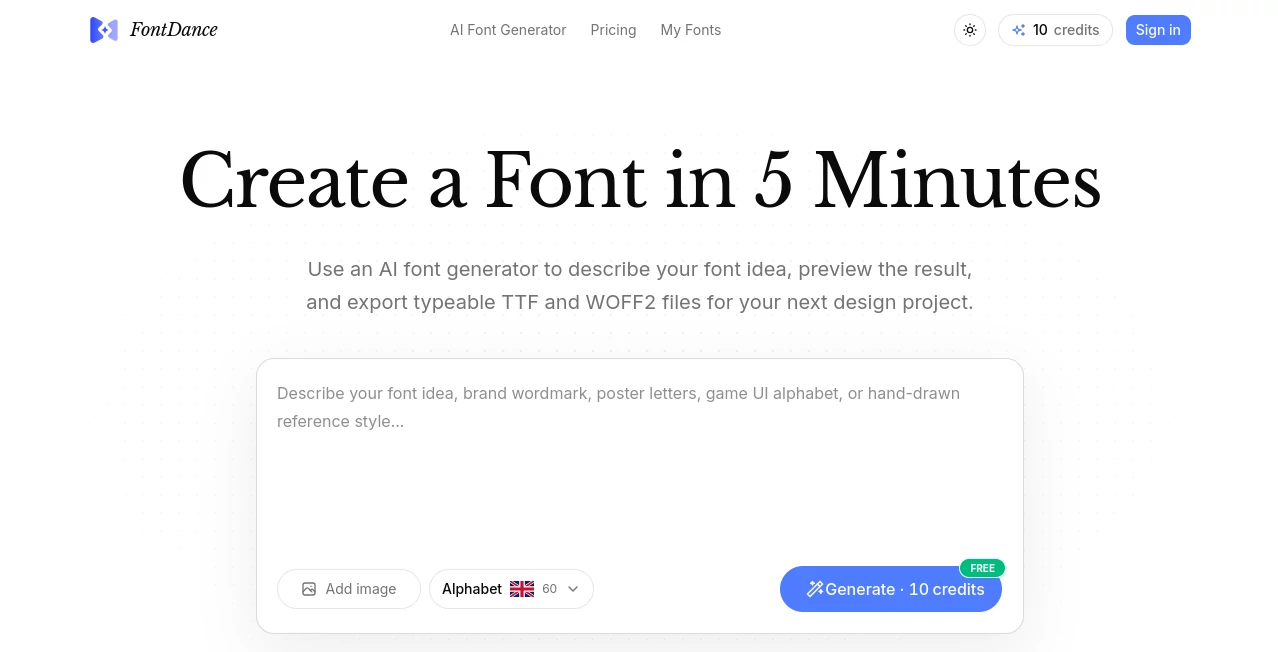
What is FontDance?
Typography is about more than just arranging letters. It's about capturing a feeling. But for a long time, the process of designing a custom typeface has felt like a distant dream for most people. It required years of training and specialized software, or a significant amount of cash to hire a professional. The introduction of this platform changes that narrative entirely. It has completely reimagined the design process, turning what was once a painstaking chore into an intuitive, almost magical, exploration. I remember trying to find the perfect font for a personal project once. I spent hours scrolling through library after library, never quite finding one that had the right "voice." This tool removes that headache. It doesn't ask you to choose from a list; it asks you to describe what you want to say .
Key Features
This platform is not just a font generator; it’s a new way of interacting with type. It gives the designer a level of control that was previously impossible, making the process surprisingly fun and rewarding.
User Interface
The interface is refreshingly minimal and approachable. You're greeted by a clean canvas where you can input a character and, more importantly, a set of descriptive keywords. Want a font that feels "elegant," "bold," or "playful"? You just type it in. The platform uses these keywords to understand the feeling you're going for. There are no confusing toolbars filled with bezier curves or point editing. It's a conversation, not a coding session. The real-time preview lets you see your vision take shape instantly, which makes the whole design process feel more like a collaboration than a task.
Accuracy & Performance
What's truly impressive is how accurately it translates your abstract ideas into concrete visual forms. The technology powering it is quite advanced, using a specialized model that processes your letter and your descriptive words independently but simultaneously, blending them together to create a cohesive result. The performance is remarkably quick. You don't have to wait for a server to churn away for minutes; the results are rendered in moments. This speed allows for rapid iteration, letting you play with different combinations of words to see how the font's "personality" shifts.
Capabilities
Beyond simple generation, its capabilities are quite extensive. It can handle a wide range of prompts, from literal concepts like "forest" to abstract concepts like "cyberpunk" or "vintage." The resulting fonts aren't just generic; they manage to capture the specific mood you're aiming for. It can also apply these styles to a full alphabet, ensuring consistency across your entire design project. Some users have even used it to create semantic logos where the letter itself becomes a visual representation of a word, like an "S" that is actually a snake .
Security & Privacy
For designers working on proprietary projects, security is often a top concern. While the specific details of its security protocols are part of its internal architecture, it's built with an understanding that your creative work is your own. The focus is on providing a secure environment where you can experiment freely without worrying about your concepts being mishandled.
Use Cases
This tool isn't just for graphic designers. It’s for anyone who needs a unique voice. A small business owner can create a custom font for their brand identity, instantly giving them a professional edge . A content creator can use it to design eye-catching thumbnails or titles that stand out. A student can generate a unique typeface for a presentation that doesn't look like it came from a default template. I even heard of a teacher who used it to create a fun, engaging font for a classroom project, and the students were fascinated to see their ideas brought to life. It's a bridge between imagination and reality.
Pros and Cons
Pros:
- Removes the technical barrier to font creation, making it accessible to everyone .
- Generates unique, expressive fonts based on natural language prompts .
- The process is incredibly fast, encouraging experimentation and creativity.
- Perfect for creating custom branding elements, logos, and social media graphics.
Cons:
- The results for specific, highly complex or niche style requests can occasionally be slightly abstract, requiring a few tweaks to the prompt.
- For professional font designers who are used to granular control over every vector point, this might feel less precise.
Pricing Plans
It typically offers a flexible range of options to suit different needs. There is usually a freemium model that allows users to test the core functionality and generate a limited number of fonts. This is perfect for getting a feel for the tool. For more serious users, there are subscription tiers that unlock unlimited generations, higher resolution outputs, and commercial usage licenses. The pricing is generally considered accessible and a great value compared to the cost of commissioning a custom typeface from a professional foundry.
How to Use FontDance
Getting started is as easy as having a conversation. You simply sign up and head to the design canvas. Start by typing in a single character, like the letter "A." Then, in the prompt box, you describe the style you have in mind. You might write: "A letter made of flower petals and vines." The tool processes this and presents you with a design. If you like the direction but want it to be more colorful, you can just ask it to "make the petals more vibrant." You can iterate like this until you get a perfect result. Once you're happy with a single letter, you can propagate that style to the entire alphabet, creating a cohesive, custom typeface that's uniquely yours .
Comparison with Similar Tools
Traditional font design software, like Glyphs or FontLab, are incredibly powerful but require a steep learning curve. They are for professionals. This platform is for everyone. When compared to other AI image generators that can be used for text effects, this tool stands out because it understands the structural requirements of a font. It doesn't just slap a texture onto a letter; it seamlessly integrates the style into the very DNA of the character . While other tools might let you create a text effect, they often struggle to maintain the legibility and consistent shape required for a whole font. This platform excels at that balance .
Conclusion
Typography is an art form, and this tool has made that art form accessible to everyone. It's a testament to how far AI has come, not just in generating images, but in understanding and interpreting human intent. Whether you're a brand owner looking for a unique identity or a creative professional wanting to push the boundaries of visual communication, this platform provides the brush and the canvas. It invites you to experiment, to play, and to create typefaces that don't just convey a message, but genuinely express a feeling.
Frequently Asked Questions (FAQ)
Do I need design experience to use this?
Not at all. The platform is designed for everyone, from complete beginners to professional designers.
Can I use these fonts commercially?
Most paid subscription tiers include a commercial license, allowing you to use the fonts in your projects.
How long does it take to generate a font?
The generation process is very fast, usually taking only a few seconds to a minute per character.
What kind of styles can I create?
You can create almost anything you can imagine. The tool excels at literal and abstract prompts, from natural materials to futuristic concepts.
Is there a free version available?
Yes, typically there is a free plan that allows you to try out the platform and create a few designs before committing to a subscription.
AI Logo Generator , AI Design Assistant , AI Art Generator , AI Font .
These classifications represent its core capabilities and areas of application. For related tools, explore the linked categories above.

FontDance Alternatives Product
GPT Image 2 …

poseup
onstyle

MakeMyOC
Color-Analys…

AI Raphael

CozAIPhoto

GPT Image 2 …

lovimg