AI Humanizer
What is AI Humanizer?
Creating content with artificial intelligence is faster than ever, but readers can often recognize when a piece feels overly structured or lacks a natural voice. This is where a modern AI text humanization platform becomes incredibly valuable. Designed to transform machine-generated content into fluent, engaging, and authentic writing, this tool helps users refine their text while preserving the original meaning.
Whether you are a student polishing an essay, a marketer improving website copy, or a blogger preparing articles for publication, the platform offers a quick way to make content sound more natural. Its clean workflow and accessibility make it suitable for anyone who wants writing that feels more personal and less mechanical.
Key Features
User Interface
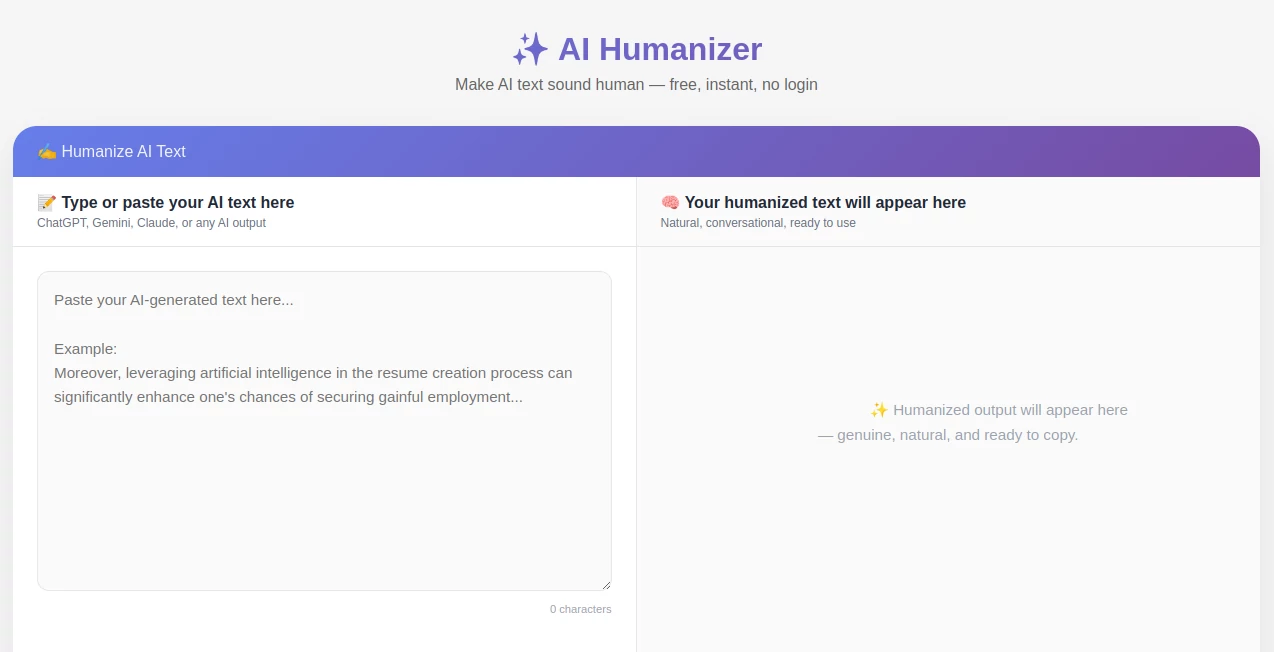
The platform offers a simple and distraction-free interface. Users can paste AI-generated text directly into the editor and receive a rewritten version within seconds. The straightforward design removes unnecessary complexity, making the process accessible even for first-time users.
Everything is arranged logically, allowing visitors to focus entirely on improving their content rather than learning complicated settings or workflows.
Accuracy & Performance
One of the most impressive aspects of the platform is its ability to maintain the original meaning of a text while improving readability and natural flow. Instead of replacing words randomly, it restructures sentences, adjusts phrasing, and introduces variations that resemble human writing patterns.
In practical use, the output feels smoother and more conversational. Long paragraphs become easier to read, and repetitive sentence structures are significantly reduced.
Capabilities
- Humanizes AI-generated content while preserving context.
- Improves readability and engagement.
- Refines sentence structure and vocabulary.
- Supports content created by popular AI writing systems.
- Helps produce writing that feels more authentic and natural.
- Useful for blogs, essays, reports, marketing materials, and emails.
The tool is especially helpful for users who want to retain the speed of AI-assisted writing while adding a more personal and professional touch.
Security & Privacy
Privacy is an important consideration whenever text is uploaded online. The platform focuses on providing a browser-based experience that minimizes friction and allows users to process content quickly without unnecessary barriers.
For professionals handling sensitive drafts, reviewing the platform's privacy policies is always recommended, but the streamlined approach contributes to a convenient and user-friendly experience.
Use Cases
The versatility of the platform makes it suitable for many different scenarios.
- Students improving AI-assisted essays and assignments.
- Bloggers refining article drafts before publishing.
- Content marketers creating more engaging website copy.
- Freelance writers enhancing readability and tone.
- Business professionals polishing reports and presentations.
- Social media managers creating more authentic posts.
- Email marketers improving communication quality.
For example, a content creator may use AI to draft a blog post quickly and then run the text through the platform to make it sound more natural and audience-friendly before publication.
Pros and Cons
Pros
- Easy-to-use interface.
- Fast text processing.
- Maintains the original message effectively.
- Improves readability and engagement.
- No advanced technical knowledge required.
- Useful across multiple writing scenarios.
Cons
- Results may still benefit from manual review for highly specialized content.
- Creative writing projects may require additional personal editing.
- Output quality can vary depending on the complexity of the original text.
Pricing Plans
A major advantage of the platform is its accessibility. Users can begin transforming content without dealing with complicated onboarding processes. This makes it particularly appealing to students, freelancers, marketers, and professionals looking for a practical solution.
Because pricing structures can evolve over time, users should review the official website for the latest information regarding available plans and usage limits.
How to Use Free AI Humanizer
Getting started is straightforward.
- Copy the AI-generated content you want to improve.
- Paste the text into the editor.
- Start the humanization process.
- Review the generated output.
- Copy and use the refined version in your project.
The entire workflow can often be completed in less than a minute, making it an efficient addition to any content creation process.
Comparison with Similar Tools
Many text humanization platforms focus only on replacing words with synonyms. This often results in awkward phrasing and reduced readability. In contrast, this platform places greater emphasis on sentence flow, structure, and natural language patterns.
Compared to traditional paraphrasing tools, the generated output typically feels more conversational and coherent. This distinction is especially important for content creators who want writing that resonates with real readers rather than appearing mechanically rewritten.
Its simplicity is another advantage. While some competitors require multiple settings and complex workflows, this platform delivers results through a streamlined experience that prioritizes speed and usability.
Conclusion
For anyone seeking a practical way to transform AI-generated content into more natural and engaging writing, this platform provides an impressive solution. It combines ease of use, strong text refinement capabilities, and a straightforward workflow that fits seamlessly into modern content creation.
Writers, students, marketers, and business professionals can all benefit from producing content that feels more authentic while preserving the ideas and information contained in the original draft. The result is writing that connects more effectively with readers and delivers a smoother reading experience.
Frequently Asked Questions (FAQ)
What does this tool do?
It transforms AI-generated text into more natural and human-like writing while maintaining the original meaning.
Who can benefit from using it?
Students, bloggers, marketers, freelancers, business professionals, and anyone working with AI-generated content.
Does it change the meaning of my content?
The goal is to preserve the original message while improving readability, sentence flow, and overall writing quality.
Can it be used for marketing content?
Yes. It is useful for blogs, landing pages, email campaigns, social media content, and other marketing materials.
Is it beginner-friendly?
Yes. The simple interface allows users to paste text, process it, and receive results without technical expertise.
AI Content Generator , AI Rewriter , AI Copywriting , AI Writing Assistants .
These classifications represent its core capabilities and areas of application. For related tools, explore the linked categories above.

AI Humanizer Alternatives Product

Ryne AI

labgen
promptcat

Sudowrite Mu…

Random Promp…

RankPeak

DocReplacer

GPT Image 2 …

Free AI Gene…