
GenApe
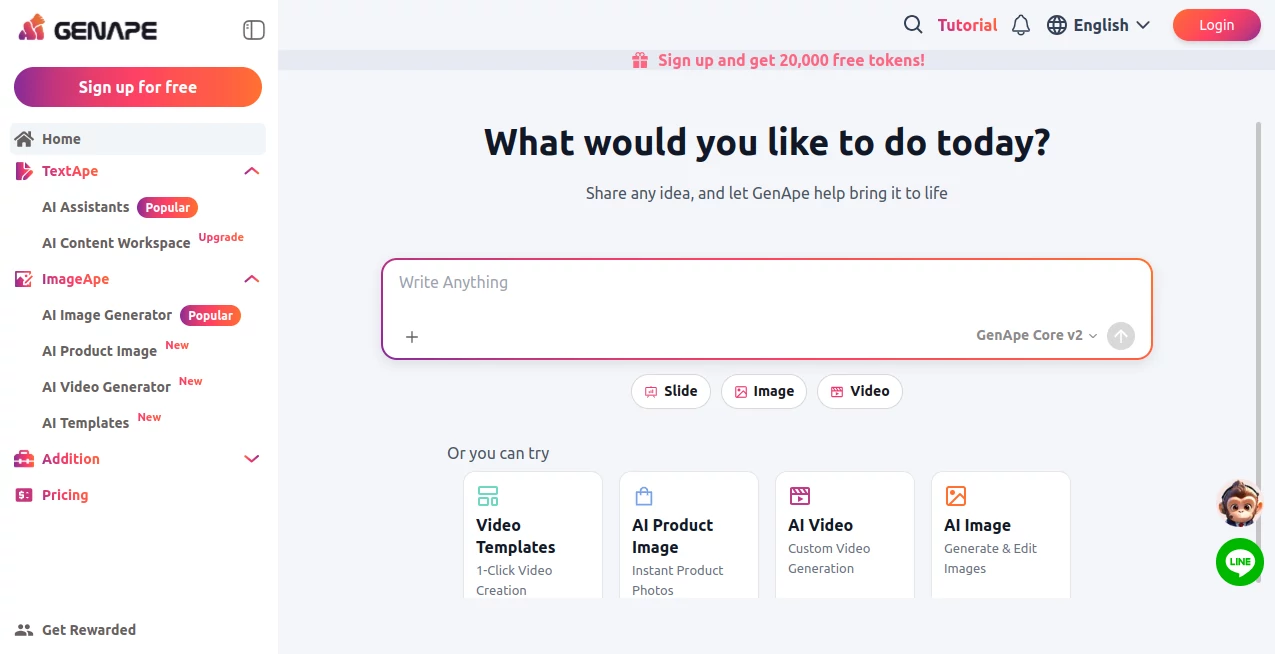
What is GenApe?
GenApe is an all-in-one AI platform designed to bring writing, image creation, video generation, research, translation, and business content workflows into one place. Instead of jumping between several specialized applications, users can work through guided AI tools that are built around practical tasks.
The platform is particularly useful for marketers, ecommerce sellers, content creators, students, researchers, agencies, and small businesses. Its approach is straightforward: choose the task, provide the necessary information, and let the appropriate AI workflow handle the heavy lifting. This makes it approachable even for people who are not comfortable writing detailed prompts.
One of the more appealing aspects is the breadth of its toolkit. The platform offers more than 70 text, image, and video tools, covering everything from SEO content and product descriptions to visual assets, short videos, research summaries, and presentation planning.
Key Features
- AI Writing Tools: Create, rewrite, expand, shorten, summarize, and polish content for blogs, SEO pages, product descriptions, emails, advertisements, social media, and business documents.
- AI Image Generation: Generate creative visuals, product images, advertising assets, and other branded imagery from simple instructions.
- AI Image Editing: Work with product visuals, background changes, image enhancement, and other image-related tasks without relying on a separate design application for every small edit.
- AI Video Generation: Create short-form video content from text or image materials for social media, marketing campaigns, product promotion, and creative projects.
- AI Research: Summarize information, organize research, translate material, and turn ideas into more structured content.
- AI Presentation Planning: Develop presentation structures and supporting ideas when starting a deck from scratch.
- Multiple AI Models: Depending on the selected feature and plan, users can access models including ChatGPT, Gemini, Claude, DeepSeek, and Seedance.
- Ready-to-Use Templates: More than 60 writing templates and guided workflows reduce the need to create complicated prompts manually.
User Interface
The interface follows a task-oriented design rather than expecting users to understand the technical side of generative AI. Text and media functions are organized into dedicated areas, while specialized assistants provide structured fields for common jobs.
This is particularly useful for someone creating several pieces of content in a row. A marketer, for example, can move from an article outline to promotional copy and then create supporting visuals without rebuilding the entire workflow elsewhere.
Accuracy & Performance
Output quality naturally depends on the selected model, prompt, source material, and type of task, so results should still be reviewed before publication. For everyday writing, rewriting, summarization, marketing copy, and creative generation, the guided workflows make it easier to reach a useful first draft quickly.
The platform also supports multiple models, giving users flexibility when a particular task benefits from a different generation approach. Selected tools can access current web information, which is helpful when working with subjects that change over time.
Capabilities
The platform covers a surprisingly wide range of practical workflows. Content teams can prepare SEO titles, meta descriptions, outlines, articles, product descriptions, advertising copy, social posts, and email campaigns. Ecommerce users can also create product visuals and descriptions without starting every task from a blank canvas.
Creative users have access to image and video generation, while researchers and students can use summarization, translation, and information-organization features. There are also conversational AI capabilities for answering questions, brainstorming, planning, and working with documents.
The built-in workspace is another useful touch because it brings text and visual production closer together. For people who regularly create marketing assets, that can remove a fair amount of unnecessary tab switching.
Security & Privacy
The platform states that it incorporates security and compliance mechanisms into its generation processes and provides privacy and data-control features for users working with business materials. Paid users are also provided commercial-use rights for generated content according to the applicable terms of service.
Businesses should still review the current privacy policy and terms before submitting confidential, regulated, or highly sensitive information. As with any generative AI service, understanding how uploaded material and generated content are handled is an important part of choosing the right workflow.
Use Cases
- Content Marketing: Build article outlines, blog content, SEO elements, promotional copy, and supporting visuals.
- Ecommerce: Create product descriptions, product imagery, advertising content, and social media materials.
- Social Media: Prepare captions, advertising copy, creative concepts, and short-form video content.
- SEO: Generate titles, meta descriptions, outlines, and structured content ideas around target topics and keywords.
- Email Marketing: Draft subject lines, promotional messages, personalized outreach, and business emails.
- Research: Summarize information, translate material, organize ideas, and turn research into structured outputs.
- Presentations: Develop presentation structures and supporting content before moving into the final design stage.
- Small Businesses: Handle several everyday content and creative tasks without maintaining a separate AI subscription for every function.
Pros and Cons
Pros
- Wide selection of writing, image, video, and research tools in one platform.
- More than 70 tools and templates for different practical workflows.
- Guided interfaces make many tasks easier for beginners.
- Multiple AI models are available for different use cases.
- Useful combination of text and visual content creation.
- Free access allows users to test the platform before upgrading.
- Commercial-use options are available on paid plans under the stated terms.
Cons
- Some advanced capabilities require a paid subscription.
- Generation quality can vary depending on the selected model and task.
- The large number of tools may take some time to explore.
- Specialized professionals may still prefer dedicated applications for advanced editing or highly technical workflows.
Pricing Plans
The platform currently offers a free tier alongside paid plans. The Free Plan costs $0 and provides 20,000 tokens for the first seven days, along with 120 video credits for the initial seven-day period. It is intended as a way to explore the available features before committing to a subscription.
The Plus Plan costs $10 per month and includes 200,000 tokens and 2,000 credits per month, along with expanded model selection, additional image and video options, longer generation capabilities, faster generation, watermark removal, private generations, and commercial-use functionality.
The Creator Plan costs $20 per month and includes unlimited tokens, 4,800 monthly credits, 240 ImageApe images per month, and the features included in the Plus tier.
A Team Plan is also available at $23 per user per month, with 10,800 monthly credits, unlimited tokens, and additional team-oriented capacity. Annual billing can provide a discount compared with monthly pricing. Prices and included quotas can change, so users should check the current plan details before subscribing.
How to Use the Platform
- Create a free account using an email address or Google account.
- Choose the type of task you want to complete, such as writing, image generation, video creation, research, or translation.
- Select the relevant assistant, template, or AI model.
- Enter your topic, product information, prompt, or other required details.
- Generate the initial result and review the output.
- Refine, rewrite, expand, translate, or edit the result as needed.
- Export or use the finished content in your website, marketing campaign, social media workflow, or other project.
Comparison with Similar Tools
Many AI products focus heavily on a single area, such as writing, image generation, or conversational assistance. This platform takes a broader approach by combining several of these functions under one account.
That distinction matters most for users with mixed workloads. A content marketer may need an article in the morning, product imagery in the afternoon, and a promotional video later in the day. Having those workflows available from one interface can be more convenient than maintaining separate tools for every stage.
It is not necessarily a replacement for every specialist application. Professional designers, video editors, developers, or teams with highly specialized requirements may still benefit from dedicated software. For general business content and everyday creative production, however, the all-in-one approach is a practical advantage.
Conclusion
An all-in-one AI workspace becomes valuable when the goal is not simply to experiment with AI, but to use it repeatedly for real work. The combination of writing assistants, image creation, video generation, research tools, translation, presentation planning, and business-focused templates gives users a broad set of options without requiring advanced prompt-writing skills.
The free tier is a sensible starting point for exploring the platform, while the paid plans make more sense for users who generate content regularly or need larger quotas and commercial features. For marketers, ecommerce businesses, creators, and small teams looking to consolidate several everyday AI tasks, it offers a compelling and flexible workflow.
Frequently Asked Questions (FAQ)
Is the platform free?
Yes. A free plan is available after registration, allowing new users to test selected writing, image, video, chat, and other AI capabilities without an initial subscription.
What can I create?
Users can create written content, SEO material, product descriptions, advertisements, emails, social media content, images, product visuals, short videos, presentation structures, research summaries, and translated material.
Which AI models are supported?
Supported models include ChatGPT, Gemini, Claude, DeepSeek, and Seedance, although availability can vary according to the selected feature and subscription plan.
Can it generate AI images?
Yes. The image tools can generate visuals from prompts and support tasks such as product imagery, background changes, image enhancement, and other creative applications.
Can it create videos?
Yes. Its video-generation tools can create short videos from text prompts or image materials for social media, product promotion, advertising, and creative storytelling.
Is it useful for ecommerce?
Yes. Ecommerce sellers can use it for product descriptions, product images, promotional copy, social media assets, and other common store-content tasks.
Does it support real-time information?
Selected AI tools can access current web information, which can be useful for research and topics where recent information matters.
Who is it best suited for?
It is a strong fit for marketers, content creators, ecommerce sellers, small businesses, agencies, students, researchers, and teams that regularly need a mixture of written and visual content.
Does it require advanced prompting skills?
No. Many workflows use guided fields, templates, and predefined assistants, allowing users to complete common tasks without constructing complicated prompts from scratch.
Can generated content be used commercially?
Paid plans include commercial-use functionality according to the platform's terms of service. Users should review the current terms for the specific rights and conditions applicable to their subscription.
AI Photo & Image Generator , AI Content Generator , AI Video Generator , AI Productivity Tools .
These classifications represent its core capabilities and areas of application. For related tools, explore the linked categories above.

GenApe Alternatives Product

UPDF AI

Gemini Omni

Presenti AI

Where Is Thi…

Pixelfox AI

morse code t…

Seed3D 2.0

Grok Imagine

Banana AI