


















ClawGrab
What is ClawGrab?
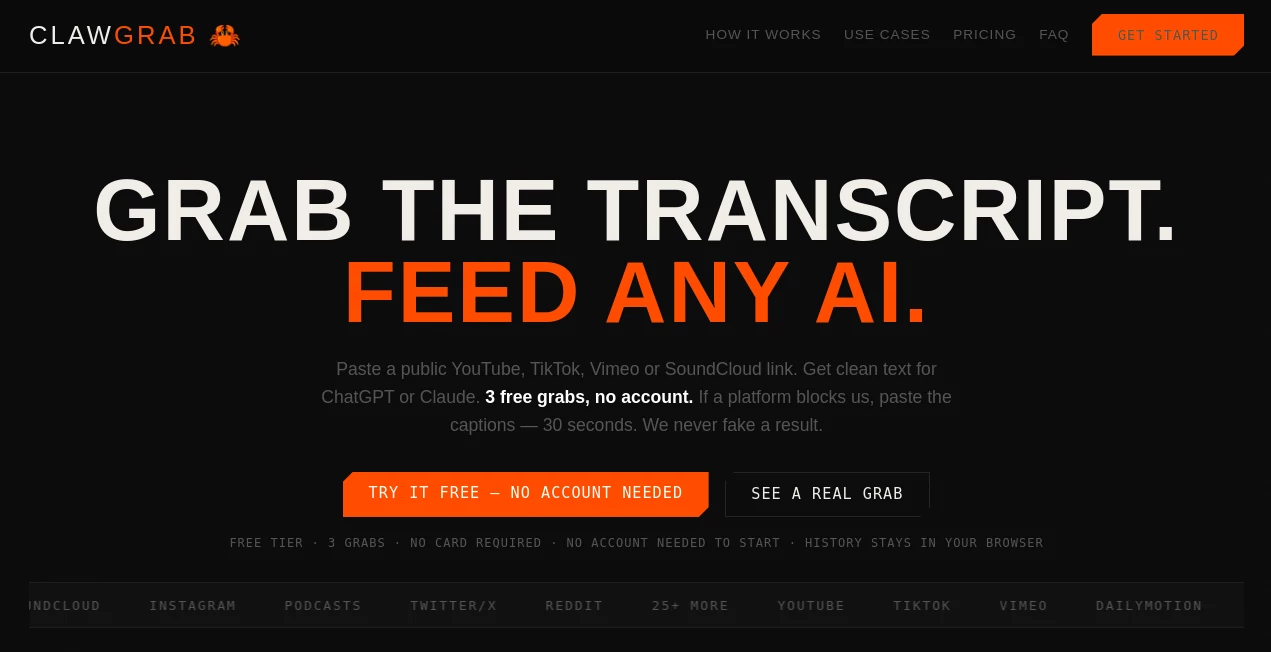
Turning a video into useful written content should not require replaying the same sections over and over again. ClawGrab takes a public video link and turns its available transcript or captions into clean, usable text that can be copied into AI assistants such as ChatGPT or Claude. It supports YouTube, TikTok, Vimeo, Dailymotion, SoundCloud, Instagram, Twitter/X, Reddit, podcasts, and more than 25 platforms.
The idea is refreshingly simple: paste a link, grab the transcript, and decide what you want to do with the content next. For someone who spends a large part of the day watching interviews, tutorials, lectures, webinars, podcasts, or social videos, this can remove a surprisingly tedious step from the workflow.
No browser extension or desktop installation is required, and new users can try the free plan without creating an account. The service also makes an effort to be transparent when a video cannot be processed instead of pretending that a transcript was successfully retrieved.
Key Features
- Transcript extraction from 25+ supported video and audio platforms.
- Clean-for-AI processing that removes music markers, applause, duplicate lines, and unnecessary formatting.
- AI-assisted summaries for quickly understanding long recordings.
- Timestamp support for locating specific moments in a video.
- Copy and export options for moving transcripts into other workflows.
- SRT export and social-friendly formatting on the Pro plan.
- Translation and blog-building features for users who want to repurpose video content.
- Local browser history so previously processed links can be accessed again.
User Interface
The interface follows a straightforward paste-and-process approach. There is little to learn before getting started: copy a public video URL, place it into the input field, and start the extraction. This makes the service particularly approachable for users who do not want to install another application or configure a complicated transcription workflow.
The minimalist approach is useful when speed matters. Instead of navigating through multiple settings before seeing a result, the main task remains visible from the beginning. A user researching a lecture or preparing content from an interview can move from the original video to usable text in just a few steps.
Accuracy & Performance
Performance is one of the stronger aspects of the workflow. The service states that transcript extraction is designed to happen within seconds, and its website demonstrates a Vimeo transcript being retrieved in roughly 1.5 seconds. The exact result naturally depends on the platform, caption availability, video length, and other technical factors.
Accuracy also depends on the source captions. If a video does not expose usable captions or transcript data, extraction may not be possible. Instead of claiming that every video will work, the service explains these limitations and provides a manual caption-paste route for situations where platform restrictions prevent direct extraction.
Capabilities
The main strength is not simply converting speech into text. It is what happens after the transcript is available. Clean text can be copied into an AI assistant for summarization, research, analysis, content planning, or rewriting.
For creators, a single interview can become a source for captions, article ideas, social posts, quotes, and scripts. Researchers can search through talks and lectures without repeatedly scrubbing through a video. Developers and AI power users can use cleaner transcripts as input for prompts and automated workflows, reducing unnecessary formatting noise and wasted tokens.
Security & Privacy
Privacy is presented as an important part of the product design. Grab history is kept in the user's browser, while transcript requests are processed by the service. The site states that transcripts may be temporarily cached for up to 24 hours for performance, rather than being retained indefinitely.
The service also states that it does not sell or share user data. Users can begin without an account, and the free tier does not require payment details. These choices make the tool convenient for quick research tasks where creating another account would only slow things down.
Use Cases
Content creators: Extract interviews, tutorials, podcasts, and short-form videos into text that can be transformed into scripts, captions, quotes, articles, and social content.
Researchers and analysts: Turn lectures, talks, webinars, and discussions into searchable text. Timestamps are particularly useful when a specific statement needs to be located later.
Marketers: Repurpose existing video material into blog posts, newsletters, social media copy, campaign ideas, and other marketing assets without repeatedly watching the source material.
Students and educators: Convert educational videos into text that can be summarized, organized into notes, or reviewed alongside the original recording.
AI power users: Use cleaned transcripts as input for ChatGPT, Claude, and other AI workflows. The Clean-for-AI approach is especially useful when raw subtitle files contain unnecessary markers or duplicated lines.
Pros and Cons
- Pros: Simple browser-based workflow, no installation, free starting option, support for 25+ platforms, AI-ready transcript cleaning, timestamps, export options, and transparent handling of unsupported videos.
- Pros: Useful for both casual transcript extraction and more serious content-repurposing workflows.
- Pros: Pro users receive unlimited grabs plus additional features such as SRT export, translation, social formatting, and blog-building tools.
- Cons: Transcript extraction depends on captions or transcript access provided by the source platform.
- Cons: Some music videos, live-only streams, and password-protected pages may not be directly accessible.
- Cons: The free plan is limited to three grabs per month, making the paid plan more suitable for frequent users.
Pricing Plans
The free plan costs $0 per month and includes three transcript grabs each month, transcript extraction, copying, and export without requiring a payment card.
The Pro plan costs $12 per month and removes the grab limit. It adds Clean-for-AI processing, summaries, chat and quotes, SRT and social formatting, translation, and a blog-building workflow. The subscription can be cancelled with a single click.
The pricing structure is easy to understand: occasional users can stay with the free allowance, while creators, researchers, marketers, and frequent AI users have a straightforward upgrade path when they need more capacity.
How to Use the Tool
- Copy the URL of a public video from a supported platform.
- Paste the link into the transcript input field.
- Start the grab process and wait for the transcript to be extracted.
- Review the resulting text and use cleaning, timestamps, summaries, or other available options when needed.
- Copy the transcript or export it in the format that fits your workflow.
- Paste the cleaned text into ChatGPT, Claude, or another AI system for summarization, research, writing, analysis, or content repurposing.
Comparison with Similar Tools
Many transcription services focus primarily on recording meetings or converting uploaded audio into text. This tool takes a different route by concentrating on content that already exists online. Its workflow starts with a video URL rather than requiring users to record or upload the original media.
Another useful distinction is the emphasis on AI-ready output. Instead of treating the transcript as the final destination, the service prepares the text for the next step, whether that means sending it to an AI assistant, creating content from it, extracting quotes, or building a summary.
For users who mainly need meeting transcription, a dedicated meeting assistant may be more appropriate. For people who regularly consume online videos and want to turn that material into searchable, reusable text, this approach is considerably more focused.
Conclusion
ClawGrab is a practical solution for a very specific problem: getting useful text out of online video without turning the process into a project of its own. Its URL-based workflow, broad platform coverage, AI-focused cleanup, export options, and simple pricing make it appealing to creators, researchers, marketers, students, and anyone who frequently moves between video content and AI tools.
The biggest advantage is the reduction in friction. Instead of watching a long recording again just to find a few useful points, users can work with the underlying text and let their preferred AI tools handle the next stage. It is not designed to magically extract every video on the internet, and the service is clear about platform and caption limitations. That honesty, combined with a fast workflow, makes it a useful addition to an AI-focused content toolkit.
Frequently Asked Questions (FAQ)
What does the tool do?
It extracts available transcripts or captions from supported online videos and formats the resulting text for use with AI assistants and other content workflows.
Does it require an installation?
No. It works as a web application, so users can paste a video link directly from their browser without installing an extension or desktop application.
Which platforms are supported?
The service supports more than 25 platforms, including YouTube, TikTok, Vimeo, Dailymotion, SoundCloud, Instagram, Twitter/X, Reddit, podcasts, and several other video and audio sources.
Can every video be transcribed?
No. Some videos do not expose accessible captions or transcripts. Music videos, certain live streams, and password-protected pages can also prevent direct extraction. When direct extraction is unavailable, the service provides an alternative method for supplying captions manually.
What is Clean-for-AI mode?
It removes unnecessary transcript elements such as music markers, applause indicators, duplicate lines, and formatting artifacts, producing cleaner text for AI processing.
Can transcripts be summarized?
Yes. The service provides summarization features designed to help users understand the main points of a transcript before working with the complete text.
Is there a free plan?
Yes. The free plan includes three grabs per month and does not require a payment card. Users can start without creating an account.
How much does the Pro plan cost?
The Pro plan costs $12 per month and includes unlimited grabs together with additional features such as Clean-for-AI processing, summaries, SRT export, social formatting, translation, and blog-building capabilities.
Is the transcript history stored permanently?
Grab history is stored in the user's browser. The service states that transcripts are processed on its server and may be cached temporarily for up to 24 hours for performance.
Can the extracted text be used with AI assistants?
Yes. The workflow is specifically designed to make transcript text easy to move into AI assistants such as ChatGPT and Claude for tasks including summarization, analysis, research, writing, and content repurposing.
AI Transcriber , AI Summarizer , AI Transcription , AI Podcast Assistant .
These classifications represent its core capabilities and areas of application. For related tools, explore the linked categories above.

ClawGrab Alternatives Product

Maestra

Read

Riverside.fm
WhisperWebUI
FluentDictat…
TranscribeYT

Zloth

AHelp

SlideStorm AI
