
















CloudByte PMS
Verified Blue CheckMark
Verified Blue CheckMark products are featured above free or unverified listings.
This badge indicates authenticity and builds trust, giving your product higher visibility across the platform.
Upgrade to get verified
Verified Blue CheckMark products are featured above free or unverified listings. This badge indicates authenticity and builds trust, giving your product higher visibility across the platform.
Upgrade to get verified
What is CloudByte PMS?
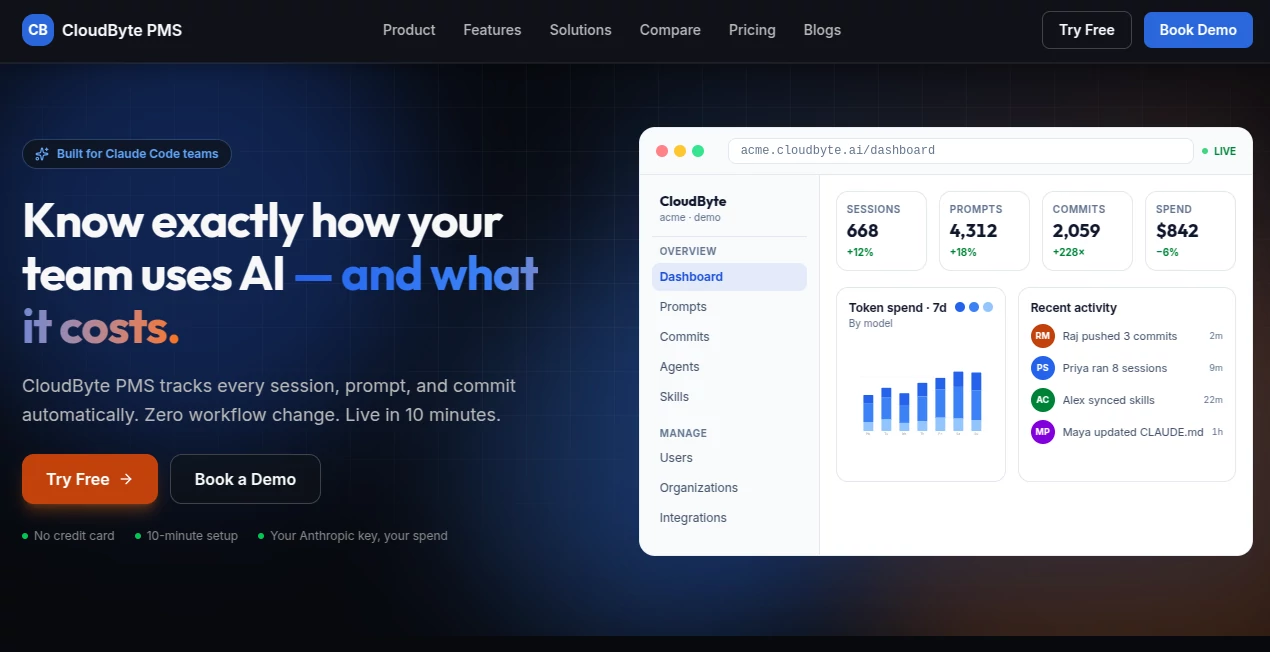
CloudByte PMS is an AI engineering visibility and productivity platform built for teams that rely on AI coding tools. Instead of asking developers to manually report how they use AI, the platform captures sessions, prompts, token usage, and Git activity automatically, giving engineering leaders a much clearer picture of what is happening across their teams.
For companies investing heavily in AI-assisted development, simply paying for AI coding seats is not enough. Managers also need to understand adoption, spending, productivity, project activity, and potential security risks. This platform brings those signals together in one dashboard without requiring developers to change the way they work.
The setup is designed to be quick. The company says teams can move from signup to a working dashboard in under 10 minutes, with no infrastructure to host and no SDK to integrate.
Key Features
- Automatic tracking of AI coding sessions and prompts
- AI token and spending analytics across supported models
- Developer and project-level activity insights
- AI-generated summaries of Git commits
- Team adoption heatmaps and productivity metrics
- Prompt pattern clustering and session-depth analysis
- AI ROI and estimated hours-saved measurements
- Support for GitHub, GitLab, Bitbucket, Linear, and Jira integrations
- Role-based access control and organization-level data isolation
- Sensitive prompt detection for secrets, credentials, and personal information
- REST API with OpenAPI support
- Self-hosted and air-gapped deployment options for enterprise customers
User Interface
The interface is built around a centralized engineering dashboard where managers can quickly move between sessions, prompts, commits, projects, users, organizations, integrations, and AI usage data. The layout puts operational information close to the surface instead of hiding it behind complicated reporting workflows.
One particularly useful aspect is the ability to view activity at different levels. A manager can look at overall team adoption, inspect individual developer activity, examine project performance, or investigate token spending. This makes the product practical for both day-to-day management and longer-term engineering analysis.
Accuracy & Performance
The platform focuses on collecting actual usage data rather than relying entirely on surveys or manually entered reports. Its background agent synchronizes information from the developer environment, while prompts can appear on the dashboard within minutes of an AI session and Git commits are generally visible within around 10 minutes.
The company's own published pilot data provides an interesting example of how the metrics can be interpreted. Across a 22-developer team, it measured an average AI productivity multiplier of 1.8x, with considerable differences between types of engineering work. That distinction matters because AI productivity is rarely identical across every project or developer.
Token spending is also broken down by developer, project, and model, helping teams understand where their AI budget is actually going instead of looking only at a monthly invoice.
Capabilities
The platform goes beyond basic activity tracking. It connects AI usage with engineering output by combining AI sessions with Git commit information. Commit diffs can be summarized automatically, making it easier for engineering managers to understand what was delivered without reading every change manually.
Another useful capability is AI efficiency analysis. Teams can monitor ROI estimates, hours saved, session depth, adoption levels, and prompt patterns. These measurements can help identify teams that are getting strong results from AI as well as areas where expensive AI subscriptions are barely being used.
There is also a strong governance layer. Administrators can monitor sensitive prompts, establish security policies, review findings, and maintain an audit trail. The platform supports several access roles, including Super Admin, Org Admin, Reviewer, and Standard users.
Security & Privacy
Security is clearly positioned as an important part of the product. Organization data is isolated at the database level, while access is protected through Google SSO, passwordless magic links, and server-enforced role-based permissions.
API credentials can be encrypted at rest using AES-256-GCM. The platform also supports a bring-your-own-key approach, allowing organizations to use their own Anthropic API credentials and keep AI billing connected to their own account.
The security monitoring feature can scan AI prompts and responses for secrets, credentials, and sensitive information. Findings can be ranked by severity and either flagged or blocked according to organizational policy.
Privacy-conscious engineering teams may also appreciate that the standard agent does not upload source-code files. According to the product documentation, it collects Claude Code session metadata and Git commit metadata rather than intercepting keystrokes, screen content, or unrelated filesystem data.
Use Cases
This platform is especially useful for engineering organizations that have already adopted AI coding assistants but lack reliable visibility into their impact.
- Engineering managers: Monitor AI adoption, developer activity, project progress, and delivery signals from one place.
- CTOs and technology leaders: Understand whether AI investments are producing measurable value across engineering teams.
- Finance teams: Track token spending by developer, project, and model to improve AI budget management.
- Security teams: Detect sensitive information entering AI workflows and maintain an audit trail for investigations.
- DevOps teams: Connect AI-assisted development activity with Git commits and engineering delivery metrics.
- Growing SaaS companies: Establish governance around AI coding adoption without introducing heavy reporting requirements.
Pros and Cons
Pros
- Fast setup with minimal workflow disruption
- Detailed AI usage and token-spending visibility
- Combines AI activity with Git-based engineering output
- Useful productivity and ROI measurements
- Strong security and governance features
- Supports multiple operating systems for the local agent
- Free starter option for small teams
- Enterprise self-hosting and air-gapped deployment support
Cons
- The platform is primarily aimed at engineering teams rather than general business users.
- Teams that do not use AI-assisted development may find many of its analytics unnecessary.
- Some of the more advanced deployment and governance capabilities are targeted at enterprise customers.
- The deepest value comes when a team has enough AI activity and engineering data to analyze.
Pricing Plans
The platform offers a free Starter plan for teams with up to five developers. This makes it relatively easy for a small engineering group to test the platform before committing to a paid subscription.
The Team plan is listed at $15 per seat per month, with an annual option reducing the effective price to $10 per seat per month. A 14-day free trial is available without requiring a credit card.
Enterprise pricing is customized for organizations that need additional capabilities. The company also states that qualifying startups founded within the previous two years and with less than $5 million in funding can receive a substantial first-year discount.
How to Use It
Getting started is intentionally straightforward. First, create an organization using Google SSO or an email address and select the organization's subdomain. No infrastructure needs to be prepared for the hosted version.
Next, install the lightweight agent on each developer's computer. The installation supports macOS, Windows, and Linux and registers the required hooks and background synchronization process.
Once the first AI coding session takes place, usage information begins appearing in the dashboard. Git activity is synchronized as well, allowing teams to connect AI usage with actual development output.
From there, managers can explore adoption, token spending, prompt patterns, sessions, commits, project activity, and security findings. The result is a continuous view of how AI is being used instead of a report assembled at the end of a sprint.
Comparison with Similar Tools
Traditional project management and engineering analytics platforms generally focus on tickets, delivery metrics, sprint activity, or developer output. AI coding assistants, on the other hand, concentrate primarily on helping individual developers write and modify code.
This product sits between those two categories. Its main advantage is connecting AI activity with engineering execution. Rather than replacing a coding assistant or a project management system, it adds an observability and governance layer around AI-assisted development.
For a team that only wants an AI coding assistant, this type of platform may be more than necessary. But for an engineering organization managing dozens of AI-enabled developers, understanding adoption, costs, productivity, and security can become just as important as the coding assistant itself.
Conclusion
AI-assisted development can deliver impressive results, but without proper visibility it is difficult to know where the value is coming from or where money is being wasted. This platform addresses that gap by turning AI sessions, prompts, token usage, Git activity, and security signals into measurable engineering data.
Its combination of productivity analytics, cost tracking, commit intelligence, and AI governance makes it particularly interesting for engineering leaders who want to move beyond simply counting AI tool subscriptions.
The free starting tier also makes it approachable for smaller teams, while the security controls, API-first architecture, and enterprise deployment options give larger organizations room to build a more controlled AI development environment.
Frequently Asked Questions (FAQ)
What type of teams is it designed for?
It is primarily designed for software engineering teams using AI-assisted development tools, especially organizations that want visibility into AI adoption, productivity, spending, and governance.
Does it change how developers work?
No major workflow change is required. A lightweight background agent collects the relevant usage information and synchronizes it automatically.
Which AI coding environment does it support?
The platform is built around Claude Code and tracks its sessions, prompts, and token usage. Its security layer also lists support for other AI coding environments such as GitHub Copilot and Cursor.
Does it upload source code?
According to the product's documentation, the standard agent does not upload source-code files. It collects session metadata, prompts, summaries, and Git commit metadata instead.
Can organizations use their own AI API key?
Yes. Organizations can use their own Anthropic API key through the bring-your-own-key model, keeping AI billing associated with their own account.
Is there a free plan?
Yes. The Starter plan is free for teams of up to five developers, making it possible to evaluate the platform without an initial subscription.
Can it be self-hosted?
Yes. Enterprise customers can use self-hosted deployments, including air-gapped environments with private model endpoints.