
GIF Face Swap
What is GIF Face Swap?
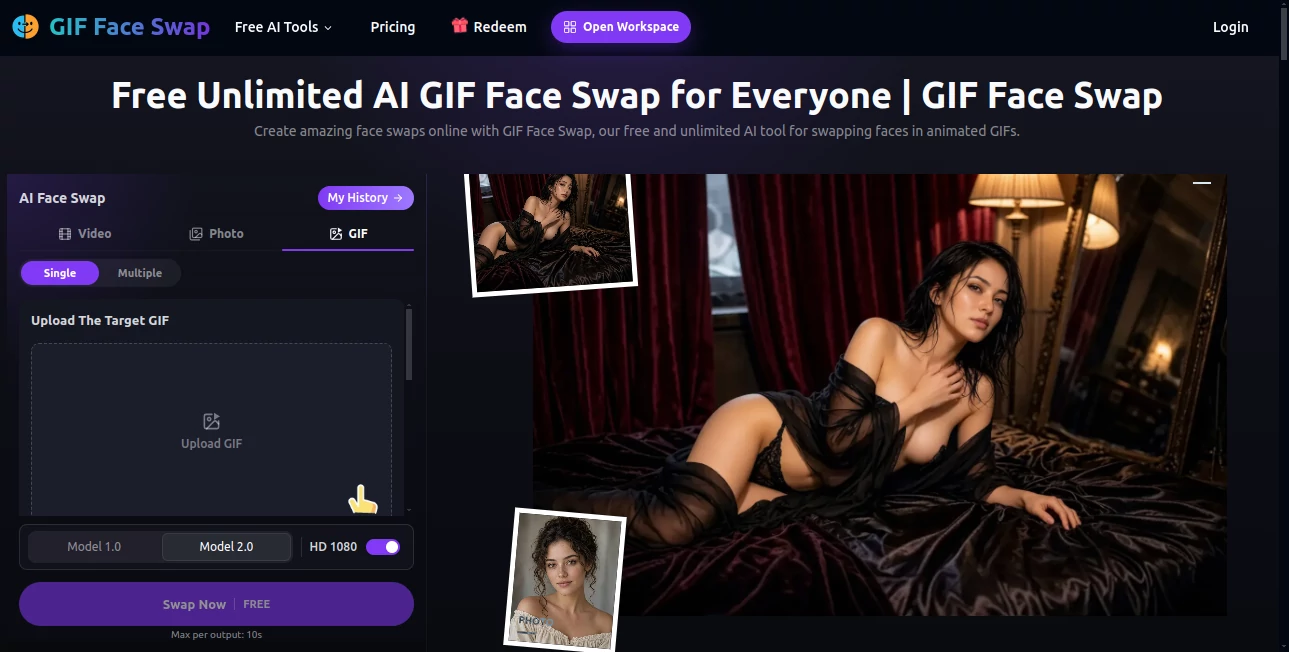
GIF Face Swap is a browser-based AI face swapping tool designed for people who want to turn ordinary animated content into something more personal, funny, or attention-grabbing. Instead of opening a complicated editing application and working through individual frames, users can upload a GIF, provide a face photo, choose an available model, and generate a new version online.
The main experience is built around simplicity. A GIF of up to 20MB can be uploaded as the source, while the replacement face can be provided as a JPG, PNG, WEBP, or HEIC image of up to 20MB. The editor also provides Model 1.0 and Model 2.0 options and supports HD 1080 output, giving users a straightforward way to experiment with different results.
What makes the service particularly appealing is its focus on accessible content creation. There is no need to learn professional compositing software just to make a playful GIF or a quick social media visual. For someone who wants to try an idea without spending half an hour setting up an editing workflow, the process feels refreshingly direct.
Key Features
- AI-powered face swapping for animated GIFs.
- Support for GIF files up to 20MB.
- Face photos supported in JPG, PNG, WEBP, and HEIC formats.
- Single and multiple face workflows.
- Model 1.0 and Model 2.0 options.
- HD 1080 output support.
- Free GIF face swapping with unlimited usage advertised by the platform.
- No watermark is advertised for generated GIF content.
- Browser-based workflow with no desktop editing software required.
- Additional photo and video face-swapping options are available in the same workspace.
User Interface
The interface keeps the main task visible from the beginning. Users can switch between Video, Photo, and GIF workflows, then upload the source media and replacement face. For GIF creation, the two essential uploads are clearly separated: the target animation and the face that will be applied.
The layout is particularly useful for beginners because there are not dozens of editing controls competing for attention. A typical workflow is essentially upload, select the model, generate, and review the result. The presence of a history area also makes it easier to return to previously generated work instead of starting from scratch every time.
Accuracy & Performance
Face swapping across an animated sequence is more demanding than replacing a face in a single photograph. The system has to follow facial features as the subject moves from frame to frame while maintaining a convincing relationship between the replacement face and the original animation.
Results can vary depending on the source material. A sharp face with good lighting and a reasonably similar viewing angle generally gives the AI better information to work with. Heavy motion blur, extreme angles, covered facial features, or poor-quality source images can make the final blend less consistent.
The platform advertises fast online processing and HD 1080 output. For GIF projects, the maximum output length shown in the editor is 10 seconds, which is well suited to short reactions, memes, social posts, and compact animated content.
Capabilities
The GIF workflow is only one part of the broader face-editing workspace. Users can work with photos and videos as well, while multiple-face functionality makes it possible to handle scenes containing more than one person.
For GIFs specifically, the system can apply a replacement face across an animated sequence rather than treating the project as a single static image. The multiple-face workflow is useful when an animation contains several recognizable faces and each detected face needs its corresponding replacement image.
There are also Model 1.0 and Model 2.0 choices in the editor. Having more than one model option is useful when a particular source image behaves differently during generation, allowing creators to test which processing option produces the better visual result.
Security & Privacy
Face-swapping involves personal images, so responsible use matters. Users should only upload photographs and GIFs they have permission to use, particularly when another person's face is involved. The platform itself also advises users to respect image rights and avoid deceptive, harassing, or exploitative uses of face-swapping technology.
Before using any face-editing service for sensitive or confidential material, it is sensible to review the site's current privacy and terms information and understand how uploaded media is handled. For commercial projects, users should also make sure they have the necessary rights for both the original media and the people represented in it.
Use Cases
One of the strongest use cases is social media content. A familiar reaction GIF can become much more engaging when the face is replaced with a creator's own face or another permitted character. This can work particularly well for short-form posts, memes, community content, and playful campaigns.
Content creators can also use face swapping to experiment with concepts before producing a more polished video. A quick animated prototype can communicate an idea to a client or creative team without requiring a complete production.
There are also plenty of casual applications. Friends can create humorous GIFs for private conversations, creators can prepare reaction animations, and marketers can develop lightweight visual variations for social campaigns.
For photographers and editors, the broader workspace can be useful when a project moves beyond GIFs. Photo, video, multiple-face, and batch workflows provide different approaches depending on the source material and the number of faces that need to be changed.
Pros and Cons
Pros
- Very simple browser-based workflow.
- Free usage is prominently offered.
- GIF files up to 20MB are supported.
- Several common face-photo formats are accepted.
- Model 1.0 and Model 2.0 provide processing choices.
- HD 1080 output is available.
- Useful for memes, social content, and quick creative experiments.
- Photo and video face-swapping tools are available alongside the GIF workflow.
Cons
- GIF generation is designed for short animations, with a maximum output length of 10 seconds shown in the editor.
- Very complex movement or heavily obscured faces may reduce consistency.
- The quality of the source face photo has a noticeable effect on the final result.
- Users working with sensitive images should carefully review privacy and usage considerations before uploading media.
Pricing Plans
The platform currently presents its GIF face-swapping experience as free and unlimited, making it particularly attractive for users who want to experiment without committing to a paid subscription. The main GIF editor displays a free generation option and promotes unlimited GIF creation without watermarks.
Because online AI services can change their pricing, usage rules, models, or account requirements over time, users should check the current workspace before starting a large commercial project. At the time of review, the free offering is one of the most notable advantages of the service.
How to Use the Tool
Start by opening the GIF face-swapping workspace and selecting the GIF workflow. Upload an animated GIF under 20MB, then upload a clear face photo in JPG, PNG, WEBP, or HEIC format. The face photo should contain one clearly visible face.
Next, select Model 1.0 or Model 2.0 and choose the available output quality. HD 1080 is provided for higher-resolution results. Once the settings are ready, start the generation process and wait for the edited animation to be processed.
For the best outcome, choose a face photograph with good lighting and a viewing angle that is reasonably close to the face inside the GIF. This small preparation step can make a surprisingly large difference. Once processing is complete, review the result and use the generated animation for your intended project.
Comparison with Similar Tools
Many face-swapping services concentrate primarily on static photos or impose noticeable restrictions on free users. This platform takes a different approach by putting animated GIF face swapping at the center of the experience while also providing photo and video workflows.
Another practical advantage is the combination of a simple interface, multiple processing models, HD output, and a free unlimited GIF offering. Someone who only needs an occasional face swap may not need the extensive timeline controls found in professional video editors. For short animated content, a focused workflow can be considerably faster.
It is not intended to replace a full professional compositing suite. Users who need detailed masking, manual frame-by-frame correction, advanced color grading, or complex visual effects will still benefit from dedicated editing software. For quick AI-assisted face replacement, however, the streamlined approach makes a strong case.
Conclusion
For anyone who wants to create animated face swaps without learning a complicated editing workflow, this service offers an unusually accessible starting point. The combination of GIF support, multiple processing models, HD output, and a free unlimited approach makes it suitable for both casual experiments and frequent content creation.
The biggest strength is its simplicity. Upload a GIF, add a suitable face photo, choose a model, and let the AI handle the repetitive work. As with any face-editing technology, the final result depends on the quality and clarity of the source material, but good inputs can produce entertaining and useful results with very little effort.
Frequently Asked Questions (FAQ)
Is the GIF face swap tool free?
Yes. The platform prominently advertises free and unlimited GIF face swapping, including a free generation option in the editor.
What GIF files are supported?
The GIF editor supports GIF files under 20MB. The maximum output length shown in the editor is 10 seconds.
Which face photo formats can I upload?
JPG, PNG, WEBP, and HEIC are supported for the replacement face photo, with a maximum file size of 20MB.
Can I swap more than one face?
Yes. A multiple-face workflow is available for projects containing several people. Each detected face can be assigned a corresponding replacement photo.
Does it support video face swapping?
Yes. The broader workspace includes video face swapping in addition to GIF and photo workflows. Video uploads support MP4, WEBM, and MOV files up to 300MB, with the editor showing a maximum output duration of 20 seconds for the free workflow.
Which AI model should I choose?
The editor provides Model 1.0 and Model 2.0. If one model produces a result that does not look quite right for a particular GIF, trying the other option can be a useful way to compare the output.
How can I get better face-swap results?
Use a sharp face photograph with clear facial features, good lighting, and a similar viewing angle to the face in the source GIF. Avoid heavy blur, extreme angles, or images where important parts of the face are covered.
Can I use generated face swaps commercially?
Commercial use depends on the rights associated with the source media and the people shown. Users should obtain the necessary permissions before using someone else's likeness or copyrighted material in commercial content.
Does the tool work on mobile devices?
The service is browser-based, making it suitable for modern desktop and mobile browsers. The actual experience can vary depending on the device, browser, file size, and processing requirements.
Photo & Image Editor , AI Face Swap Generator , AI Image to Image , AI GIF Generator .
These classifications represent its core capabilities and areas of application. For related tools, explore the linked categories above.
GIF Face Swap details
Website unavailable — View Alternatives
Pricing
- Freemium
Apps
- Web App
Categories

GIF Face Swap Alternatives Product

NanoEditor

Face To Many

Kirkify
HD Photo Con…

Before After…
Pixora
picenhancer.…
Nano Banana …
img2img.net