

















Glanced
What is Glanced?
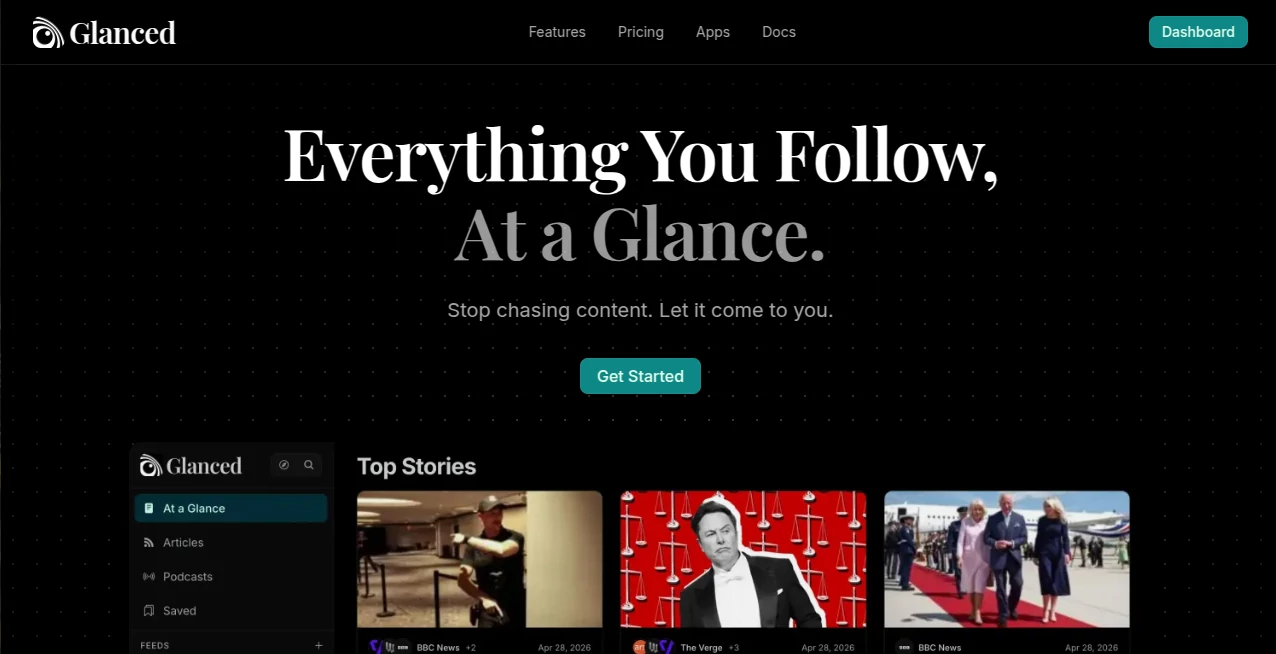
Glanced is a modern reading and content discovery platform designed for people who follow a lot of information but do not want to spend their day jumping between websites, newsletters, RSS readers, and podcast apps. Its core idea is simple: bring the content you already care about into one organized library and make it easier to understand what deserves your attention.
The platform combines RSS and Atom feeds, articles, newsletters, and podcasts in a single reading environment. Instead of opening dozens of tabs to catch up on industry news or favorite publications, users can browse everything through one streamlined feed. AI-powered summaries make the process even faster by presenting the key points of an article before users decide whether to read the complete story.
For someone who follows technology, business, research, or several specialist publications, this approach can make a noticeable difference. You can scan the important stories, group related coverage, save interesting pieces, and return to them later without losing track of where you left off.
Key Features
- Unified library for websites, blogs, newsletters, and podcasts
- AI-generated article summaries for faster reading
- Story grouping that combines coverage of the same event
- Full-text article reading when complete content is available
- Related article discovery for finding additional perspectives
- RSS and Atom feed discovery and subscriptions
- Folders and tags for organizing large collections
- Smart tag suggestions
- Full-text search across the content library
- Saved searches that can work as reusable smart feeds
- Save-for-later functionality with cross-device synchronization
- Podcast discovery and playback
- Newsletter delivery directly into the reading library
- OPML import and export for moving subscriptions from another reader
- Browser extensions for discovering feeds directly from websites
- Keyboard shortcuts for faster navigation
User Interface
The interface is built around the idea of reducing friction. Rather than forcing users to manage separate applications for different types of content, the platform puts feeds, articles, podcasts, and newsletters into a shared environment. Folders, tags, saved searches, and article notes provide practical ways to keep a growing library under control.
The reading experience also supports different preferences, making it suitable for both quick scanning and longer reading sessions. Cross-device synchronization means that an article saved on one device can be picked up later elsewhere, which is particularly useful for people who read during different parts of the day.
Accuracy & Performance
The AI summary feature is intended to help readers understand the main points of an article quickly rather than replace the original source. This distinction matters. A short summary can tell you whether a story is worth your time, while the full article remains available when you want the complete context.
Another useful feature is story grouping. When several publications report on the same event, related coverage can be brought together instead of appearing as a long list of repetitive headlines. For news-heavy readers, this can make a feed considerably easier to scan.
Capabilities
The platform goes beyond basic RSS aggregation. Users can discover hundreds of outlets and thousands of podcasts without manually collecting feed URLs. A browser extension can detect feeds on webpages, while OPML support makes it easier to move an existing subscription collection from another reader.
Organization is another strong point. Users can create folders, apply tags, save articles for later, search their library, and create saved searches for recurring information needs. Smart tagging can also suggest relevant tags while reading, reducing the amount of manual organization required.
For newsletter readers, incoming newsletters can be delivered as articles instead of adding more clutter to the email inbox. Podcast support is integrated into the same environment, allowing users to discover and listen to shows alongside their written content.
Security & Privacy
Privacy is an important consideration for any service that handles a personal reading library. The platform provides a dedicated privacy policy and maintains an ad-free reading experience. Its payment system is handled by a Merchant of Record, so payment details are not stored directly by the service.
The browser extension also states that it does not collect or use user data, according to its Chrome Web Store listing. Users who rely on many feeds and personal subscriptions should still review the current privacy policy before connecting sensitive or private sources.
Use Cases
One of the strongest use cases is professional research. A marketer, developer, investor, journalist, or researcher may follow dozens of publications every week. Instead of checking each source separately, they can collect those feeds in one place and use summaries and story grouping to identify the most relevant material.
It can also work well for daily news consumption. Imagine following twenty technology publications during a busy product launch. Seeing the same story repeated across multiple sources can quickly become frustrating. Grouped coverage provides a cleaner way to see that several outlets are discussing the same event while still allowing you to explore different perspectives.
Students and knowledge workers can use folders, tags, saved searches, notes, and full-text search to build a personal information library. Podcast listeners can keep their shows alongside written sources instead of maintaining a separate workflow.
Newsletter-heavy users have another practical reason to consider it. Moving newsletters into the reading environment can reduce the number of informational messages competing with ordinary email.
Pros and Cons
- Pros: Combines RSS feeds, articles, newsletters, and podcasts in one place.
- Pros: AI summaries make it easier to scan articles quickly.
- Pros: Story grouping reduces repetitive coverage.
- Pros: Strong search and organization features.
- Pros: Supports mobile and desktop apps as well as browser extensions.
- Pros: OPML support makes switching from another feed reader easier.
- Pros: Ad-free reading experience.
- Cons: Advanced AI and organization features require a paid plan.
- Cons: The free plan limits the number of feeds and saved items.
- Cons: Readers who only follow a handful of websites may not need such an extensive content management system.
Pricing Plans
The service uses a freemium pricing model, allowing users to start without a credit card. The Free plan costs $0 and supports up to 100 feeds, podcasts, full-text search, and mobile and desktop applications.
The Lite plan costs $4.99 per month or $49.99 per year. It increases the feed limit to 1,000 and adds AI summaries, top stories, and full content. Paid plans include a 14-day trial.
The Plus plan costs $7.99 per month or $79.99 per year. It supports up to 2,500 feeds and adds newsletters, saved searches, similar articles, smart tagging, notes, and additional organization and automation features.
Annual billing offers a 17% saving compared with monthly pricing. Users can cancel at any time, while existing data remains retained if an account is downgraded to the free tier, although content beyond the free limits becomes read-only until the account is brought back within those limits.
How to Use It
Getting started is straightforward. Create an account and begin by adding the websites, RSS or Atom feeds, newsletters, and podcasts you want to follow. The discovery system can help locate publications and podcasts without requiring users to manually search for every feed URL.
Once subscriptions are in place, organize them into folders and use tags to separate subjects or projects. When an article catches your attention, you can read the summary first and then open the complete content if it is worth exploring further.
For people moving from another RSS reader, OPML import can make the transition considerably easier. Browser extensions can also help discover feeds while browsing ordinary websites.
As the library grows, full-text search, saved searches, smart tags, and saved articles become increasingly useful. A simple setup might be enough for casual readers, while heavy information consumers can build a much more detailed personal research system.
Comparison with Similar Tools
Traditional RSS readers are excellent for collecting feeds, but many stop at aggregation. This platform takes a broader approach by combining feed management with AI summaries, story clustering, podcast support, newsletter delivery, related-article discovery, and full-text search.
It can be particularly appealing to users who have outgrown a basic RSS workflow. Instead of maintaining a feed reader, podcast application, and newsletter routine separately, they can bring those sources together and search across the resulting library.
The difference is most noticeable for people who consume a high volume of information. Someone following only five websites may not need AI summaries or story clustering, while someone following hundreds of feeds can benefit from having tools that help filter and organize the stream.
Conclusion
For readers who feel overwhelmed by the amount of information they follow, this platform offers a thoughtful solution. Its strength is not simply collecting feeds; it is creating a more manageable environment for discovering, scanning, organizing, and revisiting information.
The combination of AI summaries, grouped stories, related content, podcasts, newsletters, search, folders, tags, and cross-device access gives it a broader role than a conventional feed reader. The free tier also makes it easy to test the workflow before committing to a subscription.
Whether the goal is keeping up with industry news, following specialist publications, organizing research material, or simply spending less time jumping between apps, it provides a practical reading workflow that puts the important information closer to the surface.
Frequently Asked Questions (FAQ)
Is there a free plan?
Yes. The Free plan costs $0 and includes up to 100 feeds, podcasts, full-text search, and mobile and desktop applications.
Does it provide AI summaries?
Yes. AI summaries are available on the Lite and Plus plans and are designed to help users understand the key points of articles before deciding whether to read them in full.
Can I follow podcasts?
Yes. Podcasts are supported alongside written content, allowing users to discover and listen to shows from the same library.
Can newsletters be added?
Yes. Newsletter support is included with the Plus plan, where newsletters can be delivered as articles instead of remaining mixed with ordinary email messages.
Can I import subscriptions from another RSS reader?
Yes. OPML import and export is supported, making it easier to transfer an existing collection of subscriptions.
Does it work on mobile and desktop?
Yes. Native mobile and desktop applications are available, and the library can remain synchronized across supported devices.
Does it have a browser extension?
Yes. The browser extension can detect RSS and Atom feeds on webpages and lets users subscribe to discovered feeds with minimal effort.
Can I cancel a paid subscription?
Yes. Paid subscriptions can be canceled at any time. Access continues through the current billing period before the account moves to the Free plan.
Is the reading experience ad-free?
Yes. The service provides an ad-free reading experience across its plans.