

















What is GLM-Image?
GLMImage is an AI-powered image generation and editing platform designed for creators, marketers, designers, and anyone who wants to turn ideas into visual content. It supports both text-to-image generation and image-to-image editing, making it useful for creating new artwork, refining existing images, and exploring different visual directions without relying on complicated design software.
One of its practical advantages is its focus on text rendering inside images, including English and Chinese. This makes it worth exploring for projects that involve posters, book covers, marketing graphics, and other visuals where the words matter just as much as the artwork. Whether you are starting with a simple idea or an existing reference image, the platform offers a straightforward way to experiment and develop visual concepts.
Key Features
User Interface
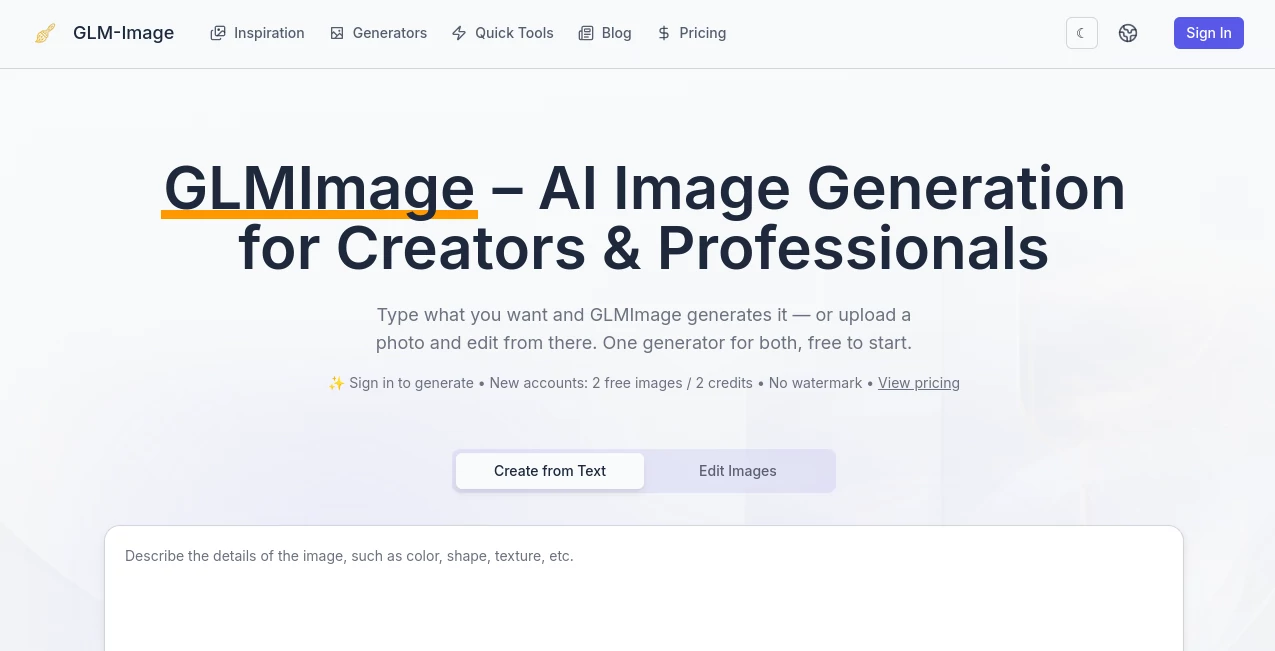
The platform provides a web-based image generation experience with a relatively direct workflow. Users can enter a prompt, select a generation mode, and create visual content without needing to install specialized software or manage AI models locally.
The interface supports text-to-image and image-to-image workflows, allowing users to choose between creating something from scratch and working from an existing reference. A simple interface is particularly helpful when the goal is to test several ideas quickly rather than spend time learning a complex creative application.
Accuracy & Performance
The underlying GLM-Image technology uses a hybrid autoregressive and diffusion architecture. This approach is designed to combine an understanding of the meaning and structure of a prompt with the visual details required to produce an image.
Its support for complex prompts and text rendering makes it relevant to users who need more than generic illustrations. For example, a designer creating a promotional poster can describe the subject, composition, lighting, and text placement in the same prompt. The final result should still be reviewed carefully, especially when the image contains important wording or precise visual requirements.
Generation speed can vary depending on the selected workflow, image requirements, and current system load. Users working on multiple concepts may benefit from generating variations and comparing the results before choosing a final direction.
Capabilities
- Text-to-Image Generation: Create images from written descriptions, including artistic scenes, portraits, illustrations, and promotional concepts.
- Image-to-Image Editing: Upload a reference image and use prompts to explore modifications, visual styles, and alternative compositions.
- Bilingual Text Rendering: Generate images containing English and Chinese text, which can be useful for posters, banners, and educational graphics.
- Multiple Image Variations: Generate up to four variants in a single request, helping users compare creative directions more efficiently.
- Creative Scene Exploration: Explore concepts such as book covers, scientific illustrations, packaging designs, portraits, and commercial posters.
- Watermark-Free Output: Generated images are provided without watermarks by default.
Security & Privacy
The service provides a hosted environment for image generation, allowing users to work through a browser rather than setting up their own image generation infrastructure. This reduces the technical effort required to get started.
Users should review the platform's privacy policy and terms of service before uploading confidential photographs, proprietary designs, or sensitive business materials. Paid plans include commercial use, but users remain responsible for checking third-party rights, trademarks, and likeness permissions when publishing generated content.
Use Cases
Marketing and Advertising: Create promotional visuals, campaign concepts, social media graphics, and poster ideas. The ability to include text in generated images can be helpful when developing early advertising concepts.
Book Covers and Publishing: Authors and designers can explore cover compositions, genre-specific artwork, and visual directions before moving into a more detailed design process.
Social Media Content: Generate original images for posts, creative campaigns, and visual storytelling. Image-to-image editing can help users experiment with alternative styles while maintaining a reference.
Educational and Scientific Visuals: Explore illustrations and explanatory graphics for learning materials, presentations, and documentation. Generated content should be checked for factual accuracy when it communicates scientific information.
Product and Packaging Concepts: Develop early visual ideas for packaging, product presentation, and brand exploration. These outputs can serve as starting points for professional design work.
Creative Experimentation: Artists, hobbyists, and designers can test different prompts, compositions, and artistic styles without having to create every element manually.
Pros and Cons
Pros
- Supports both text-to-image generation and image-to-image editing.
- Offers a browser-based workflow that is accessible to users without advanced technical knowledge.
- Includes English and Chinese text rendering capabilities.
- Provides watermark-free image generation.
- Supports multiple image variants for creative comparison.
- Paid plans include commercial use.
- Offers a free starting option for users who want to test the service.
Cons
- Free access is limited, so users with frequent generation needs may need a paid plan.
- Generated text and fine visual details should be reviewed before professional publication.
- Image generation quality and speed can vary depending on the prompt and generation conditions.
- Users who require advanced manual editing may still need dedicated design software.
- Commercial projects require attention to copyright, trademarks, and other third-party rights.
Pricing Plans
The platform uses a credit-based pricing system. New accounts receive 20 credits, equivalent to two standard image generations, providing an opportunity to test the workflow before subscribing. A standard image generation currently costs 10 credits.
Paid plans are designed for different usage levels, from occasional creative work to professional image production. The following monthly options are listed on the pricing page:
- Basic – $9.90 per month: Includes 500 credits, approximately 50 high-quality images, standard generation speed, basic support, and watermark-free output.
- Pro – $29.90 per month: Includes 2,000 credits, approximately 200 high-quality images, faster generation, priority support, watermark-free output, and commercial use.
- Max – $79.90 per month: Includes 6,000 credits, approximately 600 high-quality images, faster generation, priority support, watermark-free output, and commercial use.
Users should check the official pricing page for current subscription options, yearly billing, and one-time credit packs before making a purchase. The most suitable plan depends on how frequently images are generated and whether commercial usage is required.
How to Use the Tool
- Open the Platform: Visit the web application and sign in to access image generation.
- Write a Prompt: Describe the image you want to create. Include details such as the subject, visual style, lighting, composition, and any text that should appear in the image.
- Select a Generation Mode: Choose text-to-image when starting from a written idea, or image-to-image when working with a reference image.
- Generate the Image: Submit your prompt and allow the platform to process the request. Generation time may vary depending on the workflow and system conditions.
- Review the Result: Check the composition, visual details, and any text included in the image. If something needs improvement, refine the prompt and generate another version.
- Download and Use: Export the finished image for your website, social media, design workflow, or other permitted projects.
For better results, avoid overly vague prompts. Instead of writing “a professional poster,” try describing the subject, color direction, layout, lighting, and the short headline you want to include. Short, clearly specified text is generally easier to review than a long paragraph embedded inside an image.
Comparison with Similar Tools
AI image generators differ in the workflows and capabilities they prioritize. Some focus on artistic exploration, others emphasize editing, and some are built around design-oriented content creation.
- General AI Image Generators: Often provide broad creative capabilities for generating illustrations, portraits, and imaginative scenes.
- AI Design Platforms: Typically combine image generation with templates, layout tools, and manual editing features for marketing and branded content.
- Image Editing Tools: Focus on modifying existing photographs or artwork, making them useful when preserving a reference is more important than creating an image from scratch.
- Self-Hosted Image Models: Offer more control over deployment and customization but may require technical knowledge, suitable hardware, and maintenance.
This platform combines text-to-image and image-to-image generation in a hosted environment, with a particular focus on text rendering and creative iteration. The right choice depends on the type of images you need, your editing requirements, budget, and preferred workflow.
Conclusion
GLMImage offers a practical option for creators and professionals who want to explore AI-generated visuals through a simple web-based workflow. Its combination of text-to-image generation, image-to-image editing, bilingual text rendering, and watermark-free output makes it relevant to a variety of creative projects.
It is particularly interesting for users working on posters, book covers, marketing concepts, and other visuals where the arrangement of text and imagery matters. The free starting credits provide a way to evaluate the experience, while paid plans offer additional capacity for more frequent work.
As with any AI image generation service, the best results come from clear prompts, careful review, and a willingness to refine ideas. For users looking for a flexible tool to turn written concepts and reference images into visual content, this platform is worth exploring.
Frequently Asked Questions (FAQ)
Is the tool free to use?
Yes. New accounts receive 20 credits, enough for two standard image generations. Additional usage requires a subscription or credit purchase.
Can it generate images from text prompts?
Yes. The text-to-image mode allows users to describe an image and generate visual content based on their instructions.
Does it support image editing?
Yes. The image-to-image workflow allows users to upload a reference image and create variations or modifications using prompts.
Can it generate text inside images?
Yes. The platform supports English and Chinese text rendering. Results should be reviewed carefully, particularly when accuracy of wording is important.
Does it add watermarks?
Images generated through the service are provided without watermarks by default.
Can generated images be used commercially?
Paid plans include commercial use. Users should review the applicable terms and remain responsible for copyright, trademark, and likeness considerations.
How many credits does one image cost?
A standard image generation currently costs 10 credits. Credit consumption and available plans should be checked on the pricing page for the latest information.
Who can benefit from this tool?
It can be useful for designers, marketers, content creators, authors, educators, and individuals who want to create or refine visual concepts with AI.