

















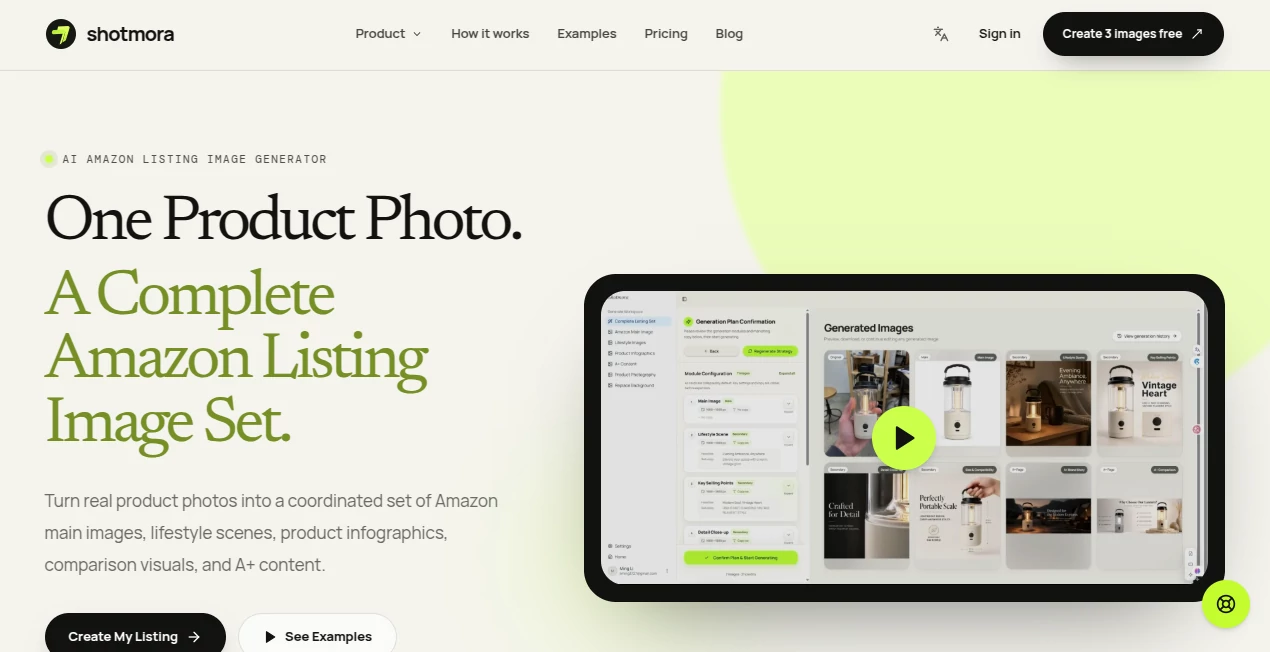
What is shotmora?
Creating strong product images for Amazon can become surprisingly time-consuming. A seller may need a clean main image, lifestyle scenes, feature graphics, comparison visuals, and A+ content, all while making sure the product itself remains accurate from one image to the next.
Shotmora is built specifically around that problem. It turns one to three real product photos into a planned set of Amazon listing visuals, giving sellers a more structured way to create product imagery instead of starting from a blank prompt every time. The workflow combines AI analysis, scene planning, image generation, review, editing, and export in one place.
What makes the approach particularly practical is that the product photo remains the reference point. Rather than simply asking an image model to invent a similar-looking product, the workflow is designed to preserve important details such as shape, color, labels, packaging, and included accessories.
Key Features
- Generate coordinated Amazon main, lifestyle, feature, comparison, and A+ visuals.
- Upload up to three clear product angles as visual references.
- Use AI to analyze the product and prepare an editable image brief.
- Review and confirm the proposed image plan before generation.
- Create product-first white-background imagery for Amazon main images.
- Generate lifestyle scenes that communicate context, scale, audience, and benefits.
- Turn product features, specifications, dimensions, and benefits into visual graphics.
- Create branded A+ content including feature, comparison, specification, and lifestyle modules.
- Regenerate individual images instead of recreating an entire listing set.
- Apply supported edits and editable text overlays before exporting.
- Maintain a consistent visual direction across multiple product images and SKUs.
User Interface
The interface follows a guided workflow rather than throwing users into an empty prompt box. The process starts with uploading product references, moves into an AI-generated image plan, and then continues through generation, review, editing, and export.
This structure should feel familiar to an Amazon seller who already thinks in terms of listing images. Instead of wondering what prompt might produce a useful result, the user can focus on deciding which visual jobs the listing needs to accomplish.
The ability to review the proposed scene mix before using generation credits is also a thoughtful touch. It gives sellers an opportunity to change the direction before committing resources to a full image set.
Accuracy & Performance
Product accuracy is one of the most important considerations when using generative imagery for ecommerce. An attractive image is not useful if the product suddenly has a different shape, altered packaging, incorrect color, or accessories that were never included.
The workflow addresses this by using real product photos as references and keeping review steps visible. Users can compare generated results with the source material, inspect shape and finish, check logos and labels, and regenerate individual images when something does not look right.
There is still an important human step. Generated images should be checked against the actual product and the latest Amazon requirements before publication. The system can speed up visual production, but the seller remains responsible for product accuracy and marketplace compliance.
Capabilities
The strongest capability is the ability to think about an Amazon listing as a complete visual sequence rather than a collection of unrelated pictures. A single product can be presented through a clean primary image, a realistic lifestyle scene, feature-focused graphics, comparison or detail visuals, and A+ content.
For example, imagine launching a new camping lantern. One source photograph can become the starting point for a white-background main image, an outdoor lifestyle scene, a graphic explaining portability and dimensions, and supporting branded content. Each image can answer a different buyer question while keeping the same product at the center.
The workflow also supports sellers who do not need an entire listing at once. Focused image jobs can be used when the goal is simply to create a main image, lifestyle visual, feature graphic, or A+ asset.
Security & Privacy
The service is browser-based and handles product-image creation and related digital workflows online. Users should still follow normal ecommerce security practices, particularly when uploading proprietary product photography, unreleased products, packaging designs, or other commercially sensitive materials.
Commercial use is included with the paid plans, while generated material should still be reviewed carefully before publication. Sellers should also avoid treating AI-generated content as automatically compliant with marketplace rules simply because it was produced through an ecommerce-focused workflow.
Use Cases
This tool is particularly useful for Amazon sellers who need to create or refresh product listings without organizing a traditional photoshoot for every visual concept.
- Launching new products: Build a coordinated image set before an ASIN goes live.
- Refreshing existing listings: Replace outdated or weak secondary visuals without recreating the entire gallery.
- Scaling product catalogs: Apply a repeatable visual workflow across multiple SKUs and variants.
- Lifestyle photography: Place products in believable environments without arranging a physical shoot for every scenario.
- Product infographics: Explain dimensions, specifications, materials, features, and customer benefits visually.
- A+ content: Create brand stories, feature breakdowns, comparisons, specifications, and supporting visuals.
- Product photography experimentation: Test different environments, lighting directions, audiences, and creative concepts before investing in a physical production.
Pros and Cons
Pros
- Designed specifically around Amazon seller workflows.
- Starts with real product photography rather than relying entirely on text prompts.
- Creates multiple image roles around the same product.
- AI planning helps users decide what visuals a listing may need.
- Users can review the image plan before generation.
- Individual images can be regenerated when necessary.
- Supports lifestyle, feature, main-image, comparison, and A+ visual workflows.
- Paid plans include commercial use.
- Three free images are available for testing without adding a payment card.
Cons
- Generated images still require human review for product accuracy.
- Marketplace requirements can change, so sellers must verify current Amazon rules before publishing.
- The workflow is highly focused on ecommerce product imagery rather than general-purpose image generation.
- Credit usage needs to be considered when producing large catalogs or many variations.
Pricing Plans
A free starting allowance makes it possible to test the workflow before committing to a subscription. New accounts receive three free images without requiring a credit card.
- Lite: $19 per month with 300 monthly credits, approximately 100 1K images, 30-day history, and commercial use.
- Pro: $49 per month with 840 monthly credits, approximately 280 1K images, 90-day history, and commercial use.
- Max: $99 per month with 1,740 monthly credits, approximately 580 1K images, 90-day history, and commercial use.
Annual billing is also available with a stated 20% saving. The credit-based model makes the plans easier to evaluate according to catalog size and expected image production rather than promising unlimited generation.
How to Use the Tool
- Upload up to three clear product photos showing useful angles and important details.
- Let the AI analyze the product and prepare a visual brief.
- Review the suggested mix of main, lifestyle, feature, comparison, and A+ images.
- Edit supported marketing copy or adjust the direction where necessary.
- Generate the planned images.
- Compare the results with the actual product, paying attention to shape, color, labels, packaging, dimensions, and accessories.
- Regenerate individual images that need improvement.
- Apply supported edits and preview the final assets.
- Export the approved images and check them against current Amazon requirements before publishing.
Comparison with Similar Tools
Many AI image generators are built as general creative platforms. They can produce attractive scenes, but the user often has to decide what prompts to write, which images to create, and how to maintain consistency between separate generations.
This workflow takes a different approach by organizing generation around the structure of an Amazon listing. The emphasis is on product references, planned image roles, consistency, review, and export. That makes it more appealing to ecommerce sellers who care less about unrestricted creative experimentation and more about producing a useful set of listing assets.
It also sits somewhere between a conventional product photography workflow and a general AI image generator. Sellers can explore environments and creative directions digitally while still using their real product photography as the foundation.
Conclusion
For Amazon sellers, creating product imagery is rarely just about making one attractive picture. A successful listing often needs a sequence of visuals that introduces the product, demonstrates how it is used, explains its features, answers practical questions, and strengthens the brand.
This tool takes a sensible approach to that challenge by combining product references, AI planning, generation, review, and editing into a seller-focused workflow. The emphasis on keeping the real product at the center is especially valuable for ecommerce, where an impressive image is only useful when it accurately represents what the customer will receive.
With three free images available for testing and paid plans starting at $19 per month, it is relatively easy for a seller to try the workflow on a real product before deciding whether it fits a larger catalog. For businesses producing Amazon visuals regularly, the structured approach can save considerable creative time while giving each listing a more consistent visual identity.
Frequently Asked Questions (FAQ)
Can I create Amazon listing images from a real product photo?
Yes. The workflow is designed to start from real product photography and use those references to create coordinated Amazon listing visuals.
How many product photos can I upload?
You can upload up to three clear product angles. Using multiple useful angles can help provide more information about the product during the planning and generation process.
Can I create a white-background Amazon main image?
Yes. A dedicated main-image workflow is available for creating clean, product-first imagery using a white background.
Can I create lifestyle product images?
Yes. Lifestyle workflows are designed to place the product in believable contexts that communicate usage, scale, audience, and benefits.
Does it create A+ content?
Yes. The platform supports A+ visual concepts including brand stories, feature breakdowns, comparisons, specifications, and lifestyle modules.
Can I regenerate only one image?
Yes. Individual images can be regenerated rather than forcing the entire listing set to be recreated.
Is commercial use included?
Commercial use is included with the paid Lite, Pro, and Max plans.
Is there a free plan?
New accounts receive three free images without requiring a credit card, allowing sellers to test the workflow before upgrading.
Does using AI guarantee Amazon compliance?
No. Generated images should always be reviewed against the actual product and the current requirements for the relevant Amazon marketplace and category. AI generation does not remove the seller's responsibility for accuracy or compliance.
Who can benefit most from this tool?
It is particularly useful for Amazon sellers, ecommerce brands, agencies, and catalog teams that regularly need consistent product photography, listing images, lifestyle visuals, infographics, or A+ content.