
Good Assistant
What is Good Assistant?
Achieving meaningful goals is rarely about motivation alone. It requires planning, consistency, organization, and the ability to stay focused when life becomes busy. This AI-powered assistant was designed around that reality, helping users transform ambitions into clear, manageable actions.
Unlike traditional chat-based tools that simply answer questions, this platform focuses on long-term progress. Whether someone is learning a new skill, building financial stability, planning a major life change, or organizing personal projects, it provides structured support through goal tracking, intelligent reminders, research assistance, and note management.
The experience feels more like having a dedicated accountability partner than using a standard productivity application. By combining planning, memory, organization, and proactive guidance, it creates an environment where important goals remain visible and actionable every day.
Key Features
User Interface
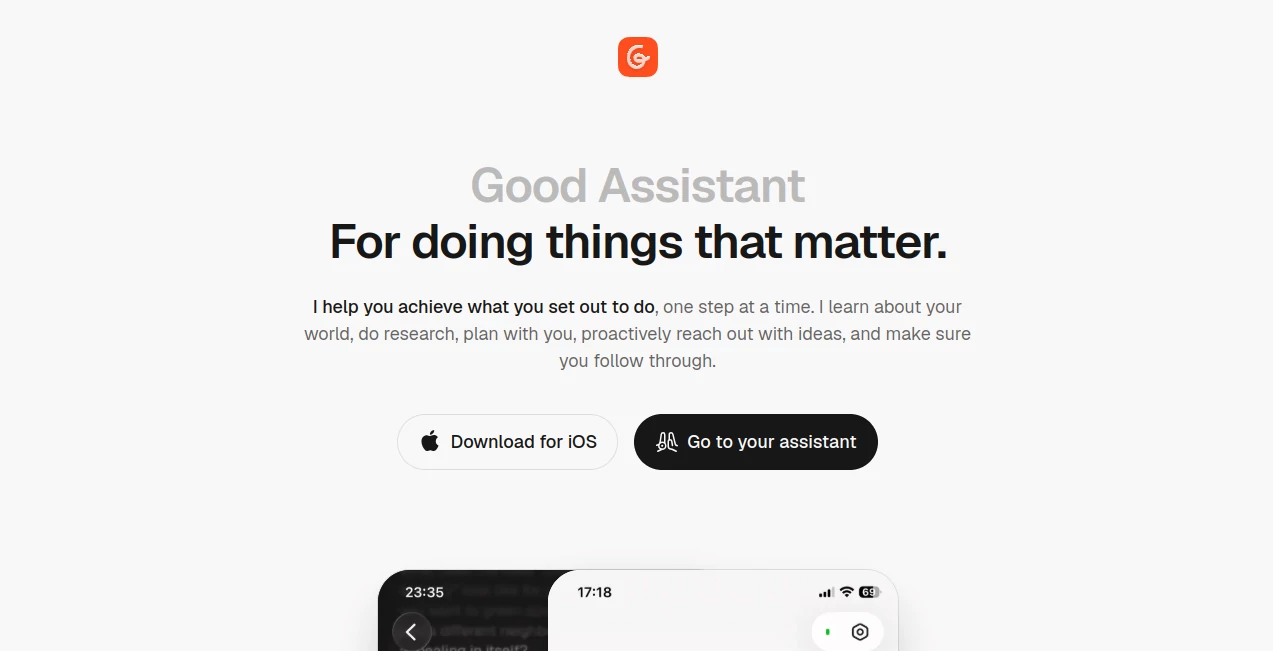
The platform offers a clean and distraction-free interface built around goals, notes, and conversations. Users can easily switch between active objectives, personal notes, reminders, and ongoing discussions. Visual timelines provide a clear overview of progress, making it easy to understand where a project stands and what should happen next.
The layout is intuitive enough for daily use while still providing enough depth for managing complex personal or professional plans.
Accuracy & Performance
One of the strongest aspects of the platform is its ability to maintain context across different activities. Instead of treating every interaction as a separate conversation, it learns from previous discussions, notes, goals, and user preferences.
This contextual understanding allows recommendations, research results, and planning suggestions to feel relevant rather than generic. Users receive practical guidance that aligns with their personal objectives and ongoing projects.
Capabilities
The platform brings together several productivity functions within a single environment.
- Goal planning and progress tracking
- Visual timelines for long-term objectives
- Intelligent note organization and editing
- Research assistance for projects and decisions
- Calendar awareness and reminder management
- Proactive suggestions and follow-up actions
- Context-aware conversations and recommendations
- Daily accountability support
These capabilities help users stay focused on meaningful outcomes rather than constantly switching between multiple productivity applications.
Security & Privacy
Personal goals, notes, plans, and reminders often contain sensitive information. The platform is designed around a personalized experience, meaning it stores context to provide better assistance over time. Users benefit from a more intelligent companion while maintaining control over the information they choose to share.
For individuals seeking a long-term digital assistant that understands personal context, privacy-conscious data handling is an important component of the overall experience.
Use Cases
- Personal Development: Create structured learning plans for new skills and track progress over time.
- Career Growth: Organize goals, research opportunities, and maintain momentum on professional objectives.
- Financial Planning: Break down complex financial goals into manageable actions and milestones.
- Relocation Projects: Plan major life transitions with research, timelines, notes, and reminders.
- Event Planning: Coordinate activities, collect research, and manage important deadlines.
- Daily Productivity: Organize tasks, notes, reminders, and personal commitments in one place.
Pros and Cons
Pros
- Focuses on long-term goals rather than simple conversations
- Visual progress tracking improves accountability
- Combines notes, planning, reminders, and research
- Provides proactive assistance instead of waiting for prompts
- Maintains context for more personalized recommendations
- Suitable for both personal and professional objectives
Cons
- Works best when users actively engage with their goals
- May offer more features than needed for simple task tracking
- Long-term planning functionality can require an initial setup period
Pricing Plans
The platform follows a freemium model, allowing users to explore core functionality before committing to premium options. Pricing structures may evolve over time, making it beneficial to review the latest plan details directly through the official platform.
- Free Plan Available
- Premium Features Available
- Suitable for individual users and productivity-focused professionals
How to Use Good Assistant
Getting started is straightforward.
- Create an account and define your primary goals.
- Break large ambitions into smaller milestones.
- Add notes, research materials, and supporting information.
- Set reminders and desired timelines.
- Review progress through visual tracking dashboards.
- Interact regularly to receive suggestions, updates, and accountability support.
- Refine plans as circumstances change.
Over time, the assistant develops a deeper understanding of personal priorities, leading to increasingly useful recommendations.
Comparison with Similar Tools
Many productivity tools specialize in a single function such as note-taking, task management, calendar scheduling, or AI chat. What makes this platform different is the way it combines these capabilities around personal goal achievement.
Traditional note-taking applications are excellent for storing information but often lack proactive guidance. Task managers help organize work but rarely provide contextual planning. Standard AI chat tools can generate ideas but generally do not maintain structured accountability.
By integrating planning, reminders, notes, research, and contextual memory into one experience, the platform creates a more complete personal productivity environment focused on follow-through rather than information alone.
Conclusion
For people who care about meaningful progress rather than simply checking tasks off a list, this platform offers a refreshing approach to personal productivity. It serves as a planning partner, research assistant, note organizer, and accountability companion within a single ecosystem.
The combination of goal tracking, proactive assistance, contextual understanding, and visual progress management makes it particularly valuable for long-term ambitions. Whether the objective is learning a new skill, improving personal organization, planning a major life change, or building better habits, the platform provides practical support that extends beyond traditional AI conversations.
Frequently Asked Questions (FAQ)
What makes this assistant different from traditional AI chatbots?
It focuses on long-term goal achievement, combining planning, reminders, research, notes, and accountability instead of only answering questions.
Can it help manage multiple goals simultaneously?
Yes. Users can create and track multiple goals, each with its own timeline, notes, reminders, and progress tracking.
Does it support note organization?
Yes. Notes can be created, edited, organized, and connected directly to ongoing goals and projects.
Is it suitable for personal productivity?
Absolutely. It was specifically designed to support personal development, organization, planning, and daily follow-through.
Can it provide reminders and proactive suggestions?
Yes. One of its core strengths is proactively reaching out with reminders, recommendations, and next-step guidance.
AI Life Assistant , AI Productivity Tools , AI Coaching , AI Notes Assistant .
These classifications represent its core capabilities and areas of application. For related tools, explore the linked categories above.
Good Assistant details
Website unavailable — View Alternatives
Pricing
- Free
Apps
- Web App
- iOS App
Categories

Good Assistant Alternatives Product
Gochu

MachineTrans…

ForthWrite

StylinAI

SalaryHow
Anti Noise F…

Hall Of Tarot

Create Filla…

Japanese Nam…